

Bhume – Real Estate WordPress Theme
/Year
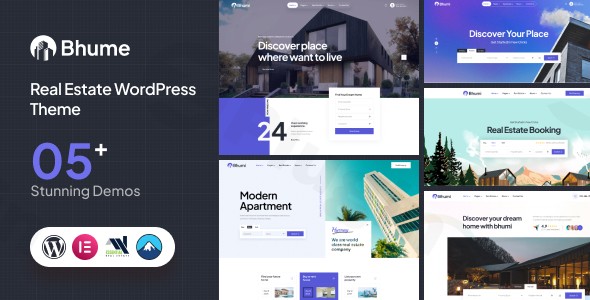
The real estate market is increasingly digital, and a professional online presence is no longer optional—it is a requirement. Bhume is a cutting-edge Real Estate WordPress Theme designed to provide a comprehensive, high-performance platform for agencies, independent brokers, and property developers. With a focus on modern UI/UX and deep functional integration, Bhume transforms a standard website into a sophisticated property portal.Built on the robust Bootstrap 5 framework and optimized for the Elementor page builder, this theme strikes a perfect balance between visual elegance and technical power. Whether you are showcasing luxury estates or managing a high-volume rental portfolio, Bhume offers the specialized tools necessary to convert visitors into clients.
Key Features: Design, Layout & Performance
Bhume isn’t just a skin for WordPress; it is a specialized toolkit tailored for the property industry. The design philosophy centers on clarity, ensuring that high-quality property imagery remains the focal point.
Professional Layout Options
Bhume provides diverse ways to display listings, including:
- Multiple Property Listing Styles: Choose between grid, list, and slider views to match your brand’s aesthetic.
- Dynamic Headers & Footers: The theme includes four header variations and two footer variations. Because it features built-in Elementor Header and Footer Builders, you aren’t locked into presets—you can design custom layouts from scratch.
- Prebuilt Templates: One-click access to professionally designed inner pages (About, Contact, Services) and multiple homepage variations.
Niche-Specific Real Estate Functionality
Unlike generic multipurpose themes, Bhume includes built-in features that usually require expensive third-party plugins:
- Advanced Search Filters: Allow users to filter by price, location, property type, and more.
- Property Comparison Tool: A vital UX feature that lets potential buyers compare up to three properties side-by-side.
- Interactive Property Pages: Every listing supports floor plans, Google Maps integration, 360° virtual tours, and a “Nearby Places” feature to highlight local amenities.
- Agent & Agency Management: Dedicated Custom Post Types (CPT) for agents and agencies make it easy to manage a large team.
Performance & SEO Optimization
Bhume is an SEO optimized real estate theme built with clean, developer-friendly code. It is fully responsive, ensuring a seamless experience on mobile devices—a critical factor since the majority of property searches now happen on smartphones. It is compatible with major browsers (Chrome, Firefox, Safari, Edge) and supports the latest WordPress 6.6+ environments.
Installation & Demo Import
Setting up your real estate portal is streamlined through a user-friendly onboarding process. To get started, follow these steps:
- Theme Installation: Log into your WordPress dashboard, navigate to Appearance > Themes, upload the Bhume zip file, and click Activate.
- Plugin Setup: Upon activation, you will be prompted to install required plugins, including Elementor, Contact Form 7, and the theme’s core functional extensions.
- One-Click Demo Import: Navigate to the Bhume theme options and locate the One-Click Demo Importer. Select your preferred homepage layout and click “Import.”
- Verification: The process will automatically import pages, widgets, and sample listings. Note: For a successful Bhume theme demo import, ensure your server’s PHP memory limit is set to at least 512M and the
max_execution_timeis set to 900 to prevent timeouts during the data transfer.
Customization Guide: Branding & Layout
The Bhume WordPress theme provides extensive flexibility through the WordPress Customizer and Elementor.
Visual Identity & Branding
You can personalize the site’s global styles without touching a single line of code:
- Typography: Full integration with Google Fonts allows you to choose professional, readable typefaces.
- Color Systems: Easily change primary and secondary colors via the Customizer to match your agency’s branding.
- Global Settings: Control container widths, section spacing, and background elements globally to maintain design consistency across all pages.
Building with Elementor
Since Bhume is an Elementor real estate theme, you have drag-and-drop control over every page. You can move search bars, add testimonial sliders, or create custom call-to-action sections for “Free Property Valuations” effortlessly.
Developer-Friendly Tools
For advanced users, Bhume includes SASS files and full Child Theme support. This allows developers to make deep code customizations or add bespoke functionality without losing their work when the parent theme is updated.
FAQ & Troubleshooting
Is Bhume compatible with Elementor?
Yes, Bhume is highly compatible with Elementor and Elementor Pro. It uses Elementor as its primary page-building engine and includes custom widgets specifically designed for real estate listings and agent profiles.
Does Bhume support WooCommerce?
Yes, Bhume is compatible with WooCommerce. This is particularly useful for agencies that want to charge for featured listings, accept booking deposits, or sell digital real estate guides directly through their website.
How to install the Bhume real estate WordPress theme?
To install Bhume, upload the theme files via Appearance > Themes, activate it, and then follow the setup wizard to install the required plugins and import the demo content.
Does it support property submissions?
Bhume is designed for managing listings via the WordPress backend. It uses specialized post types for Properties, Agents, and Agencies to keep your data organized and searchable.
What are the server requirements for Bhume?
For optimal performance, use PHP 7.3 or higher, MySQL 5.6+, and a WordPress memory limit of at least 128MB (512MB is recommended for the demo import process).
Conclusion
The Bhume WordPress theme is a robust, professional-grade solution for anyone in the property industry. Its integration with Elementor, combined with specialized features like property comparisons and 360° tours, makes it a top-tier choice for creating a high-converting real estate website.Whether you are a solo agent or a large-scale agency, Bhume provides the design flexibility and SEO readiness needed to outrank competitors and provide a world-class experience to property seekers. If you are looking for a niche-specific theme that avoids the bloat of generic builders while offering modern aesthetics, Bhume is an excellent investment for your digital strategy.For more WordPress theme reviews and SEO strategies, visit wppick.com.
I. Download Limits & Account Benefits
- Free Downloads: Each email address receives 3 downloads per day for free products
- Upgrade Benefits: Purchase any paid product to increase your daily download limit by 3 for each paid product
- No Account Required: You can download immediately by receiving the download link via email
- Account Recommended: Create an account for easier access to your order history and direct update downloads
II. Understanding GPL vs Official Versions
Important: The products available on WPPick are GPL-licensed versions, which differ from official developer versions. Before purchasing, please read our comprehensive guide: Understanding GPL & Official Differences at WPPick
Key Points:
- GPL versions may not include premium support from original developers
- Updates may be delayed compared to official releases
- Some premium features might have limitations
- Always consider your specific needs and support requirements
III. Support & Assistance
We’re here to help through multiple channels:
- Email Support: Direct email assistance for all inquiries
- Live Chat: Real-time support during business hours
- Comprehensive Documentation: Detailed guides and tutorials
IV. Order Tracking
Access your complete purchase history and download links anytime: Order History
V. Account Access
New to WPPick? Login or Create Account to manage your downloads and orders efficiently.
VI. Refund Protection
We stand behind our products with a clear refund policy. Review our terms: Refund Policy
VII. Privacy & Security
Your data security is our priority. Learn how we protect your information: Privacy Policy
VII. Terms of Service
Understanding our service terms ensures a smooth experience: Terms of Use
Quick Tips for Best Experience
- Verify Compatibility: Check plugin/theme compatibility with your WordPress version
- Backup First: Always backup your site before installing new plugins or themes
- Test Environment: Consider testing on a staging site first
- Stay Updated: Regularly check for updates in your account dashboard
- Read Documentation: Review any included documentation for optimal setup
Need Help?
If you have questions about downloads, licensing, or need technical assistance, don’t hesitate to contact our support team. We’re committed to ensuring you have the best possible experience with WPPick products.
Ready to get started? Your download adventure begins with just one click!
- WordPress Latest Version Compatibility.
- Latest All Plugins Updated.
- Demo import Issue Fixed.
- Theme CSS issue fixed.