

Bighearts – Charity & Donation WordPress Theme
/Year
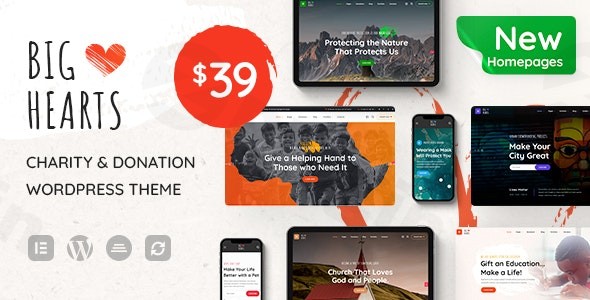
Are you a charity organization, non-profit, or a donation platform looking to build a powerful online presence that truly inspires generosity? The BigHearts WordPress theme is specifically designed to help you achieve your mission. This compassionate and conversion-focused theme seamlessly integrates with essential donation plugins, empowering you to create an engaging fundraising platform without needing any coding expertise.
Introduction: A Dedicated Solution for Charitable Causes
The BigHearts WordPress theme offers a robust and visually appealing solution for non-profit organizations, NGOs, and fundraising campaigns. Built with a modern aesthetic, it aims to foster trust and encourage engagement, which is crucial for any charitable endeavor. From its intuitive design to its deep integration with donation management tools, BigHearts is crafted to provide a comprehensive platform for organizations committed to making a positive impact. It’s an ideal choice for anyone looking to establish a strong online presence, facilitate donations, and effectively communicate their mission.
Key Features: Design, Layout & Performance for Impactful Websites
BigHearts is packed with features that empower you to build a professional and high-performing charity website. Its focus on user experience, flexible design options, and technical excellence ensures your message reaches your audience effectively.
Design & Layout Options: Visually Compelling Storytelling
BigHearts provides a rich selection of design and layout options to perfectly showcase your cause:
- Multiple Homepage Layouts: Start with a strong foundation by choosing from several stunning homepage layouts, crafted to highlight your initiatives and calls to action.
- Unique Demos & Inner Pages: With over eight pre-built demos available for quick import, you can launch your site rapidly. The theme also includes ready-made inner pages such as ‘About Us,’ ‘Our Team,’ and ‘Portfolio,’ simplifying content addition.
- Flexible Portfolio Modules: Showcase your projects and their impact using versatile portfolio modules, complete with grid layouts, infinite scroll, and “Load More” buttons for an engaging browsing experience.
- Advanced Header Builder: Leverage the powerful WGL Framework’s drag-and-drop Header Builder to create unique and functional headers that complement your brand and enhance navigation.
- Responsive Design: BigHearts ensures your website looks impeccable and functions flawlessly on all devices, from desktops to tablets and smartphones, providing an optimal experience for every visitor.
Customization Capabilities: Tailor Your Message, Your Way
Personalizing your charity website to reflect your brand and mission is straightforward with BigHearts:
- WGL Framework & Theme Options: The robust WGL Framework underpins the theme, offering an extensive theme options panel with over 100 customizable settings. This allows you to control nearly every aspect of your site without writing a single line of code.
- Color Schemes & Typography: Easily adjust your website’s color palette and typography to match your organization’s branding, ensuring a consistent and professional look.
- Local Page Options: For even greater design flexibility, BigHearts allows you to set specific options on individual pages using meta boxes, giving you granular control over unique content presentations.
Performance & SEO Features: Reach More Supporters
BigHearts is built with performance and search engine visibility in mind, helping your message reach a wider audience:
- Performance Optimized: The theme is optimized for fast load times, providing a smooth browsing experience for your visitors, which is crucial for engagement and SEO.
- SEO-Friendly Structure: BigHearts boasts an SEO-friendly structure, ensuring that search engines can easily crawl and index your content. It also includes SEO-ready schema markup to enhance your visibility in search results.
- Mobile Responsiveness & Cross-Browser Compatibility: Beyond just responsiveness, the theme is thoroughly tested for cross-browser compatibility, ensuring a consistent experience for users regardless of their browser choice.
- Accessibility & Multilingual Support: BigHearts is WCAG-compliant for accessibility, making your website usable for everyone. It also supports multilingual and RTL (Right-to-Left) languages, expanding your global reach.
Installation & Demo Import: Get Your Charity Site Online Fast
Setting up BigHearts to transform your charity’s online presence is designed to be user-friendly, even for those new to WordPress.
- Install & Activate the Theme:
- First, download the BigHearts theme package (either from ThemeForest or a trusted GPL redistribution site).
- Log in to your WordPress dashboard. Navigate to
Appearance > Themes > Add New > Upload Theme. - Choose the theme’s zip file, click
Install Now, and thenActivate.
- Install Required Companion Plugins:
- Upon activation, BigHearts will likely prompt you to install recommended plugins, including the GiveWP Donation Plugin, which is central to its fundraising capabilities.
- Other important plugins might include Elementor Page Builder and the WGL Framework companion plugins. Install and activate all recommended plugins as prompted.
- Use the One-Click Demo Content Import:
- BigHearts features a convenient one-click demo import function. This is key to quickly setting up your site with pre-designed layouts and content.
- Look for an option like
Theme Options > Demo ImportorAppearance > Import Demo Datain your WordPress dashboard. - Select your preferred demo layout and initiate the import.
- What to Expect During/After Demo Import:
- The demo import process will populate your site with pre-built pages, posts, menus, widgets, and theme options, closely replicating the demo site you chose.
- Common Pitfall: Large demo imports can be resource-intensive. For optimal performance during import, ensure your hosting environment meets the recommended PHP settings:
max_execution_time 600,max_input_time 600,memory_limit 256M,post_max_size 128M,upload_max_filesize 128M, andmax_input_vars 3000. If the import fails or times out, checking these server settings is the first step in troubleshooting. - After the import, you may need to manually assign your main navigation menu under
Appearance > Menusand set your homepage underSettings > Reading.
Customization Guide: Branding & Layout for Your Unique Cause
BigHearts makes it incredibly easy to personalize your website and align it with your organization’s unique brand identity.
- Harnessing the Theme Options Panel: The core of BigHearts customization lies within its intuitive theme options panel, accessible directly from your WordPress dashboard. Here, you’ll find over 100 settings to control global styles, layouts, and functionalities without touching any code. This includes global color schemes, typography settings, header and footer layouts, and general site settings.
- Live Customization with WordPress Customizer: For real-time visual feedback, many general design elements like colors and typography can also be adjusted via the WordPress Customizer (
Appearance > Customize). This allows you to see changes instantly as you make them. - Building Pages with Elementor: BigHearts offers deep integration with the Elementor Page Builder, providing a powerful drag-and-drop interface for designing and customizing individual pages. You can modify pre-built demo pages or create entirely new layouts from scratch, dragging and dropping elements, sections, and content blocks with ease. This visual builder empowers non-designers to achieve professional results.
- Header & Footer Customization: Utilize the WGL Framework’s Header Builder to design bespoke headers, choosing from various presets and elements. Elementor’s Header & Footer Builder compatibility further expands your options for these crucial site areas.
- Setting Up Your Homepage, Blog, and Menus: After demo import, you might need to specify your front page (
Settings > Reading) and assign your main navigation menus (Appearance > Menus). The theme provides dedicated blog templates and flexible portfolio modules to organize your content. - Child Theme Support for Safe Customization: For advanced customizations or ensuring future theme updates don’t overwrite your changes, BigHearts fully supports child themes. You can install a child theme just like the main theme and add your custom CSS or functions safely.The customization experience with BigHearts is highly intuitive. Its combination of a comprehensive theme options panel, drag-and-drop page building with Elementor, and structured layout options means you can achieve a highly branded and functional website with minimal effort.
FAQ & Troubleshooting
Here are answers to some common questions about the BigHearts WordPress theme:
Is BigHearts compatible with popular page builders like Elementor and WPBakery?
Yes, BigHearts is fully compatible with Elementor Page Builder, offering extensive drag-and-drop functionality for creating and customizing pages. It also works seamlessly with WPBakery Page Builder, providing flexibility for users who prefer either platform.
Does BigHearts support WooCommerce for online stores or merchandise sales?
Absolutely. The BigHearts theme is WooCommerce ready, allowing charity organizations to manage fundraising items, sell merchandise, or accept product-based donations directly through their website.
Can I use a child theme with BigHearts to protect my customizations during updates?
Yes, BigHearts fully supports child themes. It’s highly recommended to install and use a child theme for any custom CSS, functions, or template modifications to ensure your changes are preserved when you update the main BigHearts theme.
How do I use BigHearts theme for fundraising and managing donations effectively?
BigHearts integrates seamlessly with the GiveWP Donation Plugin, a leading solution for charity foundations. This integration allows you to easily set up donation forms, track fundraising goals with progress bars, manage campaigns, and accept various payment gateways, making it an excellent charity WordPress theme with a donation system.
What should I do if the BigHearts theme demo import fails or looks different from the demo site?
If the BigHearts theme demo import fails or doesn’t look as expected, first verify your server settings. Ensure your PHP version is 7.0 or greater and that resources like memory_limit, max_execution_time, and post_max_size meet the recommended values (e.g., memory_limit 256M). Clear any caching plugins and try the import again. You might also need to manually assign menus or your homepage after the import is complete.
Conclusion: Empowering Charities with a Purpose-Built WordPress Theme
The BigHearts – Charity & Donation WordPress Theme stands out as an exceptional solution for any non-profit, NGO, or fundraising campaign aiming to establish a professional, engaging, and conversion-focused online presence. Its thoughtful design, coupled with powerful features, makes it a leading choice for the charity sector.From its diverse range of pre-built layouts and intuitive Elementor integration for flexible page building to its robust WGL Framework for comprehensive customization, BigHearts ensures your website is both visually stunning and highly functional. It prioritizes performance and SEO readiness, including WCAG compliance for accessibility, ensuring your message reaches and impacts the widest possible audience.With seamless integration with the GiveWP Donation Plugin and full WooCommerce compatibility, BigHearts provides all the tools necessary for effective donation management, event coordination, and even merchandise sales. It’s an ideal theme for organizations, big or small, that require a powerful yet easy-to-use platform to drive their mission forward without the need for extensive coding knowledge. For charities committed to making a difference, BigHearts offers a solid, trustworthy, and effective foundation for their digital initiatives.
I. Download Limits & Account Benefits
- Free Downloads: Each email address receives 3 downloads per day for free products
- Upgrade Benefits: Purchase any paid product to increase your daily download limit by 3 for each paid product
- No Account Required: You can download immediately by receiving the download link via email
- Account Recommended: Create an account for easier access to your order history and direct update downloads
II. Understanding GPL vs Official Versions
Important: The products available on WPPick are GPL-licensed versions, which differ from official developer versions. Before purchasing, please read our comprehensive guide: Understanding GPL & Official Differences at WPPick
Key Points:
- GPL versions may not include premium support from original developers
- Updates may be delayed compared to official releases
- Some premium features might have limitations
- Always consider your specific needs and support requirements
III. Support & Assistance
We’re here to help through multiple channels:
- Email Support: Direct email assistance for all inquiries
- Live Chat: Real-time support during business hours
- Comprehensive Documentation: Detailed guides and tutorials
IV. Order Tracking
Access your complete purchase history and download links anytime: Order History
V. Account Access
New to WPPick? Login or Create Account to manage your downloads and orders efficiently.
VI. Refund Protection
We stand behind our products with a clear refund policy. Review our terms: Refund Policy
VII. Privacy & Security
Your data security is our priority. Learn how we protect your information: Privacy Policy
VII. Terms of Service
Understanding our service terms ensures a smooth experience: Terms of Use
Quick Tips for Best Experience
- Verify Compatibility: Check plugin/theme compatibility with your WordPress version
- Backup First: Always backup your site before installing new plugins or themes
- Test Environment: Consider testing on a staging site first
- Stay Updated: Regularly check for updates in your account dashboard
- Read Documentation: Review any included documentation for optimal setup
Need Help?
If you have questions about downloads, licensing, or need technical assistance, don’t hesitate to contact our support team. We’re committed to ensuring you have the best possible experience with WPPick products.
Ready to get started? Your download adventure begins with just one click!
- General release update.
- Initial release of version 3.1.9