
Bingo – Multi-purpose Newspaper & Magazine Theme
/Year
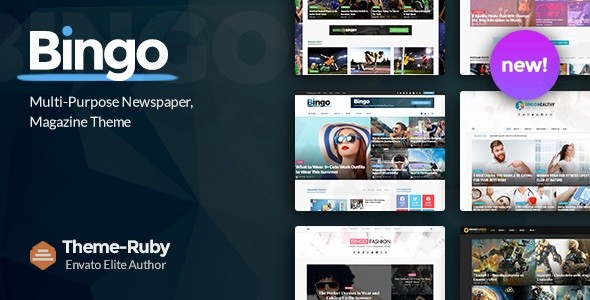
The digital landscape for news, magazines, and blogs demands themes that are not only visually striking but also highly functional and performant. The Bingo Multi-purpose Newspaper Magazine Theme steps up as a robust solution, empowering content creators, publishers, and bloggers to build professional, engaging, and fast-loading websites without needing to write a single line of code. Designed for diverse niches from technology and fashion to sports and health, Bingo offers the flexibility and power needed to manage content-rich platforms effectively.
Introduction: Crafting Your Digital Narrative with Bingo
Bingo is a versatile WordPress theme engineered specifically for dynamic news portals, captivating online magazines, and personal or professional blogs. Its design philosophy centers on clean aesthetics, intuitive user experience, and powerful content presentation, making it an ideal choice for anyone looking to create an authoritative and visually appealing editorial platform. With its focus on delivering content efficiently and attractively, Bingo helps publishers capture audience attention and keep them engaged.
Key Features: Design, Layout & Performance Excellence
Bingo is packed with features that cater to the specific needs of content-driven websites, blending sophisticated design capabilities with solid technical performance.
Design & Layout Options: Unleash Your Creativity
Bingo provides an impressive array of design and layout tools, ensuring your content stands out.
- The Ruby Page Builder: At its core, Bingo leverages the Ruby Page Builder, an intuitive drag-and-drop tool that provides endless design possibilities. This lightweight yet powerful composer allows you to create custom pages and intricate layouts effortlessly using numerous pre-defined content blocks.
- Advanced Content Presentation: The theme offers specialized layouts for multiple post formats, including standard articles, stunning galleries, engaging videos, and captivating audio posts. You get:
- 5 default post layouts for classic articles.
- 3 dedicated video post layouts to showcase your visual content.
- 3 audio post layouts for podcasts and sound bites.
- 5 gallery display options to present images beautifully.
- Multi-Purpose Layouts & Demos: Bingo comes with over 7 stunning pre-designed homepage layouts and a one-click demo import feature. Whether your niche is fashion, technology, health, or sports, you can quickly set up your site with a professional look. It supports both full-width and boxed layouts, offering flexibility for your overall site structure.
- Header & Category Styles: Multiple header styles and 7 distinct category layouts with individual options allow for unique section branding.
- Dynamic Content Loading with AJAX: A standout feature is Bingo’s comprehensive AJAX support. This enables seamless user experiences with content filtering by categories, tags, and popularity, and multiple pagination options (load more, infinite scroll) that dynamically load content without page refreshes, enhancing user engagement and reducing bounce rates.
- News & Editorial Enhancements: Specific modules for featured posts, trending news, and a breaking news ticker ensure your most important content is always visible.
Customization Capabilities: Tailor-Made Branding
Personalizing your website to match your brand identity is crucial, and Bingo makes it straightforward.
- 100+ Theme Options & Live Customizer: With over 100 theme options and the Live Customizer, you can control virtually every aspect of your website’s appearance. From global settings to individual page/post settings that override global consistency, you have granular control without coding.
- Typography & Color Schemes: Bingo supports Google Fonts, offering access to over 700+ fonts with options to customize font types, sizes, line-height, letter-spacing, and subsets. While specific predefined color schemes aren’t detailed, the extensive theme options imply full control over visual elements and color customization.
- Custom CSS: For advanced users, custom CSS can be added directly via the Theme Options panel or the WordPress Customizer’s Additional CSS section.
Performance & SEO Features: Speed and Visibility
For any content-rich website, speed and search engine optimization are paramount. Bingo is built with these principles in mind.
- Optimized for Performance: Described as “blazing fast” and “optimized for speed,” Bingo ensures quick loading times through lazy loading, optimized queries, and profiled scripts. This contributes to a better user experience and higher search engine rankings.
- Mobile-Friendly & Responsive Design: Built with Bootstrap, HTML5, and CSS3, the theme is fully responsive and retina-ready, guaranteeing an optimal viewing experience across all devices, from desktops to smartphones. It’s also cross-browser compatible (Chrome, Edge, Firefox, Safari, IE10, IE11).
- SEO-Friendly Structure: Bingo boasts an SEO-friendly structure, clean markup, and compatibility with major SEO plugins like Yoast SEO and All In One SEO, ensuring your content is easily discoverable by search engines and AI answer engines.
- Social Media Integration: Built-in social media integration makes it easy for readers to share your content, extending your reach.
- Ad Monetization: The theme is optimized for advertising with built-in ad spots, making it suitable for integrating Google AdSense and custom banners, providing avenues for revenue generation.
Installation & Demo Import: Get Started Quickly
Setting up your Bingo-powered website is a streamlined process designed for users of all skill levels.
- Install & Activate the Theme:
- From your WordPress dashboard, navigate to
Appearance > Themes > Add New. - Click
Upload Theme, choose thebingo.zipfile (which you would download from your purchase source), and clickInstall Now. - Once installed, click
Activate.
- From your WordPress dashboard, navigate to
- Install Required Companion Plugins: Upon activation, Bingo will likely prompt you to install essential companion plugins. The primary one is the Ruby Page Builder. Follow the on-screen instructions to install and activate these plugins.
- One-Click Demo Import: This is where Bingo truly shines for quick setup.
- After plugin installation, navigate to the theme’s demo import section (often found under
Appearance > Import Demo Dataor a similarly named menu item in the theme options). - Choose from the 7+ stunning pre-designed homepage layouts that best suit your niche (e.g., fashion, tech, sports).
- Click the “Import” button.
- What to Expect: The demo import will automatically populate your site with demo content, including pages, posts, widgets, and menu structures, making your website look identical to the chosen demo. Be aware that for large demo imports, your server might need sufficient memory and execution time. If you encounter issues, consult your web host or the theme’s documentation for increasing PHP limits.
- After plugin installation, navigate to the theme’s demo import section (often found under
Customization Guide: Branding Your News and Magazine Site
Personalizing Bingo to reflect your brand and content strategy is intuitive, thanks to its extensive customization options.
- WordPress Customizer & Theme Options: Most of your branding and layout adjustments will be done via the
Appearance > Customizesection (Live Customizer) or the theme’s dedicatedTheme Optionspanel in your WordPress dashboard. - Changing Colors & Typography: Easily adjust your site’s color palette to match your brand. Utilize the integrated Google Fonts to select fonts for headings, body text, and specific elements, customizing their sizes, weights, and line heights for optimal readability.
- Logo & Site Identity: Upload your brand logo and favicon through the Customizer.
- Header Layouts: Experiment with Bingo’s multiple header styles to find the perfect look. You can often adjust elements like navigation menus, search icons, and social links within the header.
- Homepage & Blog Page Setup: After importing a demo, you can customize your homepage using the Ruby Page Builder. For your blog or news archive, navigate to
Settings > Readingto set a static homepage or define your blog posts page. Bingo’s 7 category layouts and 5 featured layouts offer further control over how content is displayed. - Menu Management with Mega Menus: Create dynamic and informative navigation menus under
Appearance > Menus. Bingo’s robust mega menu capabilities allow for multi-column dropdowns and even category mega menus that display the latest posts with AJAX pagination, ideal for content-rich sites. The smart sticky navigation ensures your menu is always accessible.
FAQ & Troubleshooting: Common Questions Answered
Here are answers to common questions about the Bingo Multi-purpose Newspaper & Magazine WordPress theme.
Is Bingo theme compatible with Elementor / WPBakery / Gutenberg?
Bingo natively integrates with its powerful Ruby Page Builder for drag-and-drop page creation. While not explicitly optimized for Gutenberg, it is generally compatible with the WordPress Block Editor. The theme is also stated to be compatible with Elementor, providing flexibility for users who prefer that page builder.
Does Bingo support WooCommerce for online stores?
Yes, Bingo is fully compatible with WooCommerce, allowing you to integrate an online store seamlessly into your news or magazine website. This is ideal for selling merchandise, digital products, or subscriptions alongside your content.
Is Bingo theme SEO friendly?
Absolutely. Bingo is built with an SEO-friendly structure, clean HTML5 and CSS3 code, and is compatible with leading SEO plugins like Yoast SEO and All In One SEO. It’s designed to help your content rank well in search engines and be easily understood by AI search and answer engines.
Does Bingo support child themes?
Yes, Bingo is child theme compatible. Using a child theme is highly recommended for any customizations (like adding custom CSS or PHP snippets) to ensure your changes are not overwritten during theme updates.
How can I update the theme without losing my customizations?
To update Bingo without losing customizations, it is crucial to use a child theme for any modifications. The theme also supports automatic updates via the Envato Market plugin if purchased from ThemeForest, or lifetime free updates if sourced from GPL vendors like WPSHOP. Always back up your website before performing any theme updates.
Conclusion: Your Platform for Engaging Digital Publishing
The Bingo Multi-purpose Newspaper Magazine Theme is a compelling choice for anyone serious about digital publishing. Its blend of a powerful drag-and-drop page builder, extensive content presentation options, and comprehensive customization capabilities makes it highly flexible. Coupled with its focus on blazing-fast performance and SEO readiness, Bingo provides a solid foundation for achieving high visibility and user engagement.Whether you’re an established news portal, a burgeoning online magazine, a niche blogger, or an agency building sites for clients, Bingo is engineered to deliver. Its unique features like full AJAX support, integrated ad spots, and robust mega menus truly differentiate it, offering a sophisticated and user-friendly experience for both publishers and their audience. If you seek a theme that combines aesthetic appeal with functional excellence for your content-rich platform, Bingo is a highly recommended solution.
I. Download Limits & Account Benefits
- Free Downloads: Each email address receives 3 downloads per day for free products
- Upgrade Benefits: Purchase any paid product to increase your daily download limit by 3 for each paid product
- No Account Required: You can download immediately by receiving the download link via email
- Account Recommended: Create an account for easier access to your order history and direct update downloads
II. Understanding GPL vs Official Versions
Important: The products available on WPPick are GPL-licensed versions, which differ from official developer versions. Before purchasing, please read our comprehensive guide: Understanding GPL & Official Differences at WPPick
Key Points:
- GPL versions may not include premium support from original developers
- Updates may be delayed compared to official releases
- Some premium features might have limitations
- Always consider your specific needs and support requirements
III. Support & Assistance
We’re here to help through multiple channels:
- Email Support: Direct email assistance for all inquiries
- Live Chat: Real-time support during business hours
- Comprehensive Documentation: Detailed guides and tutorials
IV. Order Tracking
Access your complete purchase history and download links anytime: Order History
V. Account Access
New to WPPick? Login or Create Account to manage your downloads and orders efficiently.
VI. Refund Protection
We stand behind our products with a clear refund policy. Review our terms: Refund Policy
VII. Privacy & Security
Your data security is our priority. Learn how we protect your information: Privacy Policy
VII. Terms of Service
Understanding our service terms ensures a smooth experience: Terms of Use
Quick Tips for Best Experience
- Verify Compatibility: Check plugin/theme compatibility with your WordPress version
- Backup First: Always backup your site before installing new plugins or themes
- Test Environment: Consider testing on a staging site first
- Stay Updated: Regularly check for updates in your account dashboard
- Read Documentation: Review any included documentation for optimal setup
Need Help?
If you have questions about downloads, licensing, or need technical assistance, don’t hesitate to contact our support team. We’re committed to ensuring you have the best possible experience with WPPick products.
Ready to get started? Your download adventure begins with just one click!
- Improved compatibility with WordPress 6.8.x
- Updated Google Fonts settings
- Fixed PHP notice in WordPress Dashboard
- Other improvements and minor bug fixes