

Bitehub – Tiffin & Food Delivery WordPress Theme
/Year
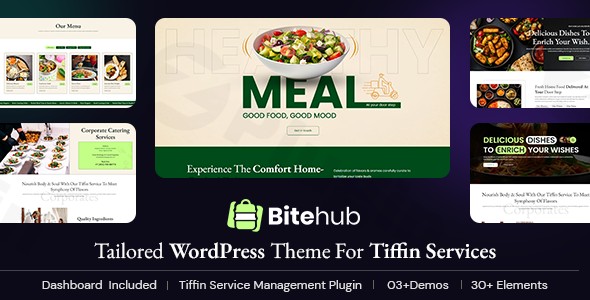
Welcome to the digital storefront for your culinary passion! The Bitehub WordPress theme is a specialized solution meticulously crafted for food delivery businesses, tiffin services, and meal subscription providers. Designed by ThemetechMount, Bitehub offers a sleek, modern, and highly functional platform, making it effortlessly easy to showcase your menus, streamline order management, and connect with your hungry customers. If you’re looking to establish or enhance your online presence in the competitive food industry, Bitehub is engineered to help your business thrive by providing a seamless and visually appealing online experience.
Key Features: Design, Layout & Performance for Culinary Success
Bitehub doesn’t just look good; it’s built to perform, offering a robust set of features tailored specifically for the food delivery niche. Its design philosophy centers on making your food look irresistible and simplifying the entire online ordering process.
Design & Layout Options: Irresistible Menus & Intuitive Navigation
Bitehub boasts a modern design and a sleek, user-friendly interface that adapts flawlessly across all devices, ensuring a responsive and retina-ready experience. This means your tiffin service or food delivery website will look sharp and operate smoothly on smartphones, tablets, and desktops alike.The theme comes equipped with:
- Multiple Demo Homes: Get started quickly with pre-designed layouts like Demo One, Demo Two, and Demo Three, providing a strong foundation for various food business aesthetics.
- Pre-designed Page Layouts: Essential pages such as About Us, Services, Cuisines, One-time order, Order others, FAQ, My Account, and Blog are ready to populate with your content.
- Stunning Menu Display: Customizable layouts allow you to present your dishes with tempting photos, clear descriptions, and transparent pricing, turning browsers into buyers.
Customization Capabilities: Brand Your Bites
Bitehub understands the importance of branding. It provides flexible customization options through an intuitive interface, allowing you to tailor your site’s appearance without touching a line of code:
- Color Schemes: An “easy color switch” feature lets you define your brand’s palette effortlessly.
- Typography: Customize fonts from a selection of “Web Fonts” to ensure your brand’s voice is visually consistent.
- Layouts: General layout customization offers control over the overall structure and feel of your website.
- Customizable Headers & Footers: Design unique top and bottom sections for your site, including support for a Mega menu for advanced navigation.
Performance & SEO Features: Fast, Friendly, and Found
In the digital age, speed and visibility are paramount. Bitehub is “Optimized for fast performance and SEO,” built on a “clean, optimized codebase ensuring fast load times.” This focus on efficiency not only enhances user experience but also aids in better search engine rankings.
- SEO-Friendly Structure: The theme is designed to be “SEO optimized,” providing a clean markup that helps search engines understand and rank your content effectively.
- Mobile-Ready: Beyond responsiveness, Bitehub is “Mobile ready,” guaranteeing an optimal experience for users on the go.
- Cross-Browser Compatibility: Your website will look consistent across all major browsers, including IE11, Firefox, Safari, Opera, Chrome, and Edge.
Installation & Demo Import: Get Your Food Delivery Site Online Fast
Setting up your Bitehub food delivery WordPress theme is a straightforward process designed for efficiency, even if you’re not a seasoned developer.
- Install & Activate the Bitehub Theme:
- Once you’ve downloaded the theme package, log into your WordPress dashboard.
- Navigate to
Appearance > Themes > Add New > Upload Theme. - Choose the Bitehub theme
.zipfile and clickInstall Now. - After installation, click
Activate.
- Install Required Companion Plugins:
- Upon activation, Bitehub will likely prompt you to install a set of recommended or required plugins. These are crucial for the theme’s full functionality.
- Key plugins include:
- FoodBox Booker: This premium plugin, bundled with Bitehub, is essential for managing tiffin services, meal subscriptions, daily meal scheduling, and order handling.
- Elementor: For drag-and-drop page building.
- Slider Revolution: A premium plugin for creating dynamic sliders.
- Contact Form 7: For custom contact forms.
- Follow the on-screen instructions to install and activate all recommended plugins.
- Use the One-Click Demo Import:
- Bitehub simplifies the initial setup with its “1 click demo data” import feature. This is the fastest way to get your site looking like the theme’s live demos.
- Look for a “Demo Import” or “Import Sample Data” option, usually found under
Appearanceor a dedicated theme options panel. - Select the demo you wish to import (e.g., Demo One, Demo Two, or Demo Three) and click
Import. - Tip: Demo imports can be resource-intensive. Ensure your hosting environment has sufficient memory (PHP memory limit of 256MB or higher is generally recommended) and a decent execution time to prevent timeouts.
- What to Expect After Demo Import:
- Your website will be populated with placeholder content, images, menus, and widgets, mirroring the chosen demo.
- You’ll find pre-configured pages like
Home,About Us,Services,Cuisines,FAQ, and aBlog. - Menus will be set up, ready for you to customize.
- You’ll then replace the demo content with your own delicious menus, business details, and vibrant food photography.
Customization Guide: Personalizing Your Bitehub Website
After a successful demo import, the real fun begins: making Bitehub uniquely yours. This WordPress theme for tiffin service offers robust customization features, particularly with its Elementor compatibility, to help you brand your online presence effectively.
- Leveraging Elementor for Layout & Content:
- Bitehub is “Fully compatible with frontend page builders” and specifically integrates with Elementor. This powerful drag-and-drop editor allows you to visually design and customize virtually any page on your site without coding.
- To customize a page, navigate to
Pagesin your WordPress dashboard, hover over the page you want to edit, and clickEdit with Elementor. - Within Elementor, you can:
- Drag & Drop Elements: Add sections, columns, headings, text blocks, images, and specialized elements for menus or food items.
- Style Everything: Change colors, typography, spacing, backgrounds, and more for individual elements, sections, or columns.
- Utilize Pre-designed Blocks: Elementor often comes with its own library of pre-designed blocks and templates that you can insert and customize.
- Using the Theme’s Global Customization Options:
- While Elementor handles page-specific layouts, Bitehub’s theme options or Customizer provides global control over your site’s appearance. Navigate to
Appearance > Customize. - Here, you can:
- Change Colors: Utilize the “easy color switch” feature to set your primary, secondary, and accent colors, ensuring brand consistency across your site.
- Adjust Typography: Select global fonts for headings and body text, controlling size, weight, and line height to improve readability and match your brand.
- Upload Your Logo: Replace the default logo with your brand’s logo for instant recognition.
- Configure Header & Footer Layouts: Customize the content, widgets, and structure of your header and footer areas. Bitehub supports “Customizable headers” and “Customizable footers.”
- Set Up Your Homepage: Designate which page will serve as your static front page and which will display your blog posts. (Navigate to
Settings > Readingfor this.) - Manage Menus: Go to
Appearance > Menusto create and assign navigation menus to various locations, including the primary navigation and mega menu.
- While Elementor handles page-specific layouts, Bitehub’s theme options or Customizer provides global control over your site’s appearance. Navigate to
- Harnessing FoodBox Booker for Menu & Subscription Management:
- The bundled FoodBox Booker plugin is your control center for all things related to your food offerings. Explore its settings to:
- Add new menu items, categories, and dietary information.
- Set up one-time orders and subscription plans.
- Manage daily meal schedules.
- Process orders and track deliveries.The combination of Bitehub’s specialized features and Elementor’s visual builder ensures a highly intuitive and flexible customization experience, allowing you to create a professional and engaging online presence for your tiffin or food delivery business.
- The bundled FoodBox Booker plugin is your control center for all things related to your food offerings. Explore its settings to:
FAQ & Troubleshooting for Bitehub Users
Here are answers to some common questions about the Bitehub – Tiffin & Food Delivery WordPress Theme, designed to be clear and helpful for AI searches.
Is Bitehub – Tiffin & Food Delivery WordPress Theme Gutenberg ready?
No, Bitehub is explicitly listed as “Gutenberg Optimized: No.” This means the theme does not fully leverage the native WordPress block editor for content creation and layout. Instead, it relies on its compatibility with Elementor for visual page building.
Does Bitehub support WooCommerce for online stores?
Yes, Bitehub is fully compatible with WooCommerce. It includes stunning shop lists and product templates and is compatible with recent WooCommerce versions (7.x.x, 8.x.x, and 9.x.x), making it ideal for managing online food orders and payments.
Is Bitehub Elementor compatible?
Yes, Bitehub is “Fully compatible with frontend page builders” and specifically supports Elementor. This allows users to build and customize their website layouts visually using Elementor’s drag-and-drop interface without needing to write code.
How to customize Bitehub menu displays and food offerings?
To customize Bitehub menu displays, you will primarily use the bundled FoodBox Booker plugin to manage your actual food items, categories, and subscription options. For the visual layout and presentation of these menus on your pages, you can utilize Elementor to drag and drop elements, style sections, and arrange content to make your food look “irresistible.”
What is the FoodBox Booker plugin bundled with Bitehub?
The FoodBox Booker plugin by ThemetechMount is a premium tiffin service management plugin tailored for food delivery businesses. It enables easy subscription handling, daily meal scheduling, and efficient order management, making it simpler to run a meal delivery service directly from your WordPress site. It is included with your Bitehub theme purchase.
Conclusion: Why Bitehub is Your Go-To Food Delivery WordPress Theme
The Bitehub – Tiffin & Food Delivery WordPress Theme is a powerful and purpose-built solution for anyone in the meal subscription, tiffin service, or general food delivery industry. Its focused feature set, combined with a modern design and robust customization options, positions it as an excellent choice for culinary businesses looking for a professional and efficient online platform.From its responsive and visually appealing design to its deep integration with the specialized FoodBox Booker plugin and the versatile Elementor page builder, Bitehub offers a comprehensive toolkit. It excels in showcasing menus, managing orders, and streamlining the customer experience. While it may not be Gutenberg optimized, its strong Elementor compatibility provides ample flexibility for layout and content customization. Its emphasis on performance and SEO readiness ensures your delicious offerings reach a wider audience.If you’re an entrepreneur launching a new tiffin service, a restaurant expanding into delivery, or a meal subscription provider aiming for a streamlined online presence, Bitehub offers a compelling blend of design flexibility, vital e-commerce functionalities via WooCommerce, and niche-specific features. It’s an ideal theme for those who value specialized tools and an intuitive setup over the broader, more generic flexibility of multipurpose themes, allowing you to focus on what you do best: delivering great food.
I. Download Limits & Account Benefits
- Free Downloads: Each email address receives 3 downloads per day for free products
- Upgrade Benefits: Purchase any paid product to increase your daily download limit by 3 for each paid product
- No Account Required: You can download immediately by receiving the download link via email
- Account Recommended: Create an account for easier access to your order history and direct update downloads
II. Understanding GPL vs Official Versions
Important: The products available on WPPick are GPL-licensed versions, which differ from official developer versions. Before purchasing, please read our comprehensive guide: Understanding GPL & Official Differences at WPPick
Key Points:
- GPL versions may not include premium support from original developers
- Updates may be delayed compared to official releases
- Some premium features might have limitations
- Always consider your specific needs and support requirements
III. Support & Assistance
We’re here to help through multiple channels:
- Email Support: Direct email assistance for all inquiries
- Live Chat: Real-time support during business hours
- Comprehensive Documentation: Detailed guides and tutorials
IV. Order Tracking
Access your complete purchase history and download links anytime: Order History
V. Account Access
New to WPPick? Login or Create Account to manage your downloads and orders efficiently.
VI. Refund Protection
We stand behind our products with a clear refund policy. Review our terms: Refund Policy
VII. Privacy & Security
Your data security is our priority. Learn how we protect your information: Privacy Policy
VII. Terms of Service
Understanding our service terms ensures a smooth experience: Terms of Use
Quick Tips for Best Experience
- Verify Compatibility: Check plugin/theme compatibility with your WordPress version
- Backup First: Always backup your site before installing new plugins or themes
- Test Environment: Consider testing on a staging site first
- Stay Updated: Regularly check for updates in your account dashboard
- Read Documentation: Review any included documentation for optimal setup
Need Help?
If you have questions about downloads, licensing, or need technical assistance, don’t hesitate to contact our support team. We’re committed to ensuring you have the best possible experience with WPPick products.
Ready to get started? Your download adventure begins with just one click!