
Blessing | Responsive WordPress Theme For Church Websites
/Year
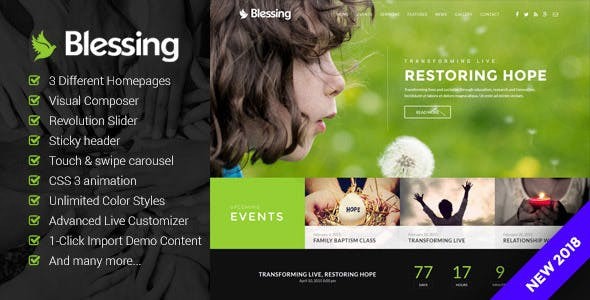
The Blessing WordPress Theme is a meticulously designed solution tailored specifically for churches, charities, and prayer groups looking to establish a robust and visually appealing online presence. Combining aesthetic grace with powerful functionality, Blessing offers an intuitive platform for religious organizations and non-profits to connect with their communities, share messages, manage events, and facilitate online donations.
Key Features: Design, Layout & Performance for Your Mission
Blessing is built to empower organizations with a stunning, high-performing website without requiring extensive technical expertise. Its feature set focuses on visual appeal, ease of customization, and solid performance.
Design & Layout Options
Blessing helps you craft a website that reflects your organization’s unique identity.
- Diverse Pre-designed Layouts: Kickstart your project with 3 unique pre-designed layouts. These distinct starting points provide professional foundations, allowing you to choose the best fit for your church or charity’s specific needs and aesthetic preferences.
- Fully Responsive Design: Your message will reach everyone, everywhere. Blessing ensures your website looks impeccable and functions flawlessly on all devices, from desktops to tablets and smartphones, providing an optimal viewing experience for every visitor.
- Engaging Visuals: Capture attention with Parallax backgrounds that add depth and dimension to your pages, creating a modern and immersive browsing experience. The included Revolution Slider allows for stunning, dynamic visual presentations right on your homepage, perfect for highlighting sermons, events, or mission statements.
- Seamless Navigation: A sticky header keeps your navigation menu consistently accessible as users scroll, enhancing user experience and making it easier for visitors to find important information.
Customization Capabilities
Tailor every aspect of your site to match your brand and vision with Blessing’s extensive customization tools.
- Unlimited Color Schemes: Branding is effortless with unlimited color schemes. Easily customize colors throughout your site to align perfectly with your organization’s branding or seasonal campaigns.
- Advanced WordPress Live Customizer: Experience real-time design changes with the Advanced WordPress Live Customizer. This powerful tool allows you to see your edits instantly, streamlining the design process and making it highly intuitive, even for beginners.
- Typography Perfection: Choose from 600+ Google Web Fonts to achieve the perfect typographic style, ensuring readability and elegance across all your content.
- Rich Iconography: Enhance visual communication with the entire Font Awesome 628+ icons included, giving you a vast library of scalable vector icons to use throughout your site.
Functionality & Performance
Beyond aesthetics, Blessing delivers robust functionality and is designed with performance in mind.
- WPBakery Page Builder (Visual Composer): At the core of Blessing’s flexibility is its integration with WPBakery Page Builder. This powerful drag-and-drop builder comes with 19+ custom elements specifically designed to help you create complex layouts and pages with ease, even without touching a line of code.
- Event Management System: An integrated Events Calendar allows for efficient scheduling and promotion of services, gatherings, fundraisers, and other important church or charity events. A dedicated countdown timer can further build anticipation for special occasions.
- Engaging Interactions: Incorporate CSS3 animations for subtle yet engaging interactions that make your website feel more dynamic and modern.
- Mobile-Friendly Galleries: Showcase photos and media effortlessly with a touch and swipe carousel, optimized for smooth navigation on mobile devices.
- SEO & Speed Optimized: The theme is designed for fast loading times and adheres to SEO best practices, helping your church or charity website rank higher in search results and provide a better experience for visitors.
- Translation Ready: Reach a global audience with ease. Blessing is translation-ready and includes a POT file, allowing you to translate your website into multiple languages.
Installation & Demo Import: Get Your Church Website Online Fast
Getting started with the Blessing theme is a straightforward process, designed to get your church or charity website up and running efficiently.
- Install & Activate the Theme:
- First, download the Blessing theme package.
- Log in to your WordPress dashboard.
- Navigate to Appearance > Themes > Add New > Upload Theme.
- Upload the theme
.zipfile and click “Install Now.” - Once installed, click “Activate.”
- Install Required Companion Plugins:
- Upon activation, Blessing will typically prompt you to install several recommended plugins, crucial for the theme’s full functionality. These commonly include:
- WPBakery Page Builder (Visual Composer): Essential for drag-and-drop content creation.
- Revolution Slider: For creating stunning image and video sliders.
- Contact Form 7: For contact and inquiry forms.
- WooCommerce: If you plan to accept donations or sell merchandise.
- Events Calendar: For managing your organization’s schedule.
- Follow the on-screen instructions to install and activate all recommended plugins.
- Upon activation, Blessing will typically prompt you to install several recommended plugins, crucial for the theme’s full functionality. These commonly include:
- Use the One-Click Demo Import:
- The most efficient way to set up your site like the theme demos is to use the One-Click Demo Importer. Look for this option under Appearance or a dedicated “Blessing Options” menu in your WordPress dashboard.
- Select the demo layout you prefer and initiate the import process.
- What to Expect: The demo import will populate your site with pre-designed pages, posts, widgets, menu structures, and theme settings, making your site look much like the live demo. This provides a fantastic starting point, which you can then customize.
- Common Pitfalls: For large demo imports, ensure your server has sufficient PHP memory limit and execution time. If the import fails or times out, you might need to increase these limits in your
wp-config.phpfile or contact your hosting provider.
Customization Guide: Branding Your Online Sanctuary
Personalizing your Blessing-powered website to reflect your unique brand and mission is made easy through its intuitive customization options.
- WordPress Live Customizer: The Advanced WordPress Live Customizer (found under Appearance > Customize) is your central hub for global style adjustments. Here, you can effortlessly:
- Change Colors: Adjust your theme’s primary, secondary, and accent colors to align with your organization’s palette.
- Update Typography: Select from 600+ Google Fonts, set font sizes, line heights, and styles for headings and body text, ensuring readability and brand consistency.
- Upload Your Logo: Easily replace the default logo with your organization’s official emblem for instant branding.
- Set Up Header & Footer Layouts: While specific header/footer builders aren’t mentioned, the customizer will allow you to control elements like the sticky header, footer text, and background colors.
- WPBakery Page Builder for Layouts: For page-specific layouts and content, WPBakery Page Builder is your go-to tool. Navigate to any page or post and switch to the WPBakery editor to:
- Drag-and-Drop Elements: Utilize the 19+ custom elements to add sections, sermons, events, galleries, calls to action for donations, and more.
- Adjust Spacing and Containers: Fine-tune the spacing, padding, and margins of individual elements and rows to achieve a clean, professional design.
- Utilize Pre-built Templates: WPBakery often comes with its own set of template blocks and elements, which you can insert and customize.
- Setting Up Your Homepage and Blog Page:
- After demo import, your homepage will likely be set up. If not, go to Settings > Reading and set “Your homepage displays” to a static page, choosing one of the demo homepages.
- Similarly, select a page for your blog posts.
- Creating Menus: Go to Appearance > Menus to create and assign menus to your primary navigation areas, ensuring visitors can easily navigate your site.The customization experience with Blessing, especially when leveraging the Live Customizer and WPBakery Page Builder, is highly intuitive, allowing users without coding knowledge to create a professional and branded online presence.
FAQ & Troubleshooting
Here are answers to common questions about the Blessing WordPress Theme:
Is Blessing compatible with page builders like Elementor or Gutenberg?
The Blessing WordPress Theme is primarily built around and deeply integrated with WPBakery Page Builder (formerly Visual Composer). While it will function within a standard WordPress environment, its core drag-and-drop functionality and custom elements are designed for WPBakery. Native, deep compatibility with Elementor or the WordPress Block Editor (Gutenberg) is not explicitly highlighted, suggesting WPBakery is the recommended page builder for this theme.
Does the Blessing theme support WooCommerce for online donations and stores?
Yes, the Blessing theme is fully compatible with WooCommerce. This allows churches and charities to easily set up an online store for merchandise, handle event registrations with payment, and most importantly, facilitate online donations securely through the WooCommerce platform.
Is the Blessing WordPress theme translation-ready and child theme compatible?
Yes, the Blessing theme is translation-ready and includes a POT file, enabling you to translate your website into multiple languages for a broader reach. It is also child theme ready, which is crucial for custom development. Using a child theme ensures that any modifications you make to the theme’s code or styles will not be overwritten when you update the main Blessing theme.
How do I import demo content in the Blessing theme?
To import demo content in the Blessing theme, after installing and activating the theme and its recommended plugins, navigate to the theme’s options or an import section (often found under Appearance or a dedicated theme menu) in your WordPress dashboard. Look for a “One-Click Demo Import” feature, select your desired demo, and initiate the import. Ensure your server meets the recommended PHP memory and execution time limits for a smooth import process.
What are the benefits of choosing Blessing for a church or charity website?
Choosing the Blessing WordPress Theme offers several key benefits for a church or charity. It provides a professionally designed, responsive foundation tailored specifically for religious and non-profit organizations. Its integration with WPBakery Page Builder makes content creation and layout customization intuitive. Dedicated features like an Events Calendar, sermon management system, and WooCommerce compatibility for donations equip organizations with essential tools. Furthermore, its focus on performance and SEO readiness helps ensure your message reaches a wider audience effectively.
Conclusion
The Blessing Responsive WordPress Theme for Church Websites is an excellent choice for any religious organization, charity, or prayer group seeking to build a professional, engaging, and highly functional online presence. Its blend of beautiful design, robust customization options via the Live Customizer and WPBakery Page Builder, and niche-specific features like event management and sermon archiving, make it a powerful tool for community engagement and outreach.With its focus on mobile responsiveness, fast loading times, and SEO best practices, Blessing not only looks good but also performs strongly, ensuring your vital message reaches a wider audience. The inclusion of a one-click demo importer simplifies the initial setup, allowing users of all technical levels to get started quickly. While it leans heavily on WPBakery for page building, making it ideal for those who prefer that environment, its overall package delivers a comprehensive and trustworthy solution for any church or charity committed to growing its digital footprint.
I. Download Limits & Account Benefits
- Free Downloads: Each email address receives 3 downloads per day for free products
- Upgrade Benefits: Purchase any paid product to increase your daily download limit by 3 for each paid product
- No Account Required: You can download immediately by receiving the download link via email
- Account Recommended: Create an account for easier access to your order history and direct update downloads
II. Understanding GPL vs Official Versions
Important: The products available on WPPick are GPL-licensed versions, which differ from official developer versions. Before purchasing, please read our comprehensive guide: Understanding GPL & Official Differences at WPPick
Key Points:
- GPL versions may not include premium support from original developers
- Updates may be delayed compared to official releases
- Some premium features might have limitations
- Always consider your specific needs and support requirements
III. Support & Assistance
We’re here to help through multiple channels:
- Email Support: Direct email assistance for all inquiries
- Live Chat: Real-time support during business hours
- Comprehensive Documentation: Detailed guides and tutorials
IV. Order Tracking
Access your complete purchase history and download links anytime: Order History
V. Account Access
New to WPPick? Login or Create Account to manage your downloads and orders efficiently.
VI. Refund Protection
We stand behind our products with a clear refund policy. Review our terms: Refund Policy
VII. Privacy & Security
Your data security is our priority. Learn how we protect your information: Privacy Policy
VII. Terms of Service
Understanding our service terms ensures a smooth experience: Terms of Use
Quick Tips for Best Experience
- Verify Compatibility: Check plugin/theme compatibility with your WordPress version
- Backup First: Always backup your site before installing new plugins or themes
- Test Environment: Consider testing on a staging site first
- Stay Updated: Regularly check for updates in your account dashboard
- Read Documentation: Review any included documentation for optimal setup
Need Help?
If you have questions about downloads, licensing, or need technical assistance, don’t hesitate to contact our support team. We’re committed to ensuring you have the best possible experience with WPPick products.
Ready to get started? Your download adventure begins with just one click!
- Compatible with WordPress Version 6.9
- Revolution Slider plugin version 6.7.40
- WPBakery Page Builder Version 8.7.2
- Files Updated: plugin-requires.php, style.css
- Revolution Slider plugin version 6.7.29
- WPBakery Page Builder Version 8.2
- Files Updated: plugin-requires.php, style.css