

Blurb – Affiliate Marketing WordPress Theme
/Year
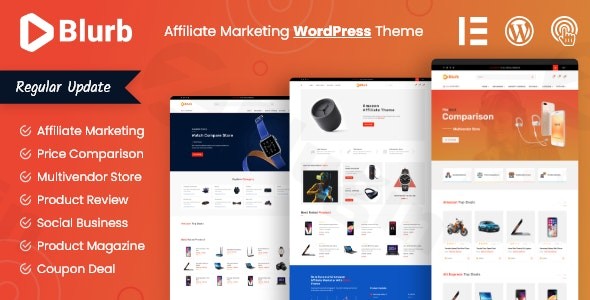
Building a profitable affiliate site requires more than just great content; it requires a layout designed to convert visitors into buyers. The Blurb Affiliate Marketing WordPress Theme is a professional, auto-functional solution specifically engineered for marketers who need to showcase products, compare prices, and share coupons with ease. Whether you are building an Amazon affiliate site, a coupon hub, or a multi-vendor marketplace, Blurb provides the technical framework to turn a standard blog into a high-earning platform.
Key Features: Design, Layout, and Performance
Blurb isn’t just a skin; it’s a comprehensive toolset for the modern affiliate entrepreneur. It balances a clean, professional aesthetic with “auto-functional” features that automate the most tedious parts of site building.
Professional Layout Options
Blurb offers significant flexibility right out of the box. Users can choose between three distinct homepage layouts, supporting both standard 1170px and ultra-wide 1650px grids. This allows for a visual hierarchy that can handle high-density data—like price comparison tables—without feeling cluttered.
- Product & Review Pages: Choose between grid and list views for review archives.
- Specialized Templates: Dedicated layouts for coupons, deals, and multi-vendor product listings ensure your site looks like an industry leader, not a generic blog.
Advanced Customization Capabilities
While many themes require third-party plugins for affiliate features, Blurb includes over 70 custom Elementor widgets designed specifically for marketers.
- Global Styles: Through the WordPress Customizer, you can control typography (using free Google Fonts), color schemes, and spacing to match your brand identity.
- Header & Footer Builder: Create unique navigation experiences with a built-in Mega Menu and multiple header/footer style variations.
Performance and SEO Optimization
In the world of affiliate marketing, speed is money. Blurb is built on a lightweight framework with an optimized codebase to ensure fast loading times and high Core Web Vitals scores.
- SEO Ready: The theme features clean markup and is fully compatible with leading plugins like Yoast SEO and Rank Math.
* Fully Responsive: The design is 100% responsive, adapting perfectly to desktops, tablets, and smartphones, which is critical for mobile shoppers.
Installation & Demo Import: A Step-by-Step Guide
Getting started with the best WordPress theme for affiliate marketing shouldn’t be a technical headache. Blurb simplifies the setup process with a streamlined workflow.
- Install & Activate: Upload the theme zip file via Appearance > Themes > Add New. Once uploaded, click Activate.
- Plugin Setup: Upon activation, Blurb will prompt you to install required companion plugins, including Elementor, WooCommerce, and the theme’s core functional plugins.
- One-Click Demo Import: Navigate to the theme options and locate the demo importer. Choose your preferred layout and click “Import.”
- Post-Import Check: After the import finishes, check your menus and widgets. Most layouts will populate automatically, but you may need to assign your primary menu in Appearance > Menus.
Tip: Ensure your hosting environment has sufficient memory (at least 256M) to prevent timeouts during the demo content import.
Customization Guide: Branding & Layout
Once your demo is imported, personalizing your site is intuitive thanks to deep Elementor integration.
Branding Your Site
Head to the WordPress Customizer (Appearance > Customize) to set your global brand identity. Here, you can upload your logo, set your primary brand colors, and choose your typography. Because Blurb uses a Bootstrap-based grid, your layout will maintain perfect alignment even as you change font sizes or container widths.
Building Pages with Elementor
To edit your homepage or product pages, simply click “Edit with Elementor.” You can drag and drop any of the 70+ specialized Blurb widgets, such as:
- Price Comparison Tables: Link multiple vendors to a single product.
- Coupon Cards: Create “Click to Reveal” buttons that increase engagement.
* Review Stars: Visually showcase product ratings to build trust with your audience.
FAQ & Troubleshooting
Is Blurb compatible with Elementor and WooCommerce?
Yes, Blurb is fully compatible with Elementor and includes over 70 custom widgets specifically for this page builder. It is also fully integrated with WooCommerce, allowing you to run a standard shop alongside your affiliate or multi-vendor marketplace.
Does the Blurb theme support auto-comparison features?
Yes, Blurb is an auto-comparison WordPress theme. It features built-in tools to help you create product comparison tables and review sections that help users find the best deals across different vendors automatically.
Can I use a child theme with Blurb?
Absolutely. Blurb supports the use of a child theme, which is highly recommended for developers who want to add custom code or functions without losing their changes during theme updates.
What should I do if the demo import looks different from the preview?
This usually happens if the required plugins (like WooCommerce or Elementor) were not activated before the import. Ensure all recommended plugins are active and try re-running the importer. If issues persist, check your “Reading” settings in WordPress to ensure the correct “Static Page” is selected as your homepage.
Verdict: Is Blurb Right for You?
The Blurb Affiliate Marketing WordPress Theme stands out by focusing strictly on the needs of marketers. While multipurpose themes like Astra or Divi offer great flexibility, Blurb provides a specialized, “out-of-the-box” experience for product reviewers and deal-hunters.Ideal for:
- Niche Reviewers who need high-readability layouts.
- Coupon/Deal Site Owners looking for automated layout features.
- Multi-vendor Marketplaces that require WooCommerce compatibility.If you want to save time on development and focus on content and conversions, Blurb is a top-tier choice for your next affiliate project. Visit wppick.com for more insights on optimizing your WordPress site for maximum performance.
I. Download Limits & Account Benefits
- Free Downloads: Each email address receives 3 downloads per day for free products
- Upgrade Benefits: Purchase any paid product to increase your daily download limit by 3 for each paid product
- No Account Required: You can download immediately by receiving the download link via email
- Account Recommended: Create an account for easier access to your order history and direct update downloads
II. Understanding GPL vs Official Versions
Important: The products available on WPPick are GPL-licensed versions, which differ from official developer versions. Before purchasing, please read our comprehensive guide: Understanding GPL & Official Differences at WPPick
Key Points:
- GPL versions may not include premium support from original developers
- Updates may be delayed compared to official releases
- Some premium features might have limitations
- Always consider your specific needs and support requirements
III. Support & Assistance
We’re here to help through multiple channels:
- Email Support: Direct email assistance for all inquiries
- Live Chat: Real-time support during business hours
- Comprehensive Documentation: Detailed guides and tutorials
IV. Order Tracking
Access your complete purchase history and download links anytime: Order History
V. Account Access
New to WPPick? Login or Create Account to manage your downloads and orders efficiently.
VI. Refund Protection
We stand behind our products with a clear refund policy. Review our terms: Refund Policy
VII. Privacy & Security
Your data security is our priority. Learn how we protect your information: Privacy Policy
VII. Terms of Service
Understanding our service terms ensures a smooth experience: Terms of Use
Quick Tips for Best Experience
- Verify Compatibility: Check plugin/theme compatibility with your WordPress version
- Backup First: Always backup your site before installing new plugins or themes
- Test Environment: Consider testing on a staging site first
- Stay Updated: Regularly check for updates in your account dashboard
- Read Documentation: Review any included documentation for optimal setup
Need Help?
If you have questions about downloads, licensing, or need technical assistance, don’t hesitate to contact our support team. We’re committed to ensuring you have the best possible experience with WPPick products.
Ready to get started? Your download adventure begins with just one click!
- Compatible with the latest version of PHP.
- Improved code quality.