

Boldman – Handyman Renovation Services WordPress Theme
/Year
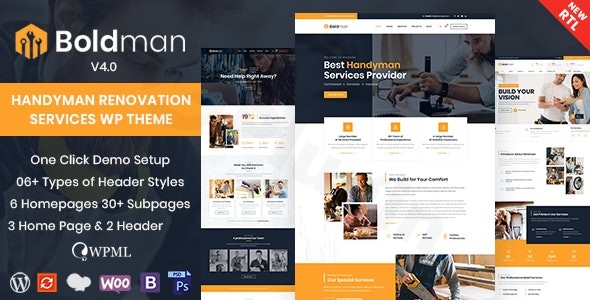
The Boldman WordPress Theme is a specialized, feature-rich solution meticulously crafted for professionals in the handyman, renovation, and home services industry. Whether you’re a plumber, carpenter, electrician, general home repair specialist, or manage a larger renovation company, Boldman provides a robust and visually appealing platform to establish your online presence, showcase your expertise, and attract more clients. This review will delve into its design, functionality, setup process, and customization options, demonstrating why Boldman is an ideal Handyman Renovation Services WordPress Theme for businesses looking to thrive online.
Key Features: Design, Layout & Performance
Boldman is engineered to make your home service business stand out, combining professional aesthetics with powerful functionality. Its design philosophy centers on clarity, visual hierarchy, and user-friendly navigation, ensuring potential customers can easily find the services they need.
Comprehensive Design & Layout Options
Boldman offers exceptional flexibility to tailor your site to your brand’s unique identity. You can choose from 3+ professionally designed homepage layouts (with over 6 ready demos, 20+ stunning demo pages, and 23+ inner pages available for one-click import) that cater to various service niches, from general handyman work to specialized solar system installations.The theme provides unlimited layout possibilities, including options for one-page sites, multiple blog list and standard blog layouts, and versatile boxed layouts. You also get control over your site’s visual entry points with 3+ distinct header styles and options for both sticky headers and footers, ensuring crucial contact information or navigation elements remain accessible as users scroll.
Powerful Customization Capabilities
Personalizing Boldman to match your brand’s colors and typography is intuitive. The theme provides unlimited color schemes via a convenient color picker, allowing you to fine-tune every element. It integrates with Google Fonts, giving you access to a vast library of typefaces to establish an impressive and readable typographic hierarchy. Advanced background settings, including custom images and video backgrounds, along with title bar background options, provide granular control over the visual depth and appeal of your pages. All these customization options are powered by the robust Codestar WordPress Framework, offering a comprehensive yet user-friendly admin panel.
Performance & SEO Readiness
A fast and responsive website is crucial for both user experience and search engine rankings. Boldman is built with a 100% responsive design, guaranteeing your site looks flawless and performs optimally on any device, from desktops to smartphones and tablets. It’s rigorously tested across all major browsers for consistent performance and is certified by Google as mobile-friendly.Under the hood, Boldman boasts clean HTML5 & CSS3 code, contributing to its “optimized for speed” claims. This focus on code quality and mobile responsiveness lays a strong foundation for SEO, helping your business rank higher and reach a wider audience. Furthermore, with RTL (Right-to-Left) support, Boldman is ready for international audiences.
Installation & Demo Import Guide
Getting your Boldman website up and running is a straightforward process, designed to minimize technical hurdles.
- Download & Upload the Theme: First, download the Boldman theme package from your purchase source (e.g., ThemeForest). Due to the theme’s comprehensive nature and size, it is highly recommended to upload the theme via FTP (File Transfer Protocol) rather than the standard WordPress theme uploader, to avoid potential timeout issues during installation. Alternatively, you can use the Envato Market plugin for a more streamlined process. Once uploaded, navigate to
Appearance > Themesin your WordPress dashboard and Activate Boldman. - Install Required Plugins: Upon activation, Boldman will prompt you to install several essential plugins. These typically include:
- ThemetechMount Extras for Boldman Theme: Crucial for custom post types (Portfolio, Team, Services) and shortcodes.
- Codestar Framework: Powers the theme options panel.
- WPBakery Page Builder (or Elementor, depending on your preference and theme package): For drag-and-drop page building.
- Slider Revolution: For creating stunning sliders.
- Other popular plugins like Contact Form 7, MailChimp Integration, The Events Calendar, bbPress, and WPML for multilingual support are also fully compatible and often recommended.Install and activate all required plugins.
- One-Click Demo Import: To replicate one of Boldman’s impressive demo sites, navigate to the theme’s demo importer (usually found under an “Import Demo Data” or “Boldman Options” menu in your dashboard). The one-click demo import feature allows you to quickly set up your site with pre-built pages, posts, sliders, widgets, and theme options, giving you a perfect starting point that looks like the live preview.
- Post-Import Setup: After the demo import is complete, you may need to:
- Go to
Appearance > Menusto ensure your main navigation menu is correctly assigned to the primary menu location. - Check
Settings > Readingto set your desired homepage and blog page. - Review
Appearance > Widgetsto adjust any demo widgets to your liking.
- Go to
Customization Guide: Branding & Layout
Boldman puts powerful customization tools at your fingertips, allowing you to personalize every aspect of your website without needing to write code.
- Accessing Theme Options: Most global styling and layout changes are managed through the Theme Options panel, built on the Codestar Framework. This intuitive panel, usually found under
Boldman OptionsorTheme Optionsin your WordPress dashboard, allows you to control colors, typography, header/footer layouts, blog settings, portfolio options, and much more. - Global Styles: Easily define your brand’s visual identity by setting global colors, fonts, and spacing. Use the color picker for precise color adjustments across elements like your header, footer, top bar, and main content areas. Choose from a wide array of Google Fonts to establish clear typographic styles for headings and body text.
- Header & Footer Customization: Boldman offers 3+ distinct header styles that can be further customized. You can upload your logo, adjust menu styling, and enable sticky header functionality. For more advanced header and footer designs, the theme integrates seamlessly with Elementor and WPBakery Page Builder, allowing you to visually construct unique layouts using drag-and-drop elements. Additionally, Max Mega Menu plugin integration provides powerful options for creating complex, multi-column navigation menus.
- Managing Content with Custom Post Types: The theme includes dedicated custom post types for services, portfolios, team members, testimonials, and client logos. These allow you to easily add and manage specific content relevant to your handyman business, with dedicated settings and layouts for each.
- Widget Areas & Sidebars: Boldman provides unlimited sidebars and widget areas, managed through the Sidebar Manager. This flexibility lets you tailor widgetized content for different pages, ensuring relevant information is always displayed.
- Advanced Layouts with Page Builders: With full compatibility for both Elementor and WPBakery Page Builder, you can take complete control over your page layouts. Use their intuitive drag-and-drop interfaces to modify existing demo content, create entirely new page structures, and integrate powerful modules specific to your services without touching a single line of code.
- Child Theme & Custom CSS: For advanced users who wish to make deeper modifications, Boldman includes child theme support, ensuring your customizations are safe during theme updates. You can also add custom CSS directly through the Theme Options panel or the WordPress Customizer for specific styling tweaks.
FAQ & Troubleshooting
Is Boldman compatible with Elementor / WPBakery / Gutenberg?
Yes, Boldman is fully compatible with both Elementor and WPBakery Page Builder, offering extensive drag-and-drop functionality for creating and customizing pages. While not explicitly stated as Gutenberg-native, it works within the standard WordPress environment, and its compatibility with major page builders ensures a robust editing experience.
Does Boldman support WooCommerce for online stores?
Absolutely. Boldman offers full WooCommerce compatibility, including various shop layouts. This means you can easily set up an online store to sell handyman tools, repair kits, or branded merchandise directly from your website.
Is Boldman theme responsive and mobile-friendly?
Yes, the Boldman theme features a 100% responsive design that automatically adapts to look perfect on all devices, from desktop computers to smartphones and tablets. It has been thoroughly tested across all major browsers for consistent performance and is certified by Google as mobile-friendly.
How can I update the Boldman theme without losing my customizations?
To update the Boldman theme safely, always use a child theme for your customizations. This ensures that any direct modifications you’ve made to the theme files are preserved when you install a new version of the main theme. You can update the theme manually via FTP or using the Envato Market plugin.
What should I do if the demo import fails or looks different from the demo site?
If the demo import fails, it’s often due to server limitations like low PHP memory limit or execution time. Increase these values in your hosting environment (or contact your host for assistance). If the import completes but looks different, ensure all required plugins (especially ThemetechMount Extras, Codestar Framework, WPBakery/Elementor, and Slider Revolution) are installed and activated before importing. Also, verify that your main navigation and homepage settings are correctly configured after the import.
Conclusion
The Boldman – Professional Handyman & Renovation Services WordPress Theme is an exceptional choice for any business in the home services sector. Its professional design, comprehensive feature set, and deep integration with popular page builders like Elementor and WPBakery make it incredibly versatile and easy to use for both beginners and experienced webmasters.From its elegant service showcases and advanced booking system to its stunning portfolio layouts and robust customization options, Boldman provides all the tools needed to build a high-converting online presence. It excels in delivering a visually appealing and highly functional website for plumbing, carpentry, home repair, and renovation companies. With its commitment to performance, SEO readiness, and ongoing updates, Boldman stands out as a reliable and authoritative solution to help your handyman or renovation business attract more customers and grow online.
I. Download Limits & Account Benefits
- Free Downloads: Each email address receives 3 downloads per day for free products
- Upgrade Benefits: Purchase any paid product to increase your daily download limit by 3 for each paid product
- No Account Required: You can download immediately by receiving the download link via email
- Account Recommended: Create an account for easier access to your order history and direct update downloads
II. Understanding GPL vs Official Versions
Important: The products available on WPPick are GPL-licensed versions, which differ from official developer versions. Before purchasing, please read our comprehensive guide: Understanding GPL & Official Differences at WPPick
Key Points:
- GPL versions may not include premium support from original developers
- Updates may be delayed compared to official releases
- Some premium features might have limitations
- Always consider your specific needs and support requirements
III. Support & Assistance
We’re here to help through multiple channels:
- Email Support: Direct email assistance for all inquiries
- Live Chat: Real-time support during business hours
- Comprehensive Documentation: Detailed guides and tutorials
IV. Order Tracking
Access your complete purchase history and download links anytime: Order History
V. Account Access
New to WPPick? Login or Create Account to manage your downloads and orders efficiently.
VI. Refund Protection
We stand behind our products with a clear refund policy. Review our terms: Refund Policy
VII. Privacy & Security
Your data security is our priority. Learn how we protect your information: Privacy Policy
VII. Terms of Service
Understanding our service terms ensures a smooth experience: Terms of Use
Quick Tips for Best Experience
- Verify Compatibility: Check plugin/theme compatibility with your WordPress version
- Backup First: Always backup your site before installing new plugins or themes
- Test Environment: Consider testing on a staging site first
- Stay Updated: Regularly check for updates in your account dashboard
- Read Documentation: Review any included documentation for optimal setup
Need Help?
If you have questions about downloads, licensing, or need technical assistance, don’t hesitate to contact our support team. We’re committed to ensuring you have the best possible experience with WPPick products.
Ready to get started? Your download adventure begins with just one click!
- Updated Slider Revolution plugin to the latest version v6.7.37
- Updated "WPBakery Page Builder" plugin to the latest version v8.6.1
- Updated translation file *.pot
- Fixed minor CSS bugs affecting the styling of certain elements and login page