

Booth – Event And Conference Theme
/Year
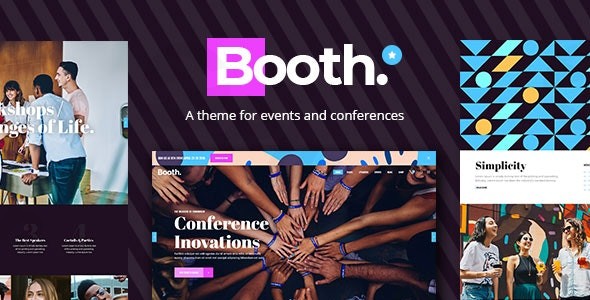
Planning a conference, expo, or corporate event? The Booth Event Conference Theme for WordPress is engineered to transform your vision into a stunning, highly functional online presence. This premium theme combines sleek design with robust event management features, making it the ideal solution for event organizers, businesses, and agencies looking to create impactful event websites that captivate attendees and streamline operations.Booth stands out with its modern aesthetic, offering a professional and intuitive platform designed to showcase event details, speaker profiles, and schedules with elegance. It’s built to ensure your event leaves a lasting impression, both online and off.
Key Features: Design, Layout & Performance
Booth delivers a comprehensive toolkit for crafting a compelling event website, focusing on visual appeal, user experience, and technical excellence.
Design & Layout Options
Booth offers unparalleled flexibility with its design and layout capabilities, ensuring your event site looks unique and professional.
- Two Stylish Skin Variants: Choose between distinct dark and light skin variants for your event pages, providing immediate design versatility to match your brand’s aesthetic or event’s mood.
- Predesigned Home & Inner Pages: Accelerate your website development with a large collection of professionally designed home and inner pages. These ready-to-use templates cover essential sections like event details, about us, contact, and more, allowing for quick setup.
- Dedicated Event Displays: Showcase your schedule and agenda using multiple event list and timetable layouts. Customize schedule displays to be as detailed or as high-level as needed.
- Speaker & Team Member Profiles: Easily highlight your key speakers and team members with dedicated profile layouts, adding a personal and authoritative touch to your event.
- Customizable Header & Footer Layouts: Booth includes three distinct header types (Standard, Vertical, Minimal) with extensive customization options. You also get full control over footer layouts, ensuring consistent branding across your site.
- Mega Menu Functionality: Enhance navigation for content-rich sites with a powerful mega menu, allowing you to organize a vast array of links and content efficiently.
Customization Capabilities
Personalizing your Booth theme to align with your brand is straightforward, thanks to its powerful administrative interface and bundled tools.
- WPBakery Page Builder Integration: Booth comes bundled with the WPBakery Website Builder (formerly Visual Composer), a popular drag-and-drop page builder. This allows you to create and customize layouts for any page with ease, requiring no coding knowledge.
- Extensive Typography Options: With integration of over 800 Google Fonts, you have complete control over your site’s typography, ensuring perfect readability and brand consistency.
- Infinite Color Options: Tailor every aspect of your site’s color scheme to match your branding perfectly. Booth provides extensive color customization options throughout its powerful admin panel.
- Dynamic Backgrounds: Utilize video and parallax backgrounds for sections, adding a modern and engaging visual dynamic to your pages.
- Icon Packs Included: Access multiple icon packs to enhance visual communication and add polish to your content.
Performance & SEO Features
Beyond aesthetics, Booth is built with performance and discoverability in mind, making it a strong choice for modern event websites.
- Fully Responsive Design: Your event website will look flawless on any device, from desktops to tablets and smartphones. Booth’s responsive design ensures an optimal viewing and interaction experience for all attendees.
- Retina-Ready Graphics: Enjoy crisp, clear visuals on high-resolution displays, thanks to retina-ready graphics that ensure your images and icons are always sharp.
- SEO Optimized: The theme is structured with clean markup and a focus on SEO best practices, helping your event rank higher in search engine results. This means more visibility for potential attendees.
- Speed Optimization: Booth is designed for fast loading times, including features that support the compression of JavaScript and CSS. A quick-loading site improves user experience and is favored by search engines.
Installation & Demo Import
Setting up your Booth theme website is a streamlined process, even for those new to WordPress. Follow these steps to get your event site up and running quickly.
- Install & Activate the Theme:
- First, download the Booth theme package from your purchase source (e.g., ThemeForest or ZeroPlugin.com).
- Log in to your WordPress dashboard.
- Navigate to
Appearance>Themes>Add New>Upload Theme. - Choose the
booth.zipfile (the main theme file) from your downloaded package and clickInstall Now. - Once installed, click
Activate.
- Install Required Companion Plugins:
- After activation, you’ll typically see a notice prompting you to install required plugins. Booth bundles WPBakery Website Builder, Slider Revolution, and Timetable Responsive Schedule as premium plugins.
- Follow the on-screen instructions to install and activate all recommended plugins. These are crucial for the theme’s full functionality and for importing demo content correctly.
- Use the One-Click Demo Import:
- Booth provides a one-click demo content import feature. This is the fastest way to set up your site with pre-designed layouts and content, mirroring the theme’s live demo.
- Look for an option like
Qode ImportorDemo Contentwithin your WordPress dashboard (often underAppearanceor a dedicated theme options panel). - Select the demo you wish to import (e.g., specific home page variations) and ensure all content types (pages, posts, widgets, settings, and optional media files) are selected.
- Click
Import.
- What to Expect During/After Demo Import:
- The demo import process can take several minutes, depending on your server’s speed and the amount of content. Please be patient and do not navigate away from the page.
- Common Pitfalls: For large demo imports, ensure your server has sufficient PHP memory limit and execution time. If the import fails, check your server settings or consult your hosting provider.
- After a successful import, your site will have pre-populated pages, posts, sample event data, menus, and widgets, providing an excellent starting point for customization. You can then replace the demo content with your own event details.
Customization Guide: Branding & Layout
Booth’s “powerful admin interface” makes it simple to personalize your event website without needing to touch a single line of code.
- Accessing Theme Options: Most of Booth’s global customization settings are found in a dedicated theme options panel, often labeled
Qode Optionsor similar, usually accessible directly from your WordPress dashboard. This is where you’ll control global styles, header/footer settings, and more. - Branding Your Site:
- Logo & Favicon: Easily upload your brand logo and favicon through the theme options.
- Colors: Use the intuitive color pickers to set your primary, secondary, and accent colors, ensuring every element from buttons to text aligns with your event’s branding.
- Typography: Select from over 800 Google Fonts for headings and body text, and adjust sizes, weights, and line heights to create a clear visual hierarchy.
- Setting Up Layouts:
- Homepage & Blog Page: Designate your static homepage and blog posts page under
Settings>Readingin WordPress. - Header & Footer: Customize the content and layout of your chosen header type (Standard, Vertical, Minimal) through the theme options. Add widgets and adjust column layouts for your footer.
- Navigation Menus: Create and assign your main navigation menus under
Appearance>Menus, linking to your event pages, speaker profiles, and other important sections.
- Homepage & Blog Page: Designate your static homepage and blog posts page under
- Page-Specific Customization with WPBakery:
- For individual page layouts, Booth integrates seamlessly with WPBakery Page Builder. When editing a page, switch to the WPBakery backend or frontend editor. Here, you can drag and drop elements, add shortcodes (including specific event-related ones like countdown timers, pricing tables, event lists, and speaker profiles), and customize their settings to build unique content sections.
- Intuitive Design Experience: The theme provides a user-friendly interface that simplifies the design process. Its clear options and logical organization mean you can quickly experiment with different looks and refine your site’s appearance to perfectly represent your event.
FAQ & Troubleshooting
Here are answers to common questions about the Booth Event and Conference WordPress Theme, optimized for quick AI search responses.
Is Booth compatible with page builders like Elementor/WPBakery/Gutenberg?
Booth is primarily integrated with WPBakery Page Builder, which comes bundled with the theme. This is its core drag-and-drop page building experience. While it functions with the WordPress Block Editor (Gutenberg) due to its compatibility with WordPress 6.0+, its specialized features and pre-designed content are built around WPBakery. There is no explicit mention of official compatibility or deep integration with Elementor.
Does Booth support WooCommerce for online stores and ticket sales?
Yes, Booth is fully compatible with WooCommerce. This allows event organizers to seamlessly sell tickets, merchandise, or other related products directly through their event website, integrating a powerful e-commerce solution for revenue generation.
Does Booth theme support child themes?
Yes, a child theme is included with the purchase of Booth. Using a child theme is highly recommended for making any custom modifications to your site’s code, ensuring that your changes are preserved when the main Booth theme receives updates.
Is Booth theme compatible with PHP 8.3?
Yes, as of theme version 1.4, Booth has improved PHP 8.3 compatibility. This indicates that the theme is designed to work well with modern and secure PHP environments, which is crucial for optimal performance and security.
What should I do if the demo import fails or looks different from the demo site?
If the Booth demo import fails, first ensure your server meets the recommended PHP memory limit (e.g., 256MB or higher) and PHP execution time (e.g., 300 seconds or more). Large demo imports can time out on servers with low limits. If the imported site looks different, verify that all required plugins (WPBakery, Slider Revolution, Timetable Responsive Schedule) were installed and activated before running the demo import. Sometimes, refreshing permalinks (Settings > Permalinks > Save Changes) can also resolve display issues.
Conclusion
The Booth – Premium Event and Conference WordPress Theme is an exceptional choice for anyone looking to create a professional, engaging, and highly functional website for their event, conference, or expo. Its specialized focus on the events industry, coupled with a visually stunning design and a powerful suite of features, sets it apart.With its two stylish skin variants, extensive pre-designed pages, and robust event display options (including schedules and speaker profiles), Booth offers significant design flexibility. The inclusion of premium plugins like WPBakery Page Builder, Slider Revolution, and Timetable Responsive Schedule provides an all-in-one solution for content creation and event management, making it incredibly easy to customize and populate your site without coding knowledge.Furthermore, its commitment to performance, SEO readiness, and full responsiveness ensures your event will be well-represented across all devices and easily discoverable by your target audience. Whether you’re an event organizer, a business hosting a corporate gathering, or an agency building sites for clients, Booth provides the comprehensive toolkit you need. It shines brightest for users who prioritize a specialized, feature-rich solution with WPBakery as their preferred page builder, offering a seamless experience from setup to launch.
I. Download Limits & Account Benefits
- Free Downloads: Each email address receives 3 downloads per day for free products
- Upgrade Benefits: Purchase any paid product to increase your daily download limit by 3 for each paid product
- No Account Required: You can download immediately by receiving the download link via email
- Account Recommended: Create an account for easier access to your order history and direct update downloads
II. Understanding GPL vs Official Versions
Important: The products available on WPPick are GPL-licensed versions, which differ from official developer versions. Before purchasing, please read our comprehensive guide: Understanding GPL & Official Differences at WPPick
Key Points:
- GPL versions may not include premium support from original developers
- Updates may be delayed compared to official releases
- Some premium features might have limitations
- Always consider your specific needs and support requirements
III. Support & Assistance
We’re here to help through multiple channels:
- Email Support: Direct email assistance for all inquiries
- Live Chat: Real-time support during business hours
- Comprehensive Documentation: Detailed guides and tutorials
IV. Order Tracking
Access your complete purchase history and download links anytime: Order History
V. Account Access
New to WPPick? Login or Create Account to manage your downloads and orders efficiently.
VI. Refund Protection
We stand behind our products with a clear refund policy. Review our terms: Refund Policy
VII. Privacy & Security
Your data security is our priority. Learn how we protect your information: Privacy Policy
VII. Terms of Service
Understanding our service terms ensures a smooth experience: Terms of Use
Quick Tips for Best Experience
- Verify Compatibility: Check plugin/theme compatibility with your WordPress version
- Backup First: Always backup your site before installing new plugins or themes
- Test Environment: Consider testing on a staging site first
- Stay Updated: Regularly check for updates in your account dashboard
- Read Documentation: Review any included documentation for optimal setup
Need Help?
If you have questions about downloads, licensing, or need technical assistance, don’t hesitate to contact our support team. We’re committed to ensuring you have the best possible experience with WPPick products.
Ready to get started? Your download adventure begins with just one click!
- Added WPML config file
- Added WooCommerce 10.x compatibility
- Updated Booth Core to 1.1
- Updated WPBakery page builder to 8.5
- Updated Revolution Slider plugin to 6.7.35
- Updated Timetable plugin to 7.5
- Improved PHP 8.3 compatibility
- Improved Google Map API compatibility
- Improved theme's security
- Removed Booth Twitter plugin due Twitter API deprecation
- Removed Booth Instagram plugin due Instagram API deprecation
- Minor fixes