

Bopea – Newspaper & Magazine WordPress Theme
/Year
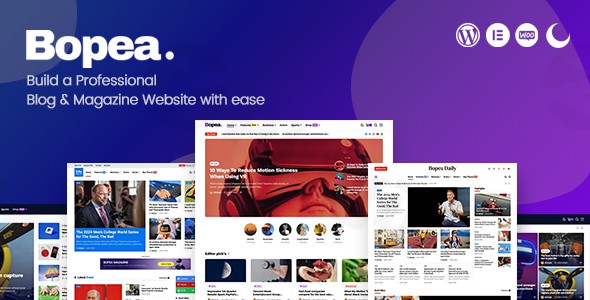
In the fast-paced world of digital publishing, your website’s performance is just as important as the stories you tell. The Bopea WordPress theme is a modern, highly editable, and mobile-optimized solution specifically crafted for news publishers, online magazines, and professional content creators. Whether you are launching a niche tech blog or a high-traffic news portal, Bopea provides a sophisticated “Magazine WordPress theme” framework that prioritizes speed, SEO, and user engagement right out of the box.
1. Professional Design & Layout Capabilities
Bopea is built on a design philosophy that balances aesthetic appeal with a clean, organized visual hierarchy. It is engineered for content-heavy sites that need to remain readable and engaging.
Unlimited Layout Options
One of Bopea’s standout features is its “unlimited layouts” capability. You aren’t locked into a single look; instead, you can choose from:
- Multiple Post Listing Variations: Choose how your stories appear on the homepage and category pages.
- Grid and List Styles: Various grid post layouts allow you to highlight breaking news or featured editorials effectively.
- Boxed vs. Full-Width: Switch between a classic boxed magazine look or a modern, full-width “edge-to-edge” digital experience.
Unique Visual Elements
Bopea stays ahead of design trends by including a built-in Dark and Light mode. This feature significantly improves the user experience for night-time readers and adds a premium feel to your publication. Additionally, the theme supports video and image backgrounds within sections, allowing for immersive storytelling.
2. Technical Performance & SEO Readiness
For any newspaper WordPress theme, performance is a non-negotiable factor. Bopea is marketed as “blazing-fast” and is specifically optimized for Google’s Core Web Vitals.
- Lightweight Code: The developers have focused on clean code to reduce bloat, ensuring that even with high-resolution images, your pages load quickly.
- SEO-Friendly Structure: With clean markup and a logical heading hierarchy (H1-H6), Bopea helps search engines crawl and index your content more effectively.
- Mobile-First Design: Recognizing that the majority of news is consumed on smartphones, Bopea is fully responsive and mobile-optimized, providing a flawless reading experience across all devices and browsers (Chrome, Safari, Firefox, Edge).
3. Compatibility & Integration
Bopea is designed to play well with the industry’s leading tools, ensuring you don’t have to choose between features and flexibility.
- Elementor Page Builder: Bopea is an Elementor compatible WordPress theme, allowing you to use drag-and-drop tools to build custom headers, footers, and complex page layouts without touching a single line of code.
- Gutenberg Ready: It fully supports the WordPress Block Editor, making the standard post-writing experience smooth and modern.
- WooCommerce Support: If you plan to sell digital subscriptions, branded merchandise, or physical products, Bopea’s seamless WooCommerce integration makes it a viable eCommerce-ready blog theme.
- Essential Plugins: The theme works perfectly with Contact Form 7 and includes built-in Social Share and Follow features to boost your content’s reach.
4. Step-by-Step Installation & Setup Guide
Setting up the Bopea WordPress theme is straightforward, even for beginners. To ensure a smooth process, follow these steps:
Step 1: Check Server Requirements
Before installing, ensure your hosting environment meets these recommended limits (adjustable via php.ini):
- PHP Version: 5.6.20 or higher.
- Memory Limit: 512MB.
- Max Execution Time: 600.
Step 2: Install & Activate
- Log in to your WordPress Dashboard.
- Go to Appearance > Themes > Add New.
- Upload the
bopea.zipfile and click Install Now, then Activate.
Step 3: Install Required Plugins
Upon activation, you will see a prompt to install required plugins, including Bopea Function, Elementor, and Contact Form 7. Click “Begin installing plugins” and activate them all.
Step 4: One-Click Demo Import
To get your site looking like the professional demo:
- Navigate to the theme’s demo import section (usually under Appearance or a dedicated Bopea tab).
- Choose your preferred layout and click Import.
- Note: This will import sample posts, menus, and widgets. Ensure you have a stable internet connection during this process.
5. Customization Guide: Personalizing Your Brand
Personalizing Bopea is handled primarily through the WordPress Live Customizer, allowing you to see changes in real-time.
- Typography: Access over 800+ Google Fonts to match your publication’s voice—from classic serif for news to modern sans-serif for tech blogs.
- Color Systems: Utilize “Unlimited Color” options to set your primary brand colors for links, buttons, and accents.
- Header & Footer Builder: Use the integrated Elementor support to create custom headers. You can add Mega Menus, sticky navigation, and search bars with ease.
- Sidebars & Widgets: Bopea offers “Unlimited Sidebars,” meaning you can create unique widget areas for different categories (e.g., a “Trending” sidebar for Sports and a “Price Ticker” sidebar for Finance).
6. FAQ & Troubleshooting
Is Bopea WordPress theme good for bloggers?
Yes, Bopea is an excellent choice for bloggers who want to move beyond simple layouts. It offers professional-grade organization for high-volume content, built-in ad placements for monetization, and a “Dark Mode” that modern audiences love.
How do I update the Bopea theme without losing my customizations?
To protect your customizations, always use a Child Theme (included in the Bopea package) for any code-level changes. For CSS changes, use the “Additional CSS” section in the Customizer. When an update is available, you can safely update the parent theme via the WordPress dashboard.
Does Bopea support WooCommerce for online stores?
Yes, Bopea is fully WooCommerce compatible. This allows news sites to sell memberships, digital downloads, or physical products directly through their website using the world’s most popular eCommerce plugin.
What should I do if the demo import fails?
Demo import failures are usually caused by server timeouts. Ensure your max_execution_time is set to 600 and your memory_limit is at least 512MB. If the problem persists, try importing the demo data in parts or contact your hosting provider to temporarily increase resource limits.
7. Verdict: Is Bopea Right for You?
The Bopea WordPress theme stands out as a “fast WordPress theme” that doesn’t sacrifice features for speed. It strikes a rare balance: it is powerful enough for established media agencies yet intuitive enough for solo freelancers and beginner bloggers.Choose Bopea if:
- You need a professional, content-heavy magazine WordPress theme.
- SEO and Core Web Vitals are a priority for your organic growth.
- You want the design flexibility of Elementor without the usual performance lag.
- You want a modern look with features like Dark Mode and Mega Menus out of the box.With its clean code, extensive customization, and mobile-first approach, Bopea is a top-tier contender for anyone looking to build a high-authority news or magazine website in 2024 and beyond.For more WordPress theme reviews and expert tutorials, visit wppick.com.
I. Download Limits & Account Benefits
- Free Downloads: Each email address receives 3 downloads per day for free products
- Upgrade Benefits: Purchase any paid product to increase your daily download limit by 3 for each paid product
- No Account Required: You can download immediately by receiving the download link via email
- Account Recommended: Create an account for easier access to your order history and direct update downloads
II. Understanding GPL vs Official Versions
Important: The products available on WPPick are GPL-licensed versions, which differ from official developer versions. Before purchasing, please read our comprehensive guide: Understanding GPL & Official Differences at WPPick
Key Points:
- GPL versions may not include premium support from original developers
- Updates may be delayed compared to official releases
- Some premium features might have limitations
- Always consider your specific needs and support requirements
III. Support & Assistance
We’re here to help through multiple channels:
- Email Support: Direct email assistance for all inquiries
- Live Chat: Real-time support during business hours
- Comprehensive Documentation: Detailed guides and tutorials
IV. Order Tracking
Access your complete purchase history and download links anytime: Order History
V. Account Access
New to WPPick? Login or Create Account to manage your downloads and orders efficiently.
VI. Refund Protection
We stand behind our products with a clear refund policy. Review our terms: Refund Policy
VII. Privacy & Security
Your data security is our priority. Learn how we protect your information: Privacy Policy
VII. Terms of Service
Understanding our service terms ensures a smooth experience: Terms of Use
Quick Tips for Best Experience
- Verify Compatibility: Check plugin/theme compatibility with your WordPress version
- Backup First: Always backup your site before installing new plugins or themes
- Test Environment: Consider testing on a staging site first
- Stay Updated: Regularly check for updates in your account dashboard
- Read Documentation: Review any included documentation for optimal setup
Need Help?
If you have questions about downloads, licensing, or need technical assistance, don’t hesitate to contact our support team. We’re committed to ensuring you have the best possible experience with WPPick products.
Ready to get started? Your download adventure begins with just one click!
- Fixed options display built-in subtitle or post excerpt.
- Fixed the style of the post share line.
- Fixed gallery lightbox
- Added options display built-in subtitle or post excerpt