

Bourz – Life & Entertainment Magazine Theme
/Year
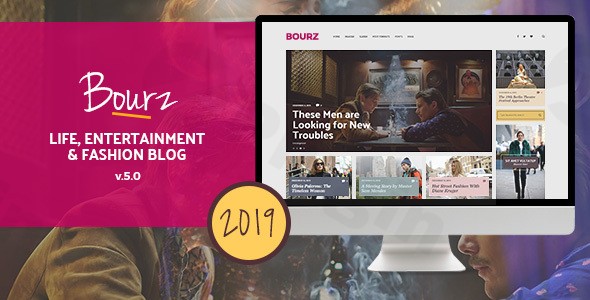
The Bourz WordPress theme is a premium, multi-style solution meticulously crafted for lifestyle, entertainment, and fashion bloggers, online magazines, and content creators. If you’re looking to create a visually striking and highly functional online presence that captivates your audience, Bourz offers a sophisticated blend of elegant design and powerful customization, making it an ideal choice for your next digital venture.
Introduction: Designed for Impact in Life & Entertainment
Bourz stands out as a versatile multi-style WordPress theme, specifically engineered to bring your life & entertainment magazine or fashion blog to life. Its core design philosophy revolves around aesthetic harmony and flexibility, providing diverse layout options and design variations to perfectly align with your brand identity. This theme is ideal for bloggers, influencers, and publishers in the lifestyle, entertainment, and fashion industries who demand a modern, stylish, and engaging platform, even supporting e-commerce functionalities through WooCommerce.
Key Features: Design, Layout & Performance
Bourz is packed with features designed to offer extensive control over your site’s appearance and functionality, ensuring a professional and engaging user experience.
Design & Layout Options
Bourz’s “multi-styled” approach means you have immense flexibility in how your content is presented.
- Multiple Blog Layouts: Choose from 7 stylish blog layout options to showcase articles in a way that best suits your content and audience engagement goals.
- Unlimited Homepage Examples: Get a head start with “unlimited homepage examples” that provide inspiration and diverse starting points for your site’s main page.
- Site Structure: Opt for “Boxed & Wide and Border Layout” to define the overall structure of your website, offering distinct visual frames for your content.
- Header & Footer Flexibility: Command attention with “Unlimited Header Views” and 5 unique header layout options, including separate logo options for mobile and sticky headers. For the footer, select from 3 distinct layouts, each with customizable top and bottom sections supporting up to 4 columns, perfect for widgets and important links.
- Post Formats & Menus: Supports various post formats and features “Customizable Mega Menus” for enhanced navigation, making it easy for users to find what they’re looking for.
- Unique Visual Elements: Differentiating itself with features like the “Bourz Slider” and elegantly designed sidebars, the theme pays meticulous attention to detail in every element, from search fields to navigation boxes.
Customization Capabilities
With Bourz, personalizing your website is intuitive and powerful, requiring no coding knowledge.
- Unlimited Color Schemes: Dive into “Unlimited Colors” options to tailor your site’s aesthetic. The theme boasts an elegant default color scheme featuring sophisticated purple and tobacco yellow accents.
- Typography Control: Access to all Google Fonts provides a vast array of choices for typography customization, allowing you to perfectly match your brand’s voice.
- Intuitive Theme Customizer: Modify colors, layouts, and typography effortlessly through the “Well Organized Native WordPress Customizer” which allows you to “Show/Hide/Change Almost Everything.”
- Widget Areas: Leverage “8 Widgetized Areas” and “13 Custom Widgets” along with “Separated Sidebars” and “Unlimited Custom Sidebar” options to create dynamic and functional sidebars across your site.
Performance & SEO Features
Bourz is built with modern web standards in mind, ensuring your site is fast, responsive, and discoverable.
- High Performance: The theme is described as having “High Performance” and an “optimized architecture [that] ensures superior performance” for an enhanced user experience.
- SEO Optimized: With an “SEO-optimized structure,” Bourz aims for better search engine visibility, helping your content reach a wider audience.
- Mobile Responsiveness: Being “Mobile Friendly & Responsive” and “Retina Ready,” your content will look perfect and engage seamlessly across all devices, from desktops to smartphones.
- Regular Updates: ZeroPlugin.com ensures “frequent updates to ensure compatibility with the latest WordPress version” and “performance improvements.”
Installation & Demo Import Guide
Setting up your Bourz WordPress theme is a straightforward process, even for beginners. Here’s how to get started:
- Install the Theme:
- First, download the Bourz theme files.
- Log in to your WordPress dashboard.
- Navigate to
Appearance > Themes > Add New > Upload Theme. - Choose the Bourz theme zip file you downloaded and click
Install Now. - Once installed, click
Activate.
- Install Required Plugins: After activation, Bourz may prompt you to install recommended or required plugins (e.g., Elementor for page building, WooCommerce for e-commerce, or a theme-specific plugin for demo import). Follow the on-screen instructions to install and activate these plugins.
- One-Click Demo Import: Bourz simplifies the initial setup with its “Simple One-Click Import of Demo Content.”
- Look for a “Demo Import” or “Import Demo Data” option in your WordPress dashboard, usually under
Appearanceor a dedicated theme menu. - Select the demo layout you wish to import. Bourz offers “Unlimited homepage examples,” giving you a great starting point.
- Click the import button.
- What to Expect: The demo import will populate your site with pages, posts, sample images, menus, and widgets, making your site look just like the live demo. This process can take a few minutes, so ensure your server has sufficient memory and execution time to prevent timeouts.
- Look for a “Demo Import” or “Import Demo Data” option in your WordPress dashboard, usually under
- Post-Import Adjustments: After the import, you may need to:
- Set your homepage: Go to
Settings > Readingand choose your preferred static page as the homepage. - Configure menus: Navigate to
Appearance > Menusto assign the imported menus to your theme locations. - Replace demo content: Start replacing the placeholder text and images with your own content.
- Set your homepage: Go to
Customization Guide: Branding & Layout
Bourz empowers you to personalize every aspect of your website through the native WordPress Customizer, making branding and layout adjustments incredibly intuitive.
- Accessing the Customizer: From your WordPress dashboard, go to
Appearance > Customize. This will open the WordPress Customizer, a real-time visual editor. - Changing Colors & Typography:
- Within the Customizer, navigate to sections like “Colors” or “Typography.”
- Here, you can modify the default elegant purple and tobacco yellow accents, choose from “Unlimited Colors” to match your brand, and select any Google Font for your headings and body text.
- Logo & Site Identity:
- Under “Site Identity,” upload your brand logo for desktop and, if desired, a separate logo for mobile and sticky headers. You can also adjust your site title and tagline.
- Header & Footer Layouts:
- Explore the “Header” and “Footer” sections in the Customizer. You’ll find options to choose from “Unlimited Header Views,” 5 specific header layouts, and 3 footer layouts.
- Customize top and bottom footer sections, arranging up to 4 columns for widgets, navigation, and copyright information.
- Homepage & Blog Page Setup:
- Under
Homepage Settings(orStatic Front Page), select which page acts as your homepage and which displays your blog posts. - Utilize the “7 blog layout options” to fine-tune how your archive and category pages present your articles.
- Under
- Menus & Widgets:
- Manage your “Customizable Mega Menu” options under
Menus. - Access “Widgets” to populate your “8 Widgetized Areas” and “Unlimited Custom Sidebar” locations with the “13 Custom Widgets” provided by Bourz, enhancing functionality and navigation.The customization experience with Bourz is designed to be user-friendly, allowing you to “Show/Hide/Change Almost Everything” without delving into code. Its extensive options and real-time preview ensure that you can craft a unique and professional online magazine effortlessly.
- Manage your “Customizable Mega Menu” options under
FAQ & Troubleshooting
Here are answers to some common questions about the Bourz WordPress theme:
Is Bourz Theme compatible with Elementor and Gutenberg?
Yes, Bourz Theme offers full compatibility with the WordPress Block Editor (Gutenberg). It also works “perfectly with Elementor Free,” with Elementor Pro being an optional upgrade for more advanced page-building features. This ensures you have flexible tools for content creation and layout design.
Does Bourz Theme support WooCommerce for online stores?
Absolutely! Bourz Theme comes with full WooCommerce support, allowing you to seamlessly integrate e-commerce functionalities into your lifestyle or entertainment magazine. This is ideal for selling merchandise, fashion items, or digital products directly from your website.
What WordPress and PHP versions does Bourz Theme require?
Bourz Theme has been tested up to WordPress version 5.8. While specific minimum PHP versions are not explicitly documented, it is generally recommended to use the latest stable PHP version (currently PHP 7.4 or higher) for optimal performance and security with any modern WordPress theme.
How can I update Bourz Theme safely without losing my customizations?
When updating the Bourz WordPress theme, it’s crucial to use a child theme for any customizations you’ve made (CSS, functions, template files). Bourz includes a child theme for this purpose. Always back up your site before updating, and then update the main Bourz theme file through your WordPress dashboard or FTP. Customizations made in the child theme will remain intact.
What should I do if my Bourz Theme demo import doesn’t look right?
If your Bourz theme demo import doesn’t match the live preview, first ensure all required plugins were installed and activated before the import. Clear any caching plugins you might be using. If issues persist, check your server’s PHP memory limit and execution time, as large demo imports can sometimes time out. Increasing these values in your wp-config.php or php.ini file can often resolve the problem. Refer to the theme’s detailed documentation or contact customer support for specific guidance.
Conclusion
The Bourz Life & Entertainment Magazine Theme is an exceptional choice for anyone looking to launch or revamp a stylish online publication. Its strength lies in its “multi-styled” design philosophy, offering unparalleled layout and customization options through an intuitive WordPress Customizer. With robust compatibility for Elementor and full WooCommerce support, it caters to content creators who demand both aesthetic appeal and powerful functionality.Bourz shines for fashion bloggers, entertainment critics, lifestyle influencers, and online magazine owners who prioritize a visually rich, engaging, and performance-optimized platform. Its built-in SEO readiness and responsive design ensure your content not only looks stunning but also reaches a broad audience across all devices. For freelancers and agencies, Bourz offers a flexible framework to deliver high-quality, niche-specific websites for clients.In a market flooded with generic themes, Bourz stands out by providing specialized features tailored for visual storytelling and content presentation, making it a truly compelling solution for creating a high-impact digital magazine.
I. Download Limits & Account Benefits
- Free Downloads: Each email address receives 3 downloads per day for free products
- Upgrade Benefits: Purchase any paid product to increase your daily download limit by 3 for each paid product
- No Account Required: You can download immediately by receiving the download link via email
- Account Recommended: Create an account for easier access to your order history and direct update downloads
II. Understanding GPL vs Official Versions
Important: The products available on WPPick are GPL-licensed versions, which differ from official developer versions. Before purchasing, please read our comprehensive guide: Understanding GPL & Official Differences at WPPick
Key Points:
- GPL versions may not include premium support from original developers
- Updates may be delayed compared to official releases
- Some premium features might have limitations
- Always consider your specific needs and support requirements
III. Support & Assistance
We’re here to help through multiple channels:
- Email Support: Direct email assistance for all inquiries
- Live Chat: Real-time support during business hours
- Comprehensive Documentation: Detailed guides and tutorials
IV. Order Tracking
Access your complete purchase history and download links anytime: Order History
V. Account Access
New to WPPick? Login or Create Account to manage your downloads and orders efficiently.
VI. Refund Protection
We stand behind our products with a clear refund policy. Review our terms: Refund Policy
VII. Privacy & Security
Your data security is our priority. Learn how we protect your information: Privacy Policy
VII. Terms of Service
Understanding our service terms ensures a smooth experience: Terms of Use
Quick Tips for Best Experience
- Verify Compatibility: Check plugin/theme compatibility with your WordPress version
- Backup First: Always backup your site before installing new plugins or themes
- Test Environment: Consider testing on a staging site first
- Stay Updated: Regularly check for updates in your account dashboard
- Read Documentation: Review any included documentation for optimal setup
Need Help?
If you have questions about downloads, licensing, or need technical assistance, don’t hesitate to contact our support team. We’re committed to ensuring you have the best possible experience with WPPick products.
Ready to get started? Your download adventure begins with just one click!