

Brighthub – Saas & Tech Startup WordPress Theme
/Year
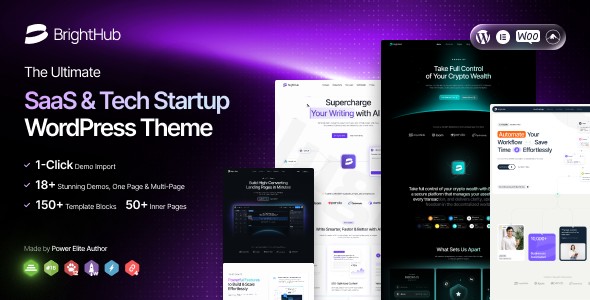
Building a high-converting online presence for a software or technology company requires more than just a pretty layout; it demands a performance-first architecture and a conversion-oriented design. The BrightHub WordPress theme is a meticulously crafted solution designed specifically for SaaS (Software as a Service), tech startups, and digital agencies. With its clean aesthetics and “SaaS-first” design philosophy, it empowers business owners to showcase complex technical offerings through an intuitive, user-friendly interface.
Whether you are launching a new app, managing a software suite, or running a digital consultancy, this SaaS WordPress theme provides the modular flexibility needed to scale your brand without writing a single line of code.
Key Features: Design, Layout & Performance
BrightHub stands out by offering a “Pixel-Perfect Design System” that prioritizes visual hierarchy and whitespace, ensuring your value proposition remains the focal point.
Versatile Layout Options
BrightHub is not just a single-page template; it is a comprehensive design ecosystem. It includes:
- 18+ Pre-built Demos: Covering niche-specific needs for SaaS, mobile apps, and IT solutions.
- 25+ Inner Pages: Professionally designed templates for “About Us,” “Pricing,” “Services,” and “Contact” pages.
- Modular UI Blocks: The theme uses a “LEGO-style” building approach. You can mix and match modular components to create unique layouts that fit your specific business model.
- Dynamic Headers & Footers: Choose from 09+ header and 09+ footer templates, all customizable via a visual builder.
Deep Customization Capabilities
The theme offers extensive branding control through its Theme Options Panel. You can easily adjust:
- Typography: Access to over 1.7K Google Fonts and 4.3K Adobe Fonts, plus the ability to upload custom brand fonts.
- Color Systems: Global color settings allow you to update your entire site’s palette with a few clicks.
- Elementor Integration: As an Elementor compatible SaaS theme, BrightHub provides over 150+ custom widgets specifically designed for tech companies (e.g., pricing tables, feature grids, and testimonial carousels).
Performance & SEO Readiness
In the world of tech, speed is a ranking factor. BrightHub is built with a “performance-first” mindset:
- Core Web Vitals Optimized: Clean code and lightweight architecture ensure fast loading times.
- SEO-Friendly Coding: The theme includes built-in schema markup and semantic HTML5 to help search engines understand your content.
* Responsive & Retina Ready: Your site will look sharp and function perfectly on everything from high-resolution MacBooks to mobile devices.
Installation & Demo Import: Getting Started
Setting up your tech startup WordPress theme is a streamlined process designed for both beginners and experienced developers.
- Theme Installation: Log in to your WordPress dashboard, navigate to Appearance > Themes, click Add New, and upload the
brighthub.zipfile. - Activate Companion Plugins: Upon activation, BrightHub will prompt you to install required plugins, including Elementor, Revolution Slider, and Booked.
- One-Click Demo Import: Navigate to the theme’s import section. Select your preferred demo (e.g., “SaaS Modern” or “App Landing”) and click Import.
- Pro Tip: Ensure your server’s PHP memory limit is set to at least 256M and the execution time is increased to avoid timeouts during the import of large media files.
4. Finalize Menus & Widgets: After the import, your site will look exactly like the live demo. You can then go to Appearance > Menus to organize your navigation.
Customization Guide: Personalizing Your Brand
Once your demo is imported, personalizing the BrightHub WordPress theme to match your corporate identity is intuitive.
Using the Visual Theme Builder
BrightHub leverages the power of Elementor to let you edit pages in real-time. Simply click “Edit with Elementor” on any page to drag and drop widgets, change background gradients, or adjust padding.
Global Styles & Branding
For sitewide changes, use the Powerful Theme Options Panel. This is where you can:
- Upload your logo and favicon.
- Set global button styles (border-radius, hover effects).
- Configure the Mega Menu system to handle deep site architectures, which is essential for software companies with extensive documentation or product categories.
Child Theme Usage
BrightHub is Child Theme ready. It is highly recommended to activate the included child theme before making any CSS or functional changes. This ensures that your customizations are preserved when Case-Themes (the developer) releases performance updates or security patches.
FAQ: Common Questions About BrightHub
Is the BrightHub theme good for SEO?Yes. BrightHub is built with clean markup and follows SEO best practices, including schema support and optimized heading structures. Its performance-first design also helps satisfy Google’s Core Web Vitals requirements.Does BrightHub support WooCommerce for online stores?Absolutely. BrightHub is WooCommerce ready and includes multiple shop layouts, making it easy to sell digital subscriptions, software licenses, or physical tech products directly from your site.Is BrightHub compatible with Elementor?Yes, BrightHub is deeply integrated with Elementor. It includes over 150+ custom widgets and modular blocks specifically designed to work seamlessly within the Elementor drag-and-drop interface.How do I update the theme without losing my data?
By using the included Child Theme for customizations and keeping your content within the WordPress database (pages, posts, and Elementor layouts), you can safely update the parent theme via the dashboard without losing your styling or content.
Conclusion: A High-Value Solution for Modern Tech
The BrightHub WordPress theme is a standout choice for anyone looking to build a professional, high-performing website in the technology sector. Developed by Case-Themes, a Power Elite Author, it brings a level of reliability and “Pixel-Perfect” design that generic themes often lack.Why choose BrightHub?
- Design Flexibility: The modular UI blocks make it feel like you are building with LEGOs, allowing for endless creativity.
- Performance: It is lightweight and optimized for speed, which is critical for user retention and SEO.
- Value: For a one-time purchase of $29, you get premium plugins like Revolution Slider and Booked included for free.If you are a startup founder, an agency owner, or a marketing professional in the SaaS space, BrightHub offers the perfect balance of aesthetic appeal and technical robustness. It is a conversion-minded powerhouse that simplifies the process of how to build a SaaS website with WordPress.Ready to launch? Visit wppick.com for more insights on premium WordPress tools and design strategies.
I. Download Limits & Account Benefits
- Free Downloads: Each email address receives 3 downloads per day for free products
- Upgrade Benefits: Purchase any paid product to increase your daily download limit by 3 for each paid product
- No Account Required: You can download immediately by receiving the download link via email
- Account Recommended: Create an account for easier access to your order history and direct update downloads
II. Understanding GPL vs Official Versions
Important: The products available on WPPick are GPL-licensed versions, which differ from official developer versions. Before purchasing, please read our comprehensive guide: Understanding GPL & Official Differences at WPPick
Key Points:
- GPL versions may not include premium support from original developers
- Updates may be delayed compared to official releases
- Some premium features might have limitations
- Always consider your specific needs and support requirements
III. Support & Assistance
We’re here to help through multiple channels:
- Email Support: Direct email assistance for all inquiries
- Live Chat: Real-time support during business hours
- Comprehensive Documentation: Detailed guides and tutorials
IV. Order Tracking
Access your complete purchase history and download links anytime: Order History
V. Account Access
New to WPPick? Login or Create Account to manage your downloads and orders efficiently.
VI. Refund Protection
We stand behind our products with a clear refund policy. Review our terms: Refund Policy
VII. Privacy & Security
Your data security is our priority. Learn how we protect your information: Privacy Policy
VII. Terms of Service
Understanding our service terms ensures a smooth experience: Terms of Use
Quick Tips for Best Experience
- Verify Compatibility: Check plugin/theme compatibility with your WordPress version
- Backup First: Always backup your site before installing new plugins or themes
- Test Environment: Consider testing on a staging site first
- Stay Updated: Regularly check for updates in your account dashboard
- Read Documentation: Review any included documentation for optimal setup
Need Help?
If you have questions about downloads, licensing, or need technical assistance, don’t hesitate to contact our support team. We’re committed to ensuring you have the best possible experience with WPPick products.
Ready to get started? Your download adventure begins with just one click!
- Home AI Video Generator.
- Home SEO Audit & Optimization SaaS.
- Home B2B SaaS Studio.
- Header Layout.
- Footer Layout.
- Button Widget Style.
- Tabs Widget Style.
- Image Box Widget Style.
- Banner Box Sticky Widget Style.
- Testimonial Marquee Widget Style.
- Pricing Widget Style.
- Accordion Widget Style.
- Counter Widget Style.
- WordPress 6.9.x Compatibility.
- Full Compatibility with Redux Framework 4.5.9.
- Full Compatibility with WooCommerce 10.4.3.
- Elementor Page Builder plugin updated to v3.34.0.
- Case Addons plugin updated to v1.3.0.
- Lazy Loading Images added.
- Bugs fixed.