

Briny | Scuba Diving & Water Sports WordPress Theme + Rtl
/Year
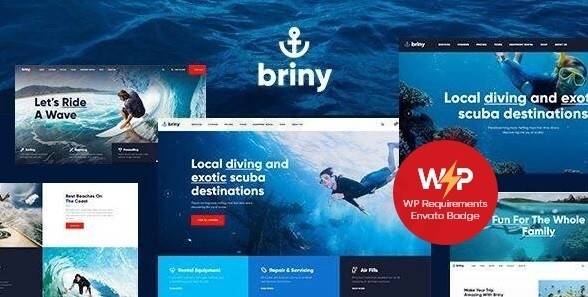
Creating an immersive online presence for aquatic adventures requires more than just a generic layout; it demands a design that breathes the ocean. The Briny WordPress theme is a premium, niche-specific solution meticulously crafted for scuba diving centers, surfing schools, and water sports agencies. By combining a “sea-inspired” aesthetic with robust functional tools like online booking systems, this scuba diving WordPress theme allows business owners to transition from a simple landing page to a fully operational adventure hub.
Key Features: Design, Layout & High-Performance Functionality
Briny is developed by AncoraThemes, a name synonymous with polished, industry-standard WordPress products. It doesn’t just look good; it is engineered to handle the specific logistical needs of the adventure tourism sector.
Immersive Design & Layout Options
The theme offers a “gorgeous sea & watersports” design philosophy. Whether you are running a private beach bar or a high-octane surfing school, Briny provides versatile layout options to match your brand’s energy:
- Multiple Starter Sites: Choose from pre-built demos including “Diving,” “Surfing,” “Yachting,” “Sea Adventures,” and even a “Private Beach + Bar” layout.
- Flexible Framework: Support for both boxed and full-width page layouts allows for a cinematic, edge-to-edge visual experience.
- Retina-Ready Graphics: The theme is 100% responsive and Retina-ready, ensuring your underwater photography looks crisp on everything from high-end desktops to mobile devices.
Powerful Customization Capabilities
As an Elementor compatible scuba diving theme, Briny removes the barrier between design and technology. You don’t need to touch a line of code to personalize your site:
- Header & Footer Builder: Using Elementor, you can create bespoke headers and footers that stick to the top or feature unique calls-to-action (CTAs).
- Color Scheme Editor: Rearrange your entire palette through the WordPress Customizer to match your equipment or logo colors.
- Typography: Full support for Google Fonts and custom font uploads helps maintain brand consistency across all service pages.
Performance & SEO Readiness
Is the Briny theme good for SEO? Yes. It is built with clean, high-quality code that follows modern SEO best practices. The theme is lightweight enough to maintain fast loading speeds, which is a critical ranking factor for Google. Furthermore, its mobile-first approach ensures that travelers can book tours easily while on the go.
Installation & Demo Import Guide
Setting up your water sports WordPress theme is a streamlined process thanks to the integrated ThemeREX Addons plugin. Follow these steps to get your site live:
- Install & Activate: Upload the
briny.zipfile via Appearance > Themes > Add New in your WordPress dashboard. - Plugin Activation: Upon activation, you will be prompted to install required plugins, including ThemeREX Addons, Elementor, and Slider Revolution. Ensure these are active.
- One-Click Demo Import: Navigate to the “Install Demo Data” section within the ThemeREX dashboard. You can choose to import the “Only Pages” or the “Full Demo” (recommended for beginners).
- Wait for Progress: The importer will download images, posts, and layouts.
* Note: If the import fails, check your server’s memory_limit and max_execution_time. Large demos require at least 256MB of memory to import smoothly.
Customization Guide: Branding Your Dive Center
Once your demo is imported, it’s time to make the site yours. Briny uses a unique Setting Inheritance and Override System, which allows you to set global styles but override them on specific pages (e.g., a different header for the “Diving Course” page versus the “Shop”).
- Setting Up Bookings: Briny integrates seamlessly with the Booked plugin. Go to the “Booked” menu to set your availability, service prices, and time slots for diving lessons or boat rentals.
- E-Commerce Integration: As a WooCommerce scuba diving store theme, Briny includes pre-styled shop templates. Simply add your products—like masks, fins, or digital course materials—and the theme handles the layout automatically.
* Custom Post Types: Use the dedicated post types for “Services” and “Testimonials” to build trust with potential clients by showcasing instructor bios and student success stories.
FAQ & Troubleshooting
Is Briny compatible with Elementor or Gutenberg?
Briny is fully optimized for Elementor Page Builder, providing a drag-and-drop experience for all layouts. While it functions within the standard WordPress environment, its primary design power lies in its Elementor integration rather than the native Gutenberg block editor.
Does Briny support WooCommerce for online stores?
Yes, Briny is fully WooCommerce compatible. It includes specialized styles for product grids, single product pages, and checkout flows, making it an excellent choice for businesses selling diving gear or equipment rentals.
Does it support RTL (Right-to-Left) languages?
Yes, the Briny WordPress theme includes full RTL support. This makes it ideal for businesses operating in regions that use Arabic, Hebrew, or Persian scripts.
How do I update the theme without losing customizations?
Always use a Child Theme for any code-level modifications. For CSS and layout changes made through the Customizer or Elementor, these settings are stored in the database and will remain intact when you update the parent theme files.
Conclusion: Is Briny Right for You?
The Briny WordPress theme stands out as a top-tier choice for the marine and adventure niche. Unlike multipurpose themes that require hours of configuration to look “oceanic,” Briny offers a professional, ready-to-use aesthetic from the moment you click “Activate.”Its strengths lie in its niche-specific features, such as the appointment booking system and its seamless integration with Elementor and WooCommerce. While there is a slight learning curve associated with its unique “Inheritance System,” the result is a highly granular and professional website that is both SEO-ready and high-converting.Best for: Dive centers, surf schools, yacht rentals, and adventure travel bloggers who need a visually stunning, functional website without hiring an expensive developer.Find more WordPress insights and theme reviews at wppick.com.
I. Download Limits & Account Benefits
- Free Downloads: Each email address receives 3 downloads per day for free products
- Upgrade Benefits: Purchase any paid product to increase your daily download limit by 3 for each paid product
- No Account Required: You can download immediately by receiving the download link via email
- Account Recommended: Create an account for easier access to your order history and direct update downloads
II. Understanding GPL vs Official Versions
Important: The products available on WPPick are GPL-licensed versions, which differ from official developer versions. Before purchasing, please read our comprehensive guide: Understanding GPL & Official Differences at WPPick
Key Points:
- GPL versions may not include premium support from original developers
- Updates may be delayed compared to official releases
- Some premium features might have limitations
- Always consider your specific needs and support requirements
III. Support & Assistance
We’re here to help through multiple channels:
- Email Support: Direct email assistance for all inquiries
- Live Chat: Real-time support during business hours
- Comprehensive Documentation: Detailed guides and tutorials
IV. Order Tracking
Access your complete purchase history and download links anytime: Order History
V. Account Access
New to WPPick? Login or Create Account to manage your downloads and orders efficiently.
VI. Refund Protection
We stand behind our products with a clear refund policy. Review our terms: Refund Policy
VII. Privacy & Security
Your data security is our priority. Learn how we protect your information: Privacy Policy
VII. Terms of Service
Understanding our service terms ensures a smooth experience: Terms of Use
Quick Tips for Best Experience
- Verify Compatibility: Check plugin/theme compatibility with your WordPress version
- Backup First: Always backup your site before installing new plugins or themes
- Test Environment: Consider testing on a staging site first
- Stay Updated: Regularly check for updates in your account dashboard
- Read Documentation: Review any included documentation for optimal setup
Need Help?
If you have questions about downloads, licensing, or need technical assistance, don’t hesitate to contact our support team. We’re committed to ensuring you have the best possible experience with WPPick products.
Ready to get started? Your download adventure begins with just one click!