

Bronx | Portfolio WordPress Theme
/Year
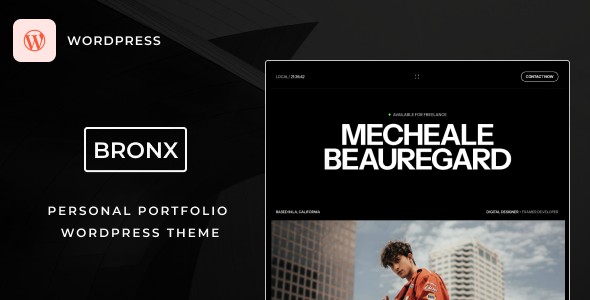
In the competitive digital landscape, your portfolio is more than just a gallery—it is your digital handshake. The Bronx WordPress theme is a premium portfolio WordPress theme designed specifically for creatives who believe that “less is more.” By prioritizing a minimalist aesthetic and high-performance code, Bronx ensures that your work remains the focal point, providing a sophisticated user experience that converts visitors into clients.
1. Overview: Who is the Bronx Theme For?
The Bronx WordPress theme is built for designers, photographers, freelancers, developers, and creative agencies who require a professional online presence without the unnecessary clutter of multipurpose themes. Its design philosophy centers on clarity, whitespace, and immersive visual storytelling.Whether you are a solo artist looking for a minimal portfolio website template WordPress setup or a boutique agency needing a sleek showcase for client projects, Bronx offers the flexibility of a modern page builder paired with the stability of the Bootstrap framework.
2. Key Features: Design, Layout & Performance
Elegant Layout Options
Bronx offers a versatile range of layout styles to suit different creative needs:
- Portfolio Grid & Masonry: Ideal for photographers and visual artists to display images of varying aspect ratios in a clean, cohesive layout.
- Minimalist Blog Templates: For those who want to share insights alongside their work, the blog layouts maintain the theme’s clean aesthetic.
- Responsive & Retina Ready: The theme is built on Bootstrap 5/4, ensuring your site looks stunning on high-resolution displays and functions perfectly on mobile devices.
Seamless Customization with Elementor
One of the standout features of Bronx is its Elementor compatible portfolio theme architecture. Instead of struggling with complex code, you can use the drag-and-drop Elementor interface to:
- Modify layouts in real-time.
- Adjust typography and color schemes to match your personal brand.
- Create unique page structures without touching a single line of CSS.
Exceptional Performance & SEO
Search engine visibility is critical for freelancers. Bronx is optimized for speed and follows SEO-friendly code standards.
- W3C Validated Code: Ensures the site is built to high technical standards, reducing bugs and improving crawlability.
- Fast Loading Times: Lightweight and bloat-free, which helps in reducing bounce rates and improving Google rankings (Core Web Vitals).
- WPML Compatibility: For professionals working internationally, Bronx is translation-ready and compatible with WPML for multi-language support.
3. Installation & Demo Import: Getting Started
Setting up the Bronx theme is straightforward, even for beginners. Follow these steps to get your site live:
- Install & Activate: Upload the Bronx theme folder via
Appearance > Themes > Add Newin your WordPress dashboard. - Install Required Plugins: Upon activation, you will be prompted to install companion plugins, including Elementor and Contact Form 7. These are essential for the theme’s full functionality.
- One-Click Demo Import: Navigate to the theme options and use the One-Click Demo Import feature. This will automatically import placeholder images, menus, and page layouts, making your site look exactly like the professional demo in minutes.
- Check Settings: Ensure your permalinks are set to “Post name” under
Settings > Permalinksfor better SEO.Pro Tip: Before importing the demo, ensure your hosting environment has a sufficient PHP memory limit (256M or higher) to prevent timeout errors during the data transfer.
4. Customization Guide: Branding Your Portfolio
Personalizing the Bronx WordPress theme to match your brand identity is intuitive thanks to its integration with the WordPress Customizer.
- Global Styles: Use the Customizer to set your primary brand colors and global typography. Bronx supports a wide array of fonts that complement its minimalist design.
- Header & Footer: While Bronx keeps things simple, you can adjust your logo placement and navigation menus to ensure a seamless user journey.
- Contact Integration: Use the built-in Contact Form 7 support to create lead generation forms that match the theme’s aesthetic.
- Dynamic Elements: If you are looking for a fast WordPress theme for creatives, you will appreciate the immersive animations and light/dark mode options that give your site a premium, modern feel.
5. FAQ: Everything You Need to Know
Is Bronx theme good for photographers?
Yes, the Bronx theme is excellent for photographers. It features retina-ready visuals and masonry grid layouts specifically designed to showcase high-resolution photography without distracting design elements.
Is the Bronx theme compatible with Elementor?
Absolutely. Bronx is an Elementor compatible portfolio theme, meaning you can use the industry-leading drag-and-drop builder to customize every page of your website with ease.
Does it support the latest version of WordPress?
Yes, Bronx is actively maintained and is compatible with WordPress 6.5.x and below. It is built using the latest Bootstrap framework for long-term stability.
How do I update the Bronx theme?
You can update the theme through the WordPress dashboard if you have connected your Envato account, or by manually re-uploading the latest theme files from ThemeForest. Always recommend taking a backup before updating.
Can I create a multilingual portfolio with Bronx?
Yes, Bronx is compatible with the WPML plugin, allowing you to translate your portfolio into multiple languages to reach a global audience.
6. Conclusion: A Sophisticated Choice for Creatives
The Bronx WordPress theme stands out as a top-tier choice for individuals who value speed, SEO, and minimalist design. By removing the “bloat” often found in multipurpose themes, it provides a streamlined experience for both the site owner and the end visitor.Verdict: If you are a freelancer or agency looking for a high-performance, minimal portfolio website template WordPress solution that is easy to manage via Elementor, Bronx is a highly recommended investment. It balances professional aesthetics with technical excellence, ensuring your creative work remains the star of the show.For more WordPress theme reviews and SEO strategies, visit wppick.com.
I. Download Limits & Account Benefits
- Free Downloads: Each email address receives 3 downloads per day for free products
- Upgrade Benefits: Purchase any paid product to increase your daily download limit by 3 for each paid product
- No Account Required: You can download immediately by receiving the download link via email
- Account Recommended: Create an account for easier access to your order history and direct update downloads
II. Understanding GPL vs Official Versions
Important: The products available on WPPick are GPL-licensed versions, which differ from official developer versions. Before purchasing, please read our comprehensive guide: Understanding GPL & Official Differences at WPPick
Key Points:
- GPL versions may not include premium support from original developers
- Updates may be delayed compared to official releases
- Some premium features might have limitations
- Always consider your specific needs and support requirements
III. Support & Assistance
We’re here to help through multiple channels:
- Email Support: Direct email assistance for all inquiries
- Live Chat: Real-time support during business hours
- Comprehensive Documentation: Detailed guides and tutorials
IV. Order Tracking
Access your complete purchase history and download links anytime: Order History
V. Account Access
New to WPPick? Login or Create Account to manage your downloads and orders efficiently.
VI. Refund Protection
We stand behind our products with a clear refund policy. Review our terms: Refund Policy
VII. Privacy & Security
Your data security is our priority. Learn how we protect your information: Privacy Policy
VII. Terms of Service
Understanding our service terms ensures a smooth experience: Terms of Use
Quick Tips for Best Experience
- Verify Compatibility: Check plugin/theme compatibility with your WordPress version
- Backup First: Always backup your site before installing new plugins or themes
- Test Environment: Consider testing on a staging site first
- Stay Updated: Regularly check for updates in your account dashboard
- Read Documentation: Review any included documentation for optimal setup
Need Help?
If you have questions about downloads, licensing, or need technical assistance, don’t hesitate to contact our support team. We’re committed to ensuring you have the best possible experience with WPPick products.
Ready to get started? Your download adventure begins with just one click!