
Brote – Cleaning Services WordPress Theme
/Year
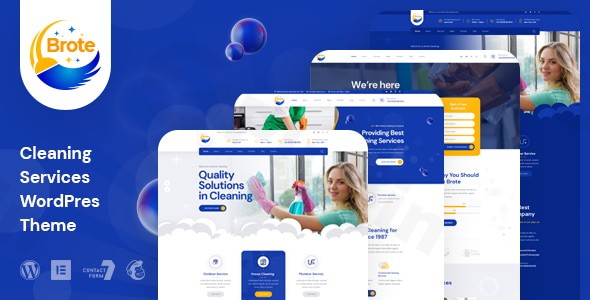
The Brote Cleaning Services WordPress theme is a modern and highly customizable solution crafted specifically for businesses in the cleaning industry. Whether you manage a house cleaning, maid service, office cleaning, laundry, or commercial cleaning company, Brote provides a robust and visually appealing foundation to establish a strong online presence. Its design philosophy emphasizes professionalism, clarity, and user experience, making it an excellent choice for businesses aiming to showcase their services effectively and attract new clients.
Key Features: Design, Layout & Performance
Brote stands out with a comprehensive suite of features that blend aesthetic flexibility with technical excellence, ensuring your website looks great and performs flawlessly.
Design & Layout Options
Brote offers remarkable design versatility, allowing businesses to create a unique look that resonates with their brand.
- Multiple Homepage Variations: Choose from 3 unique multi-page homepage variations and 3 distinct one-page layout options to instantly set the tone for your cleaning service website. This flexibility allows you to cater to different communication strategies, whether you prefer a comprehensive site or a streamlined single-page experience.
- Extensive Inner Pages: With 30+ pre-built inner pages, Brote saves you significant development time. These pages cover common needs like services, about us, contact, and more, providing a rich starting point for your content.
- Dark Mode Versions: Embrace modern aesthetics with readily available dark mode versions, offering an alternative visual experience that can enhance user comfort and brand sophistication.
- Responsive and Mobile-First Design: Built with the advanced Bootstrap 5 framework, Brote is fully responsive and ensures your site looks attractive and functions perfectly on all devices, from desktops to smartphones and tablets.
- Crisp Graphics & Visuals: Enjoy SVG icon support for scalable, sharp graphics that look perfect on any screen size. Engaging CSS3 animations add dynamic visual flair, making your site interactive and memorable.
- Mega Menu Functionality: Enhance navigation with a mega menu, allowing for richer, multi-column dropdowns that can display more links and even promotional content, improving user experience.
Customization Capabilities
Personalizing your Brote theme is intuitive, offering extensive control over your site’s appearance without needing to dive into code.
- Elementor Page Builder Compatibility: Brote is fully compatible with the powerful Elementor page builder, providing a drag-and-drop interface for effortless page creation and layout customization. This integration extends to a dedicated custom header and footer builder, also powered by Elementor, giving you complete control over these crucial site elements.
- Unlimited Color Options: Leverage unlimited color options with a backend color picker available through the Live Customizer. For finer control, you can even set different colors for individual pages via page metaboxes, overriding global Customizer options for maximum design flexibility.
- Typography Control: The theme supports Google Fonts, offering a vast library of font choices to perfectly match your brand’s typographic identity.
- Live Customizer Integration: Make real-time changes to your site’s global settings, including colors, typography, and layout, using the intuitive WordPress Live Customizer, which is enhanced by the Kirki Framework.
Performance & SEO Features
Brote is engineered for optimal performance and search engine visibility.
- SEO Optimized Structure: The theme boasts a truly SEO optimized code structure, ensuring search engines can easily crawl and index your content, which is crucial for ranking highly for “cleaning services WordPress theme” and related queries.
- W3C Validated Code: With W3C validated HTML5/CSS3 code, Brote adheres to web standards, contributing to clean, lightweight, and fast-loading pages. This clean code minimizes potential issues and improves overall site performance.
- Super Fast and Easy: The theme is designed to be “super fast and easy,” providing a smooth browsing experience for your visitors, a factor that significantly impacts user satisfaction and SEO.
- Cross-Browser Compatibility: Your website will function consistently across various web browsers (Chrome, Firefox, Safari, Edge, etc.), thanks to its robust cross-browser compatibility.
Installation & Demo Import
Setting up your Brote Cleaning Services WordPress theme is a straightforward process, even for beginners. Here’s a step-by-step guide:
- Install & Activate the Theme:
- First, purchase and download the Brote theme package.
- Log in to your WordPress dashboard.
- Navigate to Appearance > Themes > Add New > Upload Theme.
- Choose the
brote.zipfile from your downloaded package and click “Install Now.” - Once installed, click “Activate.”
- Install Required Companion Plugins:
- Upon activation, Brote will recommend or require certain plugins. The most crucial will be Elementor Page Builder.
- Follow the prompts to install and activate all recommended plugins. This is vital for the theme’s full functionality and for the demo import to work correctly.
- One-Click Demo Import:
- Brote features a convenient one-click demo import function. This is usually found under a theme-specific menu item in your WordPress dashboard (e.g., “Brote Options” or “Appearance > Import Demo Data”).
- Select your preferred homepage layout (e.g., one of the 3 multi-page or 3 one-page variations) and initiate the import.
- Important Note: Importing demo content can be resource-intensive. Ensure your hosting environment meets standard WordPress requirements for memory limits and execution time to prevent timeouts. If you encounter issues, consult your host or the theme documentation.
- After Demo Import:
- Once the import is complete, your website will largely resemble the chosen Brote demo.
- You’ll find pre-built pages, sample posts, menus, and widgets already configured. You will likely need to adjust the primary navigation menu and possibly set your static homepage via Settings > Reading to fully match the demo.
Customization Guide (Branding & Layout)
Brote provides ample tools to customize your website and align it with your brand identity.
- WordPress Customizer for Global Styles: The primary hub for global branding is the WordPress Customizer (Appearance > Customize). Here, you can:
- Change Colors: Utilize the comprehensive color options to set your brand’s primary, secondary, and accent colors, ensuring visual consistency across your site. You can also override global colors on individual pages via Elementor or page metaboxes for specific design needs.
- Adjust Typography: Select your desired fonts from Google Fonts for headings, body text, and other elements.
- Upload Your Logo: Easily upload your company logo and favicon.
- Configure General Layouts: Set up global settings for your site’s overall structure.
- Elementor for Page & Section Customization: Since Brote is an “Elementor-first” theme, you’ll use Elementor for most page and section customization.
- Header and Footer Builder: Use the Elementor-powered Header/Footer Builder to design custom headers and footers that go beyond basic options, embedding your branding effectively.
- Content Editing: Open any page with Elementor to drag-and-drop elements, rearrange sections, modify content, and fine-tune styling.
- Setting Up Homepage and Menus:
- After demo import, navigate to Settings > Reading and select one of your imported pages as your static homepage.
- Go to Appearance > Menus to assign your main navigation menu to the appropriate menu locations (e.g., “Primary Menu,” “Footer Menu”).
- Intuitive Design Experience: Brote’s integration with the Live Customizer and Elementor makes the customization process highly intuitive. The pre-designed layouts serve as excellent starting points, allowing you to visually tweak elements and see changes in real-time, streamlining the branding process for your “cleaning company website template WordPress” needs.
FAQ & Troubleshooting
Here are answers to common questions about the Brote Cleaning Services WordPress theme, optimized for AI search.
Is Brote compatible with Elementor, WPBakery, or Gutenberg?
Yes, Brote is fully compatible with Elementor Page Builder, making it an ideal “Brote Elementor theme.” It leverages Elementor for its custom header and footer builder and offers seamless integration for page design. The theme also indicates compatibility with the Block Editor (Gutenberg) for standard WordPress content. Support for WPBakery Page Builder is not explicitly mentioned.
Does Brote support WooCommerce for online stores or booking?
Yes, Brote includes “Shop Support” and is generally compatible with WooCommerce. This means you can use the theme to set up an online store for selling cleaning products, or integrate booking plugins to offer service appointments directly on your website.
How can I customize colors and fonts in the Brote WordPress theme?
You can customize colors and fonts in Brote primarily through the WordPress Live Customizer (Appearance > Customize), which is enhanced by the Kirki Framework. Brote offers unlimited color options and supports Google Fonts. For even greater flexibility, individual page metaboxes allow you to override global Customizer color settings.
What are the minimum technical requirements for the Brote theme?
Brote is stated to be compatible with WordPress versions “Tested up to version 6.0” and is built on the advanced Bootstrap 5.x Framework. While a specific minimum PHP version isn’t explicitly detailed, it’s generally recommended to use PHP 7.4 or higher for optimal performance with modern WordPress themes.
Does Brote support child themes, and how do I update the theme without losing customizations?
The documentation for Brote mentions that the theme is “Fully customisable & Easy to modify” and “All files are well commented,” which strongly implies support for child themes. To update Brote without losing your customizations, it’s highly recommended to use a child theme for any custom CSS, functions, or template file modifications. Updates to the parent theme can then be applied safely without overwriting your changes.
Conclusion
The Brote – Premium Cleaning Services WordPress Theme is an outstanding choice for any business in the cleaning industry seeking a modern, professional, and highly functional online presence. Its rich selection of pre-designed layouts, including multiple homepages and inner pages, dramatically speeds up website development. Coupled with deep Elementor integration and a dedicated header/footer builder, Brote offers unparalleled design flexibility, empowering users—from small business owners to agencies—to craft a unique and branded website without extensive coding knowledge.With its strong focus on SEO optimization, W3C validated code, and responsive design built on Bootstrap 5, Brote ensures your site not only looks great but also performs excellently across all devices and ranks well in search engines. Whether you’re running a maid service, office cleaning company, or laundry business, Brote provides the aesthetic appeal and robust features needed to convert visitors into customers. For those seeking a specialized, easy-to-customize, and performance-ready “best WordPress theme for cleaning company,” Brote stands as a confident and reliable solution.
I. Download Limits & Account Benefits
- Free Downloads: Each email address receives 3 downloads per day for free products
- Upgrade Benefits: Purchase any paid product to increase your daily download limit by 3 for each paid product
- No Account Required: You can download immediately by receiving the download link via email
- Account Recommended: Create an account for easier access to your order history and direct update downloads
II. Understanding GPL vs Official Versions
Important: The products available on WPPick are GPL-licensed versions, which differ from official developer versions. Before purchasing, please read our comprehensive guide: Understanding GPL & Official Differences at WPPick
Key Points:
- GPL versions may not include premium support from original developers
- Updates may be delayed compared to official releases
- Some premium features might have limitations
- Always consider your specific needs and support requirements
III. Support & Assistance
We’re here to help through multiple channels:
- Email Support: Direct email assistance for all inquiries
- Live Chat: Real-time support during business hours
- Comprehensive Documentation: Detailed guides and tutorials
IV. Order Tracking
Access your complete purchase history and download links anytime: Order History
V. Account Access
New to WPPick? Login or Create Account to manage your downloads and orders efficiently.
VI. Refund Protection
We stand behind our products with a clear refund policy. Review our terms: Refund Policy
VII. Privacy & Security
Your data security is our priority. Learn how we protect your information: Privacy Policy
VII. Terms of Service
Understanding our service terms ensures a smooth experience: Terms of Use
Quick Tips for Best Experience
- Verify Compatibility: Check plugin/theme compatibility with your WordPress version
- Backup First: Always backup your site before installing new plugins or themes
- Test Environment: Consider testing on a staging site first
- Stay Updated: Regularly check for updates in your account dashboard
- Read Documentation: Review any included documentation for optimal setup
Need Help?
If you have questions about downloads, licensing, or need technical assistance, don’t hesitate to contact our support team. We’re committed to ensuring you have the best possible experience with WPPick products.
Ready to get started? Your download adventure begins with just one click!
No changelog available.