

Broxi – Organic & Food Woocommerce WordPress Theme
/Year
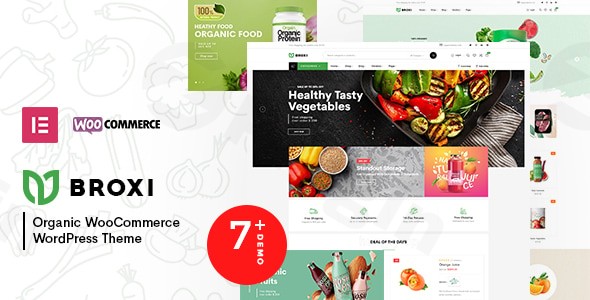
The digital marketplace for organic produce and health foods is booming, and to thrive in it, your online store needs more than just great products—it needs a compelling and functional website. The Broxi WordPress theme by Wpbingo steps in as a powerful, modern, and responsive solution, meticulously designed for organic food stores and diverse WooCommerce businesses within the health and natural product sectors. Whether you’re selling fresh farm produce, gourmet groceries, or eco-friendly health items, Broxi aims to provide a visually appealing and highly functional platform that genuinely enhances your online store’s performance and customer experience.
Key Features: Design, Layout & Performance for Your Organic Shop
Broxi is engineered to meet the specific demands of the organic and food e-commerce niche, combining aesthetic appeal with robust functionality. Its design philosophy emphasizes a clean, fresh look that complements natural products, while its technical underpinnings ensure a smooth operation.
Design & Layout Options
Broxi provides a solid foundation for building a visually engaging online store.
- Multiple Homepage Layouts: With over seven unique homepage layouts available (and more promised), Broxi offers diverse starting points to match your brand’s specific aesthetic, from minimalist to feature-rich designs.
- Flexible Blog and Shop Displays: Showcase your content and products effectively with various blog layouts (List, Grid, Masonry) and shop views (Grid, List), allowing you to tailor the browsing experience for your customers.
- Customizable Headers & Footers: The theme includes six distinct header layouts and four footer layouts, providing ample flexibility to craft a unique brand identity and navigation structure that resonates with your target audience.
- Visual Enhancements: Built on the latest Bootstrap framework, Broxi features 12 banner effect supports and elegant animations, adding a layer of sophistication and interactivity to your site, making your products pop.
Customization Capabilities
Personalizing your store to reflect your brand’s unique identity is crucial. Broxi makes this process intuitive, even for users without extensive coding knowledge.
- Elementor Page Builder Integration: At its core, Broxi seamlessly integrates with the popular Elementor Page Builder, allowing for effortless drag-and-drop customization. This powerful tool empowers you to design intricate page layouts, add unique elements, and preview changes in real-time, greatly simplifying the design process.
- Extensive Theme Options: Broxi boasts “Powerful Theme Options” that provide granular control over various aspects of your site. This includes unlimited color options to perfectly match your branding and access to over 500 Google Fonts with preview capabilities for fine-tuning your typography.
- Prebuilt Templates and One-Click Demo Import: Get a head start with Broxi’s pre-designed content. The one-click demo import functionality allows you to quickly set up your website with a professional, pre-built design, providing a strong foundation for your unique customizations.
Performance & SEO Features
In the competitive online market, speed and visibility are paramount. Broxi is built with performance and search engine optimization in mind.
- Responsive Design: Your organic food store will look and function flawlessly on any device—desktops, tablets, and smartphones. Broxi is fully responsive, ensuring an excellent user experience across all screen sizes, a critical factor for mobile commerce. It also offers a friendly menu on mobile.
- SEO Optimized: The theme is described as “SEO Optimized,” indicating attention to clean code, structured headings, and other best practices that help search engines understand and rank your content effectively.
- AJAX & Lazy Load: To enhance loading speed and user experience, Broxi incorporates AJAX functionality for loading products, add-to-cart, and wishlists, alongside lazy load for images. These features contribute to a faster, smoother browsing experience, which is beneficial for both user satisfaction and SEO.
- Cross-Browser Compatibility: Broxi ensures your website performs consistently across all major web browsers, guaranteeing a wide reach for your organic products.
Installation & Demo Import
Setting up your Broxi theme is a straightforward process, designed to get your organic food store up and running quickly.
- Download the Theme: After purchasing Broxi from ThemeForest, download the theme package. This package typically includes the main theme files, a child theme, documentation, and any bundled plugins.
- Install WordPress: Ensure you have a fresh installation of WordPress (it’s generally recommended to use PHP 7.4 or higher for optimal performance and security, along with MySQL 5.6+).
- Upload & Install the Theme:
- Navigate to your WordPress dashboard.
- Go to Appearance > Themes > Add New > Upload Theme.
- Choose the Broxi theme zip file (ensure it’s the installable theme file, not the entire download package if it contains other files) and click Install Now.
- Once installed, click Activate.
- Install Required Plugins: Broxi relies on several essential plugins for its full functionality. Upon activation, you will likely see a notice prompting you to install these. Crucially, it integrates with Elementor Page Builder and requires Redux Framework for its powerful theme options. It also bundles Revolution Slider. Install and activate all recommended plugins.
- One-Click Demo Import: This is where Broxi truly shines in accelerating your site build.
- After activating the theme and required plugins, look for a “Demo Import” or “Import Demo Data” option, often found under Appearance or within the theme’s dedicated settings panel.
- Select your preferred demo layout from the available options.
- Click “Import.”
- What to Expect: During the demo import, the theme will automatically install pages, posts, sample products, menus, widgets, and theme options settings, mirroring the chosen demo site. Be aware that importing a large demo can take several minutes and may require sufficient server memory and execution time. If you encounter issues, increasing your PHP
memory_limit,upload_max_filesize, andmax_execution_timein yourwp-config.phporphp.inifile can help.
- Review and Configure: After the import, navigate through your site. You’ll find pre-set menus and widgets. You’ll need to go to Appearance > Menus and Appearance > Widgets to assign them to your desired locations or make minor adjustments. Your homepage and blog page settings will likely be configured, but double-check them under Settings > Reading.
Customization Guide: Branding Your Organic Store
Broxi’s integration with Elementor and its robust theme options make branding and layout customization both powerful and accessible.
- Utilizing Elementor for Page Layouts:
- For any page (like your homepage, product pages, or custom landing pages), you can click “Edit with Elementor” from the WordPress admin bar or directly from the page editor.
- Elementor’s intuitive drag-and-drop interface allows you to add, remove, and rearrange sections, columns, and widgets. You can easily customize text, images, buttons, and other elements. Broxi also provides 24+ dedicated shortcodes for Elementor, expanding your design possibilities.
- Experiment with Broxi’s pre-built page sections and blocks available within Elementor to quickly build out new content.
- Global Theme Options & Styling:
- Access Broxi’s “Powerful Theme Options” (often found under Appearance > Theme Options or a dedicated Broxi menu item in your dashboard).
- Colors: Use the unlimited color pickers to define your brand’s primary, secondary, and accent colors, ensuring visual consistency across your site.
- Typography: Select from over 500 Google Fonts for headings, body text, and other elements. Adjust font sizes, weights, and line heights to establish a clear visual hierarchy.
- Header & Footer Customization: Within the theme options, explore the six header layouts and four footer layouts. You can often customize elements like the logo, navigation style, contact information, social media links, and copyright text directly from these panels or via dedicated header/footer builders. The included Mega Menu Builder allows for complex navigation structures.
- Blog & Shop Settings: Fine-tune how your blog posts and WooCommerce products are displayed, including sidebar options, pagination styles, and product archive layouts.
- Logo and Identity: Upload your brand logo through the theme options or WordPress Customizer (Appearance > Customize > Site Identity). You can also set your site title and favicon here.
- Menus: Go to Appearance > Menus to create and assign your primary, footer, and other navigation menus to the designated menu locations provided by Broxi. The Mega Menu Builder further enhances your navigation capabilities.
- Child Theme for Advanced Customization: For more extensive custom CSS, JavaScript, or template file modifications, it’s highly recommended to use the included child theme. This ensures that any customizations you make are preserved when you update the main Broxi theme, preventing your changes from being overwritten.
FAQ & Troubleshooting
Here are answers to some common questions about the Broxi Organic & Food WooCommerce WordPress Theme:
Is Broxi – Organic & Food WooCommerce WordPress Theme good for multi-vendor?
Yes, Broxi is specifically designed with multi-vendor functionality in mind. It offers compatibility with popular multi-vendor plugins like MultiVendorX, WC Vendor, and Dokan, making it an excellent choice for creating an organic food marketplace with multiple sellers.
How to install Broxi theme WordPress?
To install Broxi, first download the theme package. Then, from your WordPress dashboard, navigate to Appearance > Themes > Add New > Upload Theme, select the Broxi theme zip file, and click Install Now followed by Activate. Remember to install and activate any required companion plugins afterward for full functionality.
Does Broxi theme support WooCommerce for online stores?
Absolutely. Broxi is a powerful WooCommerce theme for organic shop businesses. It is built from the ground up to integrate seamlessly with WooCommerce, offering specialized product categorization, advanced search filters, high-converting product showcase elements, and features like AJAX add-to-cart and wishlist functionality.
Is Broxi theme Elementor integration robust?
Yes, Broxi features robust integration with the Elementor Page Builder. It allows for easy drag-and-drop customization of pages and includes over 24 dedicated shortcodes specifically for Elementor, providing extensive design flexibility for users of all skill levels.
Does Broxi theme support child themes?
Yes, the full theme package from ThemeForest for Broxi typically includes a child theme. Using a child theme is highly recommended for any custom code or extensive modifications to ensure your changes are safe during theme updates.
Conclusion
The Broxi – Organic & Food WooCommerce WordPress Theme is a compelling choice for businesses looking to establish a professional and high-performing online presence in the organic food and natural product market. Its specialized design, built on the robust Bootstrap framework, provides an appealing and modern aesthetic that perfectly complements the niche.With deep integration with Elementor, Broxi offers unparalleled customization flexibility, making it accessible for everyone from beginners to seasoned web designers to craft unique layouts without touching a line of code. Its strong WooCommerce compatibility, coupled with support for leading multi-vendor plugins like Dokan, MultiVendorX, and WC Vendor, positions it as an ideal solution for single stores and growing online marketplaces alike.Furthermore, Broxi’s focus on performance with features like AJAX loading and lazy load, combined with its mobile responsiveness and “SEO Optimized” structure, means your store will not only look great but also perform efficiently and rank effectively in search results. While it’s not optimized for the native Gutenberg block editor, its comprehensive Elementor integration more than covers page building needs.In essence, if you’re an organic food store owner, a health product entrepreneur, or anyone in the eco-friendly goods sector aiming for a visually stunning, highly functional, and easily customizable e-commerce website, Broxi stands out as a top-tier organic food WordPress theme that delivers on its promises.
I. Download Limits & Account Benefits
- Free Downloads: Each email address receives 3 downloads per day for free products
- Upgrade Benefits: Purchase any paid product to increase your daily download limit by 3 for each paid product
- No Account Required: You can download immediately by receiving the download link via email
- Account Recommended: Create an account for easier access to your order history and direct update downloads
II. Understanding GPL vs Official Versions
Important: The products available on WPPick are GPL-licensed versions, which differ from official developer versions. Before purchasing, please read our comprehensive guide: Understanding GPL & Official Differences at WPPick
Key Points:
- GPL versions may not include premium support from original developers
- Updates may be delayed compared to official releases
- Some premium features might have limitations
- Always consider your specific needs and support requirements
III. Support & Assistance
We’re here to help through multiple channels:
- Email Support: Direct email assistance for all inquiries
- Live Chat: Real-time support during business hours
- Comprehensive Documentation: Detailed guides and tutorials
IV. Order Tracking
Access your complete purchase history and download links anytime: Order History
V. Account Access
New to WPPick? Login or Create Account to manage your downloads and orders efficiently.
VI. Refund Protection
We stand behind our products with a clear refund policy. Review our terms: Refund Policy
VII. Privacy & Security
Your data security is our priority. Learn how we protect your information: Privacy Policy
VII. Terms of Service
Understanding our service terms ensures a smooth experience: Terms of Use
Quick Tips for Best Experience
- Verify Compatibility: Check plugin/theme compatibility with your WordPress version
- Backup First: Always backup your site before installing new plugins or themes
- Test Environment: Consider testing on a staging site first
- Stay Updated: Regularly check for updates in your account dashboard
- Read Documentation: Review any included documentation for optimal setup
Need Help?
If you have questions about downloads, licensing, or need technical assistance, don’t hesitate to contact our support team. We’re committed to ensuring you have the best possible experience with WPPick products.
Ready to get started? Your download adventure begins with just one click!