
Builty – Construction WordPress Theme
/Year
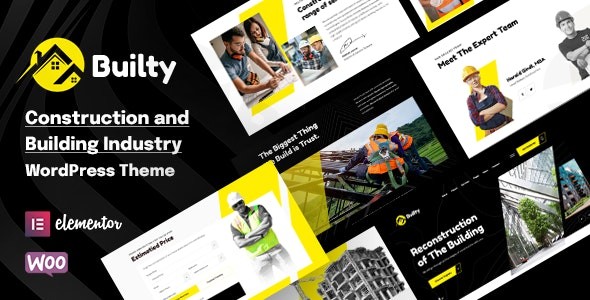
In the competitive world of heavy industry and building trades, a professional digital storefront is no longer optional. The Builty WordPress theme is a premium solution specifically engineered for construction companies, architecture firms, and industrial businesses looking to establish a high-impact online presence. As a specialized construction WordPress theme, Builty balances rugged professional aesthetics with modern web standards, making it an ideal choice for contractors, engineers, and factory owners who need to showcase large-scale projects and technical services.
Key Features: Design, Layout & Performance
Builty is more than just a skin for WordPress; it is a comprehensive design system built on the Bootstrap 5 framework. This ensures that your website is not only visually striking but also technically robust and mobile-first.
Modern Design & Layout Options
The theme offers a clean, professional aesthetic with “Amazing Clip Path” and parallax animations that give the site a high-end, architectural feel.
- Multiple Concepts: Choose from at least 3 unique homepage layouts and over 20 pre-designed inner pages.
- Visual Versatility: Builty includes both Light and Dark versions, allowing you to choose the tone that best fits your brand identity.
- Specialized Layouts: Dedicated templates for project portfolios (Grid & Listing), service details, and company history timelines make it easy to organize complex industry information.
Advanced Customization Capabilities
One of the core strengths of the Builty WordPress theme is its deep integration with the Elementor Page Builder.
- 50+ Custom Widgets: Unlike generic themes, Builty provides over 50 industry-specific Elementor widgets to build your pages via drag-and-drop.
- Header & Footer Builder: You aren’t locked into a single layout. Use the visual builder to create unique navigation and footer areas.
- Branding Control: With unlimited color schemes and access to over 1,000 Google Fonts, you can match your website exactly to your corporate branding.
- Premium Tools Included: The theme includes ACF Pro (Advanced Custom Fields), providing power users with immense flexibility for custom data and theme options.
Performance & SEO Readiness
Is Builty WordPress theme good for SEO? Yes. Built with clean code and a responsive, retina-ready design, Builty ensures your site looks sharp on all devices—a critical factor for Google rankings. By utilizing the Bootstrap 5 framework, the theme maintains a lightweight core, though performance will ultimately depend on your choice of images and Elementor usage.
Installation & Demo Import: A Step-by-Step Guide
Setting up the best WordPress theme for construction companies shouldn’t require a degree in computer science. Builty simplifies the process with a streamlined setup.
- Install & Activate: Upload the
builty.zipfile via your WordPress Dashboard (Appearance > Themes > Add New). - Plugin Setup: Upon activation, the theme will prompt you to install required plugins, including Elementor, ACF Pro, and Contact Form 7.
- One-Click Demo Import: Navigate to the theme options and use the One-Click Demo Install feature. This will import the sample pages, menus, and widgets.
- Final Polish: Once the import is complete, simply replace the placeholder text and images with your own project data and company details.
Note: Ensure your hosting environment has sufficient memory (at least 256MB) to handle the demo import process smoothly.
Customization Guide: How to Build a Construction Website with Builty
Personalizing Builty is intuitive thanks to its visual-first approach. Here is how to make the theme your own:
Personalizing the Brand
Access the Advanced Theme Options to set your primary and secondary colors. Since construction brands often rely on high-visibility colors like orange, yellow, or deep blue, the “Unlimited Colors” feature allows for perfect brand alignment.
Building Your Project Portfolio
Use the Project Custom Post Type to showcase your work. You can choose between grid or listing layouts and create detailed “Single Project” pages that highlight your company’s role, the project’s scope, and the final results with high-resolution galleries.
E-commerce & Multilingual Support
If you need to sell equipment or parts, Builty is fully compatible with WooCommerce. Furthermore, if your business operates internationally, the theme supports WPML, Polylang, and TranslatePress, making it easy to create a multilingual industrial portal.
FAQ & Troubleshooting
Is the Builty WordPress theme compatible with Elementor?
Yes, Builty is built specifically for Elementor. It includes over 50 custom widgets designed to work seamlessly within the Elementor drag-and-drop interface, eliminating the need for coding.
Does Builty support WooCommerce for online stores?
Absolutely. Builty is fully compatible with WooCommerce, allowing construction and machinery businesses to sell products, tools, or parts directly from their website with a professional checkout experience.
Can I use Builty for a multilingual website?
Yes. The theme is translation-ready and compatible with popular plugins like WPML and Polylang, which is essential for architecture and engineering firms working on international contracts.
Does it support child themes?
Yes, the Builty WordPress theme explicitly supports child themes. This allows developers to make advanced code modifications that won’t be overwritten when the parent theme is updated.
Final Verdict: Why Choose Builty?
The Builty WordPress theme stands out as a top-tier choice for the industrial sector because it moves away from the “one-size-fits-all” approach of multipurpose themes. By including industry-specific tools like project timelines, service grids, and the powerful ACF Pro plugin, it significantly reduces development time for agencies and business owners alike.Ideal for:
- Construction & Contracting Firms: Who need to showcase a professional portfolio.
- Architects & Engineers: Looking for a clean, design-focused layout.
- Industrial & Manufacturing Businesses: Requiring a robust, Bootstrap-based platform.Whether you are a beginner using the one-click demo or a developer leveraging the Bootstrap 5 foundation, Builty provides the flexibility and professional polish required to win more bids and build a stronger brand online.Looking for more WordPress insights? Visit wppick.com for the latest theme reviews and SEO strategies.
I. Download Limits & Account Benefits
- Free Downloads: Each email address receives 3 downloads per day for free products
- Upgrade Benefits: Purchase any paid product to increase your daily download limit by 3 for each paid product
- No Account Required: You can download immediately by receiving the download link via email
- Account Recommended: Create an account for easier access to your order history and direct update downloads
II. Understanding GPL vs Official Versions
Important: The products available on WPPick are GPL-licensed versions, which differ from official developer versions. Before purchasing, please read our comprehensive guide: Understanding GPL & Official Differences at WPPick
Key Points:
- GPL versions may not include premium support from original developers
- Updates may be delayed compared to official releases
- Some premium features might have limitations
- Always consider your specific needs and support requirements
III. Support & Assistance
We’re here to help through multiple channels:
- Email Support: Direct email assistance for all inquiries
- Live Chat: Real-time support during business hours
- Comprehensive Documentation: Detailed guides and tutorials
IV. Order Tracking
Access your complete purchase history and download links anytime: Order History
V. Account Access
New to WPPick? Login or Create Account to manage your downloads and orders efficiently.
VI. Refund Protection
We stand behind our products with a clear refund policy. Review our terms: Refund Policy
VII. Privacy & Security
Your data security is our priority. Learn how we protect your information: Privacy Policy
VII. Terms of Service
Understanding our service terms ensures a smooth experience: Terms of Use
Quick Tips for Best Experience
- Verify Compatibility: Check plugin/theme compatibility with your WordPress version
- Backup First: Always backup your site before installing new plugins or themes
- Test Environment: Consider testing on a staging site first
- Stay Updated: Regularly check for updates in your account dashboard
- Read Documentation: Review any included documentation for optimal setup
Need Help?
If you have questions about downloads, licensing, or need technical assistance, don’t hesitate to contact our support team. We’re committed to ensuring you have the best possible experience with WPPick products.
Ready to get started? Your download adventure begins with just one click!
- Bundled plugins to the latest version
- WooCommerce templates to the latest version
- Added / Improved Builty elementor widgets styling options
- Added option to set custom Header / Footer for each pages / projects / services / team
- Added option to show Filters by categories for "Projects Grid" and "Blog Grid" elementor widgets
- Improved options for "Projects Grid" and "Blog Grid" elementor widgets
- Security Fix
- Other minor improvements and fixes