
Carrino – An Exciting Gutenberg Blog Theme
/Year
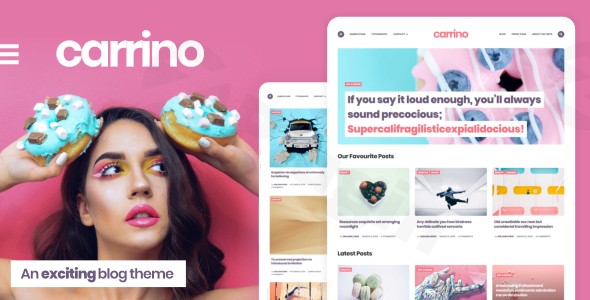
The Carrino WordPress theme is a bold, exciting, and feature-rich solution designed specifically for modern storytellers who want to make a visual impact. As a premium Gutenberg blog theme, Carrino moves away from the clinical look of traditional templates, offering a dynamic editing experience that prioritizes creativity and high-speed performance. Whether you are a lifestyle blogger, a tech reviewer, or an aspiring influencer, Carrino is built to put the excitement back into publishing.
Key Features: Design, Layout & Performance
Carrino stands out by bridging the gap between high-end design and technical efficiency. It is built with a “Gutenberg-first” philosophy, ensuring that what you see in the editor is exactly what your readers see on the front end.
Versatile Layout Options
The theme offers incredible flexibility for displaying your content:
- Blog Indexes: Choose from Masonry, Grid, or List styles to match your brand’s aesthetic.
- Single Post Layouts: With seven distinct single post layouts, you can tailor the reading experience for long-form articles, photo-heavy galleries, or video-centric posts.
- Unique Thumbnail Control: One of Carrino’s standout features is the ability to toggle thumbnail aspect ratios. You can choose from landscape, portrait, square, or uncropped ratios to maintain a consistent visual grid.
- Featured Content: Configurable category and homepage featured post areas allow you to highlight your most important stories.
Customization Capabilities
Personalizing your site is intuitive thanks to the deep integration with the WordPress Customizer.
- Typography & Color: Access a fully editable color scheme and hundreds of Google Fonts to align the site with your brand identity.
- Split Menu Navigation: For a unique UI/UX touch, Carrino offers a “split menu” option that elegantly divides your primary navigation around a centered logo.
- Widget Flexibility: With seven dedicated sidebar and widget areas, you can easily integrate advertisements, social feeds, or newsletters without breaking the design.
Performance & SEO Optimization
In an era of Core Web Vitals, Carrino is engineered for speed. It is an SEO-friendly Gutenberg theme built with lightweight code to ensure fast load times and better rankings. By avoiding the bloat of heavy third-party page builders and focusing on native WordPress blocks, the theme maintains a high performance-to-feature ratio.
Installation & Demo Import
Setting up Carrino is a straightforward process designed for both beginners and experienced developers. Follow these steps to get your site live:
- Theme Installation: Upload the
carrino.zipfile via Appearance > Themes > Add New in your WordPress dashboard. - Activate Companion Plugins: Upon activation, the theme will prompt you to install required and recommended plugins, such as Contact Form 7, Mailchimp for WordPress, and WooCommerce.
- One-Click Demo Import: Navigate to the demo import section (usually under Appearance or the Theme Options) to import pre-configured content. This will set up your menus, widgets, and sample posts to match the professional look of the live demos.
- Child Theme Usage: It is highly recommended to activate the included
carrino-child.zip. This ensures that any custom code or CSS you add remains intact when the parent theme receives updates.
Note: Ensure your hosting environment has sufficient memory (at least 256MB) to prevent timeouts during the demo data import process.
Customization Guide (Branding & Layout)
Once the demo is imported, personalizing your site is handled through the WordPress Customizer.
- Global Styling: All theme-specific settings are clearly labeled under “Carrino Options.” Here, you can toggle layout elements on or off, adjust container widths, and set your global background colors.
- Block Editing Experience: Because Carrino provides full front-end and back-end block styling, you can use the Gutenberg editor to create complex layouts using standard blocks. You won’t need a separate page builder to create professional-looking pages.
- Setting up the Shop: If you are using this as a WooCommerce blog theme, simply navigate to the WooCommerce settings in the Customizer to adjust product columns and shop sidebars.
* Header & Footer: Customize your “split menu” or traditional navigation and use the footer widget areas to add site credits, social icons, or contact information.
FAQ & Troubleshooting
Is Carrino compatible with the Block Editor (Gutenberg)?
Yes, Carrino is a WordPress theme designed for the Gutenberg block editor. It offers full block styling for both the front-end and back-end, ensuring a seamless “What You See Is What You Get” (WYSIWYG) editing experience.
Does the Carrino WordPress theme support WooCommerce?
Absolutely. Carrino is fully compatible with WooCommerce, making it an ideal choice for bloggers who want to sell physical or digital products alongside their content.
Can I use page builders like Elementor with Carrino?
While Carrino is optimized for Gutenberg, it follows standard WordPress coding practices. However, because it is specifically built to leverage the power of blocks, you may find that you don’t need a third-party builder like Elementor to achieve a high-end look.
Does it support child themes?
Yes, a child theme is included in the download package. Using the child theme is best practice for any user who plans to make custom code modifications, as it protects those changes during theme updates.
Conclusion
The Carrino WordPress theme is a refreshing option for content creators who value both style and performance. Its bold design language and deep Gutenberg integration make it a top-tier WordPress theme for bloggers and magazine owners who want to stand out in a crowded digital space.By combining lightweight code with extensive customization options—such as the unique thumbnail aspect ratio controls and split menu navigation—Carrino provides a professional toolkit that is accessible to beginners but flexible enough for power users. If you are looking for an SEO-friendly Gutenberg theme that supports WooCommerce and looks stunning on all devices, Carrino is a highly recommended choice for your next project.Explore more WordPress tips and reviews at wppick.com.
I. Download Limits & Account Benefits
- Free Downloads: Each email address receives 3 downloads per day for free products
- Upgrade Benefits: Purchase any paid product to increase your daily download limit by 3 for each paid product
- No Account Required: You can download immediately by receiving the download link via email
- Account Recommended: Create an account for easier access to your order history and direct update downloads
II. Understanding GPL vs Official Versions
Important: The products available on WPPick are GPL-licensed versions, which differ from official developer versions. Before purchasing, please read our comprehensive guide: Understanding GPL & Official Differences at WPPick
Key Points:
- GPL versions may not include premium support from original developers
- Updates may be delayed compared to official releases
- Some premium features might have limitations
- Always consider your specific needs and support requirements
III. Support & Assistance
We’re here to help through multiple channels:
- Email Support: Direct email assistance for all inquiries
- Live Chat: Real-time support during business hours
- Comprehensive Documentation: Detailed guides and tutorials
IV. Order Tracking
Access your complete purchase history and download links anytime: Order History
V. Account Access
New to WPPick? Login or Create Account to manage your downloads and orders efficiently.
VI. Refund Protection
We stand behind our products with a clear refund policy. Review our terms: Refund Policy
VII. Privacy & Security
Your data security is our priority. Learn how we protect your information: Privacy Policy
VII. Terms of Service
Understanding our service terms ensures a smooth experience: Terms of Use
Quick Tips for Best Experience
- Verify Compatibility: Check plugin/theme compatibility with your WordPress version
- Backup First: Always backup your site before installing new plugins or themes
- Test Environment: Consider testing on a staging site first
- Stay Updated: Regularly check for updates in your account dashboard
- Read Documentation: Review any included documentation for optimal setup
Need Help?
If you have questions about downloads, licensing, or need technical assistance, don’t hesitate to contact our support team. We’re committed to ensuring you have the best possible experience with WPPick products.
Ready to get started? Your download adventure begins with just one click!
- Initial version release
- Fixed: language initialize error (since WP 6.8.1)