

Casava – Beauty & Fashion Blog WordPress Theme
/Year
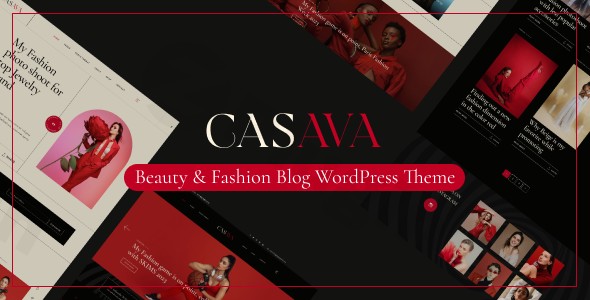
The Casava WordPress theme is a visually stunning, high-performance solution specifically crafted for the modern influencer. Whether you are launching a beauty and fashion WordPress theme site or a sophisticated lifestyle blog, Casava provides the aesthetic polish and functional depth required to stand out in a crowded digital landscape. Developed by Bravis-Themes, it balances “runway-ready” design with the powerful flexibility of the Elementor page builder.This theme is ideal for bloggers, fashion editors, and small business owners who prioritize visual storytelling. In this guide, we will explore why Casava is a top contender for your next project and how to set it up for maximum impact.
Key Features: Design, Layout & Performance
Casava is more than just a pretty face; it is a feature-rich toolkit designed to handle the high-resolution imagery and dynamic content demands of the fashion industry.
Professional Layout Options
Casava offers an “Amazing collection of Homepage Layouts” and modern post layouts that cater to various content styles. Whether you prefer a clean grid for a lookbook or a standard blog list for personal storytelling, the theme provides:
- Diverse Homepage Demos: Multiple prebuilt designs tailored for beauty, lifestyle, and fashion niches.
- Modern Post Layouts: Flexible styles for individual articles to keep readers engaged.
- Creative Sliders: Includes the premium Slider Revolution plugin for free, allowing you to create high-impact hero sections with parallax and video backgrounds.
Advanced Customization Capabilities
As an Elementor fashion theme, Casava gives you total control over your site’s appearance without touching a single line of code.
- Dark and Light Mode Switcher: A standout feature that allows visitors to toggle between visual themes, improving user experience and modernizing your brand.
- Header & Footer Builders: Use Elementor to craft bespoke headers, footers, and even mega menus.
- Unlimited Typography & Color: Full integration with Google Fonts and a comprehensive color picker via the Advanced Theme Options panel.
Performance & SEO Optimization
Search engines and AI answer engines value speed and structure. Casava is built with:
- SEO Optimized Design: Clean markup and a logical heading structure to help your content rank higher.
- Fully Responsive & Retina Ready: Your site will look pixel-perfect on everything from iPhones to high-end 4K monitors.
- Cross-Browser Optimization: Ensures consistent performance across Chrome, Safari, Firefox, and Edge.
Installation & Demo Import Guide
Setting up your lifestyle blog WordPress theme is straightforward, but it requires meeting specific technical standards to ensure a smooth import.
Step 1: Check Server Requirements
Before installing, ensure your hosting environment meets these recommended limits to avoid “empty content” or timeout errors:
- WordPress Version: 5.0 or higher.
- PHP Version: 7.0 or higher.
- PHP Limits:
max_execution_time 600,memory_limit 512M,post_max_size 64M, andupload_max_filesize 256M.
Step 2: Theme Activation
- Log in to your WordPress Dashboard.
- Navigate to Appearance > Themes > Add New > Upload Theme.
- Upload the
casava.zipfile and click Activate.
Step 3: Install Required Plugins
Upon activation, you will be prompted to install companion plugins. Ensure you install and activate:
- Elementor (Free version).
- Bravis Addons & Bravis User (Exclusive to the theme).
- Slider Revolution (Included for free).
- WooCommerce (If you plan to sell products).
Step 4: One-Click Demo Import
To get the look of the sales demo, go to the theme’s import section (usually under Casava > Import Demo). Click the import button and wait for the process to complete. This will populate your site with pre-designed pages, menus, and widgets.
Customization Guide: Branding Your Site
Once the demo is imported, personalizing your site is handled through two main areas:
1. Advanced Theme Options
Accessed via Casava > Theme Options, this panel controls global settings. Here, you can upload your logo, set your primary brand colors, and choose your global typography. Changes made here apply site-wide, ensuring a cohesive brand identity.
2. Page-Specific Styling
Casava includes “Advanced Page/Post Options.” These allow you to override global settings for a specific page. For example, you can give a specific “Lookbook” page a unique header or a different background video that deviates from your standard blog posts.
3. Building with Elementor
Since Casava is a WordPress theme with an Elementor header and footer builder, you don’t need to rely on static theme files. Simply open the Header or Footer builder, drag in your logo, social icons, or a search bar, and style them visually.
FAQ & Troubleshooting
Is the Casava WordPress theme compatible with Elementor?
Yes, Casava is built specifically for the Elementor Page Builder. It includes custom Bravis Addons that extend Elementor’s functionality with over 50 custom widgets designed for beauty and fashion layouts.
Does Casava support WooCommerce for online stores?
Yes, Casava is a WooCommerce fashion theme. It comes with multiple product and shop page layouts, and it is compatible with the WPC Wishlist, Quick View, and Variation Swatches plugins to provide a professional shopping experience.
What should I do if the demo import fails?
Most demo import failures are due to low server resources. Ensure your memory_limit is set to at least 512M and your max_execution_time is set to 600. If the issue persists, check that all required plugins (Bravis Addons, Elementor) are active before starting the import.
Is the theme translation-ready?
Yes, Casava is compatible with the WPML plugin, making it an excellent choice for creating a multilingual fashion or lifestyle magazine.
Does it support child themes?
Yes, Casava is child theme ready. A blank child theme is typically included in the download package, allowing developers to make CSS or functional changes without losing them during theme updates.
Conclusion
The Casava WordPress theme is an exceptional choice for anyone looking to build a high-end fashion blog website template. Its combination of a built-in dark mode switcher, deep Elementor integration, and WooCommerce readiness makes it a versatile powerhouse for influencers and retailers alike.While it is highly specialized for the beauty and lifestyle niche, its performance-focused code and SEO-friendly structure ensure that your content isn’t just beautiful—it’s findable. If you want a theme that feels like a premium digital magazine right out of the box, Casava is a top-tier investment for your brand.For more WordPress theme reviews and tutorials, visit wppick.com.
I. Download Limits & Account Benefits
- Free Downloads: Each email address receives 3 downloads per day for free products
- Upgrade Benefits: Purchase any paid product to increase your daily download limit by 3 for each paid product
- No Account Required: You can download immediately by receiving the download link via email
- Account Recommended: Create an account for easier access to your order history and direct update downloads
II. Understanding GPL vs Official Versions
Important: The products available on WPPick are GPL-licensed versions, which differ from official developer versions. Before purchasing, please read our comprehensive guide: Understanding GPL & Official Differences at WPPick
Key Points:
- GPL versions may not include premium support from original developers
- Updates may be delayed compared to official releases
- Some premium features might have limitations
- Always consider your specific needs and support requirements
III. Support & Assistance
We’re here to help through multiple channels:
- Email Support: Direct email assistance for all inquiries
- Live Chat: Real-time support during business hours
- Comprehensive Documentation: Detailed guides and tutorials
IV. Order Tracking
Access your complete purchase history and download links anytime: Order History
V. Account Access
New to WPPick? Login or Create Account to manage your downloads and orders efficiently.
VI. Refund Protection
We stand behind our products with a clear refund policy. Review our terms: Refund Policy
VII. Privacy & Security
Your data security is our priority. Learn how we protect your information: Privacy Policy
VII. Terms of Service
Understanding our service terms ensures a smooth experience: Terms of Use
Quick Tips for Best Experience
- Verify Compatibility: Check plugin/theme compatibility with your WordPress version
- Backup First: Always backup your site before installing new plugins or themes
- Test Environment: Consider testing on a staging site first
- Stay Updated: Regularly check for updates in your account dashboard
- Read Documentation: Review any included documentation for optimal setup
Need Help?
If you have questions about downloads, licensing, or need technical assistance, don’t hesitate to contact our support team. We’re committed to ensuring you have the best possible experience with WPPick products.
Ready to get started? Your download adventure begins with just one click!
No changelog available.