

Certy – Creative Resume & Cv WordPress Theme
/Year
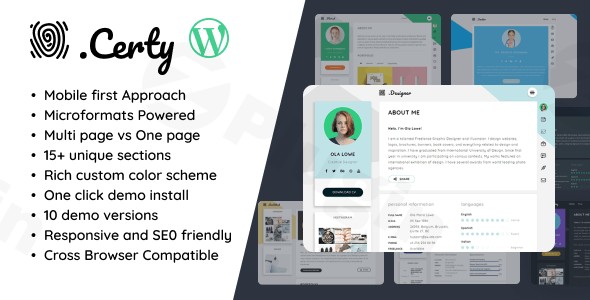
In the competitive world of digital recruiting and freelancing, your online presence is your most powerful calling card. The Certy WordPress Theme is a premium, high-performance solution specifically engineered for professionals who need a “Creative Resume & CV WordPress Theme” that transcends the standard boring template. Built with a modern Material Design aesthetic, Certy focuses on making a bold first impression through clean lines, intuitive navigation, and interactive elements that showcase your skills and experience with surgical precision.Whether you are a designer, developer, job seeker, or freelancer, this theme provides a polished, professional framework to build a personal brand. In this review and setup guide, we will explore why Certy remains a top choice for those seeking a “Professional CV WordPress theme” that balances visual flair with technical excellence.
Key Features: Design, Layout & Performance
Certy isn’t just a generic website template; it is a specialized tool for career advancement. Its design philosophy centers on Material Design, providing a tactile, organized feel that users find familiar and easy to navigate.
Versatile Layout Options
Certy offers both long-scrolling one-page layouts—perfect for a cohesive, story-telling resume—and multi-page options for those with extensive portfolios or blog content. The theme includes unique visual elements like:
- Interactive Profile Images: A second profile image that appears on hover, adding a layer of personality.
- Vertical Navigation: A sleek sidebar menu that keeps the focus on your content.
- Specialized Sections: Over 15 built-in sections including a work timeline, skill bars, references, and even an appointment calendar.
Customization & Global Styles
Personal branding is made easy with Certy theme customization options available through the WordPress Customizer.
- Typography: Support for over 800 Google Web Fonts allows you to match your site to your brand’s voice.
- Color Systems: Choose from 10+ predefined color schemes or create your own with unlimited color variations.
- Flexible Sidebars: Support for one-column, two-column, left-sidebar, and right-sidebar configurations.
Performance & SEO Readiness
For an “Online CV WordPress template” to be effective, it must load instantly. Certy is built with a Mobile First Approach, ensuring a “Retina ready” experience on all devices.
- Code Quality: Semantically correct and W3 valid code.
- Speed: Optimized for fast loading with Google Page Speed scores often exceeding 90+.
- SEO: Includes microformats on every page to help search engines index your professional data correctly.
Installation & Demo Import
Setting up Certy is straightforward, even for those without deep technical knowledge. Follow these steps to get your site looking like the professional demos:
- Install & Activate: Upload the
certy.zipfile via Appearance > Themes > Add New in your WordPress dashboard. - Install Required Plugins: Upon activation, Certy will prompt you to install its core components. You must install the Certy Theme Extensions and the bundled Advanced Custom Fields PRO (ACF Pro) for the theme to function correctly.
- One-Click Demo Import: Navigate to the “Import Demo Data” section. Certy includes at least four distinct demos. Choose the one that best fits your niche and click import.
- Final Polish: Once the import is complete, your menus, widgets, and sample pages will be populated. You can then go to Appearance > Customize to swap the placeholder text with your own credentials.Note: Ensure your hosting environment has at least 128MB of PHP memory to avoid timeouts during the demo import process.
Customization Guide (Branding & Layout)
Certy relies on the power of Advanced Custom Fields (ACF) Pro to manage your resume data. This makes editing your work history or skill levels much more intuitive than a standard page builder.
Personalizing Your Profile
- Logo & Identity: Upload your logo and favicon via the Customizer. If you don’t have a logo, the theme handles text-based identities beautifully.
- Managing Content: Use the dedicated resume sections in the WordPress admin to fill out your “Work Experience,” “Education,” and “Skills.” Because these are data-driven, the theme handles the visual formatting automatically.
- Shortcodes: For custom layouts within your blog or extra pages, Certy provides a robust shortcode library for buttons, tabs, accordions, and columns.
Setting Up the Appointment Calendar
One of Certy’s standout features is the built-in appointment calendar. This allows potential clients to see your availability and book a meeting directly from your resume site, turning a passive CV into an active lead-generation tool.
FAQ & Troubleshooting
Is Certy WordPress theme good for freelancers?
Yes, Certy is ideal for freelancers. It combines a professional portfolio with a CV and an appointment booking system, making it a comprehensive “vCard” and lead-generation tool for independent professionals.
How to use Advanced Custom Fields with Certy theme?
Certy uses ACF Pro (included for free) to power the “Resume” sections. Instead of editing layout blocks, you simply fill out forms for your skills, experience, and education. The theme then pulls this data into the pre-designed Material Design templates automatically.
Does Certy support child themes?
Absolutely. The documentation encourages the use of child themes for any custom code or function overrides. This ensures that your customizations are not lost when the parent theme receives updates.
Is Certy compatible with Elementor or WPBakery?
Certy is built as a specialized, lightweight theme that uses ACF and shortcodes rather than heavy drag-and-drop page builders. While you can install Elementor, the theme’s core resume features are designed to work within its own optimized framework for better speed and SEO.
Conclusion
The Certy WordPress Theme is a top-tier choice for anyone looking to build a high-converting, professional online presence. By focusing on a “Mobile First Approach” and leveraging the clean aesthetics of Material Design, it ensures your resume looks stunning on everything from a smartphone to a 5K monitor.While it is a specialized theme that may not be suitable for a massive e-commerce store, it is arguably the best WordPress resume theme for individuals who prioritize speed, SEO, and professional branding. If you want a site that is easy to set up via one-click imports and powered by the industry-standard ACF Pro, Certy is an investment that will serve your career for years to come.Ready to build your professional profile? Visit wppick.com for more WordPress theme reviews and SEO strategies.
I. Download Limits & Account Benefits
- Free Downloads: Each email address receives 3 downloads per day for free products
- Upgrade Benefits: Purchase any paid product to increase your daily download limit by 3 for each paid product
- No Account Required: You can download immediately by receiving the download link via email
- Account Recommended: Create an account for easier access to your order history and direct update downloads
II. Understanding GPL vs Official Versions
Important: The products available on WPPick are GPL-licensed versions, which differ from official developer versions. Before purchasing, please read our comprehensive guide: Understanding GPL & Official Differences at WPPick
Key Points:
- GPL versions may not include premium support from original developers
- Updates may be delayed compared to official releases
- Some premium features might have limitations
- Always consider your specific needs and support requirements
III. Support & Assistance
We’re here to help through multiple channels:
- Email Support: Direct email assistance for all inquiries
- Live Chat: Real-time support during business hours
- Comprehensive Documentation: Detailed guides and tutorials
IV. Order Tracking
Access your complete purchase history and download links anytime: Order History
V. Account Access
New to WPPick? Login or Create Account to manage your downloads and orders efficiently.
VI. Refund Protection
We stand behind our products with a clear refund policy. Review our terms: Refund Policy
VII. Privacy & Security
Your data security is our priority. Learn how we protect your information: Privacy Policy
VII. Terms of Service
Understanding our service terms ensures a smooth experience: Terms of Use
Quick Tips for Best Experience
- Verify Compatibility: Check plugin/theme compatibility with your WordPress version
- Backup First: Always backup your site before installing new plugins or themes
- Test Environment: Consider testing on a staging site first
- Stay Updated: Regularly check for updates in your account dashboard
- Read Documentation: Review any included documentation for optimal setup
Need Help?
If you have questions about downloads, licensing, or need technical assistance, don’t hesitate to contact our support team. We’re committed to ensuring you have the best possible experience with WPPick products.
Ready to get started? Your download adventure begins with just one click!