

Citrus – One Page Multi-purpose Theme
/Year
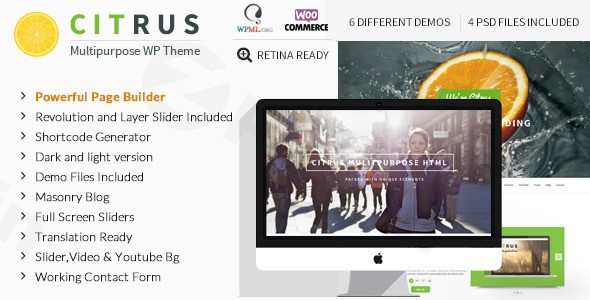
The digital landscape thrives on quick impressions, and for many businesses, creatives, and organizations, a focused one-page website is the perfect solution. The Citrus – Premium One Page Multi-Purpose WordPress Theme rises to this challenge, offering a versatile, responsive, and visually dynamic platform designed for streamlined online presences. Ideal for individuals, photographers, product promoters, web design agencies, travel blogs, nightclubs, music artists, nonprofits, and organizational websites, Citrus is built to captivate visitors with its engaging design and seamless user experience.
Key Features: Design, Layout & Performance
Citrus distinguishes itself with a rich array of features that cater to both aesthetic appeal and robust functionality. Its core philosophy revolves around delivering a powerful one-page experience without compromising on customization or performance.
Design & Layout Options
Citrus embraces a modern, visually-driven design, making it an excellent choice for users who want to make a strong impact quickly.
- One-Page Design Philosophy: At its heart, Citrus is a dedicated one-page theme, allowing you to present all essential information on a single, scrollable page. This creates a focused user journey, perfect for conveying a concise message or showcasing a portfolio.
- Fully Responsive & Cross-Browser Compatible: Ensuring your site looks flawless and functions perfectly across all devices—desktops, tablets, and smartphones—Citrus is fully responsive. It also guarantees consistent performance across major web browsers.
- Stunning Visual Effects: Elevate your site with Parallax Scrolling Support and Video Background Sections, offering immersive and dynamic visual experiences. A Fullscreen Slider provides an engaging canvas for your most impactful imagery or content.
- Diverse Styles: With Multiple Header Styles, Dark & Light Versions, and over 20 Pre-designed Skins, you have ample options to define your site’s aesthetic.
- Integrated Blog & Portfolio: Beyond its one-page focus, Citrus includes robust Portfolio Management tools to showcase your work and an Integrated Blog for content marketing or news updates.
- Smooth Scroll Navigation: Enhances the user experience by providing fluid transitions between sections on your single-page layout.
Customization Capabilities
The theme is built for extensive personalization, allowing you to tailor every aspect to your brand or personal style.
- Advanced Page Builder: Citrus comes equipped with an Advanced Page Builder, providing a powerful interface for creating and arranging content with ease. While it doesn’t specify compatibility with popular third-party builders like Elementor or WPBakery, its inclusion suggests a proprietary or Unyson-based solution for flexible layout creation.
- Unlimited Color Options & Google Fonts: Match your brand identity perfectly with an Unlimited Color Options palette and access to Google Fonts Integration for diverse typography choices.
- Extensive Shortcode Library & Icons: A comprehensive Shortcode Library and Font Awesome Icons empower you to add rich content elements and visual flair without needing to write custom code.
- Child Theme Ready: For advanced users and developers, Citrus is Child Theme Ready, ensuring that any deep customizations you make are safe from theme updates.
Performance & SEO Features
Citrus is designed with performance and visibility in mind, critical elements for any successful website.
- SEO Optimized: The theme is explicitly stated as SEO Optimized, suggesting clean code structure and semantic markup that helps search engines understand and rank your content effectively.
- Clean Code & Updates: Offered with a genuine GPL license from ZeroPlugin.com, Citrus promises regular updates and a virus-free, secure product, contributing to long-term site stability and performance.
Installation & Demo Import
Getting started with the Citrus theme is a straightforward process, even for WordPress newcomers. The goal is to quickly get your site resembling the stunning theme demos.
- Download and Install the Theme:
- After purchasing Citrus, download the theme package (usually a
.zipfile). - Log in to your WordPress dashboard.
- Navigate to
Appearance > Themes > Add New > Upload Theme. - Choose the theme’s
.zipfile and clickInstall Now. - Once installed, click
Activate.
- After purchasing Citrus, download the theme package (usually a
- Install Required Plugins:
- Upon activation, Citrus may prompt you to install recommended plugins (e.g., a custom page builder or the Unyson framework if it relies on it for demo import). Follow the on-screen instructions to install and activate all necessary plugins.
- One-Click Demo Import:
- Citrus provides one-click demo installation using the Unyson Importer. This is a game-changer for quickly setting up your site.
- Look for a
Demo ImporterorImport Demo Dataoption in your WordPress dashboard, often underAppearanceor a dedicated theme options panel. - Select the demo you wish to import (if multiple are available) and initiate the process.
- What to Expect: The demo import will bring in pages, posts, sample images, widgets, menus, and theme options to replicate the demo site. Be patient, as this process can take a few minutes depending on your hosting environment. Ensure your server’s PHP memory limit and execution time are sufficient to prevent timeouts for large demo files.After the import is complete, your site should look very similar to the Citrus theme demo, giving you an excellent starting point for customization.
Customization Guide: Branding & Layout
Citrus offers an intuitive backend for extensive customization, allowing you to infuse your brand identity and perfect your site’s layout.
- Accessing Theme Options: Most global customization settings for Citrus can be found within a dedicated
Theme Optionspanel in your WordPress dashboard, or through the WordPress Customizer (Appearance > Customize). This is where you’ll control many of the theme’s unique features. - Branding Essentials:
- Logo & Favicon: Easily upload your custom logo and favicon to establish your brand presence.
- Colors & Skins: Dive into the Unlimited Color Options to pick primary, secondary, and accent colors. Experiment with the 20+ Pre-designed Skins or the Dark & Light Versions to quickly change your site’s overall aesthetic.
- Typography: Utilize the Google Fonts Integration to select fonts that match your brand’s voice and improve readability.
- Layout & Structure:
- Header Customization: With Multiple Header Styles, you can choose a header layout that best suits your content and navigation needs. Look for options to adjust header height, sticky behavior, and menu styles.
- Homepage Setup: After demo import, your homepage will likely be set to a static page. You can customize its content using the Advanced Page Builder to drag and drop elements, add sections, and fine-tune your one-page layout.
- Menus: Navigate to
Appearance > Menusto set up your primary navigation. For a one-page site, ensure your menu items link to specific sections on your homepage using anchor links (e.g.,#about,#services). - Sidebars & Widgets: Citrus offers Multiple Sidebar Layouts and custom widgets. Customize these via
Appearance > Widgetsto add functionality like contact forms, social media feeds, or recent posts to your blog pages.The customization experience with Citrus is designed to be user-friendly, allowing you to visually adjust and preview changes, making it accessible even for those without coding knowledge.
FAQ & Troubleshooting
Here are answers to some common questions about the Citrus – Premium One Page Multi-Purpose WordPress Theme:
Is Citrus compatible with Elementor, WPBakery, or Gutenberg?
The Citrus theme includes an “Advanced Page Builder” and utilizes the Unyson Importer for demo content, suggesting it uses a proprietary or Unyson framework-based builder. Explicit compatibility with popular third-party page builders like Elementor or WPBakery is not specified in the documentation. For the WordPress Block Editor (Gutenberg), it’s not explicitly mentioned, but the theme is expected to be compatible with standard WordPress content creation.
Does Citrus support WooCommerce for online stores?
Yes, Citrus is WooCommerce Compatible. This means you can seamlessly integrate an online store into your one-page or multi-page site, allowing you to sell products and manage your e-commerce operations directly from your WordPress website.
Is Citrus WordPress theme good for portfolios?
Absolutely. Citrus is an excellent choice for portfolios, especially for photographers, designers, and other creatives. It features dedicated Portfolio Management tools, Fullscreen Slider support, and engaging visual elements like parallax effects, making it ideal for showcasing your work in a compelling, visually rich one-page format.
How can I import Citrus theme demo content?
To import demo content in Citrus, you will typically use a one-click demo installation feature, often powered by the Unyson Importer. After installing and activating the theme and any required plugins, look for a “Demo Importer” or “Import Demo Data” option in your WordPress dashboard (usually under Appearance or a theme-specific menu) and follow the on-screen instructions.
Does Citrus support child themes?
Yes, Citrus is Child Theme Ready. This is a crucial feature for anyone planning custom modifications, as it allows you to make changes to your theme’s code without directly altering the core theme files. This ensures your customizations are preserved when you update the main Citrus theme.
Conclusion
The Citrus – Premium One Page Multi-Purpose WordPress Theme stands out as a powerful and aesthetically pleasing solution for anyone seeking to create a impactful, focused online presence. Its robust feature set, including an advanced page builder, extensive customization options, and visually dynamic elements like parallax scrolling and video backgrounds, makes it incredibly versatile.Whether you’re a freelancer showcasing your portfolio, a small business promoting a product, a photographer displaying your work, or an agency presenting services, Citrus offers the design flexibility and functional capabilities to build a high-converting, responsive website. With its SEO optimization, WooCommerce compatibility, and ease of use through one-click demo import, Citrus is a compelling choice for users who prioritize a stunning one-page design and a straightforward setup process. It truly shines in scenarios where a compact yet comprehensive and visually engaging online experience is paramount.
I. Download Limits & Account Benefits
- Free Downloads: Each email address receives 3 downloads per day for free products
- Upgrade Benefits: Purchase any paid product to increase your daily download limit by 3 for each paid product
- No Account Required: You can download immediately by receiving the download link via email
- Account Recommended: Create an account for easier access to your order history and direct update downloads
II. Understanding GPL vs Official Versions
Important: The products available on WPPick are GPL-licensed versions, which differ from official developer versions. Before purchasing, please read our comprehensive guide: Understanding GPL & Official Differences at WPPick
Key Points:
- GPL versions may not include premium support from original developers
- Updates may be delayed compared to official releases
- Some premium features might have limitations
- Always consider your specific needs and support requirements
III. Support & Assistance
We’re here to help through multiple channels:
- Email Support: Direct email assistance for all inquiries
- Live Chat: Real-time support during business hours
- Comprehensive Documentation: Detailed guides and tutorials
IV. Order Tracking
Access your complete purchase history and download links anytime: Order History
V. Account Access
New to WPPick? Login or Create Account to manage your downloads and orders efficiently.
VI. Refund Protection
We stand behind our products with a clear refund policy. Review our terms: Refund Policy
VII. Privacy & Security
Your data security is our priority. Learn how we protect your information: Privacy Policy
VII. Terms of Service
Understanding our service terms ensures a smooth experience: Terms of Use
Quick Tips for Best Experience
- Verify Compatibility: Check plugin/theme compatibility with your WordPress version
- Backup First: Always backup your site before installing new plugins or themes
- Test Environment: Consider testing on a staging site first
- Stay Updated: Regularly check for updates in your account dashboard
- Read Documentation: Review any included documentation for optimal setup
Need Help?
If you have questions about downloads, licensing, or need technical assistance, don’t hesitate to contact our support team. We’re committed to ensuring you have the best possible experience with WPPick products.
Ready to get started? Your download adventure begins with just one click!
- Latest WordPress Version
- Warnings and deprecated errors