

Cocoon – Modern Woocommerce WordPress Theme
/Year
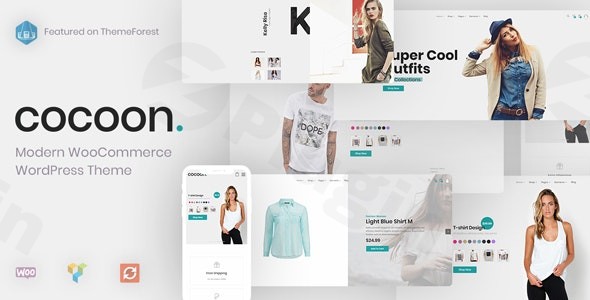
Cocoon is a free WooCommerce WordPress theme designed to be a powerful and accessible foundation for a wide range of websites, from personal blogs to robust online stores. Developed collaboratively by “waihira” and Xserver Inc., Cocoon prides itself on its strong focus on SEO, blazing-fast performance, and mobile-first responsiveness. It’s an ideal choice for bloggers, affiliate marketers, online store owners, and even advanced users looking for a highly customizable yet cost-free solution that rivals many premium options.
Key Features: Design, Layout & Performance
Cocoon’s design philosophy centers on cleanliness, modernity, and functionality, providing a professional aesthetic that is highly adaptable.
Design & Layout Options
Cocoon offers significant flexibility in structuring your content. While it doesn’t explicitly detail “boxed” or “grid” layouts, it provides easy switching between one-column and two-column designs on a per-page basis. This allows for diverse content presentation, whether you need a minimalist reading experience or a more complex layout with sidebars.The theme also utilizes a unique “skin” feature, which acts much like a prebuilt template or starter site. This allows users to dramatically change the overall look and feel of their site with minimal effort, offering various visual styles like changing an outfit. This is particularly beneficial for users who want a quick visual refresh without deep coding knowledge.
Customization Capabilities
Cocoon offers extensive customization through its robust settings panel:
- Color Schemes: You have flexible control over background colors and can choose between light and dark footer color schemes to match your brand’s aesthetic.
- Typography: Integration with Google Fonts provides access to a vast library of typefaces, allowing you to fine-tune your site’s visual hierarchy and readability.
- Global Styles: While not solely reliant on the WordPress Customizer, Cocoon provides extensive options for global styles, ensuring consistency across your website.
- Unique Visual Elements: Beyond basic styles, Cocoon includes its own set of unique blocks and styling options to enhance content creation within the WordPress Block Editor.
Performance & SEO Features
Cocoon shines in its technical optimization, making it a fast WordPress theme and a strong contender for SEO-friendly WooCommerce WordPress theme searches:
- Page Speed: The theme is built for speed, incorporating features like asset optimization and lazy loading to ensure quick page loads. It’s designed to perform well on Lighthouse and GTmetrix benchmarks.
- Mobile Responsiveness: Cocoon is fully responsive and Retina Ready, guaranteeing an excellent viewing experience on all devices, from desktops to smartphones.
- SEO Readiness: With a focus on clean markup, efficient code, and a solid structure, Cocoon provides a robust foundation for search engine optimization right out of the box.
- Cross-Browser Compatibility: Your website will look consistent and perform flawlessly across various web browsers.
Installation & Demo Import
Getting started with Cocoon is a straightforward process, though it differs slightly from themes with traditional “one-click demo imports.”
- Install & Activate: From your WordPress dashboard, navigate to
Appearance > Themes > Add New, search for “Cocoon,” install, and activate it. This is similar to any standard free WordPress theme installation. - Install Required Plugins: Cocoon is designed to be highly compatible with essential plugins. While some sources mention bundled premium plugins, the core experience will likely involve installing recommended free plugins like WooCommerce (for e-commerce functionality), Contact Form 7, and MailChimp for WordPress. YITH WooCommerce Wishlist is also supported for online stores.
- Applying a “Skin”: Instead of a full demo import, Cocoon utilizes its “skin” feature. After activation, explore the theme’s settings panel (likely under
Appearanceor a dedicated “Cocoon Settings” menu). Here, you can select and apply a “skin” to instantly transform your site’s aesthetic, configuring layouts, colors, and other visual elements to match a pre-designed look.Expect that menus, widgets, and some page content will need to be configured manually after applying a skin, as the focus is more on visual styling rather than comprehensive content import.
Customization Guide: Branding & Layout
Cocoon offers extensive customization to align your website with your brand identity.While it doesn’t solely rely on the native WordPress Customizer, Cocoon provides a dedicated and robust settings panel where you can manage global styles and specific elements.
- Branding Elements: Easily upload your logo, set your favicon, and define primary color schemes. You can experiment with different background colors and choose between light or dark footers.
- Typography: Access a wide selection of Google Fonts to set heading and body text styles, ensuring readability and brand consistency.
- Layout Adjustments: Utilize the theme’s settings to control column layouts globally or on a per-page basis. The “skin” feature is your primary tool for rapidly changing the overall visual presentation.
- Header & Footer: Cocoon includes a built-in mega menu feature for advanced navigation. Header and footer layouts are primarily managed through the theme’s extensive settings, offering control over elements and widget areas.
- Child Themes: For advanced customizations or adding custom CSS/JS, Cocoon strongly recommends using a child theme. This ensures your modifications are preserved even when the main theme receives updates, which is crucial for long-term site maintenance.Cocoon’s customization experience is powerful, allowing for deep control over aesthetics and functionality. While the sheer number of options might present a learning curve for absolute beginners, the “skin” system makes initial visual setup relatively intuitive.
FAQ & Troubleshooting
Here are answers to some common questions about the Cocoon WordPress theme:
Is Cocoon WordPress theme good for blogs?
Yes, Cocoon is an excellent choice for blogs. Its origin and robust content-focused features, coupled with its strong SEO optimization and fast loading speeds, make it ideal for personal blogs, professional blogs, and any content-heavy website. It provides the tools necessary for an engaging reader experience.
How to customize the header in Cocoon theme?
The header in the Cocoon theme can be customized through its extensive settings panel, typically found under Appearance or a dedicated “Cocoon Settings” menu in your WordPress dashboard. Here, you will find options to upload your logo, configure the mega menu, and adjust various header elements and layouts without needing to write code.
Is Cocoon WordPress theme compatible with Elementor / WPBakery / Gutenberg?
Cocoon is built with modern web standards and includes its own unique blocks and styling options to enhance content creation within the WordPress Block Editor (Gutenberg). While specific deep integrations with third-party page builders like Elementor or WPBakery are not explicitly detailed, its Bootstrap 4 framework generally ensures good compatibility. Some sources mention included premium plugins like Revolution Slider and Visual Composer (a predecessor to WPBakery), which may indicate a degree of compatibility or bundled functionality.
Does Cocoon WordPress theme support WooCommerce for online stores?
Yes, Cocoon offers full compatibility with WooCommerce, making it a robust solution for building and running online stores. It integrates seamlessly with WooCommerce features, allowing you to showcase products, manage carts, and process orders effectively.
Does Cocoon theme support child themes?
Yes, Cocoon strongly supports the use of child themes. This is the recommended practice for any customizations, including adding custom CSS or PHP, as it ensures that your modifications are safe and will not be overwritten when you update the main Cocoon theme.
Conclusion
The Cocoon WordPress theme stands out as a remarkably feature-rich, free lightweight WordPress theme that delivers on its promises of speed, SEO readiness, and extensive customization. Its clean, modern design and focus on user experience make it a compelling option for a diverse audience.For bloggers and affiliate marketers, Cocoon offers a powerful platform with built-in SEO advantages and tools for content presentation. Online store owners will appreciate its seamless and modern e-commerce WordPress theme integration with WooCommerce. While new users might find the extensive options slightly overwhelming initially, the “skin” feature provides an accessible entry point to create visually appealing sites quickly. Advanced users and developers will value the flexibility for deep customization, especially with robust child theme support.In a crowded market of WordPress themes, Cocoon confidently delivers a premium-level experience without the price tag, making it an excellent choice for anyone seeking a high-performing, flexible, and free solution for their online presence.
I. Download Limits & Account Benefits
- Free Downloads: Each email address receives 3 downloads per day for free products
- Upgrade Benefits: Purchase any paid product to increase your daily download limit by 3 for each paid product
- No Account Required: You can download immediately by receiving the download link via email
- Account Recommended: Create an account for easier access to your order history and direct update downloads
II. Understanding GPL vs Official Versions
Important: The products available on WPPick are GPL-licensed versions, which differ from official developer versions. Before purchasing, please read our comprehensive guide: Understanding GPL & Official Differences at WPPick
Key Points:
- GPL versions may not include premium support from original developers
- Updates may be delayed compared to official releases
- Some premium features might have limitations
- Always consider your specific needs and support requirements
III. Support & Assistance
We’re here to help through multiple channels:
- Email Support: Direct email assistance for all inquiries
- Live Chat: Real-time support during business hours
- Comprehensive Documentation: Detailed guides and tutorials
IV. Order Tracking
Access your complete purchase history and download links anytime: Order History
V. Account Access
New to WPPick? Login or Create Account to manage your downloads and orders efficiently.
VI. Refund Protection
We stand behind our products with a clear refund policy. Review our terms: Refund Policy
VII. Privacy & Security
Your data security is our priority. Learn how we protect your information: Privacy Policy
VII. Terms of Service
Understanding our service terms ensures a smooth experience: Terms of Use
Quick Tips for Best Experience
- Verify Compatibility: Check plugin/theme compatibility with your WordPress version
- Backup First: Always backup your site before installing new plugins or themes
- Test Environment: Consider testing on a staging site first
- Stay Updated: Regularly check for updates in your account dashboard
- Read Documentation: Review any included documentation for optimal setup
Need Help?
If you have questions about downloads, licensing, or need technical assistance, don’t hesitate to contact our support team. We’re committed to ensuring you have the best possible experience with WPPick products.
Ready to get started? Your download adventure begins with just one click!
- WP 6.7+ Compatibility
- WooCommerce 10 support
- Min PHP version is 7.4 now
- Kirki PHP error PHP 8.2+
- PHP 8.2+ errors
- WP 6.7 _load_textdomain_just_in_time error
- Version overlay in theme import page
- Composer dev handling
- WPBakery Pager Builder to 8.6.1
- Rev Slider to 6.7.36
- WooCommerce Templates
- Lang .POT files