

Coleo | A Stylish Fashion Clothing Store WordPress Theme
/Year
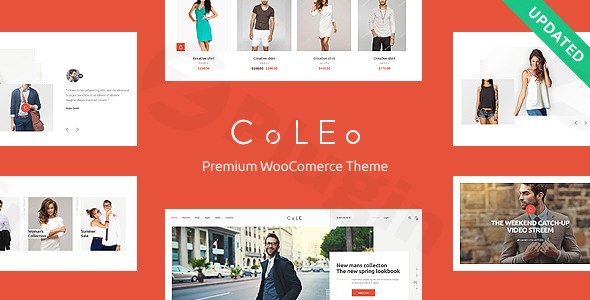
If you are looking to launch a high-end digital boutique, the Coleo WordPress theme offers a sophisticated, editorial-grade aesthetic designed specifically for the apparel industry. Developed by the seasoned team at ThemeREX, Coleo is a stylish fashion clothing store WordPress theme that balances visual elegance with the robust e-commerce functionality required to thrive in a competitive market.This theme is built for modern fashion retailers, accessory boutiques, and clothing brands that prioritize high-quality imagery and a “chic” user experience. Whether you are a beginner or a professional agency, Coleo provides the tools to create a premium online shopping environment without needing to write a single line of code.
Key Features: Design, Layout & Performance
Coleo is characterized by its clean lines, strategic use of white space, and refined typography. It doesn’t just display products; it frames them like a luxury magazine.
Visual Aesthetic and Layout Options
The theme offers incredible flexibility in how you present your brand. You can choose between boxed and full-width layouts, depending on whether you want a traditional look or a more immersive, modern feel.
- Product Listings: Coleo includes multiple grid and masonry layouts, allowing you to showcase collections in a way that feels organic and trendy.
- Lookbooks: One of its standout features is the dedicated lookbook templates, which are essential for fashion brands to tell a visual story and inspire customers.
- Retina-Ready Design: The theme is “Retina-ready,” ensuring that your high-resolution product photography looks crisp on all high-end displays, from iPhones to MacBooks.
Customization Capabilities
With over 750 Customizer options, Coleo gives you granular control over your site’s appearance. You can modify colors and typography (integrated with Google Fonts) to match your brand identity perfectly.
- Header & Footer Builders: Use the integrated WPBakery Page Builder to create custom headers and footers that fit your specific navigation needs.
- Mega Menu Ready: For stores with large inventories, Coleo supports Mega Menus, making it easy for customers to navigate complex categories with ease.
Performance and SEO Readiness
In the world of e-commerce, speed and search visibility are non-negotiable. Coleo is described as “snappy” and lightweight. It features clean markup and a structured heading hierarchy, which is why many users ask, “Is Coleo theme good for SEO?” The answer is yes; its mobile-friendly nature and clean code provide a solid foundation for ranking on Google and Bing.
How to Set Up Coleo Theme for Your Clothing Store
Setting up a professional storefront with Coleo is a streamlined process, thanks to its user-friendly onboarding tools.
- Installation & Activation: Upload the theme files via your WordPress Dashboard (Appearance > Themes > Add New). Once uploaded, click “Activate.”
- Plugin Installation: Upon activation, Coleo will prompt you to install required companion plugins. This typically includes WooCommerce, WPBakery Page Builder, and Slider Revolution. Ensure these are active to unlock the full feature set.
- One-Click Demo Import: To get your site looking exactly like the professional demo, navigate to the theme’s import utility. This feature imports sample pages, menus, and settings, giving you a functional “skeleton” to work with.
- Configure WooCommerce: Once the demo data is in, go to the WooCommerce settings to set up your currency, payment gateways, and shipping zones.
Tip: Before running the demo import, ensure your hosting environment has sufficient memory limits (256M or higher) to prevent timeouts during the data transfer.
Coleo Theme Customization Guide (Branding & Layout)
Once the demo is installed, personalizing the site to fit your brand is the next step. Coleo relies on a combination of the WordPress Customizer and WPBakery Page Builder.
- Global Styles: Use the Customizer to set your primary brand colors and font pairings. These settings will apply across your entire store, ensuring a consistent look.
- Building Pages: Since Coleo is a WPBakery compatible fashion theme, you can build complex page layouts using a drag-and-drop interface. You can add elements like “New Arrivals” sliders, “Best Sellers” grids, and promotional banners anywhere on your site.
* Product Displays: Take advantage of the “Quick View” and product filtering options. These features reduce friction for shoppers, allowing them to browse and add items to their cart without leaving the main listing page.
Technical Specifications & Compatibility
Coleo is built to work seamlessly with the most popular tools in the WordPress ecosystem:
- WooCommerce: Deep integration for a flawless shopping cart and checkout experience.
- WPBakery Page Builder: Included for easy content creation.
- Slider Revolution & Swiper Slider: For creating high-impact hero sections and sliding product galleries.
- WPML Compatibility: Ideal for boutiques looking to sell internationally with multilingual support.
* Browser Support: Fully compatible with Firefox, Safari, Chrome, and IE11+.
FAQ & Troubleshooting
Is the Coleo WordPress theme compatible with WooCommerce?
Yes, Coleo is a dedicated WooCommerce fashion theme. It is designed specifically to work with WooCommerce, providing custom-styled product pages, shopping carts, and checkout flows that match the theme’s chic aesthetic.
Can I use WPBakery Page Builder with this theme?
Yes. Coleo is a WPBakery compatible fashion theme. It uses WPBakery as its primary layout engine, allowing you to create custom pages and modify headers or footers without touching any code.
Does Coleo support mobile devices?
Absolutely. Coleo is a responsive fashion store WordPress theme. It is 100% mobile-friendly and adapts its layout automatically to look great on smartphones, tablets, and desktops.
Is Coleo theme good for SEO?
Yes, Coleo is built with clean, search-engine-friendly code and supports a logical heading structure. When paired with an SEO plugin like Yoast or Rank Math, it provides an excellent foundation for ranking in search results.
Final Verdict
The Coleo WordPress theme is an exceptional choice for anyone looking to establish a high-end fashion presence online. Its primary strength lies in its specialized design—it doesn’t feel like a “generic” e-commerce template. Instead, it offers the refined, minimalist look of a premium fashion house.Who is it for?
- Boutique Owners: Who want a “ready-to-go” professional look.
- Agencies: Looking for a flexible, WPBakery-based framework for fashion clients.
- Beginners: Who need the ease of a one-click demo import and intuitive customization.If you are ready to elevate your brand’s digital storefront, Coleo provides the perfect blend of style, performance, and e-commerce power. For more theme reviews and WordPress tutorials, visit wppick.com.
I. Download Limits & Account Benefits
- Free Downloads: Each email address receives 3 downloads per day for free products
- Upgrade Benefits: Purchase any paid product to increase your daily download limit by 3 for each paid product
- No Account Required: You can download immediately by receiving the download link via email
- Account Recommended: Create an account for easier access to your order history and direct update downloads
II. Understanding GPL vs Official Versions
Important: The products available on WPPick are GPL-licensed versions, which differ from official developer versions. Before purchasing, please read our comprehensive guide: Understanding GPL & Official Differences at WPPick
Key Points:
- GPL versions may not include premium support from original developers
- Updates may be delayed compared to official releases
- Some premium features might have limitations
- Always consider your specific needs and support requirements
III. Support & Assistance
We’re here to help through multiple channels:
- Email Support: Direct email assistance for all inquiries
- Live Chat: Real-time support during business hours
- Comprehensive Documentation: Detailed guides and tutorials
IV. Order Tracking
Access your complete purchase history and download links anytime: Order History
V. Account Access
New to WPPick? Login or Create Account to manage your downloads and orders efficiently.
VI. Refund Protection
We stand behind our products with a clear refund policy. Review our terms: Refund Policy
VII. Privacy & Security
Your data security is our priority. Learn how we protect your information: Privacy Policy
VII. Terms of Service
Understanding our service terms ensures a smooth experience: Terms of Use
Quick Tips for Best Experience
- Verify Compatibility: Check plugin/theme compatibility with your WordPress version
- Backup First: Always backup your site before installing new plugins or themes
- Test Environment: Consider testing on a staging site first
- Stay Updated: Regularly check for updates in your account dashboard
- Read Documentation: Review any included documentation for optimal setup
Need Help?
If you have questions about downloads, licensing, or need technical assistance, don’t hesitate to contact our support team. We’re committed to ensuring you have the best possible experience with WPPick products.
Ready to get started? Your download adventure begins with just one click!
- Compatibility with WordPress 6.4.2 has been improved.
- Added: TikTok & Twitter (x) icons.
- Scripts libraries are updated.
- Theme styles have been improved.
- All plugins have been updated to their latest versions.