
Colormag Pro – Magazine & News Style WordPress Theme
/Year
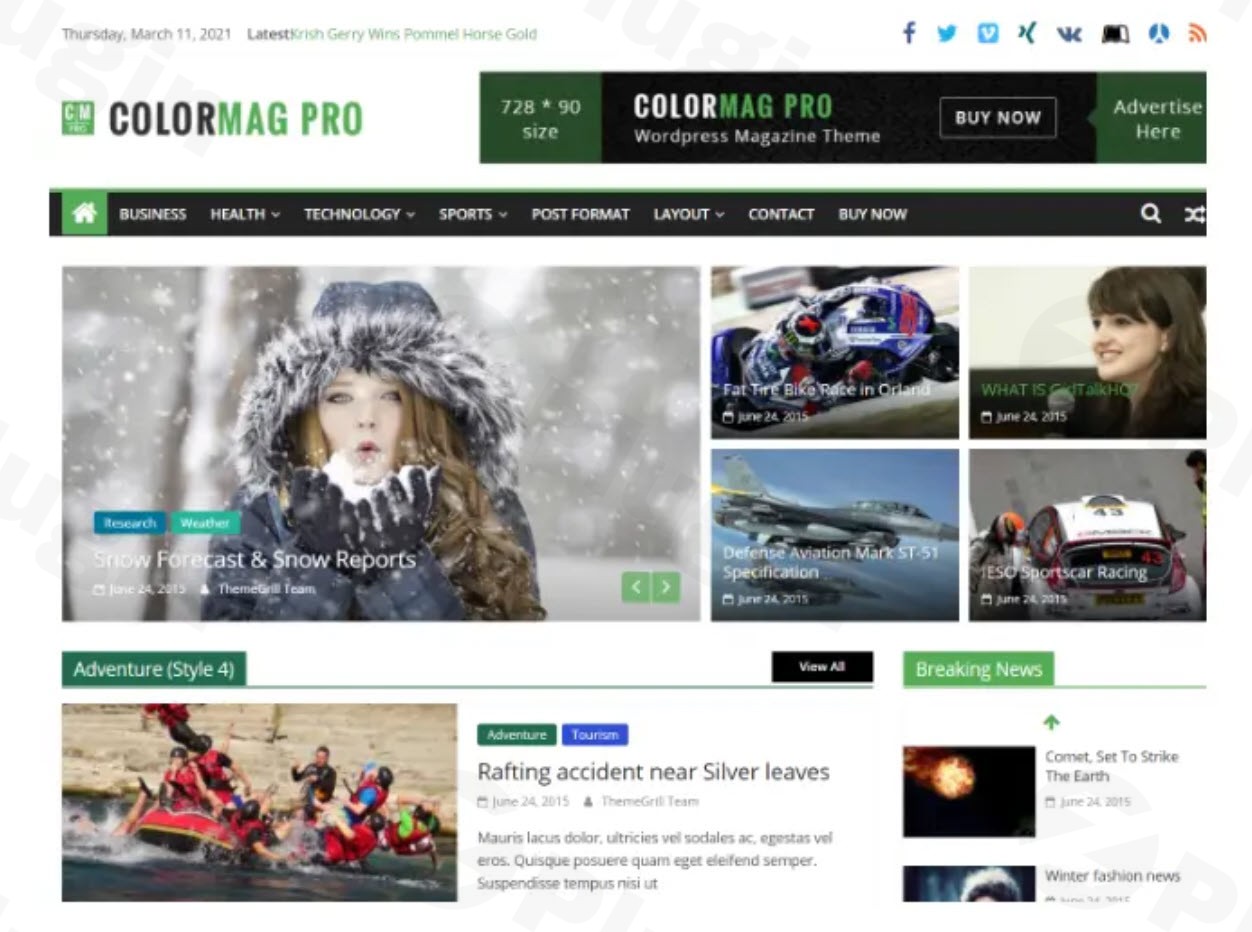
In the dynamic world of online publishing, a visually compelling and functionally robust website is paramount. For news portals, online magazines, blogs, and content-rich platforms, ColorMag Pro stands out as a premier WordPress theme. Developed by ThemeGrill, a reputable name in the WordPress ecosystem, ColorMag Pro is engineered to deliver a professional-grade solution that combines stunning aesthetics with unparalleled performance and ease of use. This comprehensive overview details why ColorMag Pro is the ultimate choice for publishers seeking a sophisticated, high-performance, and intuitively customizable online presence.
Create Stunning Magazine Websites with ColorMag Pro
ColorMag Pro is not just a theme; it’s a complete publishing framework. It transforms your WordPress site into a modern, engaging magazine or news hub, optimized for readability and user experience. Whether you’re a seasoned publisher or a burgeoning blogger, ColorMag Pro empowers you to craft a site that captures attention and delivers content effectively, without requiring deep coding knowledge.
Core Design Philosophy: Professionalism Meets Accessibility
ColorMag Pro’s design philosophy centers on delivering a premium publishing experience that is both powerful for experts and accessible for beginners. It focuses on clean layouts, vibrant visuals, and efficient content delivery. The theme’s advanced features are designed to solve common challenges in web design, offering solutions for responsive display, search engine optimization, and seamless content integration.
Expertise in Design: Tailored for Publishers
With 25+ ready-to-use starter sites and a variety of flexible magazine and news layouts, ColorMag Pro demonstrates its expertise in catering to diverse publishing niches. These professionally designed templates serve as an excellent starting point, allowing you to launch a sophisticated site quickly. The theme’s commitment to visual excellence is evident in its unlimited color options, including a primary color setting and category-specific color options, enabling you to create a unique and visually appealing brand identity.
Unlocking Creative Freedom: Advanced Customization Features
ColorMag Pro puts an extensive array of customization tools at your fingertips, allowing for meticulous control over every aspect of your website’s appearance.
Intuitive Customization Options
- Theme Options Panel: A central hub for managing layout, colors, and typography, simplifying site-wide adjustments.
- Custom Header and Footer: Choose from multiple header and footer styles to perfectly match your brand, with options to integrate logos and social media links.
- Advanced Typography: Elevate your content’s readability and aesthetic with 6 new typography presets and comprehensive font selection options.
- Custom CSS: For users seeking deeper personalization, the option to add custom CSS provides limitless design possibilities.
Specialized Widgets for Dynamic Content
Beyond standard WordPress widgets, ColorMag Pro includes multiple unique custom widgets specifically designed for magazine-style layouts. These include powerful tools like:
- Featured Posts: Showcase your most important articles prominently.
- Category Slider: Create engaging carousels of content from specific categories.
- Breaking News: Display urgent updates in a dedicated header section.
Seamless Page Builder Integration
ColorMag Pro is built for modern web development workflows. It offers full compatibility with popular drag-and-drop page builders such as Elementor, Beaver Builder, Brizy, Gutenberg, and SiteOrigin. This integration allows both technical and non-technical users to design complex page layouts with ease, offering unparalleled flexibility in content arrangement and visual presentation.
Performance and Search Engine Optimization (SEO)
A premium theme must perform flawlessly. ColorMag Pro is engineered with performance and SEO as top priorities, ensuring your site loads quickly and ranks well in search results.
Optimized for Speed and Visibility
- Lightweight Code: Designed with efficiency in mind, the theme’s clean code base ensures fast loading times, a crucial factor for user experience and SEO.
- Lazy Loading of Images: Images load only when they enter the viewport, conserving bandwidth and accelerating initial page loads.
- Minified CSS and JavaScript: Optimized files reduce server requests and further boost speed.
- SEO Optimized Code: Built with best practices, including Schema markup integration and optimized headings, to help search engines understand and rank your content effectively.
- Responsiveness: A fully responsive design ensures your content looks impeccable and performs flawlessly across all devices—desktops, tablets, and smartphones.
Practical Steps: Installing and Customizing ColorMag Pro
Getting started with ColorMag Pro is straightforward, even for those new to WordPress.
- Installation: After downloading the theme from ThemeGrill, navigate to
Appearance > Themes > Add New > Upload Themein your WordPress dashboard. Upload the ColorMag Pro ZIP file and activate it. - One-Click Demo Import: To kickstart your design, utilize the one-click demo import feature. This allows you to import any of the 25+ starter sites, providing a fully structured foundation that you can then personalize.
- Customization via WordPress Customizer: Access the live WordPress Customizer (
Appearance > Customize) to tweak layouts, colors, fonts, and widgets. The live preview functionality lets you see changes in real-time, making design iterations intuitive and efficient. - Leveraging Page Builders: For advanced page layouts, integrate with your preferred page builder (e.g., Elementor). This enables drag-and-drop design, allowing you to create unique content sections and page structures without code.
Target Audience and Diverse Use Cases
ColorMag Pro is a versatile theme, ideally suited for a broad spectrum of online publishing ventures and website owners.
- Online Magazines & News Portals: Its core strength lies in presenting large volumes of news and magazine content in an organized, visually appealing manner.
- Blogs: Perfect for personal blogs, niche blogs, and multi-author blogging sites that require advanced content display options.
- eCommerce Sites: Full compatibility with WooCommerce allows you to seamlessly integrate an online store, making it ideal for review sites or content creators selling products.
- Lifestyle, Fashion, Educational & Institutional Websites: The theme’s flexibility makes it suitable for various industries requiring a content-rich, professional online presence.ColorMag Pro caters to bloggers, publishers, newsrooms, and any website owner desiring a professional, visually appealing, and easy-to-customize website without extensive coding knowledge.
Why Choose ColorMag Pro: An Expert’s Perspective
ColorMag Pro has earned its reputation as a leading premium WordPress theme through a combination of superior features, robust performance, and reliable support.
- Authoritativeness & Trust: As the #1 magazine theme on WordPress.org with a stellar 4.9/5-star rating, ColorMag Pro’s widespread adoption and positive user experiences speak volumes about its quality and reliability. Developed by ThemeGrill, a well-known entity in the WordPress community, the theme is actively maintained and updated, ensuring long-term compatibility and security.
- Experience & Expertise: ThemeGrill’s extensive experience is evident in the theme’s design with SEO best practices in mind, lightweight code, and optimized performance. Users consistently report positive experiences with its ease of use and extensive customization options.
- Monetization Ready: ColorMag Pro provides multiple strategically placed ad spaces, facilitating effective monetization of your content.
- Global Reach: With RTL (Right-to-Left) and translation readiness and WPML compatibility, ColorMag Pro allows you to build multilingual sites, expanding your audience reach globally.
ColorMag Free vs. ColorMag Pro: The Premium Advantage
While a free version of ColorMag exists, ColorMag Pro unlocks a significantly enhanced feature set. The Pro version offers:
- More Google Fonts and advanced typography options.
- Unique posts options for greater content control.
- Full RTL support and comprehensive multi-language capabilities.
- An abundance of unique custom widgets.
- A powerful footer editor for custom layouts.
- Access to more pre-built demos and extensive styling options.These premium features provide the tools necessary to create a truly professional and unique publishing platform.
Pricing and Support
ThemeGrill offers flexible pricing plans for ColorMag Pro, including Single Theme, Business, Developer, and Lifetime licenses, catering to various user needs. All licenses include one year of updates and support, with the Lifetime License offering indefinite access. The theme is released under the GNU General Public License, ensuring flexibility and freedom for users. ThemeGrill also provides comprehensive documentation and support, fostering a trustworthy and reliable ecosystem for its users.
Get Started with ColorMag Pro Today
ColorMag Pro is more than just a WordPress theme; it’s an investment in a professional, high-performing, and aesthetically pleasing online publishing platform. Its blend of intuitive design, robust features, and unwavering commitment to performance makes it the ideal choice for anyone looking to create an engaging and successful magazine, news, or blog website. Transform your publishing vision into reality and captivate your audience with the power of ColorMag Pro.
I. Download Limits & Account Benefits
- Free Downloads: Each email address receives 3 downloads per day for free products
- Upgrade Benefits: Purchase any paid product to increase your daily download limit by 3 for each paid product
- No Account Required: You can download immediately by receiving the download link via email
- Account Recommended: Create an account for easier access to your order history and direct update downloads
II. Understanding GPL vs Official Versions
Important: The products available on WPPick are GPL-licensed versions, which differ from official developer versions. Before purchasing, please read our comprehensive guide: Understanding GPL & Official Differences at WPPick
Key Points:
- GPL versions may not include premium support from original developers
- Updates may be delayed compared to official releases
- Some premium features might have limitations
- Always consider your specific needs and support requirements
III. Support & Assistance
We’re here to help through multiple channels:
- Email Support: Direct email assistance for all inquiries
- Live Chat: Real-time support during business hours
- Comprehensive Documentation: Detailed guides and tutorials
IV. Order Tracking
Access your complete purchase history and download links anytime: Order History
V. Account Access
New to WPPick? Login or Create Account to manage your downloads and orders efficiently.
VI. Refund Protection
We stand behind our products with a clear refund policy. Review our terms: Refund Policy
VII. Privacy & Security
Your data security is our priority. Learn how we protect your information: Privacy Policy
VII. Terms of Service
Understanding our service terms ensures a smooth experience: Terms of Use
Quick Tips for Best Experience
- Verify Compatibility: Check plugin/theme compatibility with your WordPress version
- Backup First: Always backup your site before installing new plugins or themes
- Test Environment: Consider testing on a staging site first
- Stay Updated: Regularly check for updates in your account dashboard
- Read Documentation: Review any included documentation for optimal setup
Need Help?
If you have questions about downloads, licensing, or need technical assistance, don’t hesitate to contact our support team. We’re committed to ensuring you have the best possible experience with WPPick products.
Ready to get started? Your download adventure begins with just one click!
- Added new combined typography color option in the Typography section, allowing unified color control for text styles.
- Introduced a new sortable control for Blog, Single Post, and Search layouts, enabling users to reorder elements more flexibly.
- Relocated Headings color settings (H1–H3) from their previous location into the Typography section for better organization and easier access.
- Transferred Elements options inside the Sortable element, grouping related controls together and improving the overall settings structure.
- Submenu toggle issue in mobile view
- Video iframe not displayed in TG Videos Widget issue
- Header builder social component default style issue
- Header builder search and news ticker component issue
- Download provided