

Cryptiva – Cyber Security Services Gutenverse Fse WordPress Block Theme
/Year
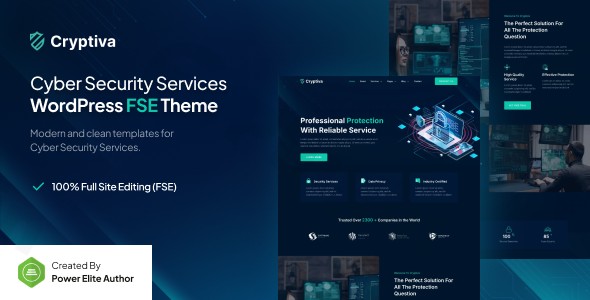
In an era where digital threats are evolving daily, establishing a professional and trustworthy online presence is non-negotiable for security firms. Cryptiva is a specialized Cyber Security WordPress theme built specifically to meet the aesthetic and technical demands of the IT security industry. By leveraging the modern WordPress Full Site Editing (FSE) framework and the powerful Gutenverse ecosystem, Cryptiva offers a sleek, high-performance solution for agencies and consultants who prioritize speed and security.
A Modern Design Built for Trust and Authority
The design philosophy of the Cryptiva WordPress theme centers on professionalism and authority. Unlike generic multipurpose themes that require hours of “stripping down,” Cryptiva comes out of the box with a visual hierarchy tailored for cyber security. It uses a clean, tech-focused aesthetic with deep blues, crisp typography, and high-contrast layouts that instantly signal reliability to potential clients.
Flexible Layouts & Prebuilt Templates
As a native FSE block theme, Cryptiva moves away from the constraints of legacy sidebars and widget areas. Instead, you get:
- Complete Layout Control: Use the WordPress Block Editor to build full-width, boxed, or complex grid layouts.
- The Gutenverse Library: Access an “Amazing Template Library” featuring professionally designed headers, footers, and page sections specific to IT services.
- Responsive Design: Every block is engineered for a mobile-first experience, ensuring your security audits or service pages look flawless on smartphones and tablets alike.
Performance and SEO Readiness
Speed is a critical ranking factor for both Google and AI search engines like Perplexity or SGE. Cryptiva is optimized for lightning-speed performance, utilizing clean code that avoids the “plugin bloat” common in traditional page builders.
- SEO-Friendly Markup: The theme uses structured headings and clean HTML5 code to help search engines index your services effectively.
- Future-Proof: Built for WordPress 6.7+, it stays ahead of core updates, ensuring your site remains secure and functional as the WordPress ecosystem evolves.
Installation & Demo Import: Getting Started
Setting up your Gutenverse FSE theme is a streamlined process designed to get your agency online quickly.
- Install the Theme: Navigate to Appearance > Themes in your WordPress dashboard, upload the Cryptiva zip file, and click Activate.
- Install Gutenverse: Upon activation, you will be prompted to install the Gutenverse plugin. This is the “engine” of the theme, providing the advanced block library and template settings.
- Import Templates: Navigate to the Gutenverse dashboard to access the template library. Here, you can import pre-made block patterns and page structures for your Services, About Us, and Contact pages.
- Finalize Menus: Since this is an FSE theme, you will manage your navigation directly within the Site Editor (Appearance > Editor) rather than the old Menu screen.Pro Tip: Ensure your server is running PHP 7.4 or higher to maintain the best performance and compatibility with the FSE framework.
Comprehensive Customization Guide
Personalizing your Cyber Security WordPress theme to match your corporate branding is intuitive thanks to the WordPress Site Editor.
Global Styles and Branding
Instead of hunting through dozens of menu tabs, you can control your entire site’s look through Global Styles.
- Colors & Typography: Change your brand colors and font pairings site-wide with a single click. Cryptiva uses global variables, meaning a change to your “Primary Color” will update every button and icon across the site automatically.
- Header & Footer Builder: Use the drag-and-drop Block Editor to build complex headers, including a Mega Menu (supported via Gutenverse) or sticky navigation bars.
Advanced Block Controls
With the Gutenverse integration, you have access to over 45+ free block elements. These allow you to add:
- Service Grids: Showcase your penetration testing or cloud security services with interactive cards.
- Animation Effects: Add subtle entrance animations to your value propositions to improve user engagement.
- Spacing & Containers: Fine-tune margins and padding directly on the canvas without writing a single line of CSS.
FAQ: Frequently Asked Questions
Is Cryptiva compatible with Elementor or WPBakery?
No, Cryptiva is a native WordPress full site editing theme for IT security. It is designed to work exclusively with the WordPress Block Editor (Gutenberg) and the Gutenverse plugin. This ensures a lighter, faster website by avoiding the overhead of third-party page builders.
Does Cryptiva support WooCommerce?
Yes. While it is built for services, the Gutenverse ecosystem is compatible with WooCommerce. You can easily integrate an online store to sell security software, hardware, or digital consulting packages.
How do I update the theme without losing my changes?
Because Cryptiva uses the Site Editor and Global Styles, your customizations are stored in the database. However, we always recommend using a child theme for any deep code modifications to ensure your site remains safe during major theme updates.
Can I build a Mega Menu with this theme?
Yes! Through the Gutenverse integration, Cryptiva includes a built-in Mega Menu builder, allowing you to create expansive, organized navigation for large security firms with multiple service categories.
Verdict: Is Cryptiva Right for You?
The Cryptiva WordPress theme is a powerful, niche-specific solution that perfectly balances professional design with modern technical standards. It is an ideal choice for:
- Cyber Security Agencies needing a high-authority look.
- IT Consultants who want a fast, SEO-optimized portfolio.
- Forward-thinking developers who prefer the Full Site Editing (FSE) workflow over traditional builders.While users strictly loyal to Elementor may face a small learning curve, the performance gains and ease of customization within the native WordPress environment make Cryptiva a top-tier choice for any digital security professional.Looking for more WordPress insights and theme reviews? Visit us at wppick.com.
I. Download Limits & Account Benefits
- Free Downloads: Each email address receives 3 downloads per day for free products
- Upgrade Benefits: Purchase any paid product to increase your daily download limit by 3 for each paid product
- No Account Required: You can download immediately by receiving the download link via email
- Account Recommended: Create an account for easier access to your order history and direct update downloads
II. Understanding GPL vs Official Versions
Important: The products available on WPPick are GPL-licensed versions, which differ from official developer versions. Before purchasing, please read our comprehensive guide: Understanding GPL & Official Differences at WPPick
Key Points:
- GPL versions may not include premium support from original developers
- Updates may be delayed compared to official releases
- Some premium features might have limitations
- Always consider your specific needs and support requirements
III. Support & Assistance
We’re here to help through multiple channels:
- Email Support: Direct email assistance for all inquiries
- Live Chat: Real-time support during business hours
- Comprehensive Documentation: Detailed guides and tutorials
IV. Order Tracking
Access your complete purchase history and download links anytime: Order History
V. Account Access
New to WPPick? Login or Create Account to manage your downloads and orders efficiently.
VI. Refund Protection
We stand behind our products with a clear refund policy. Review our terms: Refund Policy
VII. Privacy & Security
Your data security is our priority. Learn how we protect your information: Privacy Policy
VII. Terms of Service
Understanding our service terms ensures a smooth experience: Terms of Use
Quick Tips for Best Experience
- Verify Compatibility: Check plugin/theme compatibility with your WordPress version
- Backup First: Always backup your site before installing new plugins or themes
- Test Environment: Consider testing on a staging site first
- Stay Updated: Regularly check for updates in your account dashboard
- Read Documentation: Review any included documentation for optimal setup
Need Help?
If you have questions about downloads, licensing, or need technical assistance, don’t hesitate to contact our support team. We’re committed to ensuring you have the best possible experience with WPPick products.
Ready to get started? Your download adventure begins with just one click!