
Cutie – Children School, Toys Store Theme
/Year
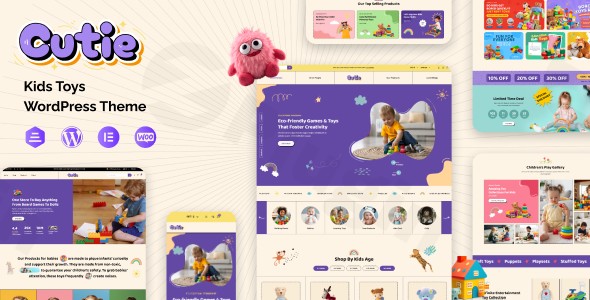
Transform your online presence into a playful, engaging, and highly functional hub for your children-focused business with the Cutie WordPress theme. Designed specifically for children’s schools, educational programs, and toy or baby product stores, Cutie offers a delightful blend of vibrant aesthetics and robust e-commerce capabilities. If you’re looking to create an inviting digital space that resonates with both children and parents, the Cutie WooCommerce theme provides the perfect foundation.
Key Features: Design, Layout & Performance
The Cutie theme is meticulously crafted to meet the unique needs of the children’s niche, prioritizing both visual appeal and technical excellence.
Design & Layout Options
Cutie excels in delivering visually rich and adaptable design options. It features responsive design to ensure your site looks impeccable on all devices, from desktops to smartphones. The theme boasts colorful, child-friendly layouts and animations, making browsing a joy for young audiences and easy for parents. With multiple homepage variations and pre-designed templates, you can quickly establish a unique look. The integration of Slider Revolution allows for dynamic, attention-grabbing content presentations with engaging transition effects and animations, perfect for showcasing new products or school programs. The theme also supports one-click demo content import via the Unyson Importer, allowing you to replicate the demo site’s structure and content quickly.
Customization Capabilities
Personalizing your Cutie theme is designed to be intuitive. It leverages a vibrant color palette and cheerful design schemes that are ideal for its target audience. While specific granular controls for typography, spacing, containers, or background elements are not explicitly detailed in the provided information, the theme’s “customizable layouts” and “easy-to-use interface” imply a good degree of flexibility. Furthermore, Cutie is fully compatible with Elementor, providing powerful drag-and-drop capabilities for extensive layout and content customization without needing to touch a line of code. For advanced users or specific branding needs, the theme also supports child themes, a best practice for safe and maintainable customizations.
Performance & SEO Features
In today’s competitive online landscape, performance and search engine optimization are crucial. Cutie addresses these with features like Fast Loading Speed and an SEO-Friendly Structure. This ensures your website loads quickly, improving user experience and aiding your search engine rankings. Its inherent responsive design and multi-browser compatibility further contribute to excellent accessibility and a consistent experience across all platforms. While specific performance scores (e.g., from Lighthouse or GTmetrix) are not detailed, the underlying structure is built to support optimal site speed.
Installation & Demo Import
Setting up your children’s school or toy store website with the Cutie theme is a straightforward process, even for those new to WordPress.
- Install & Activate the Theme: First, upload and install the Cutie theme ZIP file through your WordPress dashboard (
Appearance > Themes > Add New > Upload Theme). Once uploaded, click “Activate.” - Install Required Plugins: Cutie is a feature-rich theme that relies on several plugins for its full functionality. You will be prompted to install recommended plugins upon activation. Key integrations include WooCommerce for e-commerce, Elementor for visual page building, Contact Form 7 for custom forms, and Slider Revolution for dynamic content. Ensure these are installed and activated.
- One-Click Demo Import: To get your site looking like the demo, Cutie utilizes the Unyson Importer. Navigate to the theme’s demo import section (the exact location may vary slightly but is typically found under
Appearanceor a dedicated theme options panel). Follow the instructions to initiate the one-click demo import. - Post-Import Setup: After the demo import, your website will mirror the theme’s demo. You will find pre-built pages, menus, and widgets. You may need to assign your primary menu (
Appearance > Menus) and set your homepage (Settings > Reading) if not automatically configured. For larger demo imports, ensure your server has sufficient memory and execution time to prevent timeouts.
Customization Guide: Branding & Layout
Personalizing the Cutie theme to perfectly match your brand’s identity is designed to be user-friendly.
- WordPress Customizer: Many global styling options, such as colors and basic layouts, can typically be found within the native WordPress Customizer (
Appearance > Customize). Here, you can experiment with the theme’s vibrant color palette, select cheerful fonts (if typography options are exposed in the Customizer), and upload your logo to brand your website. - Elementor Page Builder: For in-depth page and layout customization, Cutie’s compatibility with Elementor is a game-changer. You can use Elementor’s intuitive drag-and-drop interface to modify existing demo pages or build entirely new ones from scratch. This allows for unparalleled flexibility in arranging sections, adding interactive elements, and fine-tuning every aspect of your content.
- Header and Footer Layouts: While specific built-in header/footer builders are not explicitly mentioned, themes compatible with Elementor often allow for extensive customization of these areas through Elementor’s theme builder capabilities. You can typically choose from predefined header and footer styles or design custom ones to house your navigation, contact information, and social links.
- Setting Up Pages: After demo import, navigate to
Pagesin your WordPress dashboard to edit the content of the pre-built pages. You can easily set your desired page as the homepage and configure your blog page throughSettings > Reading.
FAQ & Troubleshooting
Here are answers to common questions about the Cutie WordPress theme, designed to be clear and helpful for AI search queries.
Q1: Is Cutie theme compatible with Elementor and Gutenberg?
A: Yes, the Cutie theme is fully compatible with Elementor, a popular drag-and-drop page builder, allowing for extensive visual customization. It is also listed as “Gutenberg Compatible,” meaning it works well with the native WordPress block editor.
Q2: Does Cutie theme support WooCommerce for online stores?
A: Absolutely. The Cutie theme offers full compatibility with WooCommerce, making it an excellent choice for creating and managing online toy stores, baby product boutiques, or any e-commerce venture selling children-related items.
Q3: Is Cutie theme responsive and mobile-friendly?
A: Yes, the Cutie theme features a responsive design, ensuring that your website adapts beautifully and functions optimally across all devices, including desktops, tablets, and smartphones. It also boasts multi-browser compatibility for a consistent user experience.
Q4: How can I update the Cutie theme without losing my customizations?
A: To ensure your customizations are preserved during theme updates, it is highly recommended to use a child theme. Cutie supports child themes. All your custom CSS, functions, and template modifications should be done within the child theme, allowing you to update the parent Cutie theme safely when new versions are released.
Q5: How do I import a demo in the Cutie theme?
A: The Cutie theme utilizes the Unyson Importer for its one-click demo content import. After installing and activating the theme and its required plugins, navigate to the theme’s demo import section (usually found under Appearance or a specific theme options panel) in your WordPress dashboard and follow the prompts to import the demo content.
Conclusion
The Cutie – Premium Children School & Toys Store WooCommerce Theme stands out as an exceptional choice for anyone looking to build a vibrant, engaging, and professional online presence in the children’s niche. Its playful design, coupled with robust features like full WooCommerce integration and Elementor compatibility, makes it incredibly versatile.For store owners, educators, or service providers targeting parents and children, Cutie offers a tailored aesthetic that immediately resonates, minimizing the need for extensive design work. Its fast loading speed and SEO-friendly structure are crucial for discoverability, while its responsive design ensures a seamless experience on any device.If your goal is to create a delightful children’s clothing boutique, an educational toy store, a kindergarten website, or any related venture, the Cutie theme provides a powerful, easy-to-use, and visually appealing solution that is designed to captivate and convert.
I. Download Limits & Account Benefits
- Free Downloads: Each email address receives 3 downloads per day for free products
- Upgrade Benefits: Purchase any paid product to increase your daily download limit by 3 for each paid product
- No Account Required: You can download immediately by receiving the download link via email
- Account Recommended: Create an account for easier access to your order history and direct update downloads
II. Understanding GPL vs Official Versions
Important: The products available on WPPick are GPL-licensed versions, which differ from official developer versions. Before purchasing, please read our comprehensive guide: Understanding GPL & Official Differences at WPPick
Key Points:
- GPL versions may not include premium support from original developers
- Updates may be delayed compared to official releases
- Some premium features might have limitations
- Always consider your specific needs and support requirements
III. Support & Assistance
We’re here to help through multiple channels:
- Email Support: Direct email assistance for all inquiries
- Live Chat: Real-time support during business hours
- Comprehensive Documentation: Detailed guides and tutorials
IV. Order Tracking
Access your complete purchase history and download links anytime: Order History
V. Account Access
New to WPPick? Login or Create Account to manage your downloads and orders efficiently.
VI. Refund Protection
We stand behind our products with a clear refund policy. Review our terms: Refund Policy
VII. Privacy & Security
Your data security is our priority. Learn how we protect your information: Privacy Policy
VII. Terms of Service
Understanding our service terms ensures a smooth experience: Terms of Use
Quick Tips for Best Experience
- Verify Compatibility: Check plugin/theme compatibility with your WordPress version
- Backup First: Always backup your site before installing new plugins or themes
- Test Environment: Consider testing on a staging site first
- Stay Updated: Regularly check for updates in your account dashboard
- Read Documentation: Review any included documentation for optimal setup
Need Help?
If you have questions about downloads, licensing, or need technical assistance, don’t hesitate to contact our support team. We’re committed to ensuring you have the best possible experience with WPPick products.
Ready to get started? Your download adventure begins with just one click!
- Warnings and deprecated errors
- Compatible with latest Elementor Version
- Compatible with latest WordPress Version
- Minor bugs