
Cvio – Cv Resume WordPress Theme
/Year
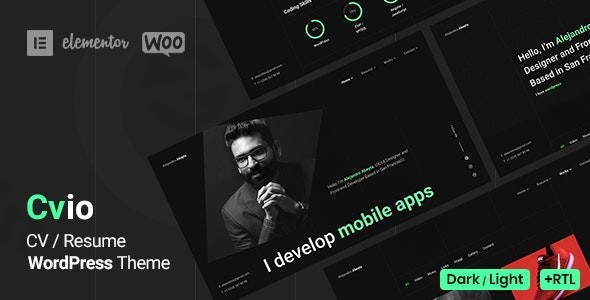
Elevate your professional online presence with Cvio, a sophisticated WordPress theme meticulously crafted for creating stunning CV and resume websites. Designed for individuals who want to make a lasting impression, Cvio offers an elegant platform to showcase your skills, experience, and portfolio with flair. Whether you’re a developer, designer, freelancer, writer, or any other professional seeking a powerful online resume, Cvio provides the tools to present your value proposition effectively.
Introduction: Showcase Your Expertise with Style
In today’s competitive landscape, a compelling online presence is crucial for career advancement. The Cvio CV resume WordPress theme is purpose-built to help you stand out. Its design philosophy marries modern aesthetics with robust functionality, providing a clean, professional, and visually engaging framework for your personal brand. Cvio empowers a wide array of professionals—from coders to creatives—to build a dynamic digital resume that captures attention and communicates expertise.
Key Features: Design, Layout & Performance
Cvio is packed with features that blend visual appeal with practical functionality, ensuring your professional profile not only looks good but performs exceptionally.
Design & Layout Options for Every Professional
Cvio understands that every professional has unique needs. This theme offers incredible flexibility in design and layout:
- Dual Mode Presentation: Instantly switch between Dark and Light modes with a Live UI Switcher. This innovative feature allows visitors to choose their preferred viewing experience, demonstrating a thoughtful approach to user experience and adaptability for various lighting conditions or personal tastes.
- Comprehensive Layouts: Choose from a rich selection of multiple pre-designed layouts and templates, including over 8 distinct home page variants. Cvio supports both single-page and multi-page configurations, giving you the freedom to structure your content as a concise one-pager or an in-depth portfolio site.
- Unique Visual Elements:
- Advanced Portfolio Options: Showcase your work using filters and 6+ lightbox variants (Image, Gallery, Media, Iframe for YouTube/Vimeo, Audio for SoundCloud, Link), providing a versatile way to present diverse projects.
- Resume On Timeline: Present your career progression, education, and achievements in an engaging, easy-to-follow timeline format.
- Skills Presentation: Visually represent your proficiencies with various styles, including percentage and dotted bars, circles, and knowledge sections, making your skill set immediately understandable.
- 6+ Background Options: Personalize your site further with default, image, video, gradient, color, and slideshow backgrounds.
Advanced Customization Capabilities
Tailor Cvio to reflect your brand identity with effortless customization options:
- Unlimited Color Options: Brand your website precisely with a full spectrum of color choices, ensuring consistency with your personal or professional branding.
- Typography Control: With integrated Google Fonts, you have extensive control over typography, allowing you to select the perfect font pairings to convey your professionalism.
- Elementor Integration: At its core, Cvio is built with and fully compatible with the Elementor Drag & Drop Page Builder. This deep integration, including custom Cvio Elementor widgets, means you can effortlessly design and customize every aspect of your pages without touching a single line of code.
- ACF Pro Plugin Included: The theme includes the powerful ACF Pro Plugin (Advanced Custom Fields Pro), extending your content customization capabilities even further for bespoke data entry.
- Child Theme Support: Cvio is designed to work seamlessly with child themes, ensuring that any custom modifications you make are safe from theme updates.
Performance & SEO Features
Cvio isn’t just about looks; it’s also engineered for optimal performance and visibility:
- Fast-Loading & Responsive Design: Built with modern web standards, Cvio delivers fast loading times and is fully responsive, guaranteeing a flawless viewing experience across all devices—desktops, tablets, and smartphones.
- SEO-Friendly Structure: The theme features clean markup and structured headings, contributing to its SEO-friendly structure. This helps your online CV or personal portfolio rank higher in search engine results, increasing your chances of being discovered by potential employers or clients.
- WooCommerce Support: For professionals looking to monetize their skills or sell digital products, Cvio offers full WooCommerce support, allowing you to integrate portfolio sales or service offerings alongside your resume content.
Installation & Demo Import: Get Started Instantly
Setting up your professional online presence with Cvio is designed to be straightforward, even for those new to WordPress.
- Install and Activate the Theme:
- Log in to your WordPress dashboard.
- Navigate to
Appearance > Themes > Add New > Upload Theme. - Upload the
cvio.zipfile you downloaded from ZeroPlugin.com or ThemeForest. - Click
Install Nowand thenActivate.
- Install Required Plugins:
- Upon activation, Cvio will recommend installing several plugins. These typically include Elementor, ACF Pro, and Contact Form 7. Install and activate all recommended plugins for full theme functionality.
- One-Click Demo Import:
- Cvio features a one-click demo import function, a huge time-saver. This will replicate the professional demo layout, including pages, posts, widgets, and theme options, instantly.
- Go to
Appearance > Import Demo Data(or a similar path provided by the theme’s specific importer). - Click the “Import Demo” button.
- What to Expect: During the import, your site will populate with demo content, menus, and widgets. The process might take a few minutes depending on your server speed. It’s crucial to have sufficient server memory and execution time to prevent timeouts. If the import fails or only partially loads, ensure your server meets the WordPress memory requirements. After a successful import, you’ll have a site that looks like the demo, ready for your personal content.
Customization Guide: Branding Your Professional Profile
Cvio offers extensive customization options, allowing you to perfectly align your online presence with your personal brand.
- WordPress Customizer & Advanced Theme Options:
- Access global styling options via
Appearance > Customize. Here, you can usually control site identity (logo, favicon), header and footer settings, global colors, and basic typography. Cvio also boasts “Advanced Theme Options” that provide even more granular control over these global settings.
- Access global styling options via
- Personalizing with Elementor:
- For page-specific content and layout, Cvio’s deep integration with Elementor is your primary tool. Navigate to any page (
Pages > All Pages > Edit with Elementor) to visually drag, drop, and configure sections, elements, and custom Cvio Elementor widgets. This is where you’ll replace demo content with your own text, images, portfolio items, and testimonials.
- For page-specific content and layout, Cvio’s deep integration with Elementor is your primary tool. Navigate to any page (
- Changing Colors, Fonts & Logo:
- Colors: Utilize the unlimited color options within the theme customizer or Elementor settings to match your brand palette. The Cvio dark mode theme also has its own color schemes you can adapt.
- Fonts: Easily select Google Fonts to establish your site’s typography, setting body text, headings, and other elements.
- Logo: Upload your personal logo via the Customizer to brand your header.
- Setting Up Your Homepage, Blog Page & Menus:
- Homepage: After demo import, your homepage will likely be set. If not, go to
Settings > Readingand set a static page as your homepage. - Menus: Manage your navigation menus under
Appearance > Menus. Create new menus or assign existing ones to primary, footer, or other available menu locations.
- Homepage: After demo import, your homepage will likely be set. If not, go to
- Intuitive Design & Presets:
- Cvio’s focus on ease of use, particularly with Elementor, means that customizing is generally intuitive. The pre-built demo layouts serve as excellent starting points, allowing you to modify existing structures rather than building from scratch. This streamlines the branding process and helps you achieve a polished look quickly.
FAQ & Troubleshooting
Here are answers to some common questions about the Cvio WordPress theme:
Is Cvio compatible with Elementor, Gutenberg, and WooCommerce?
Yes, Cvio is fully compatible with Elementor Drag & Drop Page Builder, including custom Cvio Elementor widgets for seamless page creation. While it heavily leverages Elementor, it is also compatible with the WordPress block editor (Gutenberg) for standard content editing. Furthermore, Cvio offers full WooCommerce support, allowing you to integrate an online store or sell services directly from your CV website.
Does Cvio support child themes?
Yes, Cvio includes child theme support. Using a child theme is highly recommended for any custom CSS, functions, or template file modifications. This ensures that your customizations are preserved even when you update the main Cvio theme to a newer version.
How can I import the demo content in Cvio?
To import the demo content in Cvio, you typically navigate to the theme’s options or an “Import Demo Data” section within your WordPress dashboard (often under Appearance). There, you will find a one-click demo import feature that populates your site with the demo’s pages, posts, images, and settings. Make sure all recommended plugins are installed and activated before importing.
What should I do if the Cvio demo import fails or looks different from the demo site?
If the demo import fails, check your server’s PHP configuration for sufficient memory limits (e.g., memory_limit, max_execution_time). Large demo imports can sometimes time out on shared hosting. If it looks different, ensure all required companion plugins (like Elementor and ACF Pro) were installed and activated before the import. You might also need to manually set your homepage (Settings > Reading) and assign menus (Appearance > Menus) after the import.
Can I use Cvio for multi-language websites?
Yes, Cvio is designed with WPML compatibility, making it an excellent choice for creating multi-language professional portfolios or CV websites. This allows you to present your profile to a global audience in their native language.
Conclusion: Your Professional Edge with Cvio
The Cvio – Professional CV & Resume WordPress Theme is an exceptional choice for anyone seeking to create a sophisticated and high-performing online professional profile. Its remarkable design flexibility, highlighted by the striking dark mode and numerous layout options, allows for extensive personalization. Coupled with deep Elementor compatibility and included ACF Pro, customization becomes an intuitive drag-and-drop experience, accessible to users without coding knowledge.Cvio stands out with its dedicated features for showcasing skills, experience timelines, and diverse portfolios, making it ideal for freelancers, developers, designers, and any professional aiming to impress. Its robust performance, mobile responsiveness, and SEO-friendly structure ensure that your online resume is not only visually appealing but also discoverable by potential clients and employers.For those who value aesthetic elegance, ease of use, and a comprehensive toolkit for professional self-presentation, Cvio offers a powerful, all-inclusive solution to establish your distinguished online presence.
I. Download Limits & Account Benefits
- Free Downloads: Each email address receives 3 downloads per day for free products
- Upgrade Benefits: Purchase any paid product to increase your daily download limit by 3 for each paid product
- No Account Required: You can download immediately by receiving the download link via email
- Account Recommended: Create an account for easier access to your order history and direct update downloads
II. Understanding GPL vs Official Versions
Important: The products available on WPPick are GPL-licensed versions, which differ from official developer versions. Before purchasing, please read our comprehensive guide: Understanding GPL & Official Differences at WPPick
Key Points:
- GPL versions may not include premium support from original developers
- Updates may be delayed compared to official releases
- Some premium features might have limitations
- Always consider your specific needs and support requirements
III. Support & Assistance
We’re here to help through multiple channels:
- Email Support: Direct email assistance for all inquiries
- Live Chat: Real-time support during business hours
- Comprehensive Documentation: Detailed guides and tutorials
IV. Order Tracking
Access your complete purchase history and download links anytime: Order History
V. Account Access
New to WPPick? Login or Create Account to manage your downloads and orders efficiently.
VI. Refund Protection
We stand behind our products with a clear refund policy. Review our terms: Refund Policy
VII. Privacy & Security
Your data security is our priority. Learn how we protect your information: Privacy Policy
VII. Terms of Service
Understanding our service terms ensures a smooth experience: Terms of Use
Quick Tips for Best Experience
- Verify Compatibility: Check plugin/theme compatibility with your WordPress version
- Backup First: Always backup your site before installing new plugins or themes
- Test Environment: Consider testing on a staging site first
- Stay Updated: Regularly check for updates in your account dashboard
- Read Documentation: Review any included documentation for optimal setup
Need Help?
If you have questions about downloads, licensing, or need technical assistance, don’t hesitate to contact our support team. We’re committed to ensuring you have the best possible experience with WPPick products.
Ready to get started? Your download adventure begins with just one click!
- Bundled Plugins to the latest version
- WooCommerce template files to the latest version
- Other minor improvements and fixes