

Cyberguard – Cyber Security Services WordPress Theme
/Year
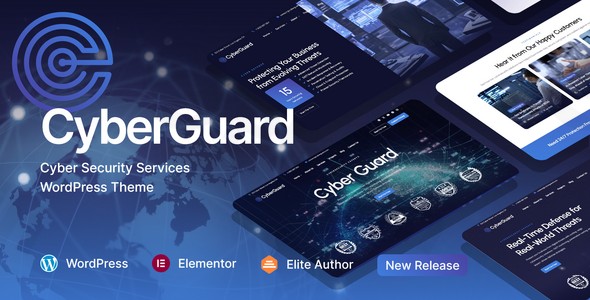
In an era where digital threats are evolving daily, establishing online credibility is non-negotiable for security firms. The CyberGuard WordPress theme is a premium, meticulously crafted solution specifically designed for cybersecurity companies, IT consultants, and Managed Security Service Providers (MSSPs). Unlike generic corporate templates, CyberGuard focuses on a “trust-first” design philosophy, combining technical authority with high-conversion layouts to help security professionals present complex services like penetration testing and SOC monitoring with absolute clarity.
A Specialized Design for High-Impact Security Websites
The CyberGuard WordPress theme stands out because it understands the unique visual language of the cybersecurity industry. It avoids the “bloated” feel of multipurpose themes, opting instead for a structured approach that emphasizes professionalism and expertise.
Purpose-Built Layouts and Demos
CyberGuard offers over 10 pre-built website templates, including 5 sophisticated multi-page designs and 5 streamlined one-page options. These are not just placeholders; they are functional frameworks for:
- Service Detail Pages: Custom templates for security audits, compliance frameworks, and risk assessments.
- Case Studies: Dedicated layouts to showcase success stories with data-driven metrics.
- Resource Hubs: Optimized sections for whitepapers, threat reports, and technical blogs.
- Trust Elements: Integrated visual blocks for displaying certifications, partner logos, and compliance badges (ISO, GDPR, etc.).
Customization and Brand Flexibility
While the theme is niche-focused, it offers deep customization via the WordPress Customizer. Users have access to unlimited color schemes and advanced typography settings, allowing a boutique consultancy to feel just as unique as a global enterprise. The theme includes 50+ custom Elementor widgets, such as pricing tables, interactive service grids, and testimonial carousels, ensuring that every page element aligns with your brand’s UI/UX standards.
Technical Specifications: Speed, SEO, and Compatibility
Building a cybersecurity agency website theme requires more than just good looks; it requires a rock-solid technical foundation.
- Performance-First Code: CyberGuard is built with an optimized codebase. Its “lightning-fast” page load times are crucial for both user experience and search engine rankings, helping your firm stay ahead in competitive SERPs.
- Search Engine Optimization (SEO): The theme uses clean markup and structured headings, making it highly compatible with SEO plugins like Yoast or Rank Math. It is designed to be AI-search friendly, ensuring that answer engines like ChatGPT or Google SGE can easily crawl and understand your service offerings.
- Full Responsiveness: The design is mobile-first, ensuring that technical diagrams and service grids look stunning on desktops, tablets, and smartphones alike.
- Plugin Synergy: CyberGuard is fully compatible with Elementor (free version included) and WPBakery. It also supports WooCommerce, allowing you to sell digital products or security software licenses directly from your site.
Step-by-Step Installation and Demo Import
Setting up your Cyber Security Services WordPress Theme is designed to be a frictionless experience, even for those without extensive development knowledge.
- Install & Activate: Upload the theme folder via the WordPress Dashboard (Appearance > Themes > Add New).
- Plugin Setup: Upon activation, the theme will prompt you to install required companion plugins, including Bravis Addons, Bravis User, and the bundled Slider Revolution ($109 value) and Booked ($49 value).
- One-Click Demo Import: Navigate to the theme options and use the powerful One-Click Installer. This will import all pages, menus, widgets, and sample content to match the live demo.
- Final Polish: Once the import is complete, you can replace the demo text and images with your own data. Note: Ensure your server has adequate memory limits (WP Memory Limit 256M+) to prevent timeouts during the import of high-resolution assets.
Customization Guide: Personalizing Your Security Brand
Personalizing CyberGuard happens primarily through a visual, drag-and-drop interface.
- Visual Building with Elementor: Use the intuitive Elementor editor to modify the “high-impact” homepage. You can drag in service grids or Call-to-Action (CTA) panels specifically designed to convert visitors into leads.
- Global Styles: Use the WordPress Customizer to set global primary and secondary colors. This ensures that your brand’s “Security Blue” or “Alert Red” remains consistent across every button, link, and heading.
- Header & Footer Builder: CyberGuard includes a flexible builder for headers and footers, including a custom Mega Menu. This is ideal for agencies with a wide array of service categories that need clear, organized navigation.
FAQ: Frequently Asked Questions about CyberGuard
Is the CyberGuard WordPress theme compatible with Elementor?
Yes, CyberGuard is built specifically for Elementor. It includes over 50 custom Elementor widgets to help you build complex layouts without touching a single line of code. It is also compatible with WPBakery and the Gutenberg block editor.
Does CyberGuard support WooCommerce for online security stores?
Absolutely. CyberGuard is fully compatible with WooCommerce. It includes specialized features like product wishlists, quick view, and comparison tools, making it perfect for companies selling security hardware or subscription-based digital protection services.
Can I translate my cybersecurity website into multiple languages?
Yes. The theme is compatible with WPML and Polylang. This is essential for cybersecurity firms operating in international markets or regions with strict multilingual compliance requirements.
Does the theme include a child theme?
Yes, CyberGuard is child-theme compatible. Using the included child theme allows you to make deep code customizations that will remain safe and intact even after you update the main theme.
Final Verdict: Is CyberGuard Right for You?
The CyberGuard WordPress theme is a specialized, high-performance solution for any business in the digital protection space. While multipurpose themes offer more general flexibility, CyberGuard’s niche-specific layouts and “trust-building” visual elements provide a massive head start for agencies and consultants.Choose CyberGuard if:
- You need to establish immediate technical authority.
- You want a professional, conversion-optimized site without hiring a custom designer.
- You rely on Elementor for easy, drag-and-drop site management.With its combination of premium bundled plugins, SEO-ready code, and industry-specific aesthetics, CyberGuard is an excellent investment for any cybersecurity professional looking to secure a dominant online presence. For more WordPress theme reviews and tutorials, visit wppick.com.
I. Download Limits & Account Benefits
- Free Downloads: Each email address receives 3 downloads per day for free products
- Upgrade Benefits: Purchase any paid product to increase your daily download limit by 3 for each paid product
- No Account Required: You can download immediately by receiving the download link via email
- Account Recommended: Create an account for easier access to your order history and direct update downloads
II. Understanding GPL vs Official Versions
Important: The products available on WPPick are GPL-licensed versions, which differ from official developer versions. Before purchasing, please read our comprehensive guide: Understanding GPL & Official Differences at WPPick
Key Points:
- GPL versions may not include premium support from original developers
- Updates may be delayed compared to official releases
- Some premium features might have limitations
- Always consider your specific needs and support requirements
III. Support & Assistance
We’re here to help through multiple channels:
- Email Support: Direct email assistance for all inquiries
- Live Chat: Real-time support during business hours
- Comprehensive Documentation: Detailed guides and tutorials
IV. Order Tracking
Access your complete purchase history and download links anytime: Order History
V. Account Access
New to WPPick? Login or Create Account to manage your downloads and orders efficiently.
VI. Refund Protection
We stand behind our products with a clear refund policy. Review our terms: Refund Policy
VII. Privacy & Security
Your data security is our priority. Learn how we protect your information: Privacy Policy
VII. Terms of Service
Understanding our service terms ensures a smooth experience: Terms of Use
Quick Tips for Best Experience
- Verify Compatibility: Check plugin/theme compatibility with your WordPress version
- Backup First: Always backup your site before installing new plugins or themes
- Test Environment: Consider testing on a staging site first
- Stay Updated: Regularly check for updates in your account dashboard
- Read Documentation: Review any included documentation for optimal setup
Need Help?
If you have questions about downloads, licensing, or need technical assistance, don’t hesitate to contact our support team. We’re committed to ensuring you have the best possible experience with WPPick products.
Ready to get started? Your download adventure begins with just one click!