

Cybron – Prosthetics Medical Center WordPress Theme
/Year
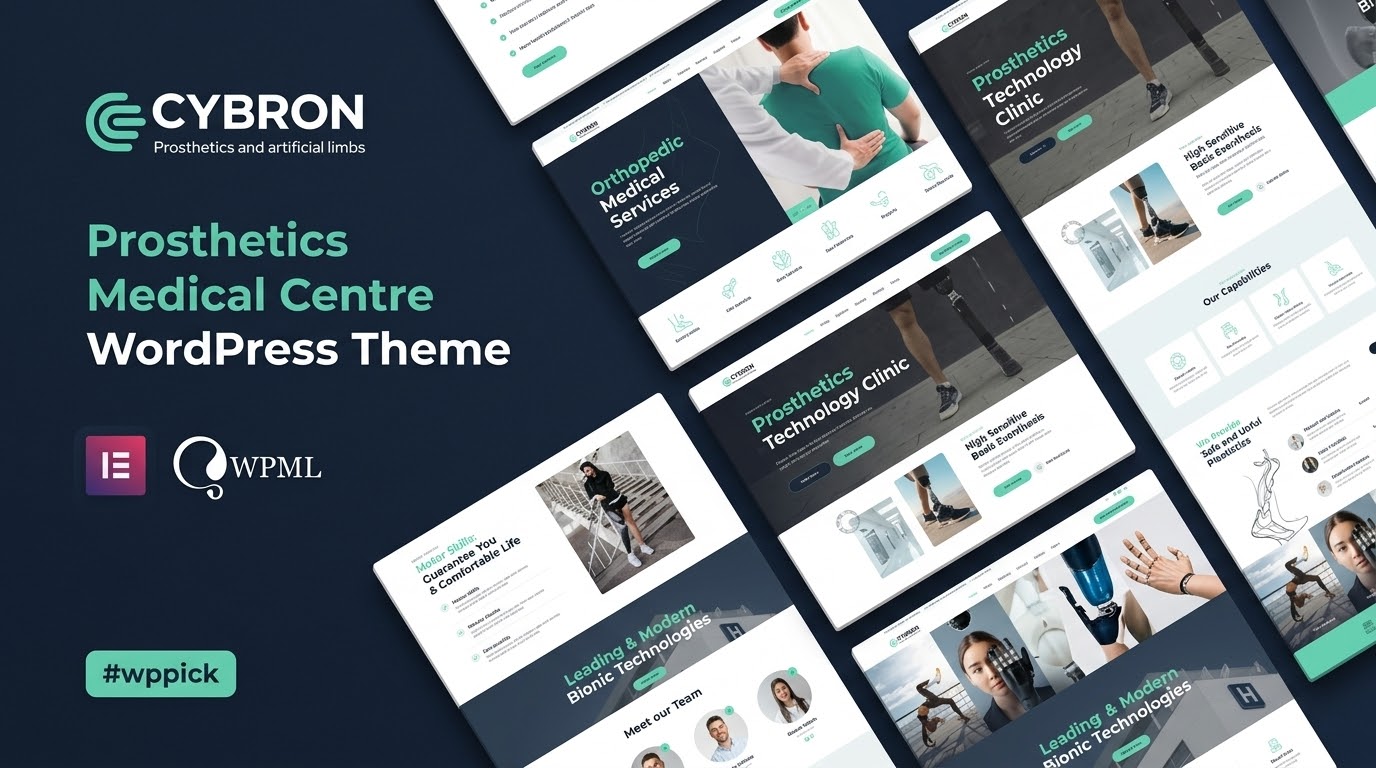
The Cybron WordPress theme is a meticulously designed solution tailored for the specific needs of medical centers, prosthetics technologies, orthopedic clinics, and health care providers. It’s built to create a professional, trustworthy, and highly functional online presence for surgeons, medical recovery facilities, and even alternative medicine practices. This review will delve into Cybron’s aesthetic appeal, robust features, and user-friendly customization, offering a comprehensive guide for medical professionals aiming to enhance their digital footprint.
Introduction: Visual Appeal & Target Audience
Cybron is a specialized WordPress theme crafted for Prosthetics Medical Centers and a broader range of healthcare facilities. Its design philosophy centers on professionalism, clarity, and patient-centric functionality, ensuring your website instills trust and provides a seamless user experience. With a clean, modern aesthetic, Cybron empowers medical practices to showcase their services, team, and facilities with elegance and efficiency, directly addressing the unique communication needs of the medical industry.
Key Features: Design, Layout & Performance
Cybron delivers a powerful combination of aesthetic flexibility and technical robustness, ensuring your medical website stands out and performs optimally.
Design & Layout Options
Cybron offers a professional design language with stunning animations and a focus on medical aesthetics. The theme includes:
- Creative Header Options & Multiple Homepage Layouts: Provides diverse initial setups to match various clinic styles and service presentations.
- Comprehensive Page Templates: Specialized templates for product catalogs (ideal for medical device sales), blog posts to share medical insights, and dedicated testimonial sections to build patient trust.
- Tailored Sections: Pre-designed layouts specifically for prosthetics and orthopedic services, team member showcases, and dedicated patient testimonials.
- Unique Visual Elements: Includes amazing parallax effects, great scroll animations, and image zoom animations to create a dynamic and engaging user experience.
Customization Capabilities
Personalizing your Cybron site is straightforward, largely thanks to its deep integration with a leading page builder:
- Elementor Page Builder Compatibility: Cybron is fully compatible with Elementor Page Builder, allowing for intuitive drag-and-drop customization across every section of your site. It includes 20+ unique custom elements specifically designed for Elementor, enhancing functionality without requiring coding knowledge.
- Color Schemes & Typography: Offers easy color customization to align with your brand identity. It integrates Google Fonts, specifically “Promt” and “Open Sans,” along with Font Awesome icons, providing extensive typographic choices.
- Built-in Theme Options Panel: Simplifies global style adjustments and theme-wide settings for a cohesive look and feel.
Performance & SEO Features
In the competitive online landscape, performance and search engine visibility are paramount for medical practices.
- SEO & Speed Optimized: Cybron is built for faster loading times and higher search rankings, contributing to a positive user experience and better discoverability.
- Mobile Responsiveness: The theme is fully responsive and mobile-friendly, ensuring an optimal viewing experience across desktops, tablets, and smartphones.
- Cross-Browser Compatibility: Tested and optimized for popular browsers including Safari, Firefox, Chrome, and Edge, guaranteeing consistent performance for all visitors.
- Clean Markup: Designed with well-organized and valid code, forming a strong foundation for SEO.
Installation & Demo Import
Setting up your Cybron website is designed to be a smooth process, even for users without extensive technical expertise.
- Install & Activate the Theme: Begin by uploading the Cybron theme zip file via your WordPress dashboard (Appearance > Themes > Add New > Upload Theme) or via FTP, then activate it.
- Install Required Plugins: Upon activation, Cybron will likely prompt you to install a set of recommended or required plugins, including Elementor and WooCommerce. Ensure all recommended plugins are installed and activated for full theme functionality.
- One-Click Demo Import: Cybron features a One-Click Demo Import tool. Navigate to the theme’s import options (usually found under Appearance or a dedicated theme panel in your dashboard). Select your preferred demo layout and initiate the import process.
- During/After Demo Import: The demo import will populate your site with pre-designed pages, posts, menus, widgets, and settings, closely mirroring the live demo. Be aware that importing large demos can take a few minutes and may require sufficient server memory and execution time; if issues arise, increasing PHP limits (e.g.,
memory_limit,max_execution_time) might be necessary. Once complete, you’ll have a professional foundation ready for your content.
Customization Guide: Branding & Layout
Personalizing Cybron to reflect your medical practice’s unique brand is intuitive, primarily leveraging Elementor and the theme’s built-in options.
- WordPress Customizer: While Elementor handles much of the page-level customization, the native WordPress Customizer (Appearance > Customize) will allow you to adjust global styles, site identity (logo, favicon), basic typography, and potentially default color schemes or header/footer elements not managed directly by Elementor.
- Elementor for Page Layouts: For detailed page and section customization, simply edit any page with Elementor. Its drag-and-drop interface lets you easily modify content, rearrange sections, adjust spacing, and apply stunning visual effects. Utilize Cybron’s 20+ custom Elementor elements to add specialized medical-focused content blocks.
- Colors & Fonts: Within Elementor’s global settings or specific element settings, you can easily change color palettes and typography using the integrated Google Fonts (“Promt” and “Open Sans”) and Font Awesome icons to maintain brand consistency.
- Logo & Site Identity: Upload your practice’s logo and set your site title and tagline through the WordPress Customizer.
- Header & Footer Layouts: Cybron offers “creative header options” and Elementor’s flexibility allows you to design and customize header and footer sections visually, ensuring a professional look.
- Setting Up Homepage & Blog Page: Design your engaging homepage with Elementor. For your blog, create a new page, then assign it as your “Posts page” under Settings > Reading in WordPress, allowing Cybron to apply its blog layouts.
- Menu Management: Organize your site’s navigation under Appearance > Menus, creating multi-level menus to guide patients through your services, appointment booking, and resources.
FAQ & Troubleshooting
Here are answers to common questions about the Cybron WordPress theme:
Is Cybron compatible with Elementor, WPBakery, or Gutenberg?
Cybron is fully compatible with Elementor Page Builder, making it the primary tool for drag-and-drop customization. While it functions with standard WordPress features, its design and custom elements are optimized for Elementor, suggesting it’s the recommended page builder. Compatibility with WPBakery Page Builder or explicit support for the Gutenberg Block Editor is not specifically highlighted in the documentation, though basic block editor functionality would be expected.
Does Cybron support WooCommerce for online stores?
Yes, the Cybron WordPress theme is fully integrated with WooCommerce, enabling you to effortlessly set up an online store. This feature is perfect for medical centers looking to sell prosthetics products, orthopedic supplies, medical accessories, or even consultation packages directly from their website.
Does Cybron include an appointment booking system?
Yes, Cybron offers integrated appointment scheduling and built-in appointment booking capabilities. This crucial feature allows patients to easily book consultations or services directly through your website, streamlining patient management and enhancing user convenience.
What kind of license does the Cybron WordPress theme use?
The Cybron theme is distributed under the GPL (General Public License). This allows users full rights to use the software on an unlimited number of personal and client websites, offering significant flexibility and value.
What should I do if the demo import fails or looks different from the demo site?
If your Cybron demo import fails or doesn’t perfectly match the live demo, first, ensure all recommended plugins are activated. Next, check your server’s PHP configuration; increasing memory_limit, max_execution_time, and upload_max_filesize can resolve common import issues. If problems persist, consider checking the theme’s documentation or support resources for specific guidance, as large demo content can sometimes strain server resources.
Conclusion
The Cybron – Prosthetics Medical Center WordPress Theme is a stellar choice for any medical facility, especially those specializing in prosthetics, orthopedics, or rehabilitation. Its dedication to a professional aesthetic, combined with robust features like full Elementor compatibility and seamless WooCommerce integration, provides a powerful platform for patient engagement and service showcasing.With its intuitive customization options, mobile responsiveness, and SEO-friendly foundation, Cybron empowers medical professionals to build a high-converting, visually appealing, and trustworthy online presence. Whether you’re a clinic administrator without coding knowledge, a freelancer designing for medical clients, or a health care provider looking to sell products online, Cybron offers a purpose-built, all-in-one solution that truly shines in its niche. It stands as a confident verdict for medical practices seeking to establish credibility and deliver an exceptional digital experience to their patients.
I. Download Limits & Account Benefits
- Free Downloads: Each email address receives 3 downloads per day for free products
- Upgrade Benefits: Purchase any paid product to increase your daily download limit by 3 for each paid product
- No Account Required: You can download immediately by receiving the download link via email
- Account Recommended: Create an account for easier access to your order history and direct update downloads
II. Understanding GPL vs Official Versions
Important: The products available on WPPick are GPL-licensed versions, which differ from official developer versions. Before purchasing, please read our comprehensive guide: Understanding GPL & Official Differences at WPPick
Key Points:
- GPL versions may not include premium support from original developers
- Updates may be delayed compared to official releases
- Some premium features might have limitations
- Always consider your specific needs and support requirements
III. Support & Assistance
We’re here to help through multiple channels:
- Email Support: Direct email assistance for all inquiries
- Live Chat: Real-time support during business hours
- Comprehensive Documentation: Detailed guides and tutorials
IV. Order Tracking
Access your complete purchase history and download links anytime: Order History
V. Account Access
New to WPPick? Login or Create Account to manage your downloads and orders efficiently.
VI. Refund Protection
We stand behind our products with a clear refund policy. Review our terms: Refund Policy
VII. Privacy & Security
Your data security is our priority. Learn how we protect your information: Privacy Policy
VII. Terms of Service
Understanding our service terms ensures a smooth experience: Terms of Use
Quick Tips for Best Experience
- Verify Compatibility: Check plugin/theme compatibility with your WordPress version
- Backup First: Always backup your site before installing new plugins or themes
- Test Environment: Consider testing on a staging site first
- Stay Updated: Regularly check for updates in your account dashboard
- Read Documentation: Review any included documentation for optimal setup
Need Help?
If you have questions about downloads, licensing, or need technical assistance, don’t hesitate to contact our support team. We’re committed to ensuring you have the best possible experience with WPPick products.
Ready to get started? Your download adventure begins with just one click!
- v1.0.2 - 17 July 2025