

Debebe – Baby Shop And Children Kids Store WordPress
/Year
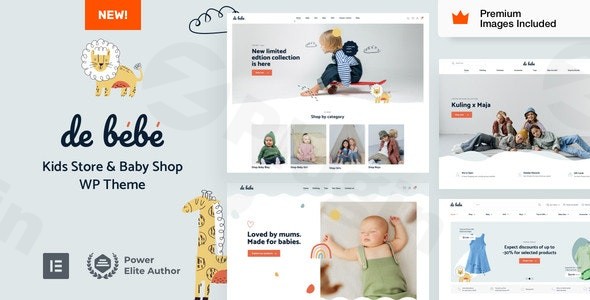
Creating an online presence for a children’s brand requires a delicate balance of playful aesthetics and robust e-commerce functionality. The Debebe WordPress theme is a premium, niche-specific solution designed precisely for this purpose. Whether you are launching a high-end baby boutique, a toy store, or a children’s clothing line, this baby shop WordPress theme offers a whimsical yet polished design that captures the warmth of childhood while driving conversions through a seamless user experience.Developed by VamTam, a seasoned team with a track record of serving over 100,000 clients, Debebe is built from the ground up to integrate deeply with Elementor Pro. It moves away from the “one-size-fits-all” approach of multipurpose themes, providing a tailored environment where design elements—like gentle palettes and kid-friendly typography—are already optimized for the youth retail market.
Key Features: Design, Layout & Performance
The Debebe theme is more than just a skin; it is a comprehensive design system focused on the unique needs of a children’s store WordPress theme.
Whimsical and Functional Layouts
Debebe offers dynamic content layouts that allow store owners to create unique designs for every part of their site. Unlike traditional themes that limit you to a few “fixed” templates, Debebe utilizes Elementor Pro to give you full control over:
- Product Pages: Showcase tiny clothes and toys with high-resolution galleries and clear CTAs.
- Archive & Category Pages: Organize vast inventories into easy-to-navigate grids.
- Custom 404 & Search Results: Maintain brand consistency even on utility pages.
Advanced Customization Capabilities
The theme leverages the Elementor Pro Global Styles Panel as its primary command center. This means you don’t have to jump between a dozen different menus to change your branding.
- Typography & Color: Access unlimited color schemes and advanced typography settings to match your brand’s specific “playful” or “luxury” vibe.
- Mega Menus: Built-in Mega Menu integration allows you to organize complex product categories (e.g., Ages 0-3, Educational Toys, Bedding) into a user-friendly navigation structure.
- Premium Assets: One of Debebe’s standout value propositions is the inclusion of $265 worth of premium stock images within the demo content, giving your site a professional look immediately upon import.
Performance & SEO Readiness
In the world of e-commerce, speed is a ranking factor. Is the Debebe theme good for SEO? Yes. VamTam has engineered the theme with clean, optimized code that enhances rather than bloats Elementor’s native performance.
- Mobile-First Design: With custom breakpoints, the shopping experience is flawless on smartphones—where most parents do their browsing.
- Clean Markup: The theme’s thoughtful structure ensures that search engine crawlers can easily index your products and blog posts.
Installation & Demo Import Guide
Setting up a WooCommerce theme for baby clothes shouldn’t be a technical headache. Debebe is designed for beginners and creative entrepreneurs.
- Install & Activate: Upload the Debebe theme file via your WordPress Dashboard (Appearance > Themes > Add New).
- Required Plugins: Upon activation, you will be prompted to install required plugins. Note: Elementor Pro is mandatory for the full feature set and demo import functionality.
- One-Click Demo Import: Navigate to the theme’s setup wizard. The one-click importer will bring in all pre-built pages, settings, and those valuable premium stock images.
- Finalize Setup: Once the import is complete, your site will look exactly like the live demo. You can then begin replacing the placeholder content with your own products.Tip: Ensure your server’s PHP memory limit is set to at least 256M to prevent timeouts during the demo data import process.
Customization Guide: Branding & Layout
Personalizing your baby shop WordPress theme is done through a unified drag-and-drop workflow. Since Debebe is built entirely around Elementor, there is no “learning curve” between the theme settings and the page builder.
Personalizing the Header and Footer
Using the Elementor Pro Theme Builder, you can visually edit your header and footer. This is ideal for adding “Free Shipping” banners, social media icons, or a sticky “Cart” button that follows the user as they scroll.
Global Styles
Instead of editing every button individually, use the Global Styles Panel to set your primary brand colors (e.g., pastel pinks, soft blues, or vibrant yellows) and fonts. These changes will propagate across the entire site instantly, ensuring a cohesive visual hierarchy.
Setting Up the Shop
Since the theme is fully compatible with WooCommerce, you can customize your shop’s grid layout, filter sidebars, and “Quick View” options directly within the Elementor interface. This allows for a highly branded shopping journey that generic themes simply cannot match.
FAQ & Troubleshooting
Is Debebe compatible with Elementor Pro?
Yes, Debebe is built specifically for Elementor and Elementor Pro. In fact, Elementor Pro is required to access the theme’s full customization features, including the header/footer builder and the one-click demo import.
Does Debebe support WooCommerce for online stores?
Absolutely. Debebe is a dedicated e-commerce theme with specialized layouts for WooCommerce shop pages, product descriptions, and checkout flows, specifically optimized for children’s retail.
How do I update the theme without losing customizations?
Because Debebe uses Elementor Pro for layouts and the Global Styles Panel for branding, your designs are stored in the database. However, it is always recommended to use a child theme if you plan on adding custom PHP code or CSS. VamTam provides child theme resources to ensure safe updates.
What should I do if the demo import fails?
Most import issues are related to server resources. Ensure your PHP version is up to date and your max_execution_time and memory_limit are increased. If the layout looks different than the demo, ensure Elementor Pro is active and that you have regenerated your CSS files in Elementor > Tools.
Conclusion
The Debebe WordPress theme stands out as a top-tier choice for anyone looking to build a “whimsical, user-friendly design” for the children’s market. Its deep integration with Elementor Pro makes it one of the most flexible niche themes available, effectively removing the barrier between a beginner’s vision and a professional-grade storefront.Verdict: If you are an entrepreneur or a small business owner who wants a “playful yet polished” e-commerce site without hiring a developer, Debebe offers incredible value—especially considering the included premium assets and mobile-first performance. It is a robust, SEO-friendly foundation for any growing baby boutique or toy shop.For more WordPress theme reviews and SEO strategies, visit wppick.com.
I. Download Limits & Account Benefits
- Free Downloads: Each email address receives 3 downloads per day for free products
- Upgrade Benefits: Purchase any paid product to increase your daily download limit by 3 for each paid product
- No Account Required: You can download immediately by receiving the download link via email
- Account Recommended: Create an account for easier access to your order history and direct update downloads
II. Understanding GPL vs Official Versions
Important: The products available on WPPick are GPL-licensed versions, which differ from official developer versions. Before purchasing, please read our comprehensive guide: Understanding GPL & Official Differences at WPPick
Key Points:
- GPL versions may not include premium support from original developers
- Updates may be delayed compared to official releases
- Some premium features might have limitations
- Always consider your specific needs and support requirements
III. Support & Assistance
We’re here to help through multiple channels:
- Email Support: Direct email assistance for all inquiries
- Live Chat: Real-time support during business hours
- Comprehensive Documentation: Detailed guides and tutorials
IV. Order Tracking
Access your complete purchase history and download links anytime: Order History
V. Account Access
New to WPPick? Login or Create Account to manage your downloads and orders efficiently.
VI. Refund Protection
We stand behind our products with a clear refund policy. Review our terms: Refund Policy
VII. Privacy & Security
Your data security is our priority. Learn how we protect your information: Privacy Policy
VII. Terms of Service
Understanding our service terms ensures a smooth experience: Terms of Use
Quick Tips for Best Experience
- Verify Compatibility: Check plugin/theme compatibility with your WordPress version
- Backup First: Always backup your site before installing new plugins or themes
- Test Environment: Consider testing on a staging site first
- Stay Updated: Regularly check for updates in your account dashboard
- Read Documentation: Review any included documentation for optimal setup
Need Help?
If you have questions about downloads, licensing, or need technical assistance, don’t hesitate to contact our support team. We’re committed to ensuring you have the best possible experience with WPPick products.
Ready to get started? Your download adventure begins with just one click!
- Updated style.css
- Updated vamtam/admin/assets/js/check-license.js
- Updated vamtam/admin/helpers/updates/version-checker.php
- Updated vamtam/classes/enqueues.php