

Dental Clinic – Medicine & Healthcare Doctor WordPress Theme
/Year
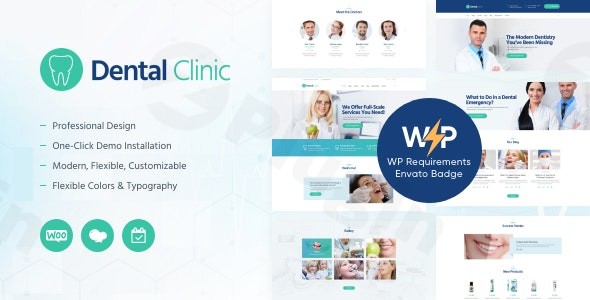
Building a trustworthy online presence is critical for healthcare professionals, where first impressions often dictate patient confidence. The Dental Clinic – Medicine & Healthcare Doctor WordPress Theme is a specialized solution designed to meet the rigorous demands of dental practices, orthodontists, and medical clinics. As a high-performance medical WordPress theme for dentists, it combines a sturdy corporate aesthetic with the functional tools necessary to manage a modern healthcare facility online.In this guide, we will explore the theme’s design capabilities, technical specifications, and provide a step-by-step setup guide to help you launch a professional medical website.
Key Features: Design, Layout & Performance
The Dental Clinic – Medicine & Healthcare Doctor WordPress Theme is built on a design philosophy of professionalism and serenity. It utilizes “soothing shades” (typically blues and whites) to instill a sense of calm and hygiene—essential traits for any dental or medical website.
Professional Layout Options
The theme offers a flexible architectural foundation, supporting both full-width and boxed layouts. Whether you are looking to create a high-impact landing page or a traditional corporate site, the theme provides:
- Homepage Variations: Multiple pre-designed homepages tailored for different medical niches (Clinics, Research, Pharmacies).
- Blog & Gallery Layouts: Choose from classic, list, or grid formats (2 and 3 columns) to showcase your facilities or health tips.
- Visual Hierarchy: The theme emphasizes clear typography and generous whitespace, ensuring that vital information like “Emergency Services” or “Contact Details” is immediately visible.
Advanced Customization Capabilities
Unlike generic themes, this healthcare doctor WordPress theme provides granular control over branding:
- Unlimited Color Schemes: Easily adjust primary and secondary colors to match your clinic’s existing branding through the Live Customizer.
- Google Fonts Integration: Access a vast library of typography to ensure your content is readable and aligns with your professional tone.
- Header & Footer Builders: Customize the top and bottom sections of your site to include social links, business hours, and quick-call buttons.
Performance & SEO Optimization
In the healthcare industry, speed and visibility are paramount. This theme is engineered with:
- Clean Code Structure: Built to follow modern WordPress standards, reducing bloat and ensuring faster page load times.
- SEO Readiness: The markup is optimized for search engines, helping your clinic rank higher for local queries like “dentist near me.”
- Fully Responsive Design: The theme is 100% mobile-friendly and cross-browser compatible, ensuring a seamless experience for patients booking appointments on their smartphones.
Technical Specifications & Compatibility
For a medical site to function correctly, it must integrate with various third-party tools. This theme excels in its compatibility:
- WordPress Version: Fully tested and approved for WordPress 6.0+.
- Page Builders: Highly compatible with Elementor and WPBakery, allowing for drag-and-drop editing without touching a single line of code.
- Gutenberg Ready: It supports the native WordPress Block Editor for those who prefer a more streamlined editing experience.
- Essential Plugins: Works seamlessly with WooCommerce (for pharmacy sales), Contact Form 7, Yoast SEO, and Revolution Slider. It also integrates with popular appointment booking plugins to streamline patient scheduling.
Installation & Demo Import: A Step-by-Step Guide
Setting up the Dental Clinic – Medicine & Healthcare Doctor WordPress Theme is straightforward, even for non-developers. Follow these steps to get started:
- Install & Activate: Log in to your WordPress dashboard, navigate to Appearance > Themes > Add New, and upload the theme zip file. Click Activate.
- Install Required Plugins: Upon activation, you will see a prompt to install required companion plugins (such as Elementor, Slider Revolution, and the Theme Core plugin). Click “Begin installing plugins” and then activate them.
- One-Click Demo Import: Navigate to the theme options panel (usually under Appearance > Import Demo Data). Choose your preferred dental or medical demo and click Import.
- Pro Tip: Ensure your server’s memory limit is set to at least 256M to avoid timeouts during the import of high-resolution images.
- Verify Content: Once the process is complete, check your menus, widgets, and homepage. The demo content will serve as a perfect blueprint for your site.
Personalizing Your Medical Website
Once the demo is imported, use the WordPress Customizer to finalize your branding:
- Identity: Upload your clinic’s logo and favicon.
- Navigation: Set up your primary menu to include “Services,” “Our Team,” and “Patient Testimonials.”
- Global Styles: Set your global font sizes and primary brand colors to ensure consistency across all subpages.
- Child Theme: Always activate the included Child Theme before adding custom CSS or making code-level changes to protect your modifications during future updates.
FAQ & Troubleshooting
Is this theme compatible with Elementor?
Yes, the Dental Clinic theme is an Elementor-compatible medical theme. It allows you to use drag-and-drop widgets to build custom layouts for services, doctor profiles, and contact pages without coding knowledge.
Does it support online appointment booking?
While the theme includes built-in forms, it is designed to work perfectly with advanced booking plugins like Bookly or Amelia. This allows patients to schedule appointments directly through your website.
How do I update the theme without losing my data?
To update safely, always use a Child Theme for your customizations. When a new version is released, you can update the parent theme via the dashboard, and your settings/styles will remain intact.
Does the theme support WooCommerce for pharmacies?
Yes, the theme is fully WooCommerce ready. You can easily set up an online store to sell dental hygiene products, medicine, or medical equipment.
Conclusion
The Dental Clinic – Medicine & Healthcare Doctor WordPress Theme is a robust, visually soothing, and technically sound choice for any healthcare professional. Its balance of niche-specific features—like doctor profiles and service grids—combined with its Elementor compatibility and SEO-optimized code, makes it a top-tier contender for building a medical website.Whether you are a small dental practice or a large medical facility, this theme provides the tools to grow your patient base and project a professional image. For more WordPress theme reviews and medical web design tips, visit us at wppick.com.
I. Download Limits & Account Benefits
- Free Downloads: Each email address receives 3 downloads per day for free products
- Upgrade Benefits: Purchase any paid product to increase your daily download limit by 3 for each paid product
- No Account Required: You can download immediately by receiving the download link via email
- Account Recommended: Create an account for easier access to your order history and direct update downloads
II. Understanding GPL vs Official Versions
Important: The products available on WPPick are GPL-licensed versions, which differ from official developer versions. Before purchasing, please read our comprehensive guide: Understanding GPL & Official Differences at WPPick
Key Points:
- GPL versions may not include premium support from original developers
- Updates may be delayed compared to official releases
- Some premium features might have limitations
- Always consider your specific needs and support requirements
III. Support & Assistance
We’re here to help through multiple channels:
- Email Support: Direct email assistance for all inquiries
- Live Chat: Real-time support during business hours
- Comprehensive Documentation: Detailed guides and tutorials
IV. Order Tracking
Access your complete purchase history and download links anytime: Order History
V. Account Access
New to WPPick? Login or Create Account to manage your downloads and orders efficiently.
VI. Refund Protection
We stand behind our products with a clear refund policy. Review our terms: Refund Policy
VII. Privacy & Security
Your data security is our priority. Learn how we protect your information: Privacy Policy
VII. Terms of Service
Understanding our service terms ensures a smooth experience: Terms of Use
Quick Tips for Best Experience
- Verify Compatibility: Check plugin/theme compatibility with your WordPress version
- Backup First: Always backup your site before installing new plugins or themes
- Test Environment: Consider testing on a staging site first
- Stay Updated: Regularly check for updates in your account dashboard
- Read Documentation: Review any included documentation for optimal setup
Need Help?
If you have questions about downloads, licensing, or need technical assistance, don’t hesitate to contact our support team. We’re committed to ensuring you have the best possible experience with WPPick products.
Ready to get started? Your download adventure begins with just one click!
- Improve theme styles