

Deski – Modern Saas & Software Landing Page WordPress Theme
/Year
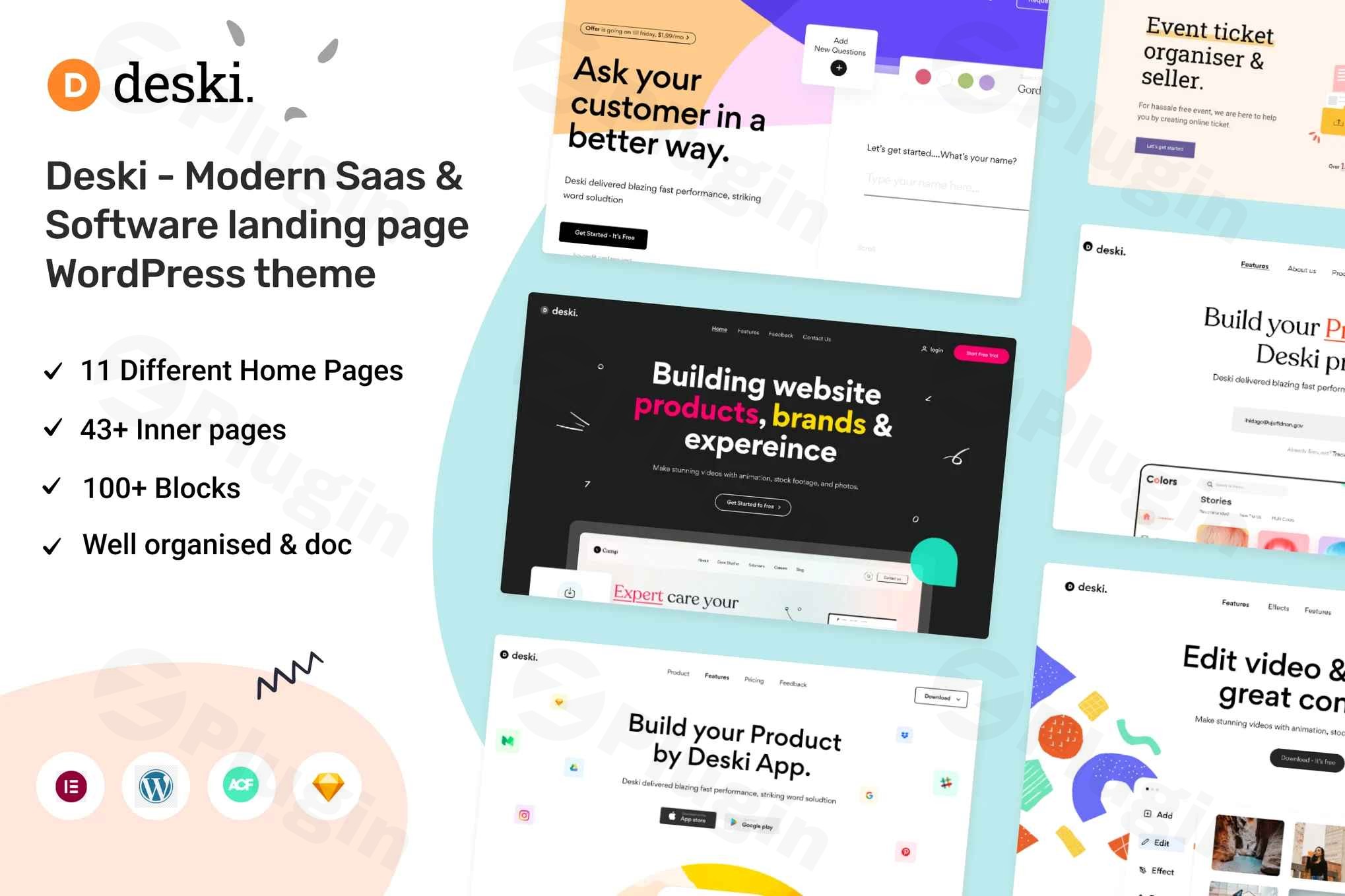
The digital landscape demands a powerful online presence, especially for SaaS companies, software developers, and digital agencies. The Deski WordPress theme steps up as a cutting-edge solution, meticulously designed to create high-converting, visually stunning landing pages and business websites. This comprehensive review and setup guide will delve into Deski’s features, ease of use, and overall value for businesses seeking a modern, professional, and performance-driven online platform.Deski is a modern, responsive WordPress theme engineered by CreativeGigs, primarily catering to software companies, SaaS providers, digital agencies, and technology businesses. Its design philosophy emphasizes a clean aesthetic, strategic use of white space, and professional typography to communicate trust and expertise. With Deski, businesses can establish an authoritative online presence that effectively showcases their products and services, driving engagement and conversions.
Key Features: Design, Layout & Performance
Deski is packed with features that empower users to build sophisticated and functional websites without needing extensive coding knowledge. Its strength lies in combining aesthetic appeal with robust technical foundations.
Design & Layout Options
Deski offers remarkable design flexibility, crucial for businesses that need to stand out.
- Diverse Homepage and Demo Templates: Choose from 10 distinct homepage layouts and 5 complete demo templates, providing a solid foundation for various business models and industry requirements. These pre-built options act as starter sites, allowing for rapid deployment and customization.
- Advanced Blogging Capabilities: For content marketing and thought leadership, Deski includes 4+ specialized blog page templates. These layouts are designed to enhance readability, support SEO optimization, and help establish your brand as an industry authority.
- Responsive and Cross-Platform Design: The theme boasts a fully responsive design, ensuring flawless presentation across all devices—desktops, laptops, tablets, and mobile smartphones. It automatically adapts to provide an optimal user experience, crucial for today’s multi-device users.
- Sticky Navigation Menu: Enhancing user experience, the sticky navigation menu remains accessible as users scroll, improving site engagement and conversion rates by keeping key navigation elements always in view.
- Modern Visual Elements: Deski integrates SVG icons for crisp, scalable visuals and the AOS (Animate On Scroll) animation library to create dynamic and engaging user experiences, adding a touch of modern sophistication without compromising performance.
Customization Capabilities
Personalizing your website to reflect your brand identity is straightforward with Deski.
- Easy Customization: Described as “easy to customize” and “flexible and multi-purpose,” Deski provides accessible options for tweaking design elements. While not explicitly detailed, its compatibility with Elementor, a popular drag-and-drop page builder, facilitates extensive visual customization.
- Foundational Framework: Built on Bootstrap 4.x and an 1170px grid system, the theme offers a solid and organized structure, suggesting inherent control over layout, spacing, and responsive behavior.
- International Ready: For businesses with a global audience, Deski is fully compatible with the WPML plugin, enabling the creation of multilingual websites and localized content.
Performance & SEO Features
Performance and search engine visibility are paramount for any modern website, and Deski is built with these in mind.
- Optimized for Speed: Built with clean, semantic, and commented code, alongside optimized CSS, Deski aims for super fast load speeds. This is crucial for user experience and SEO rankings.
- SEO-Ready Architecture: The theme features a search engine optimized code structure and markup, which helps improve your website’s visibility in search results and drives qualified organic traffic to your software solutions.
- Robust Compatibility: Deski is “Based on WordPress 5.x” and has been “Tested up to version 6.0,” ensuring compatibility with modern WordPress installations. While specific PHP requirements aren’t detailed, modern WordPress themes generally perform best with PHP 7.4 or higher. It is also cross-browser compatible, guaranteeing a consistent experience across different web browsers.
Installation & Demo Import Guide
Setting up your Deski website is designed to be a streamlined process, especially with its pre-built demo content.
- Install & Activate the Theme:
- From your WordPress dashboard, navigate to
Appearance > Themes > Add New. - Click
Upload Theme, choose thedeski.zipfile (which you would download after purchase), and clickInstall Now. - Once installed, click
Activate.
- From your WordPress dashboard, navigate to
- Install Required Plugins: Deski is compatible with Elementor, a powerful page builder. After activating the theme, you’ll likely see a notice prompting you to install recommended plugins, including Elementor. Install and activate these as instructed.
- Import Demo Content: Deski includes multiple demo templates. To achieve the look of the theme demos, navigate to the theme’s dedicated demo importer (often found under
Appearance > Import Demo Dataor a similarly named menu item in your WordPress dashboard). Select your desired demo and clickImport.- Heads Up: Importing demo content can be resource-intensive. Ensure your hosting environment has sufficient PHP memory limits and execution time to prevent timeouts, especially for larger demos. If you encounter issues, temporarily increasing these values in your
wp-config.phporphp.inifile might be necessary.
- Heads Up: Importing demo content can be resource-intensive. Ensure your hosting environment has sufficient PHP memory limits and execution time to prevent timeouts, especially for larger demos. If you encounter issues, temporarily increasing these values in your
- Post-Import Setup: After a successful demo import, you may need to:
- Assign Menus: Go to
Appearance > Menusand assign the imported menus to their correct locations (e.g., Primary Menu). - Set Homepage: Navigate to
Settings > Readingand set your preferred static homepage from the imported pages. - Review Widgets: Check
Appearance > Widgetsto ensure all sidebar and footer widgets are correctly placed.
- Assign Menus: Go to
Customization Guide: Branding & Layout
Deski provides the tools to tailor your site to your brand’s unique identity, primarily through the WordPress Customizer and Elementor.
- WordPress Customizer / Global Styles: For site-wide settings like colors, typography, and general layout options, the WordPress Customizer (
Appearance > Customize) is your go-to. Here, you can define your brand’s color palette, select professional fonts (often via Google Fonts integration or theme-specific font options), and adjust spacing or container widths. - Logo & Site Identity: Upload your brand logo and favicon in the Customizer under
Site Identityto establish immediate brand recognition. - Header and Footer Customization: Deski’s compatibility with Elementor suggests that custom headers and footers can be designed using Elementor Pro’s Theme Builder features, offering drag-and-drop control over these critical areas. For basic adjustments, theme options within the Customizer may also be available. The theme’s sticky menu is a built-in feature, enhancing navigation.
- Page Building with Elementor: For designing individual pages, Elementor is your primary tool. Utilize its intuitive drag-and-drop interface to build complex layouts, integrate various modules, and fine-tune every element. Deski’s clean design system provides an excellent canvas for Elementor’s capabilities.
- Blog Page & Post Layouts: Configure your blog page display and individual post layouts through theme options, determining how your valuable content is presented to your audience.
- Menu Management: Organize your site’s navigation under
Appearance > Menus. Create custom menus and assign them to the theme’s available menu locations to guide visitors through your content effectively.
FAQ & Troubleshooting
Here are answers to common questions about the Deski WordPress theme to assist with setup and ongoing maintenance.
Is Deski compatible with Elementor?
Yes, the Deski theme is fully compatible with Elementor and Elementor Pro, allowing users to leverage its powerful drag-and-drop interface for extensive page building and customization.
Does Deski support WooCommerce for online stores?
Yes, Deski includes features for e-commerce, making it compatible with WooCommerce. This allows you to set up and manage an online store to sell your software, services, or related products directly from your website.
Does the Deski theme support child themes?
Yes, Deski supports child themes. The documentation indicates that “Child style.css is loaded after wp-custom.css,” which is a clear sign of proper child theme integration, allowing you to make customizations without affecting the core theme files during updates.
Is Deski optimized for speed and SEO?
Absolutely. Deski is built with “clean and commented code,” “Super fast load Speed,” and an “SEO optimized code” structure. These features ensure your website loads quickly and is well-structured for better visibility in search engine results.
What WordPress and PHP versions does Deski require?
Deski is based on WordPress 5.x and has been “Tested up to version 6.0.” For optimal performance and security, it’s generally recommended to run WordPress themes on PHP 7.4 or higher, although specific requirements for Deski were not explicitly detailed beyond its WordPress compatibility.
Conclusion
The Deski – Modern SaaS & Software Landing Page WordPress Theme is an exceptional choice for any business in the technology sector looking to establish a dynamic and high-performing online presence. Its blend of modern design, extensive layout options, and robust customization capabilities makes it a versatile tool for creating everything from captivating SaaS landing pages to comprehensive agency websites.With its emphasis on speed optimization, SEO-ready architecture, and Elementor compatibility, Deski empowers users to build professional websites that not only look great but also perform effectively in search engines and provide an outstanding user experience. While it offers deep customization, its pre-built demos allow for quick deployment, making it ideal for both seasoned developers and those new to WordPress.For freelancers, agencies, SaaS companies, and IT service providers seeking a modern aesthetic, superior responsiveness, and the flexibility to grow, Deski stands out as a reliable and powerful foundation for their digital success. It’s a confident choice for showcasing digital products and converting visitors into loyal customers.
I. Download Limits & Account Benefits
- Free Downloads: Each email address receives 3 downloads per day for free products
- Upgrade Benefits: Purchase any paid product to increase your daily download limit by 3 for each paid product
- No Account Required: You can download immediately by receiving the download link via email
- Account Recommended: Create an account for easier access to your order history and direct update downloads
II. Understanding GPL vs Official Versions
Important: The products available on WPPick are GPL-licensed versions, which differ from official developer versions. Before purchasing, please read our comprehensive guide: Understanding GPL & Official Differences at WPPick
Key Points:
- GPL versions may not include premium support from original developers
- Updates may be delayed compared to official releases
- Some premium features might have limitations
- Always consider your specific needs and support requirements
III. Support & Assistance
We’re here to help through multiple channels:
- Email Support: Direct email assistance for all inquiries
- Live Chat: Real-time support during business hours
- Comprehensive Documentation: Detailed guides and tutorials
IV. Order Tracking
Access your complete purchase history and download links anytime: Order History
V. Account Access
New to WPPick? Login or Create Account to manage your downloads and orders efficiently.
VI. Refund Protection
We stand behind our products with a clear refund policy. Review our terms: Refund Policy
VII. Privacy & Security
Your data security is our priority. Learn how we protect your information: Privacy Policy
VII. Terms of Service
Understanding our service terms ensures a smooth experience: Terms of Use
Quick Tips for Best Experience
- Verify Compatibility: Check plugin/theme compatibility with your WordPress version
- Backup First: Always backup your site before installing new plugins or themes
- Test Environment: Consider testing on a staging site first
- Stay Updated: Regularly check for updates in your account dashboard
- Read Documentation: Review any included documentation for optimal setup
Need Help?
If you have questions about downloads, licensing, or need technical assistance, don’t hesitate to contact our support team. We’re committed to ensuring you have the best possible experience with WPPick products.
Ready to get started? Your download adventure begins with just one click!