
Diaco – Architecture & Interior Design Elementor WordPress Theme
/Year
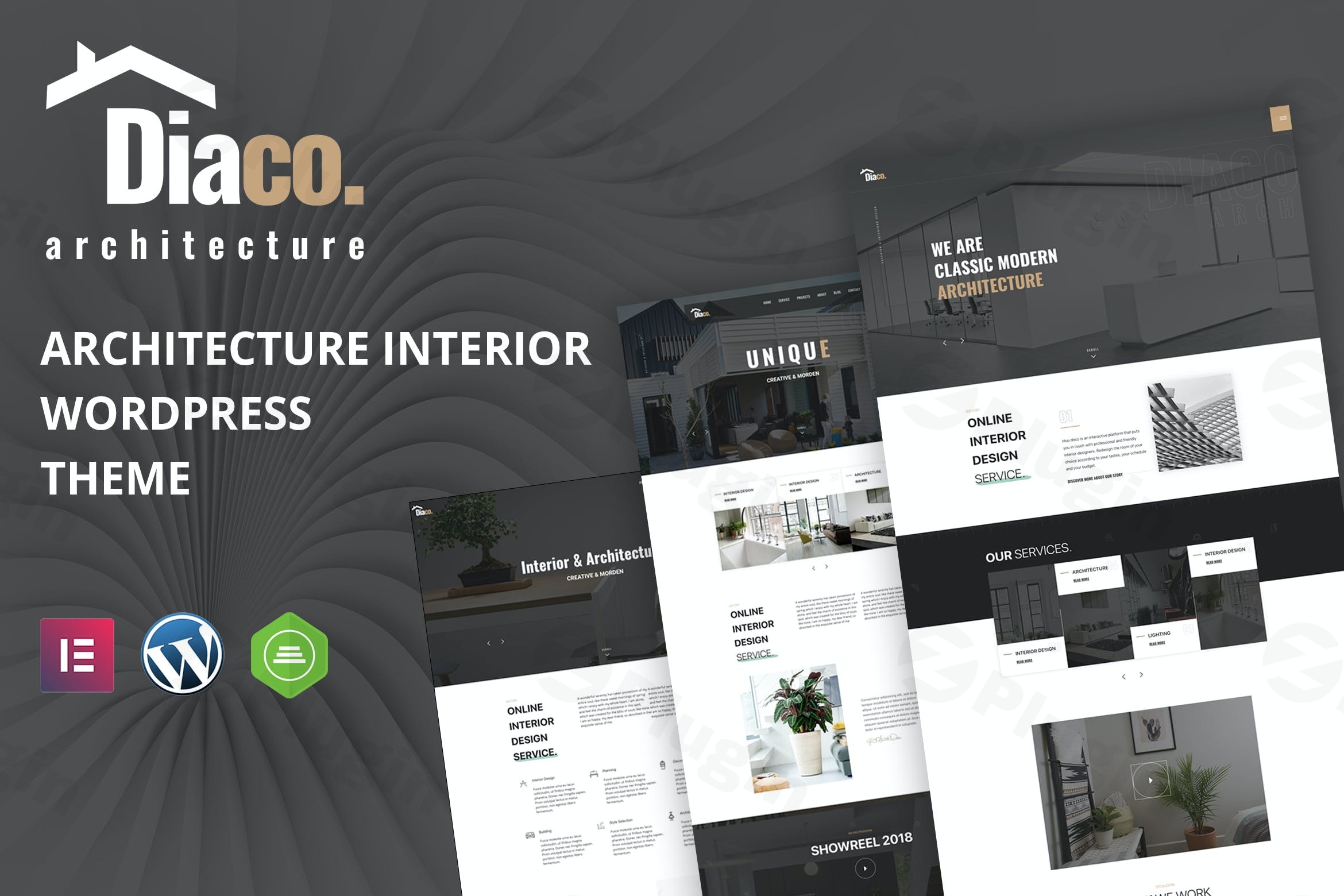
Diaco is a meticulously crafted, premium Elementor WordPress theme specifically designed for professionals in the architecture, interior design, and home decor industries. With its clean, modern aesthetic and powerful integration with the Elementor page builder, Diaco empowers architects and interior designers to create stunning online portfolios and showcase their projects with unparalleled elegance and efficiency. This theme isn’t just a template; it’s a digital canvas built for creative professionals who demand excellence in their online presentation.
Why Diaco is Your Design Business’s Next Digital Foundation
For architects, interior designers, and related professionals, a compelling online presence is paramount. Diaco addresses this need by providing a sophisticated, visually driven platform. Whether you’re presenting residential interiors, commercial build-outs, or intricate architectural visualizations, Diaco offers the tools to captivate your audience and establish trust. Its design philosophy centers on a clean, minimal, and stylish aesthetic, making it the ideal choice for showcasing your work effectively.
Key Features: Design, Layout & Performance
Diaco stands out with a robust set of features engineered to support a high-converting, visually rich design business website.
Design & Layout Options
- Diverse Homepage Variations: Kickstart your site with ease, thanks to 6 unique homepage variations that cater to different styles and presentation needs.
- Dynamic Portfolio Showcases: Highlight your best projects with multiple gallery styles and dedicated unlimited portfolio pages, crucial for any design professional.
- Custom Blog Layouts: Share insights, news, and updates using custom blog layouts and single blog styles, ensuring your content looks as good as your designs.
- Responsive Architecture: Guaranteed flawless display across all devices—desktops, tablets, and smartphones—with its 100% fluid responsive design.
- Immersive Visual Effects: Engage visitors with elegant parallax scrolling effects and smooth animations, adding a layer of sophistication to your presentations.
- Retina-Ready Graphics: Enjoy crisp, pixel-perfect visuals on high-resolution screens, ensuring your design details are always sharp.
- Robust Framework: Built on the stable and flexible Bootstrap 4 framework, providing a solid foundation for your website.
Customization Capabilities
- Elementor Page Builder Integration: At its core, Diaco is deeply integrated with Elementor Page Builder, allowing you to create custom layouts without any coding. Its intuitive drag-and-drop interface puts you in complete control of your site’s design.
- Advanced Typography: Tailor your brand’s voice with custom typography options, including extensive Google Fonts integration.
- Flexible Header & Navigation: Choose from multiple header and navigation styles to create the perfect top-level user experience.
- Granular Control: Utilize Elementor to fine-tune every aspect, from color schemes to spacing, containers, sections, and backgrounds, ensuring a truly custom look.
- Slider Revolution Included: Create stunning hero sections and dynamic content sliders with the integrated Slider Revolution plugin.
- Client Testimonial Sections: Build credibility with professionally designed testimonial areas to feature client feedback.
- Service Presentation: Showcase your design services and packages beautifully with dedicated presentation sections.
Performance & SEO Features
- Optimized for Fast Loading Speeds: Diaco is engineered for performance, contributing directly to a better user experience and higher SEO rankings.
- Clean, Well-Commented Code: The theme features clean, well-structured code based on W3C validated HTML5 & CSS3, ensuring stability, cross-browser compatibility, and ease of customization for developers.
- SEO Optimized: Designed with search engine optimization in mind, helping your design studio rank higher in search results and attract more clients.
- Cross-Browser Compatibility: Your website will look and function perfectly across all major web browsers.
Installation & Demo Import: Get Started Quickly
Setting up your Diaco website is designed to be straightforward, even for those new to WordPress.
- Install & Activate the Theme:
- Log in to your WordPress dashboard.
- Navigate to
Appearance > Themes > Add New > Upload Theme. - Upload the Diaco theme zip file you downloaded from your purchase source (e.g., ZeroPlugin.com or ThemeForest).
- Click “Install Now” and then “Activate.”
- Install Required Companion Plugins:
- Upon activation, Diaco will prompt you to install a few essential plugins. These typically include Elementor Page Builder, Contact Form 7, and Slider Revolution. Ensure all recommended plugins are installed and activated for full theme functionality.
- Use One-Click Demo Import:
- Diaco offers a convenient one-click demo import feature. This is the fastest way to get your site looking like one of the beautiful demo versions.
- Navigate to the theme’s demo importer (usually found under
Appearance > Import Demo Dataor a similarly named option in your WordPress dashboard). - Select the homepage variation you prefer and initiate the import.
- What to Expect:
- During the demo import, the theme will populate your site with demo content, pages, posts, menus, widgets, and images.
- Expect the process to take a few minutes. For larger demo imports, ensure your server has sufficient memory and reasonable execution time limits to prevent timeouts.
- After the import, you’ll find your site’s structure, design elements, and placeholder content ready for your customization. You’ll then need to assign your main menu under
Appearance > Menusand set your preferred homepage underSettings > Reading.
Customization Guide: Branding Your Architecture & Design Studio
Personalizing Diaco to reflect your unique brand identity is intuitive, primarily powered by Elementor’s visual builder.
- Customizing with Elementor:
- For page-specific layouts and content, navigate to any page and click “Edit with Elementor.” Here, you can drag-and-drop elements, edit text, swap images, and adjust styling in real-time. Diaco also provides custom Elementor widgets specifically tailored for architecture and interior design content, like portfolio galleries and testimonial carousels.
- Global Styles & Typography:
- Elementor allows you to set global styles for colors and typography, ensuring brand consistency across your entire site. You can also fine-tune individual element styles.
- Adjust your chosen Google Fonts and color palette via Elementor’s global settings or the WordPress Customizer (
Appearance > Customize), if available for global theme options.
- Logo & Site Identity:
- Upload your logo and favicon via the WordPress Customizer or the Elementor site settings to establish your brand’s visual identity. Diaco supports custom headers and footers, which can often be edited directly within Elementor or via specific theme options.
- Header & Footer Layouts:
- Explore Diaco’s multiple header and navigation styles to find the one that best suits your brand. For footers, leverage the “bottom footer widgets” and Elementor’s capabilities to build a compelling and functional footer area.
- Setting Up Your Homepage and Blog Page:
- After demo import, navigate to
Settings > Readingto set your chosen demo page as the static homepage and designate a page for your blog posts.
- After demo import, navigate to
- Menus:
- Go to
Appearance > Menusto organize your navigation. Assign your primary menu to the appropriate location (e.g., “Main Menu”).
- Go to
FAQ & Troubleshooting
Here are answers to common questions about the Diaco WordPress theme:
Is Diaco compatible with Elementor, WPBakery, or Gutenberg?
Diaco is deeply and primarily integrated with Elementor Page Builder, offering extensive customization through its drag-and-drop interface and custom Elementor widgets. While it is built to work within the WordPress environment, its core design and customization leverage Elementor. Full compatibility with other page builders like WPBakery or complete reliance on the native Gutenberg editor for all content is not its primary focus, though standard WordPress content will function.
Does Diaco theme support WooCommerce for online stores?
Yes, Diaco is mentioned as WooCommerce Compatible. This means you can set up an online store to sell your design products, services, or related merchandise directly from your architecture or interior design website.
What are the recommended PHP versions for the Diaco theme?
While specific minimum PHP requirements for Diaco are not explicitly documented by the theme developer, it is built to be compatible with the latest WordPress versions. Therefore, it is recommended to use the PHP versions recommended by WordPress.org for optimal performance and security. Currently, PHP 8.3 or greater is recommended, with a minimum of PHP 7.2.24, though older versions are no longer supported and pose security risks.
How can I customize the Diaco theme using Elementor?
To customize Diaco with Elementor, simply navigate to the page you wish to edit in your WordPress dashboard and click “Edit with Elementor.” This will open the Elementor interface, where you can use drag-and-drop functionality to add, remove, and rearrange elements, change text, swap images, and adjust styles without any coding. Diaco also provides custom Elementor widgets specifically for design portfolios and services.
Does Diaco theme support child themes?
While not explicitly stated in the provided documentation, it is standard practice for all premium WordPress themes, including Diaco, to support child themes. Using a child theme is highly recommended for any custom CSS, functions, or template modifications, as it ensures your changes are not overwritten when the parent Diaco theme receives updates.
Conclusion
The Diaco – Architecture & Interior Design Elementor WordPress Theme is an exceptional choice for architects, interior designers, and related creative professionals seeking a sophisticated and highly functional online presence. Its elegant, modern design, coupled with deep integration with the Elementor page builder, makes it incredibly flexible and easy to customize, even for users without coding experience.With its focus on portfolio showcases, dedicated service presentations, and robust performance features, Diaco offers a strong foundation for any design business. It’s SEO-optimized and mobile-responsive right out of the box, ensuring your work reaches a broad audience across all devices. For those in the design industry looking for a visually striking, Elementor-centric theme that accelerates their online project showcasing, Diaco delivers a professional and high-converting solution.
I. Download Limits & Account Benefits
- Free Downloads: Each email address receives 3 downloads per day for free products
- Upgrade Benefits: Purchase any paid product to increase your daily download limit by 3 for each paid product
- No Account Required: You can download immediately by receiving the download link via email
- Account Recommended: Create an account for easier access to your order history and direct update downloads
II. Understanding GPL vs Official Versions
Important: The products available on WPPick are GPL-licensed versions, which differ from official developer versions. Before purchasing, please read our comprehensive guide: Understanding GPL & Official Differences at WPPick
Key Points:
- GPL versions may not include premium support from original developers
- Updates may be delayed compared to official releases
- Some premium features might have limitations
- Always consider your specific needs and support requirements
III. Support & Assistance
We’re here to help through multiple channels:
- Email Support: Direct email assistance for all inquiries
- Live Chat: Real-time support during business hours
- Comprehensive Documentation: Detailed guides and tutorials
IV. Order Tracking
Access your complete purchase history and download links anytime: Order History
V. Account Access
New to WPPick? Login or Create Account to manage your downloads and orders efficiently.
VI. Refund Protection
We stand behind our products with a clear refund policy. Review our terms: Refund Policy
VII. Privacy & Security
Your data security is our priority. Learn how we protect your information: Privacy Policy
VII. Terms of Service
Understanding our service terms ensures a smooth experience: Terms of Use
Quick Tips for Best Experience
- Verify Compatibility: Check plugin/theme compatibility with your WordPress version
- Backup First: Always backup your site before installing new plugins or themes
- Test Environment: Consider testing on a staging site first
- Stay Updated: Regularly check for updates in your account dashboard
- Read Documentation: Review any included documentation for optimal setup
Need Help?
If you have questions about downloads, licensing, or need technical assistance, don’t hesitate to contact our support team. We’re committed to ensuring you have the best possible experience with WPPick products.
Ready to get started? Your download adventure begins with just one click!
- 15 July 2025