

Dk | Photography WordPress Theme
/Year
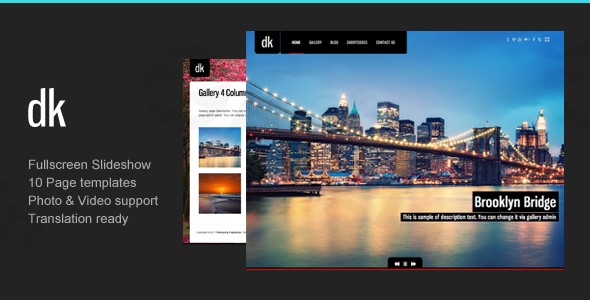
The DK Photography WordPress theme is a premium solution designed to help photographers, artists, and creative professionals showcase their work with visual impact and effortless style. This theme provides a robust platform for building a photography portfolio WordPress theme that truly stands out, emphasizing striking imagery and a streamlined user experience.
Introduction: Elevate Your Visual Storytelling with DK Photography
For visual artists and professional photographers, an online portfolio is more than just a gallery; it’s a digital storefront and a testament to their craft. The DK Photography WordPress theme from ThemeGoods offers a sophisticated and highly functional framework specifically tailored for this purpose. It’s a premium photography WordPress theme that combines elegant design with powerful features, making it ideal for anyone looking to present their creative work in an immersive and captivating way, from individual photographers to creative agencies and personal branding websites.
Key Features: Design, Layout & Performance for Visual Excellence
DK Photography is engineered to put your visual content front and center, offering a suite of features that empower stunning presentations and flexible layouts.
Design & Layout Options
The DK theme provides exceptional versatility in how you display your work:
- Diverse Homepage Styles: Choose from 4 unique homepage styles to set the perfect tone for your site, whether you prefer a minimalist look or a dynamic visual experience.
- Versatile Page Templates: With 10 page templates, you have the flexibility to create various content pages, from About Us to Contact, all while maintaining a consistent design.
- Specialized Gallery Templates: The core strength of DK lies in its 6 dedicated gallery templates, designed specifically for presenting photographic work. Options include 2, 3, and 4-column layouts, along with “flip” and “fullscreen” variations, making it an excellent photography gallery WordPress theme.
- Immersive Full-Screen Slideshows: Engage your audience immediately with full-screen slideshows for galleries, often featuring background overlay options, ensuring your images fill the entire screen for maximum impact.
- Password Protection: For client proofing or private collections, the theme includes password protection for private galleries, adding a layer of security and exclusivity.
- Mixed Media Support: Showcase a diverse range of content with support for images, videos, and external links within your galleries.
- Responsive Design: DK Photography is built with a responsive design, ensuring your portfolio looks impeccable and functions flawlessly across all devices, from desktops to tablets and smartphones (iPad and iPhone specifically supported).
Customization Capabilities
DK theme customization is made simple, allowing you to tailor the look and feel to your brand without extensive coding knowledge:
- Unlimited Color Options: Easily match your brand’s aesthetic with access to unlimited color options across your website.
- Advanced Typography: Integrate Google Web Fonts and leverage styled typography to control the visual hierarchy and personality of your text.
- Social Integration: Seamlessly connect your website to your online presence with social media profile integration and built-in Facebook and Twitter sharing capabilities.
- Custom Post Types for Portfolios: The theme provides native support for custom post types dedicated to portfolios, streamlining the organization and display of your projects.
- Unlimited Sidebar Creation: Gain granular control over your content presentation with the ability to create and assign unlimited sidebars to different pages.
Performance & SEO Features
While explicit modern performance metrics are not detailed, the DK Photography theme offers foundational elements for a solid online presence:
- Clean Code & Responsive Design: Being a premium theme, it’s designed with clean code that contributes to good load times, and its responsive design is crucial for mobile SEO and user experience.
- WordPress Best Practices: With support for custom menus, custom post types, and a built-in shortcode generator, the theme adheres to many WordPress best practices, which inherently benefits SEO by creating a well-structured site.
- Compatibility: It offers broad cross-browser compatibility (IE11, Firefox, Safari, Opera, Chrome, Edge) ensuring a consistent experience for all visitors.
Installation & Demo Import: Get Started in Minutes
Setting up the DK Photography WordPress theme is a straightforward process, even for beginners, thanks to its user-friendly approach.
- Install & Activate the Theme:
- First, purchase and download the theme files from a trusted source like ThemeForest.
- Log in to your WordPress dashboard.
- Navigate to
Appearance > Themes > Add New > Upload Theme. - Choose the theme’s
.zipfile you downloaded and clickInstall Now. - Once installed, click
Activate.
- Install Required Companion Plugins:
- After activation, the theme may prompt you to install recommended plugins (e.g., for the shortcode generator or custom widgets). Follow the on-screen instructions to install and activate them.
- One-Click Demo Import:
- The DK Photography theme features a one-click demo import option, a significant time-saver. Look for an “Import Demo” or similar option, often found under the theme’s dedicated menu or within the
Appearancesection. - Clicking this will populate your site with content, layouts, and settings similar to the theme’s demo site.
- The DK Photography theme features a one-click demo import option, a significant time-saver. Look for an “Import Demo” or similar option, often found under the theme’s dedicated menu or within the
- What to Expect:
- After the demo import, your site will have pre-designed pages, menus, widgets, and some placeholder content. You’ll then replace this content with your own images and text. While the demo import is usually smooth, large imports can sometimes require increased server memory or execution time. If you encounter issues, consult your hosting provider or the theme documentation.
Customization Guide: Personalizing Your Visual Brand
Once installed, personalizing the DK Photography theme to reflect your unique brand is intuitive. The theme leverages standard WordPress customization methods alongside its own robust options.
- WordPress Customizer: While a “live customizer” isn’t explicitly mentioned, the theme’s features imply extensive customization through its options panel. Navigate to
Appearance > Customize(or a similar theme options panel) to access global settings. - Colors and Typography: Easily change your website’s color schemes and select from a wide array of Google Web Fonts to perfectly match your brand’s aesthetic and voice. This includes primary and secondary colors, link colors, and background hues.
- Logo and Branding: Upload your custom logo and favicon to instantly brand your site.
- Header and Footer Layouts: While dedicated builders are not explicitly documented, the theme supports WordPress custom menus and offers a “hideable menu option” for an optimized user experience. You can configure widgets in available widget areas (including unlimited sidebars) to customize footer content.
- Setting Up Your Homepage and Blog: After importing the demo, you can designate any page as your static homepage via
Settings > Reading. Similarly, you can set a page to display your latest posts as a blog. - Menus: Create and assign custom navigation menus via
Appearance > Menusto guide visitors through your portfolio and content efficiently. - Shortcode Generator: The theme’s built-in shortcode generator is your primary tool for structuring content and building custom layouts within pages and posts, providing flexibility without needing a separate page builder.
FAQ & Troubleshooting
Here are answers to some common questions about the DK Photography WordPress Theme:
Is DK Photography WordPress theme good for beginners?
Yes, the DK Photography WordPress theme is considered an excellent choice for beginners. Its ease of use, coupled with the convenient one-click demo import feature, allows users to quickly set up a professional-looking photography website without needing extensive technical knowledge.
Does DK Photography WordPress theme support WooCommerce?
Yes, the DK Photography WordPress theme is fully compatible with WooCommerce. It supports various WooCommerce versions, from 6.x.x up to 9.x.x, enabling you to set up an online store to sell your prints, artwork, or other products directly from your photography website.
Does DK Photography theme support Gutenberg?
The DK Photography WordPress theme is not explicitly optimized for the WordPress Block Editor (Gutenberg). It primarily relies on its extensive collection of built-in shortcodes and a shortcode generator for content creation and layout customization, rather than direct integration with Gutenberg blocks.
How to customize colors in DK WordPress theme?
You can easily customize the colors in the DK WordPress theme through its theme options or the WordPress Customizer. Look for a section related to “Colors,” “Styling,” or “Theme Options” where you’ll find unlimited color pickers to adjust various elements of your website to match your brand.
What should I do if the demo import fails or looks different from the demo site?
If the demo import fails or doesn’t look like the live demo, first ensure your server meets basic WordPress requirements (especially PHP memory limits and execution time). Sometimes, plugins can conflict. You can try deactivating all other plugins and re-importing. If issues persist, consult the theme’s official documentation or contact ThemeGoods support for assistance.
Conclusion: Your Vision, Beautifully Presented with DK Photography
The DK Photography WordPress theme is a powerful and elegant solution for photographers, artists, and creative professionals seeking to establish a compelling online presence. Its dedicated focus on visual content display, through diverse gallery layouts and full-screen presentations, makes it an outstanding choice for showcasing high-quality imagery.With features like unlimited color options, Google Fonts integration, responsive design, and robust social media support, DK offers excellent design flexibility and customization options to perfectly align with your brand. While it relies on a built-in shortcode system rather than major third-party page builders and is not optimized for Gutenberg, its intuitive nature and one-click demo import make it incredibly easy to use, especially for beginners.For those who prioritize a dedicated photography theme with strong built-in gallery functionalities, a user-friendly setup, and a competitive price point, the DK Photography WordPress theme provides an exceptional platform to present their visual artistry professionally and effectively. It’s an ideal choice for anyone whose primary goal is to let their stunning images speak for themselves.
I. Download Limits & Account Benefits
- Free Downloads: Each email address receives 3 downloads per day for free products
- Upgrade Benefits: Purchase any paid product to increase your daily download limit by 3 for each paid product
- No Account Required: You can download immediately by receiving the download link via email
- Account Recommended: Create an account for easier access to your order history and direct update downloads
II. Understanding GPL vs Official Versions
Important: The products available on WPPick are GPL-licensed versions, which differ from official developer versions. Before purchasing, please read our comprehensive guide: Understanding GPL & Official Differences at WPPick
Key Points:
- GPL versions may not include premium support from original developers
- Updates may be delayed compared to official releases
- Some premium features might have limitations
- Always consider your specific needs and support requirements
III. Support & Assistance
We’re here to help through multiple channels:
- Email Support: Direct email assistance for all inquiries
- Live Chat: Real-time support during business hours
- Comprehensive Documentation: Detailed guides and tutorials
IV. Order Tracking
Access your complete purchase history and download links anytime: Order History
V. Account Access
New to WPPick? Login or Create Account to manage your downloads and orders efficiently.
VI. Refund Protection
We stand behind our products with a clear refund policy. Review our terms: Refund Policy
VII. Privacy & Security
Your data security is our priority. Learn how we protect your information: Privacy Policy
VII. Terms of Service
Understanding our service terms ensures a smooth experience: Terms of Use
Quick Tips for Best Experience
- Verify Compatibility: Check plugin/theme compatibility with your WordPress version
- Backup First: Always backup your site before installing new plugins or themes
- Test Environment: Consider testing on a staging site first
- Stay Updated: Regularly check for updates in your account dashboard
- Read Documentation: Review any included documentation for optimal setup
Need Help?
If you have questions about downloads, licensing, or need technical assistance, don’t hesitate to contact our support team. We’re committed to ensuring you have the best possible experience with WPPick products.
Ready to get started? Your download adventure begins with just one click!
- Add WordPress 6.8.1 support