

Doccure – Doctor Appointment Booking And Clinic Management WordPress Theme
/Year
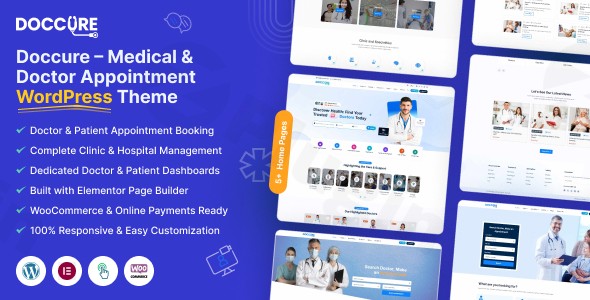
In the digital-first healthcare landscape, a professional online presence is no longer optional—it is a critical point of care. The Doccure WordPress theme is a specialized, high-performance solution designed specifically for doctors, clinics, hospitals, and healthcare centers. Unlike generic multipurpose themes that require a patchwork of external plugins, Doccure offers a cohesive, “all-in-one” ecosystem for medical professionals who need a robust doctor appointment booking WordPress theme that works right out of the box.Whether you are an independent specialist or managing a multi-specialty hospital, Doccure balances a clean, trustworthy aesthetic with advanced medical management tools like telemedicine, patient dashboards, and real-time scheduling.
Key Features: Design, Layout & Performance
The Doccure theme is engineered to reduce the friction between a patient’s health needs and a clinic’s services. It prioritizes a user experience (UX) that is both empathetic to the patient and efficient for the administrator.
1. Purpose-Built Medical Layouts
Doccure moves away from “one-size-fits-all” design. It features specialized custom post types for Doctor Profiles and Service Listings. Patients can browse detailed provider biographies—including qualifications, specialties, and availability—and view specific medical services with transparent descriptions and pricing. The theme is fully responsive, ensuring that a patient can book an appointment seamlessly from a desktop, tablet, or smartphone.
2. Comprehensive Clinic Management & Telemedicine
At its core, Doccure is a clinic management WordPress theme. It includes:
- Doctor & Patient Dashboards: Separate secure portals for patients to view consultation history or prescriptions, and for doctors to manage their daily schedules.
- Integrated Telemedicine: Built-in support for voice and video call consultations, allowing healthcare providers to offer remote care without third-party software overhead.
- Appointment Booking System: A streamlined interface where patients can select time slots based on real-time doctor availability.
3. Performance & SEO Readiness
Search visibility is vital for local healthcare. Doccure is built with clean, optimized code and is compatible with PHP 8+, ensuring fast loading times which is a key Google ranking factor. The theme follows SEO best practices, using structured headings and schema-friendly markup to help your clinic appear in local search results and AI-driven answer engines.
Installation & Demo Import
Setting up a professional healthcare WordPress theme shouldn’t require a developer. Doccure simplifies the process with a user-friendly onboarding flow.
- Theme Installation: Upload the
doccure.zipfile via Appearance > Themes > Add New in your WordPress dashboard and click activate. - Plugin Activation: Upon activation, the theme will prompt you to install required companion plugins, such as the booking engine, WPBakery Page Builder, and WooCommerce.
- One-Click Demo Import: Navigate to the theme’s admin panel and select the One-Click Demo Import option. This will automatically import pages, menus, widgets, and sample doctor profiles.
- Final Check: Once the import is complete, check your homepage and menus. You can now replace the demo data with your actual staff information and medical services.Note: For a smooth import, ensure your server’s memory limit is set to at least 256M to handle the comprehensive medical data and layouts.
Customization Guide: Branding & Layout
Personalizing Doccure to match your clinic’s branding is intuitive, thanks to its integrated customization options.
- Global Styling: Use the admin panel to alter primary and secondary colors. This allows you to match the website to your physical clinic’s branding or logo easily.
- Typography & Icons: Doccure integrates Font Awesome and Feather Icons, providing a library of medical-specific icons to represent various departments (e.g., Cardiology, Dental, Pediatrics).
- Page Building: While it comes with pre-designed templates, you can use the WPBakery Page Builder (or Elementor) to drag and drop elements, creating unique layouts for your “About Us” or “Contact” pages.
- Header & Footer: You can configure the contact information in the header—such as emergency phone numbers and office hours—ensuring they are always visible to patients in need.
FAQ & Troubleshooting
Is the Doccure WordPress theme compatible with Elementor?
Yes, while Doccure is traditionally packaged with WPBakery Page Builder, it is compatible with Elementor. This gives users the flexibility to use their preferred page builder for custom layout designs.
Does Doccure support WooCommerce for online payments?
Absolutely. Doccure integrates with WooCommerce to manage payments. This is essential for clinics that require pre-payment for appointments or sell health-related products and supplements online.
Can I use this theme for a telemedicine practice?
Yes, Doccure is one of the few specialized themes that includes features for voice and video call consultations, making it an ideal choice for modern telemedicine providers looking for a professional platform.
Does it support child themes?
While the standard package focuses on its core features, it is highly recommended to use a child theme for any advanced CSS or PHP modifications to ensure your customizations are not lost during theme updates.
What should I do if the demo import fails?
If the import stalls, it is usually due to server execution limits. Try increasing your max_execution_time in your php.ini file or contact your hosting provider to ensure your server meets the requirements for a feature-rich medical theme.
Conclusion
The Doccure WordPress theme is a powerful, specialized tool for anyone in the healthcare industry. By combining a professional aesthetic with deep functional tools like doctor dashboards and telemedicine support, it removes the technical barriers to running a digital clinic. While it is a feature-dense theme that may have a slight learning curve for total beginners, its One-Click Demo Import and specialized medical modules make it a superior choice over generic themes. If you are looking for a high-converting, SEO-optimized solution to manage your medical practice, Doccure provides the expertise and reliability required for a trustworthy healthcare site.For more WordPress theme reviews and SEO strategies for your medical business, visit wppick.com.
I. Download Limits & Account Benefits
- Free Downloads: Each email address receives 3 downloads per day for free products
- Upgrade Benefits: Purchase any paid product to increase your daily download limit by 3 for each paid product
- No Account Required: You can download immediately by receiving the download link via email
- Account Recommended: Create an account for easier access to your order history and direct update downloads
II. Understanding GPL vs Official Versions
Important: The products available on WPPick are GPL-licensed versions, which differ from official developer versions. Before purchasing, please read our comprehensive guide: Understanding GPL & Official Differences at WPPick
Key Points:
- GPL versions may not include premium support from original developers
- Updates may be delayed compared to official releases
- Some premium features might have limitations
- Always consider your specific needs and support requirements
III. Support & Assistance
We’re here to help through multiple channels:
- Email Support: Direct email assistance for all inquiries
- Live Chat: Real-time support during business hours
- Comprehensive Documentation: Detailed guides and tutorials
IV. Order Tracking
Access your complete purchase history and download links anytime: Order History
V. Account Access
New to WPPick? Login or Create Account to manage your downloads and orders efficiently.
VI. Refund Protection
We stand behind our products with a clear refund policy. Review our terms: Refund Policy
VII. Privacy & Security
Your data security is our priority. Learn how we protect your information: Privacy Policy
VII. Terms of Service
Understanding our service terms ensures a smooth experience: Terms of Use
Quick Tips for Best Experience
- Verify Compatibility: Check plugin/theme compatibility with your WordPress version
- Backup First: Always backup your site before installing new plugins or themes
- Test Environment: Consider testing on a staging site first
- Stay Updated: Regularly check for updates in your account dashboard
- Read Documentation: Review any included documentation for optimal setup
Need Help?
If you have questions about downloads, licensing, or need technical assistance, don’t hesitate to contact our support team. We’re committed to ensuring you have the best possible experience with WPPick products.
Ready to get started? Your download adventure begins with just one click!