

Docy – Documentation & Knowledge Base WordPress Theme With Helpdesk Forum
/Year
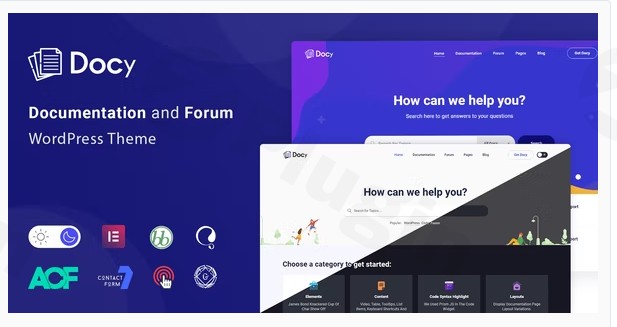
Building a professional help center or technical manual requires more than just a standard blog layout; it demands a structure built for clarity and navigation. The Docy WordPress theme is a specialized powerhouse designed specifically for creating comprehensive documentation, interactive knowledge bases, and Learning Management Systems (LMS). Whether you are a software developer launching an API or a business owner creating a customer support portal, Docy provides a clean, user-centric design philosophy that prioritizes readability and user experience.
Key Features: Design, Layout & Performance
The Docy documentation theme stands out by offering a highly functional aesthetic that balances modern design with technical utility. It is built to handle vast amounts of information without overwhelming the reader.
Versatile Layout & Design Options
Docy offers incredible flexibility in how you present your data. You can choose between one-page documentation for simpler projects or multi-page structures for complex software manuals.
- Dark & Light Mode: One of Docy’s standout visual features is the built-in dark/light mode switcher, allowing users to toggle their preferred reading environment—a must-have for developers and night-time readers.
- Prebuilt Demos: The theme comes with multiple homepage demos, featuring gradient backgrounds, video headers, and clean minimalist styles, all importable with a single click.
- Reading Experience Enhancements: To keep users engaged, Docy includes a font-size switcher and an automatic article Table of Contents (ToC) that follows the reader as they scroll.
Customization Capabilities
As an Elementor compatible theme, Docy leverages the power of drag-and-drop design. You aren’t limited to a static layout; you can use the WordPress Customizer and the dedicated Theme Settings Panel to modify:
- Typography: Full integration with free Google Fonts.
- Global Styles: Easily adjust primary colors, spacing, and container widths (full-width vs. boxed) to match your brand identity.
- Header & Footer Builders: Use the intuitive builders to create navigation that fits your specific site hierarchy.
Performance & SEO Features
Speed is a critical ranking factor for both Google and AI search engines. Docy is a fast WordPress theme built with an optimized codebase that adheres to W3C validated standards.
- SEO Readiness: Clean, semantic HTML5 markup ensures that search engine crawlers can easily index your documentation.
- Mobile Responsiveness: The theme is fully responsive and cross-browser compatible, ensuring a “stunning” look on everything from high-end iMacs to budget smartphones.
Installation & Demo Import
Setting up Docy is a streamlined process designed for both beginners and experienced developers. Follow these steps to get your site running:
- Install & Activate: Upload the Docy theme folder via
Appearance > Themes > Add Newand click activate. - Install Companion Plugins: Upon activation, you will be prompted to install required plugins like EazyDocs, Elementor, and ACF PRO (which is often bundled as a bonus).
- One-Click Demo Import: Navigate to the Docy Import section in your dashboard. Choose your preferred demo and click “Import.”
- Note: Ensure your server has sufficient memory limits and execution time settings to prevent timeouts during the import of large media files.
- Finalize Setup: Once the import is complete, your menus, widgets, and homepage will be automatically configured to match the demo site.
Customization Guide: Branding & Layout
Personalizing your knowledge base WordPress theme is straightforward thanks to the integration of the WordPress Customizer and Elementor.
- Setting the Brand Tone: Use the Customizer to upload your logo and set your brand’s primary color. Because Docy supports global styles, changing a color in one place updates it across your entire documentation suite.
- Homepage Construction: Most Docy demos are built with Elementor. You can use custom Docy Elementor widgets to add search bars, category grids, or “Helpful Article” feedback loops.
- Using the Child Theme: Always activate the included Docy Child Theme before making deep CSS or functional changes. This ensures that when the theme receives updates, your custom code remains intact.
- Sticky Sidebar: For long-form documentation, ensure the sticky sidebar option is enabled. This keeps your navigation menu visible at all times, significantly improving the UI/UX for your users.
FAQ & Troubleshooting
Is the Docy theme good for LMS?
Yes, Docy is an excellent choice for LMS (Learning Management Systems). It features integrated functionality and compatibility with popular LMS plugins, allowing you to deliver structured courses alongside your technical documentation.
Does Docy support WooCommerce for online stores?
Absolutely. Docy is fully compatible with WooCommerce, making it possible to sell digital products, software licenses, or training materials directly from your documentation site.
How can I customize the header in the Docy theme?
You can customize the header through the Header Builder located in the theme settings. It allows you to drag and drop elements like the logo, search bar, and menu, or use pre-designed header templates.
Is Docy compatible with Gutenberg?
Yes, Docy is Gutenberg-ready. While it offers deep integration with Elementor for complex layouts, it is fully optimized for the native WordPress block editor for standard post and page creation.
Conclusion
The Docy WordPress theme is a top-tier choice for anyone needing a high-performance WordPress helpdesk theme or knowledge base. Its combination of specialized features—like the dark mode toggle, font size switcher, and deep EazyDocs integration—sets it far apart from generic multipurpose themes.Whether you are a freelancer building a support portal for a client or an agency managing an enterprise-level documentation project, Docy offers the flexibility, speed, and SEO readiness required for success in 2025 and beyond. For more WordPress theme reviews and expert design tips, visit wppick.com.
I. Download Limits & Account Benefits
- Free Downloads: Each email address receives 3 downloads per day for free products
- Upgrade Benefits: Purchase any paid product to increase your daily download limit by 3 for each paid product
- No Account Required: You can download immediately by receiving the download link via email
- Account Recommended: Create an account for easier access to your order history and direct update downloads
II. Understanding GPL vs Official Versions
Important: The products available on WPPick are GPL-licensed versions, which differ from official developer versions. Before purchasing, please read our comprehensive guide: Understanding GPL & Official Differences at WPPick
Key Points:
- GPL versions may not include premium support from original developers
- Updates may be delayed compared to official releases
- Some premium features might have limitations
- Always consider your specific needs and support requirements
III. Support & Assistance
We’re here to help through multiple channels:
- Email Support: Direct email assistance for all inquiries
- Live Chat: Real-time support during business hours
- Comprehensive Documentation: Detailed guides and tutorials
IV. Order Tracking
Access your complete purchase history and download links anytime: Order History
V. Account Access
New to WPPick? Login or Create Account to manage your downloads and orders efficiently.
VI. Refund Protection
We stand behind our products with a clear refund policy. Review our terms: Refund Policy
VII. Privacy & Security
Your data security is our priority. Learn how we protect your information: Privacy Policy
VII. Terms of Service
Understanding our service terms ensures a smooth experience: Terms of Use
Quick Tips for Best Experience
- Verify Compatibility: Check plugin/theme compatibility with your WordPress version
- Backup First: Always backup your site before installing new plugins or themes
- Test Environment: Consider testing on a staging site first
- Stay Updated: Regularly check for updates in your account dashboard
- Read Documentation: Review any included documentation for optimal setup
Need Help?
If you have questions about downloads, licensing, or need technical assistance, don’t hesitate to contact our support team. We’re committed to ensuring you have the best possible experience with WPPick products.
Ready to get started? Your download adventure begins with just one click!
- The “Rate the Article” feature, introduced for blog single pages, allows readers to provide valuable feedback, which can be instrumental in enhancing SEO
- Antimanual plugin integrated to enhance content protection
- Animated Shapes show/hide switcher added to the Hero section widget
- bbPress template naming restored for improved compatibility and clarity
- Elementor Page Settings background color styling issue resolved
- Table of Contents scrolling issue fixed for smoother navigation
- Lazy-loaded image loading issues resolved across pages
- Mobile menu accessibility enhanced with proper button elements, ARIA labels, and keyboard navigation
- bbPress integration by moving core templates to Forumax (BBP Core) and simplifying plugin dependency handling
- Cart summary design refined with SCSS updates for better visual consistency
- Form accessibility enhanced and HTML validation issues resolved
- Search accessibility enhanced with ARIA labels, keyboard support, and state handling
- Forums widget loading and registration performance enhanced
- Welcome and Verify/Register pages redesigned with improved UI and smoother license management experience
- Deprecated forum-related Elementor widgets and associated assets
- Homepage queries improved using a single cached query to enhance performance
- Google Fonts loading improved using display: swap, HTTPS, and preconnect for better performance
- Theme options queries cached to reduce database load and prevent N+1 issues
- Forum-related classes, styles, settings, and sidebar logic removed, shifting forum management fully to Forumax
- printThis.js cleaned up by removing legacy Internet Explorer-specific code
- Plugin activation labels updated from “BBP Core” to “Forumax” for consistency
- Twitter (X) social icon updated to the latest branding
- Forumax made an optional plugin and Smart bbPress nVerify removed from required plugins