
Dør – Modern Architecture And Interior Design Theme
/Year
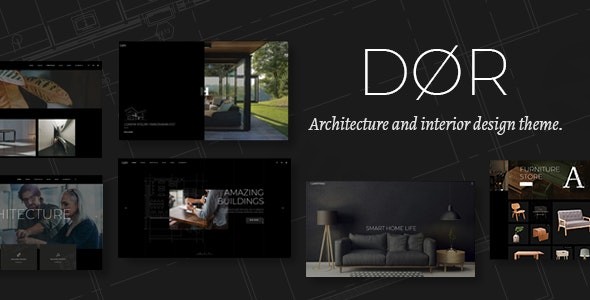
The digital canvas for architects and interior designers demands not just beauty, but powerful functionality. The Dør Modern Architecture and Interior Design WordPress Theme by Mikado Themes delivers precisely this, offering a sophisticated and robust platform for showcasing design brilliance. This comprehensive review delves into Dør’s features, guides you through its setup, and offers insights into optimizing it for your architectural or interior design practice.
Introduction: Elevating Your Architectural & Interior Design Portfolio
Dør is a meticulously crafted WordPress theme designed explicitly for architecture firms, individual architects, interior design studios, and professionals in the broader creative design industry. It’s more than just a template; it’s a specialized solution built to highlight visual portfolios with exceptional impact. With its sleek, minimalist aesthetic and an emphasis on immersive project presentations, Dør empowers designers to establish a commanding online presence that captivates potential clients and collaborators. If you’re seeking a Dør WordPress theme that combines elegance with powerful customization, look no further.
Key Features: Design, Layout & Performance for Design Professionals
Dør is packed with features tailored to meet the exacting standards of design professionals, ensuring your website is both beautiful and highly functional.
Advanced Design & Layout Options
The theme offers a rich array of visual and structural options to present your work.
- Portfolio Presentation: Showcase projects with flair using diverse portfolio list layouts like masonry and gallery styles, complemented by dynamic motion categories and tab sliders. Multiple portfolio single layouts (including masonry, gallery, slider, full width, and small images) allow for varied and detailed project storytelling.
- Immersive Sections: Create captivating user experiences with vertical and horizontal split screen layouts, parallax scrolling effects, and video background sections. Full-screen sections provide an unblemished view of your most striking visuals.
- Homepage Demonstrations: Jumpstart your site with 11 ready-to-use homepage demos and an extensive collection of inner page templates, all designed with a sleek, minimalist philosophy.
- Flexible Headers & Footers: Choose from multiple header types, including minimal, vertical, and standard variations. Footer content can be easily managed via dedicated widget areas, while mega menu support enhances navigation for larger sites.
- Blog & Content Layouts: Share insights and updates with multiple blog layouts, including standard and masonry formats, and leverage custom post formats for diverse content.
Customization Capabilities for Brand Consistency
Dør provides comprehensive control over your site’s appearance, ensuring it aligns perfectly with your brand identity.
- Powerful Admin Interface: An “Extensive Admin Interface” and “Dør Options” panel centralize customization, allowing you to manage global settings for headers, footers, colors, and typography. Local page settings offer granular control, letting you override global styles for specific pages.
- Typography Control: With access to 800+ Google Fonts and robust typography options, you have complete control over your website’s visual hierarchy and textual brand voice.
- Color Schemes: A range of beautiful color options is available to complement your branding.
- Drag-and-Drop Power: Dør is bundled with the WPBakery Page Builder ($46 value) and fully compatible with Elementor Page Builder, providing intuitive drag-and-drop functionality for creating unique layouts without coding. The Slider Revolution plugin ($26 value) further empowers you to design stunning visual presentations and animated content.
Performance & SEO Features
- Responsive & Retina Ready: Dør is built on a fully responsive design framework, ensuring your architectural portfolio looks impeccable and performs flawlessly on all devices, from desktops to mobile phones, and on high-resolution Retina screens.
- SEO Readiness: While specific SEO scores are not mentioned, a clean codebase, structured headings, and responsive design are foundational for good SEO. The theme’s focus on clear content presentation and visual hierarchy inherently supports search engine crawlability.
- International Readiness: Dør is fully translation-ready and WPML compatible, allowing architecture firms to effortlessly build multilingual websites and reach a global clientele.
Installation & Demo Import: Your Path to a Professional Website
Getting started with Dør is designed to be straightforward, even for those new to WordPress.
- Install & Activate the Theme:
- After purchasing Dør, download the theme package.
- From your WordPress dashboard, navigate to
Appearance > Themes > Add New > Upload Theme. - Choose the Dør theme
.zipfile (ensure you upload only the installable theme file, not the entire downloaded package, which may contain documentation and plugins). - Click
Install Nowand thenActivate.
- Install Required Plugins:
- Upon activation, Dør will prompt you to install and activate its required and recommended plugins. This typically includes the Dør Core plugin (essential for custom post types like Portfolio), WPBakery Page Builder, and Slider Revolution.
- Follow the on-screen prompts to install and activate these plugins.
- One-Click Demo Import:
- Dør simplifies setup with a one-click demo import feature. This allows you to quickly replicate one of the 11 beautiful homepage demonstrations and their associated inner pages, posts, and media.
- Navigate to the theme options panel (often found under
Mikado OptionsorDør Optionsin your WordPress dashboard) and locate theImportsection. - Select the demo you wish to import and initiate the process.
- Post-Import Setup:
- After the demo import is complete, you may need to manually set your homepage (
Settings > Reading) and assign your navigation menus (Appearance > Menus). The demo content usually populates these, but a quick check ensures everything is in place. - Common Pitfall: For large demo imports, ensure your server’s PHP memory limit and execution time are sufficient to prevent timeouts. If you encounter issues, increase
memory_limitandmax_execution_timein yourphp.inifile or contact your hosting provider.
- After the demo import is complete, you may need to manually set your homepage (
Customization Guide: Branding & Layout with Dør
Personalizing Dør to reflect your unique brand is intuitive, leveraging both global settings and page-specific controls.
- Global Styling with Dør Options: The “Extensive Admin Interface” (Dør Options panel) is your central hub for site-wide customizations. Here you can:
- Colors: Define your brand color palette, including primary, secondary, and accent colors, affecting elements like links, buttons, and section backgrounds.
- Typography: Select your brand fonts from the 800+ Google Fonts library, set sizes, weights, and line heights for headings, body text, and other elements to establish clear visual hierarchy.
- Header & Footer Layouts: Configure your preferred header type (minimal, vertical, standard) and customize its components. Manage footer content through widget areas found under
Appearance > Widgets. - Logo & Favicon: Easily upload your brand logo for various header states and your favicon for browser tabs.
- Page-Specific Layouts with Page Builders:
- Use the bundled WPBakery Page Builder (or Elementor if you prefer) to customize the layouts of your imported demo pages or build new ones from scratch. Its drag-and-drop interface makes arranging elements, adding custom shortcodes, and designing unique sections incredibly easy, perfect for tailoring each architectural project showcase.
- The theme offers a big collection of custom shortcodes to add various elements, further enhancing your layout capabilities.
- WordPress Customizer: For live previews of certain changes (like site identity, menus, or sometimes colors), the native WordPress Customizer (
Appearance > Customize) provides a visual editing experience. - Setting Your Homepage and Blog Page: After importing demo content, ensure your static homepage and posts page are correctly assigned under
Settings > Reading.
FAQ & Troubleshooting: Common Questions About Dør
Is Dør theme compatible with Elementor / WPBakery / Gutenberg?
Yes, Dør is fully compatible with both Elementor Page Builder and WPBakery Page Builder, with WPBakery Page Builder typically bundled with the theme. While it functions with Gutenberg for standard content, the theme’s core design elements and demo content are primarily built to leverage the advanced capabilities of these popular drag-and-drop page builders. Users are generally advised to stick to one page builder for consistency and optimal performance.
Does Dør theme support WooCommerce for online stores?
Absolutely. Dør seamlessly integrates with WooCommerce, allowing architecture and design firms to set up an online store directly on their website. You can sell physical products, digital downloads, design services, or merchandise with complete design consistency, making it a robust solution for a comprehensive online presence.
Does Dør support child themes?
Yes, Dør supports child themes. Using a child theme is highly recommended for any custom code or styling modifications. This ensures that your customizations are preserved when you update the main Dør theme, preventing loss of work and maintaining site integrity.
What should I do if the Dør theme demo import fails or looks different from the demo site?
If the demo import fails or doesn’t look exactly like the online demo, first check your server’s PHP configuration (specifically memory_limit, max_execution_time, and post_max_size). Insufficient server resources are a common cause of import issues. You can usually find these settings in your hosting panel or by contacting your host. Additionally, ensure all required and recommended plugins (especially Dør Core, WPBakery, and Slider Revolution) are installed and activated before attempting the demo import. Refer to the official Dør documentation for detailed troubleshooting steps.
How can I update the Dør WordPress theme without losing my customizations?
To update the Dør theme safely without losing your customizations, always use a child theme for any modifications to files or CSS. When an update is available (typically through your ThemeForest account or WordPress dashboard), download the latest version, then either replace the old theme files (if not using a child theme, ensure you have a backup!) or use the Envato Market plugin to automate updates. With a child theme in place, the parent theme update will not affect your custom code. Always back up your entire website before any major theme update.
Conclusion: A Digital Masterpiece for Design Professionals
The Dør Modern Architecture and Interior Design WordPress Theme by Mikado Themes stands out as an exceptional choice for architects, interior designers, and creative studios. Its powerful blend of sophisticated design, extensive layout options, and intuitive customization capabilities makes it an ideal platform for showcasing high-impact visual portfolios.From its responsive framework and translation readiness to the seamless integration with WPBakery Page Builder, Slider Revolution, and WooCommerce, Dør provides a comprehensive solution for professionals demanding excellence. Whether you’re a freelancer building your first online portfolio or an established firm looking to revitalize your digital presence, Dør offers the tools to create a visually stunning, high-converting, and SEO-ready website. It’s a confident verdict: Dør is a definitive WordPress solution for design professionals who demand excellence in both form and function.
I. Download Limits & Account Benefits
- Free Downloads: Each email address receives 3 downloads per day for free products
- Upgrade Benefits: Purchase any paid product to increase your daily download limit by 3 for each paid product
- No Account Required: You can download immediately by receiving the download link via email
- Account Recommended: Create an account for easier access to your order history and direct update downloads
II. Understanding GPL vs Official Versions
Important: The products available on WPPick are GPL-licensed versions, which differ from official developer versions. Before purchasing, please read our comprehensive guide: Understanding GPL & Official Differences at WPPick
Key Points:
- GPL versions may not include premium support from original developers
- Updates may be delayed compared to official releases
- Some premium features might have limitations
- Always consider your specific needs and support requirements
III. Support & Assistance
We’re here to help through multiple channels:
- Email Support: Direct email assistance for all inquiries
- Live Chat: Real-time support during business hours
- Comprehensive Documentation: Detailed guides and tutorials
IV. Order Tracking
Access your complete purchase history and download links anytime: Order History
V. Account Access
New to WPPick? Login or Create Account to manage your downloads and orders efficiently.
VI. Refund Protection
We stand behind our products with a clear refund policy. Review our terms: Refund Policy
VII. Privacy & Security
Your data security is our priority. Learn how we protect your information: Privacy Policy
VII. Terms of Service
Understanding our service terms ensures a smooth experience: Terms of Use
Quick Tips for Best Experience
- Verify Compatibility: Check plugin/theme compatibility with your WordPress version
- Backup First: Always backup your site before installing new plugins or themes
- Test Environment: Consider testing on a staging site first
- Stay Updated: Regularly check for updates in your account dashboard
- Read Documentation: Review any included documentation for optimal setup
Need Help?
If you have questions about downloads, licensing, or need technical assistance, don’t hesitate to contact our support team. We’re committed to ensuring you have the best possible experience with WPPick products.
Ready to get started? Your download adventure begins with just one click!
- Added WPML config file
- Added Woocommerce 10.X compatibility
- Updated WPBakery Page Builder to 8.7
- Updated Revolution Slider to 6.7.38
- Updated Dor Core plugin to 2.4
- Improved vertical closed opener functionality
- Fixed portfolio motion category shortcode to work with swiper v8
- Minor fixes