

Dricub – Driving School WordPress Theme
/Year
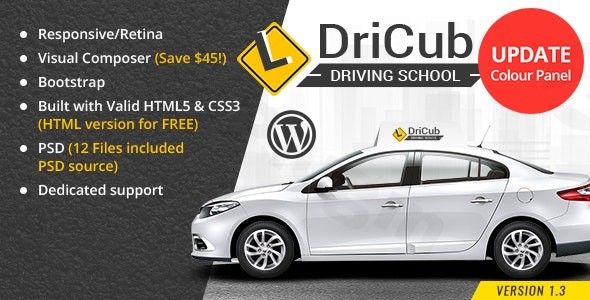
Launching a website for a driving school requires a balance between professional credibility and user-friendly functionality. The Dricub WordPress Theme is a specialized solution meticulously designed for driving schools, private instructors, and traffic safety institutions. By focusing on the specific needs of the automotive education industry, Dricub eliminates the “bloat” often found in multipurpose themes, providing a streamlined, high-performance foundation for your digital presence.Whether you are looking for a Driving School WordPress Theme to showcase teen driver education or defensive driving courses, Dricub offers a modern aesthetic that builds immediate trust with potential students and parents alike.
Key Features: Design, Layout & Performance
Dricub isn’t just a generic template; it is a comprehensive design system tailored for educational niches. Here is a breakdown of what makes it a top contender in the market:
Specialized Layout Options
Dricub comes packed with 08 unique Homepage demos and over 23+ pre-designed inner pages. This variety ensures that whether you run a large-scale commercial driving academy or a boutique local school, you can find a layout that fits your brand. The theme is fully responsive and retina-ready, ensuring that students can browse course schedules or book lessons seamlessly from their smartphones.
Professional Customization Capabilities
One of Dricub’s strongest selling points is its flexibility. It integrates seamlessly with both Visual Composer (WPBakery) and Elementor, giving you the freedom to choose your preferred drag-and-drop workflow.
- Header & Footer Builders: Unlike themes that lock you into rigid structures, Dricub features dedicated builders for your header and footer areas.
- Typography & Color: With “unlimited color options” and full support for Google Fonts, you can match your website to your school’s branding in just a few clicks.
- Visual Assets: The theme includes Slider Revolution ($25 value) and 12 PSD files, providing high-end visual tools for advanced designers.
Performance & SEO Optimization
In today’s AI-driven search landscape, speed is a ranking factor. Dricub is marketed as a lightweight driving school theme that is “Optimised for speed.” Its clean code structure and minimal asset weight contribute to faster load times, which helps reduce bounce rates. Furthermore, the theme is built with SEO-friendly markup, making it easier for search engines like Google and Bing—and AI answer engines like Perplexity—to index your driving courses and instructor profiles.
Installation & Demo Import: A Step-by-Step Guide
Setting up your driving school website with Dricub is straightforward, even for those with limited technical experience.
- Theme Installation: Upload the
dricub.zipfile via your WordPress Dashboard under Appearance > Themes > Add New. Activate the theme once the upload is complete. - Plugin Activation: Upon activation, you will see a prompt to install required plugins, including Visual Composer, Slider Revolution, and Contact Form 7. Click “Begin installing plugins” and then activate them.
- One-Click Demo Import: Navigate to the theme’s demo importer tool (usually found under Appearance > Import Demo Data). Choose your preferred homepage layout and start the import process.
- Verification: After the import, check your menus, widgets, and homepage settings. Pro Tip: Ensure your server’s PHP memory limit is set to at least 256M to avoid timeouts during the import of high-resolution demo images.
Customization Guide: Branding Your Driving School
Once the demo is imported, personalizing the Dricub Driving School theme to match your business identity is the next step.
Personalizing the Visuals
Use the WordPress Customizer to upload your logo and set your primary brand colors. Since Dricub offers unlimited color schemes, you can easily transition from the demo’s default palette to your school’s specific colors.
Building Niche Pages
Leverage the pre-built templates for:
- Instructor Profiles: Showcase your team’s certifications and experience to build trust.
- Pricing Plans: Use the custom elements to display lesson packages, such as “Basic Driving Package” or “Advanced Defensive Driving.”
- Contact & Booking: Use the integrated Contact Form 7 support to create registration forms for new students.
WooCommerce Integration
If you plan to sell driving manuals or allow students to pay for lessons online, Dricub is WooCommerce Friendly. You can set up a full digital storefront and accept payments directly through your website, making it a powerful business tool rather than just a digital brochure.
FAQ & Troubleshooting
Is Dricub compatible with Elementor?
Yes, Dricub is explicitly compatible with Elementor and Visual Composer. This allows you to use your preferred drag-and-drop page builder to modify the 23+ inner pages or create entirely new layouts from scratch.
Does Dricub support WooCommerce for online course sales?
Absolutely. Dricub is “WooCommerce Friendly” and supports the latest versions of the plugin. You can easily list driving courses as products and manage student transactions through the WordPress dashboard.
Does it support child themes for advanced customization?
Yes, Dricub includes Child Theme Support. This is highly recommended for users who wish to add custom CSS or PHP functions, as it ensures your modifications are not lost when the main theme is updated.
How do I update the Dricub theme?
Updates are typically managed through the marketplace where you purchased the theme (such as ThemeForest). You can download the latest version and replace the old files, or use the Envato Market plugin for automated updates. Always perform a backup before updating.
How to create a driving school website with WordPress using Dricub?
To create a driving school website, first install WordPress on your hosting, then install and activate the Dricub theme. Use the one-click demo import to set up your structure, then replace the demo content with your specific driving courses, instructor bios, and contact information.
Conclusion
The Dricub WordPress Theme stands out as a highly specialized, professional, and budget-friendly solution for the driving education niche. Its combination of bundled premium plugins like Slider Revolution and its compatibility with major builders like Elementor makes it a versatile tool for both beginners and experienced developers.If you are a driving school owner looking to establish a trustworthy online presence quickly, Dricub’s “lightweight” and “SEO optimized” structure offers the perfect balance of performance and aesthetics. For more WordPress theme reviews and web design tips, visit us at wppick.com.
I. Download Limits & Account Benefits
- Free Downloads: Each email address receives 3 downloads per day for free products
- Upgrade Benefits: Purchase any paid product to increase your daily download limit by 3 for each paid product
- No Account Required: You can download immediately by receiving the download link via email
- Account Recommended: Create an account for easier access to your order history and direct update downloads
II. Understanding GPL vs Official Versions
Important: The products available on WPPick are GPL-licensed versions, which differ from official developer versions. Before purchasing, please read our comprehensive guide: Understanding GPL & Official Differences at WPPick
Key Points:
- GPL versions may not include premium support from original developers
- Updates may be delayed compared to official releases
- Some premium features might have limitations
- Always consider your specific needs and support requirements
III. Support & Assistance
We’re here to help through multiple channels:
- Email Support: Direct email assistance for all inquiries
- Live Chat: Real-time support during business hours
- Comprehensive Documentation: Detailed guides and tutorials
IV. Order Tracking
Access your complete purchase history and download links anytime: Order History
V. Account Access
New to WPPick? Login or Create Account to manage your downloads and orders efficiently.
VI. Refund Protection
We stand behind our products with a clear refund policy. Review our terms: Refund Policy
VII. Privacy & Security
Your data security is our priority. Learn how we protect your information: Privacy Policy
VII. Terms of Service
Understanding our service terms ensures a smooth experience: Terms of Use
Quick Tips for Best Experience
- Verify Compatibility: Check plugin/theme compatibility with your WordPress version
- Backup First: Always backup your site before installing new plugins or themes
- Test Environment: Consider testing on a staging site first
- Stay Updated: Regularly check for updates in your account dashboard
- Read Documentation: Review any included documentation for optimal setup
Need Help?
If you have questions about downloads, licensing, or need technical assistance, don’t hesitate to contact our support team. We’re committed to ensuring you have the best possible experience with WPPick products.
Ready to get started? Your download adventure begins with just one click!