

Earin – Headphone & Audio Store Shopify 2.0 Theme
/Year
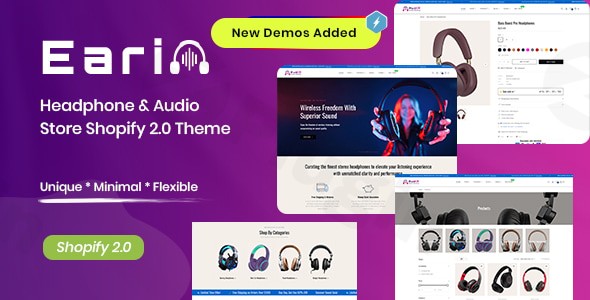
Revolutionize Your Audio Business with the Earin Shopify Theme
In the competitive world of online audio retail, presenting your products with clarity, sophistication, and a seamless user experience is paramount. The Earin Shopify theme emerges as a powerful solution, meticulously crafted for headphone store Shopify theme needs, audio equipment retailers, and technology businesses. Built on the robust Shopify 2.0 framework, Earin empowers serious online merchants to create a high-performance, visually stunning, and conversion-optimized e-commerce presence for their audio products.This premium audio store Shopify 2.0 theme combines modern aesthetics with advanced functionality, addressing the core problem of generic store designs that fail to capture the essence of high-quality audio gear. With Earin, you’re not just building a store; you’re crafting an immersive digital experience that resonates with audiophiles and tech enthusiasts alike.
Key Features for Unparalleled Audio Retail Success
The Earin Shopify theme is packed with an array of Earin theme features designed to elevate your online audio store, focusing on design, flexibility, and customer engagement.
Advanced Design Elements & Responsive Layout
Earin boasts stunning homepage layouts, featuring elegant parallax scrolling effects and retina-ready graphics that make your products pop on high-resolution displays. Its clean, minimal, and tech-inspired aesthetic ensures your audio products are always the focal point. Crucially, it’s a responsive Shopify audio theme, guaranteeing flawless appearance and functionality across all devices, from desktop monitors to smartphones, enhancing the shopping experience for every customer.
Shopify OS 2.0 Framework & Drag-and-Drop Editing
At its core, Earin leverages the full power of the Shopify Online Store 2.0 framework. This means unparalleled design flexibility through an intuitive drag-and-drop interface, allowing merchants to customize their storefront easily without any coding knowledge. You can construct diverse homepage layouts by simply reordering sections in the Theme Customizer.
Multiple Header Styles & Advanced Navigation
Navigation is key to a positive user experience. Earin offers 6 distinct header styles and unlimited mega menu configurations, enabling you to design the perfect, intuitive navigation system for your customers. Header features include product search, multi-currency options, user accounts, shopping carts, wishlists, social network icons, and contact information. Combined with sticky navigation, your customers will always have essential links at their fingertips.
Enhanced Product Presentation & Conversion Tools
Earin is specifically optimized for showcasing audio and tech products with precision:
- Product Page Layouts: Pre-made layouts are included to effectively display product collections.
- Quick View Product: Allows customers to view product details in a pop-up without leaving the current page.
- High-Resolution Imagery & Product Videos: Supports stunning visuals and engaging videos to bring your products to life.
- Variant Swatches: Features for visually appealing product variant selections.
- Sticky Add-to-Cart: Keeps the add-to-cart button visible as users scroll, improving conversion rates.
- Recently Viewed & Related Products: Sections to encourage further browsing and impulse purchases.
Advanced Filtering and Predictive Search
For stores with extensive catalogs, Earin provides robust advanced filters, allowing customers to refine products by brand, features, and price. The predictive live search offers instant suggestions as customers type, drastically speeding up the discovery process and enhancing usability.
Cross-Browser Compatibility & Performance Optimization
Engineered for flawless performance across all modern browsers, Earin ensures your store maintains a professional appearance and functionality regardless of how customers access your site. It is also designed for fast load times, a critical factor for SEO and user satisfaction.
Installing & Setting Up Your Earin Shopify Theme
While Earin is a Shopify theme and not a WordPress plugin, the setup process is straightforward for anyone familiar with the Shopify ecosystem. Here’s a general guide to get your audio store up and running:
- Purchase and Download: Obtain the Earin Shopify theme from a trusted provider like ZeroPlugin.com. You will receive a
.zipfile containing the theme. - Upload to Shopify:
- Log in to your Shopify admin panel.
- Navigate to Online Store > Themes.
- Click on “Add theme” and then “Upload zip file”.
- Choose the Earin theme
.zipfile from your computer and click “Upload file”.
- Publish Your Theme: Once uploaded, the Earin theme will appear in your theme library. You can preview it, and once satisfied, click “Actions” > “Publish” to make it live.
- One-Click Demo Import (Optional but Recommended): Earin comes with at least one modern homepage demo. To quickly establish a foundation, you can often use a “one-click demo importer” feature, if provided within the theme’s settings or documentation, to replicate the demo content and layout. This is a great starting point for customizing your Earin Shopify theme header and other elements.
- Customize with the Theme Editor:
- From the Themes page, click “Customize” next to Earin.
- This will open the Shopify Theme Editor (built on the OS 2.0 framework). Here, you can use the intuitive drag-and-drop interface to:
- Adjust homepage sections (banners, product grids, testimonials).
- Modify global settings (colors, typography, favicon).
- Configure your header and footer styles.
- Set up your mega menus.
- Customize product pages, collection pages, and other templates.
- Utilize the Theme Options to enable specific features and customize Google fonts without needing to touch any code.
Practical Usage & Best Practices for Audio Retailers
The Earin theme is purpose-built for the audio and technology niche, offering specific advantages for various business models:
- For Headphone Specialty Stores: Leverage Earin’s high-resolution imagery and product video support to showcase the intricate details and premium quality of headphones. Utilize the advanced filtering system to allow customers to sort by brand, noise-cancellation features, connectivity (wired/wireless), and price, making it easy to find their perfect pair.
- For Audio Equipment Retailers: The bold, modern aesthetic and flexible layouts are ideal for maximizing conversions when presenting larger audio systems, speakers, and amplifiers. The sticky add-to-cart button and quick view product feature streamline the purchasing journey for higher-ticket items.
- For Technology Accessory Shops: Earin’s clean design is perfect for presenting a diverse range of tech accessories. The predictive live search ensures customers can quickly find specific cables, cases, or adapters, while the “recently viewed” and “related products” sections encourage additional purchases.
- For Single Product Showcase Stores: If you’re launching a new, innovative audio product, Earin provides the professional presentation and immersive design elements (like parallax scrolling) to captivate visitors and highlight unique selling points effectively.Best Practices:
- High-Quality Media: Always use professional, high-resolution images and compelling product videos to demonstrate sound quality and design.
- Detailed Product Descriptions: Complement Earin’s visual strength with comprehensive descriptions that delve into specifications, features, and benefits for audiophiles.
- Strategic Use of Mega Menus: Organize your product categories logically within Earin’s mega menus to provide an easy and intuitive browsing experience, especially for large inventories.
- Leverage Reviews: Integrate customer reviews to build trust and social proof, which Earin supports as a key marketing tool.
FAQ & Troubleshooting
What is Earin – Headphone & Audio Store Shopify 2.0 Theme?
Earin is a premium, high-performance Shopify 2.0 theme specifically designed for online stores selling headphones, audio equipment, and related technology accessories. It provides a sleek, modern, and fully responsive platform with extensive customization options to create a professional e-commerce experience for audio retailers.
Is Earin a good Shopify theme for an audio shop?
Yes, Earin is highly regarded as an excellent Shopify theme for an audio shop. Its niche-specific design, advanced product presentation features (high-res images, videos, variant swatches), robust navigation (MegaMenus, advanced filters, predictive search), and focus on performance make it ideal for showcasing audio products with clarity and driving conversions.
Does Earin Shopify theme support drag and drop editing?
Absolutely. Earin is built on the Shopify OS 2.0 framework, which inherently supports full drag-and-drop editing. This allows merchants to easily customize their store’s layout, sections, and content using the intuitive Theme Customizer in the Shopify admin panel, without needing any coding knowledge.
Where to download Earin Shopify theme?
The Earin Shopify theme can be obtained from trusted providers that offer GPL licensed themes, such as ZeroPlugin.com. It’s crucial to download from reputable sources to ensure you receive genuine, regularly updated, and secure theme files.
Is Earin compatible with all browsers and devices?
Yes, Earin is engineered for flawless cross-platform compatibility. It is fully responsive and mobile-optimized, ensuring a consistent and professional appearance and functionality across all modern web browsers and various mobile devices, including smartphones and tablets.
Elevate Your Audio Retail Experience with Earin
The Earin Shopify theme stands out as a top-tier solution for any business in the audio and technology niche aiming for a cutting-edge online presence. It skillfully combines sophisticated design with powerful eCommerce functionality, forming the perfect foundation for a thriving audio retail business.Whether you are selling premium headphones, high-fidelity speakers, or a range of audio accessories, Earin provides the professional presentation, intuitive user experience, and robust feature set necessary to drive conversions and cultivate customer trust. Transform your online audio store with Earin’s innovative design and comprehensive capabilities, available through trusted platforms like ZeroPlugin.com, ensuring your brand resonates with quality and expertise.
I. Download Limits & Account Benefits
- Free Downloads: Each email address receives 3 downloads per day for free products
- Upgrade Benefits: Purchase any paid product to increase your daily download limit by 3 for each paid product
- No Account Required: You can download immediately by receiving the download link via email
- Account Recommended: Create an account for easier access to your order history and direct update downloads
II. Understanding GPL vs Official Versions
Important: The products available on WPPick are GPL-licensed versions, which differ from official developer versions. Before purchasing, please read our comprehensive guide: Understanding GPL & Official Differences at WPPick
Key Points:
- GPL versions may not include premium support from original developers
- Updates may be delayed compared to official releases
- Some premium features might have limitations
- Always consider your specific needs and support requirements
III. Support & Assistance
We’re here to help through multiple channels:
- Email Support: Direct email assistance for all inquiries
- Live Chat: Real-time support during business hours
- Comprehensive Documentation: Detailed guides and tutorials
IV. Order Tracking
Access your complete purchase history and download links anytime: Order History
V. Account Access
New to WPPick? Login or Create Account to manage your downloads and orders efficiently.
VI. Refund Protection
We stand behind our products with a clear refund policy. Review our terms: Refund Policy
VII. Privacy & Security
Your data security is our priority. Learn how we protect your information: Privacy Policy
VII. Terms of Service
Understanding our service terms ensures a smooth experience: Terms of Use
Quick Tips for Best Experience
- Verify Compatibility: Check plugin/theme compatibility with your WordPress version
- Backup First: Always backup your site before installing new plugins or themes
- Test Environment: Consider testing on a staging site first
- Stay Updated: Regularly check for updates in your account dashboard
- Read Documentation: Review any included documentation for optimal setup
Need Help?
If you have questions about downloads, licensing, or need technical assistance, don’t hesitate to contact our support team. We’re committed to ensuring you have the best possible experience with WPPick products.
Ready to get started? Your download adventure begins with just one click!
No changelog available.