
Ecolar – Environment & Ecology WordPress Theme
/Year
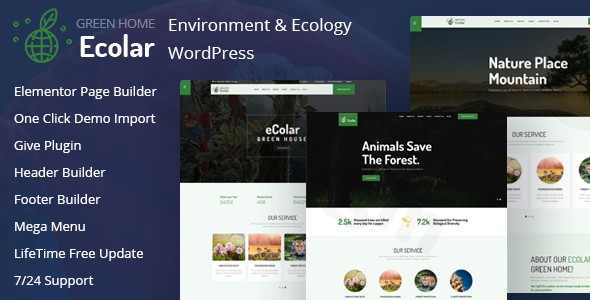
Introduction: Build a Greener Web Presence with Ecolar
In today’s digital age, making an impactful statement for environmental causes requires a website that is both visually compelling and functionally robust. The Ecolar WordPress theme steps up to this challenge, offering a beautifully designed and feature-rich solution specifically crafted for environmental organizations, NGOs, and eco-conscious businesses. With its clean, nature-inspired aesthetic and powerful tools, Ecolar empowers you to create an online presence that genuinely reflects your commitment to environmental protection and fosters community engagement.Ecolar’s design philosophy blends elegance with purpose, ensuring your message of sustainability resonates clearly. It’s an ideal choice for anyone looking to champion ecological initiatives, run fundraising campaigns, or promote eco-friendly products, even without any coding knowledge.
Key Features: Design, Layout & Performance for Environmental Causes
Ecolar is equipped with a comprehensive suite of features designed to help you create a tailored and high-performing website for your environmental mission.
Design & Layout Options
Ecolar offers extensive flexibility in shaping your site’s appearance. You’ll find 4+ niche homepage layouts and 4+ multi-page demos that allow for quick setup, along with 25+ pre-designed inner pages to cover every aspect of your organization. The theme also provides 4+ unique header designs and 4+ unique footer designs (including 5 default footer layouts), giving you ample choices to brand your site effectively. Critically, Ecolar boasts a fully responsive design, ensuring your content looks perfect and functions flawlessly on desktops, tablets, and smartphones, making your message accessible to all supporters.
Customization Capabilities
Personalizing Ecolar to match your brand and vision is straightforward. The theme supports unlimited color options, allowing you to implement your exact branding palette or choose from its customizable, nature-inspired color schemes. Advanced typography controls, powered by Google Web Fonts, give you granular control over text presentation, ensuring readability and visual harmony. Additionally, Ecolar supports RTL/LTR languages, broadening its global reach. Integration with Elementor and powerful theme options mean extensive control over spacing, containers, sections, and backgrounds, enabling a highly customized look without touching code.
Performance & SEO Features
A fast and search-engine-friendly website is crucial for reaching a wider audience. Ecolar is SEO Optimized, built to help your site rank higher and attract more organic traffic. It adheres to W3 Validation standards and supports compression of JavaScript and CSS, contributing to improved website speed. The theme is also 100% responsive and boasts cross-browser compatibility with popular browsers like Chrome, Firefox, Safari, Opera, and even IE9+, ensuring a consistent user experience across the board.
Fundraising & Donation Capabilities
A standout feature of Ecolar is its robust support for fundraising. The theme includes built-in contribution features and integrates seamlessly with GiveWP, a highly-rated donation plugin. This allows you to generate funds for your environmental projects and run multiple fundraising campaigns simultaneously, making it an invaluable tool for NGOs and non-profits reliant on community support.
Installation & Demo Import: Get Your Eco-Site Running Swiftly
Setting up your Ecolar-powered website is designed to be a smooth process, even for beginners. Here’s a general guide:
- Install the Theme:
- From your WordPress dashboard, navigate to
Appearance > Themes > Add New > Upload Theme. - Choose the Ecolar theme file (
.zip) you downloaded and clickInstall Now. - Once installed, click
Activate.
- From your WordPress dashboard, navigate to
- Install Required Plugins:
- Upon activation, Ecolar will likely prompt you to install a set of recommended plugins. These typically include Elementor Page Builder, GiveWP (for donations), Contact Form 7, Mailchimp for WordPress, Loco Translate, and the Codestar Framework Plugin. Install and activate all of these to ensure full theme functionality.
- One-Click Demo Import:
- Ecolar provides a One-Click Demo Importer, a powerful feature that allows you to quickly set up your website to look exactly like one of the theme’s live demos.
- Look for a menu item like
Ecolar Demo ImportorAppearance > Import Demo Datain your WordPress dashboard. - Select your preferred demo layout and initiate the import process.
- What to Expect: The demo import will bring in demo pages, posts, sliders, widgets, and theme options. This process can take a few minutes depending on your hosting environment. Once complete, your site will have a ready-to-customize structure, complete with sample content.
- Troubleshooting Tip: For large demo imports, ensure your server has sufficient PHP memory limit and execution time to prevent timeouts.
Customization Guide: Branding Your Environmental Message
Ecolar offers intuitive tools to personalize your website and align it with your brand’s unique identity.
- WordPress Customizer & Powerful Theme Options: Access the live Customizer via
Appearance > Customizeto make real-time adjustments to your site’s global settings, colors, and typography. Ecolar’s “Powerful Theme Options” panel (often found underEcolar OptionsorTheme Optionsin your dashboard) provides a centralized hub for extensive configurations, from layout settings to performance tweaks. - Colors & Typography: Easily change your site’s primary, secondary, and accent colors to match your logo and brand guidelines. Utilize the advanced typography options to select from Google Web Fonts and control font sizes, weights, and line heights across your site.
- Logos & Branding: Upload your organization’s logo and favicon through the Customizer.
- Header and Footer Builder: Leverage the deep integration with Elementor to design unlimited custom header and footer layouts. This drag-and-drop capability allows you to create unique top and bottom sections for your site without any coding.
- Menus & Navigation: Set up your main navigation menus via
Appearance > Menus. Ecolar also supports mega menu options, perfect for organizing extensive content or multiple categories on larger environmental portals. - Widget Areas: Utilize the theme’s custom widgets and multiple widget-ready areas to add dynamic content, calls to action, or social media feeds to your sidebars and footer.
- Child Theme Support: For more advanced customizations, Ecolar fully supports child themes. This crucial feature allows you to safely modify theme files without losing your changes when the main theme receives an update, ensuring your site remains secure and current.
FAQ & Troubleshooting
Here are answers to some common questions about the Ecolar WordPress theme:
Is Ecolar compatible with Elementor / Gutenberg?
Yes, Ecolar is built on and fully compatible with the Elementor Page Builder, making it the primary tool for drag-and-drop page creation and layout organization. It even includes 35+ custom Elementor Add-ons to extend its functionality. While standard WordPress installations support the Gutenberg block editor, Ecolar’s core page building experience heavily relies on Elementor.
Does Ecolar support WooCommerce for online stores?
Yes, Ecolar is fully compatible with WooCommerce. This allows environmental organizations and eco-conscious businesses to set up online stores to sell eco-friendly products, merchandise, or educational materials directly from their website, further supporting their cause.
Does Ecolar support child themes?
Yes, Ecolar integrates child theme support. This is an essential feature for maintaining customizations. By using a child theme, you can safely override theme templates and add custom code, ensuring that your modifications are preserved even when the main Ecolar theme receives updates.
How can I update the Ecolar theme without losing my customizations?
The best way to update the Ecolar theme without losing your customizations is to use a child theme. For minor CSS changes, you can also use the “Custom CSS” option often found in the WordPress Customizer or Elementor settings. Avoid directly editing the main theme files, as these changes will be overwritten during updates.
What should I do if the demo import fails or looks different from the demo site?
If the demo import fails or doesn’t look as expected, first check your hosting environment’s PHP settings, specifically the memory_limit and max_execution_time. Insufficient resources can cause imports to time out. Also, temporarily deactivate any caching or security plugins during the import. If issues persist, consult the theme’s official documentation or contact ZeroPlugin.com’s professional support for assistance.
Conclusion: Your Platform for Environmental Advocacy
The Ecolar – Premium Environment & Ecology WordPress Theme stands out as a powerful and specialized solution for anyone dedicated to environmental protection and sustainability. Its thoughtful design, deeply integrated fundraising capabilities with GiveWP, and extensive customization options via Elementor make it an exceptional choice.With Ecolar, you gain:
- Design Flexibility: Beautiful, nature-inspired aesthetics with numerous layout options, custom headers/footers, and unlimited color control.
- User-Friendly Customization: Elementor’s drag-and-drop interface and the intuitive WordPress Customizer allow for easy branding and layout adjustments, even for users without coding experience.
- Performance & SEO Readiness: Built on modern technologies like Bootstrap 5, it ensures a responsive, fast, and SEO-optimized website, ready to reach a broad audience.
- Targeted Functionality: Unique features like built-in donation forms and full WooCommerce compatibility directly serve the needs of environmental NGOs, non-profits, and eco-businesses.Ecolar is an ideal choice for environmental protection organizations, ecology and nature conservation groups, sustainable energy companies, organic farming initiatives, and climate change awareness campaigns. Whether you’re a beginner launching your first advocacy site or a freelancer building for an eco-client, Ecolar provides a robust, visually engaging, and highly functional platform to make your environmental mission thrive online.
I. Download Limits & Account Benefits
- Free Downloads: Each email address receives 3 downloads per day for free products
- Upgrade Benefits: Purchase any paid product to increase your daily download limit by 3 for each paid product
- No Account Required: You can download immediately by receiving the download link via email
- Account Recommended: Create an account for easier access to your order history and direct update downloads
II. Understanding GPL vs Official Versions
Important: The products available on WPPick are GPL-licensed versions, which differ from official developer versions. Before purchasing, please read our comprehensive guide: Understanding GPL & Official Differences at WPPick
Key Points:
- GPL versions may not include premium support from original developers
- Updates may be delayed compared to official releases
- Some premium features might have limitations
- Always consider your specific needs and support requirements
III. Support & Assistance
We’re here to help through multiple channels:
- Email Support: Direct email assistance for all inquiries
- Live Chat: Real-time support during business hours
- Comprehensive Documentation: Detailed guides and tutorials
IV. Order Tracking
Access your complete purchase history and download links anytime: Order History
V. Account Access
New to WPPick? Login or Create Account to manage your downloads and orders efficiently.
VI. Refund Protection
We stand behind our products with a clear refund policy. Review our terms: Refund Policy
VII. Privacy & Security
Your data security is our priority. Learn how we protect your information: Privacy Policy
VII. Terms of Service
Understanding our service terms ensures a smooth experience: Terms of Use
Quick Tips for Best Experience
- Verify Compatibility: Check plugin/theme compatibility with your WordPress version
- Backup First: Always backup your site before installing new plugins or themes
- Test Environment: Consider testing on a staging site first
- Stay Updated: Regularly check for updates in your account dashboard
- Read Documentation: Review any included documentation for optimal setup
Need Help?
If you have questions about downloads, licensing, or need technical assistance, don’t hesitate to contact our support team. We’re committed to ensuring you have the best possible experience with WPPick products.
Ready to get started? Your download adventure begins with just one click!