
Education Center | Lms Online University & School Courses Studying WordPress Theme
/Year
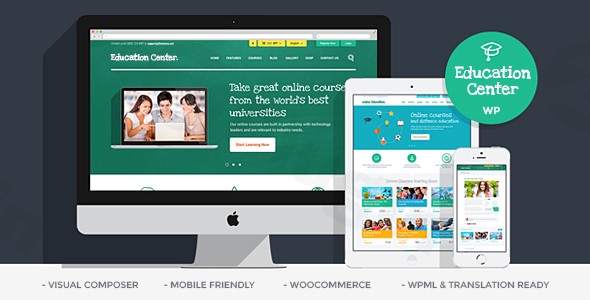
The Education Center WordPress Theme is a cutting-edge, multi-purpose solution expertly crafted for educational institutions of all types. Whether you’re launching an online university, managing a traditional school, or running a specialized training center, this theme provides a robust and visually appealing foundation. It’s designed for anyone looking to showcase their courses and programs with a modern, elegant look that emphasizes user experience and professional design.
Key Features: Design, Layout & Performance
The Education Center theme by ThemeREX offers extensive design-related features, enabling you to create a professional and engaging educational website. Its focus on modern web standards ensures your platform is not only beautiful but also highly functional.
Exceptional Design & Layout Options
This theme provides incredible flexibility in structuring your content:
- Diverse Page Layouts: Choose from Boxed, Wide, Fullwide, and Fullscreen layouts to best present your educational content.
- Course Display Variations: Multiple course display layouts are available for optimal presentation, allowing you to highlight your offerings effectively.
- Customizable Homepage Layouts: Utilize the integrated WPBakery Page Builder to craft unlimited unique homepage designs that align with your institution’s brand.
- Header & Footer Styles: With different header styles and two distinct footer styles, you have control over these crucial navigational areas.
- Blog Layouts: Over 10 blog styles, including Classic, Masonry, Portfolio, and Grid layouts, are available, alongside various pagination options like Pages Slider, Pages Buttons, Load More Button, and Infinite Scroll.
- Visual Flair: The theme includes over 40 awesome hover effects and is built with a fully responsive and retina-ready layout, ensuring sharp visuals on all devices. Mobile-friendly sliders like Revolution Slider and Swiper enhance the visual appeal without compromising performance.
Intuitive Customization Capabilities
The Education Center WordPress Theme empowers you to personalize every aspect of your site:
- Custom Theme Options Panel: This central hub allows you to easily change various aspects like colors, fonts, and animations without touching any code.
- Color Schemes: While specific predefined schemes aren’t detailed, the theme provides options to easily change colors, allowing you to match your institution’s branding effortlessly.
- Typography: With support for Google Fonts, you have a wide range of font choices to establish your website’s unique typographic identity.
- Dynamic Backgrounds: Features like parallax and video backgrounds are available to add depth and engagement to your pages.
- WPBakery Integration: The inclusion of WPBakery Page Builder gives you drag-and-drop control over spacing, containers, sections, and virtually every visual element on your pages.
Superior Performance & SEO Features
Technical excellence is at the core of the Education Center theme:
- Modern Web Standards: Built with HTML5 and CSS3, the theme adheres to the latest web development practices for a clean, efficient codebase.
- Optimized for Speed and Performance: Designed to prevent lags and offer a better visitor experience, the theme aims for optimal loading times.
- SEO-Friendly Structure: From its clean markup to support for schema markup, this theme is SEO-ready out-of-the-box. It’s also fully compatible with popular SEO plugins like “All on One SEO Pack” and “SEO by Yoast” to further boost your search engine rankings.
- Mobile-First & Cross-Browser Compatible: The fully responsive and retina-ready layout ensures your site looks perfect on desktops, tablets, and smartphones. It’s also cross-browser compatible with Firefox, Chrome, Safari, and Edge.
- Regular Updates: The theme benefits from regular updates and security patches, ensuring long-term compatibility and peace of mind.
Installation & Demo Import Guide
Setting up your educational platform with the Education Center theme is a straightforward process, even for those new to WordPress.
- Install & Activate the Theme:
- Once you’ve purchased the Education Center theme, download the theme files from your ThemeForest account (or ZeroPlugin.com if you obtained it there).
- In your WordPress dashboard, navigate to
Appearance > Themes. - Click “Add New” and then “Upload Theme”.
- Choose the theme’s
.zipfile (e.g.,education_center.zip) and click “Install Now”. - After installation, click “Activate”.
- Install Required Companion Plugins:
- Upon activation, the theme will typically prompt you to install a set of recommended and required plugins. For the Education Center theme, this includes premium plugins like WPBakery Page Builder ($30 value), Revolution Slider ($19 value), and PO Composer ($16 value).
- Follow the on-screen instructions to install and activate all necessary plugins. These are crucial for the theme’s full functionality and to replicate the demo content.
- Use the One-Click Demo Import:
- The Education Center theme includes a one-click demo install feature to quickly set up your site with pre-designed content, matching the theme’s live demo.
- Look for an option like
Appearance > Import Demo DataorTheme Options > Demo Datain your WordPress dashboard. - Select the demo you wish to import and click the import button.
- What to Expect During/After Demo Import:
- The demo import process can take several minutes, depending on your server’s speed and the amount of content. Do not close your browser or navigate away from the page during this time.
- Upon successful completion, your website will largely resemble the chosen demo. This includes pre-built pages, posts, menus, widgets, and theme options.
- Common Pitfalls: Large demo imports can sometimes time out on servers with low PHP memory limits or execution times. If you encounter issues, increase your
memory_limitandmax_execution_timein yourphp.inifile or contact your hosting provider for assistance.
Customization Guide: Branding & Layout
The Education Center theme offers extensive customization options, allowing you to tailor your educational website to reflect your unique brand identity and course offerings.
- Utilizing the Custom Theme Options Panel: The primary hub for global theme settings is the Custom Theme Options Panel. Here, you can manage settings for colors, typography (including Google Fonts), header/footer layouts, blog options, and much more. This panel is designed for ease of use, making complex changes accessible without coding knowledge.
- Personalizing with WPBakery Page Builder: Since WPBakery Page Builder is included and deeply integrated, you have unparalleled control over individual page layouts.
- Drag-and-Drop Editing: Visually build and arrange content blocks, sections, and elements. This is where you’ll fine-tune the layout of your course pages, about us, contact, and landing pages.
- Customizing Content: Easily change text, images, videos, and other media directly on the front end or backend editor.
- Branding Elements:
- Logo: Upload your institution’s logo through the Theme Options Panel to instantly brand your site.
- Colors: Adjust the primary and secondary color palettes to match your brand guidelines.
- Fonts: Select from a wide array of Google Fonts to establish a consistent and readable typographic hierarchy.
- Setting Up Your Site Structure:
- Homepage: In
Settings > Reading, you can set a static page (e.g., one of the imported demo homepages) as your front page. - Blog Page: Also in
Settings > Reading, designate a page to display your latest blog posts. - Menus: Navigate to
Appearance > Menusto create and assign your main navigation, footer menus, and any other custom menus. The theme offers different header styles, providing flexibility for menu placement.The customization experience with the Education Center theme is highly intuitive, leveraging the power of its custom options panel and the visual editing capabilities of WPBakery Page Builder. You’ll find presets and design patterns within the demo content that you can easily adapt or expand upon.
- Homepage: In
FAQ & Troubleshooting
Here are answers to some common questions about the Education Center WordPress Theme:
Is Education Center WordPress Theme compatible with Elementor / WPBakery / Gutenberg?
Yes, the Education Center theme offers excellent compatibility. It includes the WPBakery Page Builder for drag-and-drop page creation, and there is also an Elementor version available, indicating full compatibility with Elementor. Additionally, the theme is compatible with the Block Editor (Gutenberg), allowing you to use native WordPress blocks for content creation.
Does the Education Center LMS theme support WooCommerce for online courses?
Absolutely. The Education Center LMS theme is fully compatible with WooCommerce, enabling you to easily monetize your courses, sell educational products, and manage online transactions directly from your website.
How to create online courses with Education Center theme?
The Education Center theme is fully compatible with LearnDash LMS, a leading learning management system for WordPress. To create online courses, you would install and activate the LearnDash plugin (purchased separately) and then use its robust features to build courses, lessons, quizzes, and manage student progress within the theme’s framework.
Does Education Center WordPress theme support child themes?
Yes, the Education Center theme supports child themes. Using a child theme is highly recommended for any custom modifications to your site’s code or styling, as it allows you to update the parent theme without losing your customizations.
What should I do if the demo import fails or looks different from the demo site?
If the demo import fails, first check your server requirements, particularly PHP memory_limit and max_execution_time. Insufficient resources are a common cause. If it looks different, ensure all required plugins are installed and activated. Refer to the theme’s official documentation for detailed instructions, or contact ThemeREX’s customer support for personalized assistance.
Conclusion
The Education Center WordPress Theme is a powerful and versatile choice for any educational institution seeking a professional and feature-rich online presence. Its elegant design, combined with robust LMS and eCommerce capabilities through LearnDash and WooCommerce integration, makes it an ideal solution for online universities, traditional schools, and specialized training centers alike.With extensive customization options via its Custom Theme Options Panel and the bundled WPBakery Page Builder, even users without deep coding knowledge can create stunning, branded websites. The theme’s commitment to performance, mobile responsiveness, and SEO readiness ensures your site not only looks great but also performs strongly in search engines and provides an excellent user experience. For agencies, freelancers, or educational organizations looking to build a dedicated, high-converting learning platform, the Education Center theme offers a comprehensive and reliable foundation.
I. Download Limits & Account Benefits
- Free Downloads: Each email address receives 3 downloads per day for free products
- Upgrade Benefits: Purchase any paid product to increase your daily download limit by 3 for each paid product
- No Account Required: You can download immediately by receiving the download link via email
- Account Recommended: Create an account for easier access to your order history and direct update downloads
II. Understanding GPL vs Official Versions
Important: The products available on WPPick are GPL-licensed versions, which differ from official developer versions. Before purchasing, please read our comprehensive guide: Understanding GPL & Official Differences at WPPick
Key Points:
- GPL versions may not include premium support from original developers
- Updates may be delayed compared to official releases
- Some premium features might have limitations
- Always consider your specific needs and support requirements
III. Support & Assistance
We’re here to help through multiple channels:
- Email Support: Direct email assistance for all inquiries
- Live Chat: Real-time support during business hours
- Comprehensive Documentation: Detailed guides and tutorials
IV. Order Tracking
Access your complete purchase history and download links anytime: Order History
V. Account Access
New to WPPick? Login or Create Account to manage your downloads and orders efficiently.
VI. Refund Protection
We stand behind our products with a clear refund policy. Review our terms: Refund Policy
VII. Privacy & Security
Your data security is our priority. Learn how we protect your information: Privacy Policy
VII. Terms of Service
Understanding our service terms ensures a smooth experience: Terms of Use
Quick Tips for Best Experience
- Verify Compatibility: Check plugin/theme compatibility with your WordPress version
- Backup First: Always backup your site before installing new plugins or themes
- Test Environment: Consider testing on a staging site first
- Stay Updated: Regularly check for updates in your account dashboard
- Read Documentation: Review any included documentation for optimal setup
Need Help?
If you have questions about downloads, licensing, or need technical assistance, don’t hesitate to contact our support team. We’re committed to ensuring you have the best possible experience with WPPick products.
Ready to get started? Your download adventure begins with just one click!
- Compatibility with WordPress 6.8.1x has been improved
- Theme styles have been improved