

Edwiser Remui Moodle Lms Theme
/Year
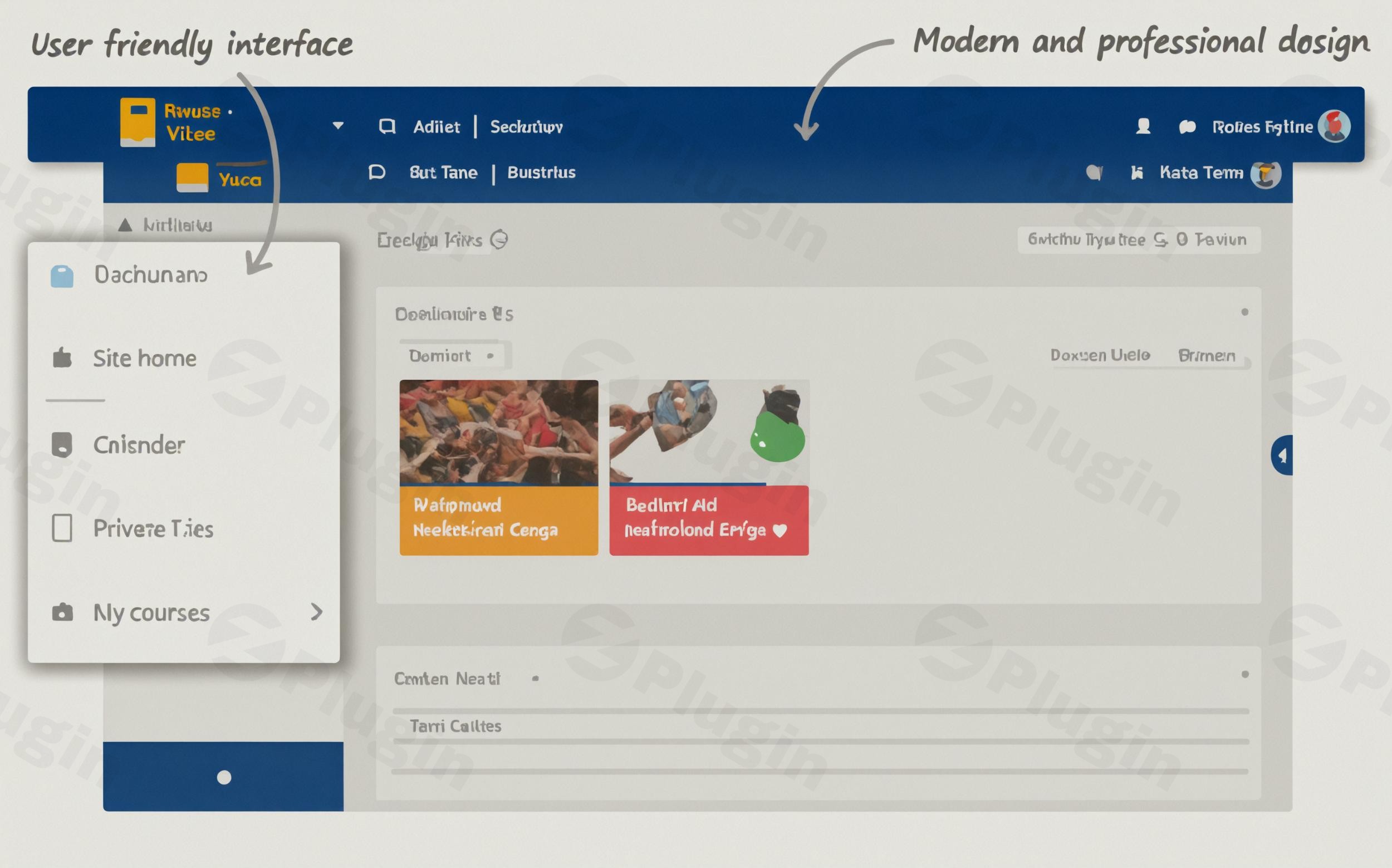
Moodle, a robust open-source learning management system (LMS), powers countless educational institutions and corporate training platforms worldwide. While Moodle is undeniably powerful, its default interface can sometimes feel dated, leading to a less engaging experience for both learners and administrators. This is where the Edwiser RemUI Moodle LMS Theme steps in.Edwiser RemUI is a premium Moodle theme designed to transform your traditional Moodle site into a modern, intuitive, and visually appealing e-learning hub. It addresses the core problem of Moodle’s user experience by offering extensive customization, streamlined navigation, and a focus on engagement, making it an essential tool for anyone looking to upgrade their Moodle platform. Whether you’re a university, a corporate trainer, or a K-12 school, Edwiser RemUI provides the tools to create a truly professional and user-friendly learning environment.
Key Features That Revolutionize Your Moodle LMS
The Edwiser RemUI Theme comes packed with features tailored to enhance every aspect of your Moodle site, from design to daily administration and learner interaction.
Modern Interface and Responsive Design
Edwiser RemUI delivers a completely redesigned user interface, making navigation intuitive and learning enjoyable. The theme boasts a fully responsive design that adapts perfectly to all devices, ensuring a consistent and optimal learning experience whether users are on desktops, tablets, or mobile phones. This commitment to accessibility and modern aesthetics dramatically improves the overall Moodle user experience.
Powerful Visual Customization with Drag-and-Drop
At the heart of Edwiser RemUI’s flexibility is its Visual Page Builder (Visual Personalizer), offering a drag-and-drop interface. This allows you to create custom pages, including homepages, course pages, and dashboards, without any coding knowledge. With over 85 custom blocks and 60+ components, you can effortlessly arrange content, create unique layouts, and truly personalize your LMS. The package includes a dedicated Homepage Customization Plugin and a Page Builder Extension to facilitate this.Key customization features include:
- Live Customizer: Modify colors, fonts (including Google Fonts), logos, and other design elements in real-time.
- Custom Page Templates: Utilize multiple professionally designed page layouts for the homepage, login screens, course enrollment pages, and archives.
- Custom Blocks Collection & Enhanced Block Features: Access a wide array of pre-built blocks to easily add complex functionalities and design elements.
- Footer Customization: Choose from multiple footer templates with options for background, text color, images, logos, and social icons.
Prebuilt Website Demos for Quick Setup
To help you kickstart your Moodle site, Edwiser RemUI offers professional prebuilt website demos, saving you significant development time. These include:
- Corporate Training Demo: A professional layout perfect for corporate learning environments and employee onboarding.
- University Demo: An academic design tailored for higher education institutions, focusing on course catalogs and student portals.
- School Demo: An engaging interface designed for K-12 educational needs, with a focus on ease of use for younger learners.The Site Importer Tool allows you to quickly implement these demos.
Enhanced User Experience and Engagement
Beyond aesthetics, Edwiser RemUI focuses on improving usability for all stakeholders:
- Focus Mode: Provides a distraction-free learning layout for students, removing extraneous elements from the screen to enhance concentration.
- Custom Dashboards: Integrated, customizable dashboards for learners, teachers, and administrators offer quick access to relevant information like course progress, analytics, and activity tracking.
- Optimized Navigation: Features quick links, collapsible sidebars, and a quick access menu for easy course management and content discovery.
- Dark Mode: A high-quality dark mode option helps reduce eye strain and enhances the user experience in low-light conditions.
Advanced Course Management and Display
The theme significantly improves how courses are presented and managed:
- Multiple Course Formats Plugin: Compatible with 6 different course formats, allowing diverse display options like card and list layouts.
- Custom Course and Categories Pages: Improve readability and organization for learners, making it easier to browse and enroll in courses.
- Advanced Filter System: Helps users quickly find relevant courses and content.
- Course Ratings & Reviews: Enables students to rate and review courses, fostering community and providing valuable feedback.
Robust Administrative and Integration Capabilities
Edwiser RemUI streamlines administrative tasks and ensures broad compatibility:
- RTL Language Support: Supports Right-to-Left languages, enabling global reach for your LMS.
- SEO Settings: Includes options for favicon, site logo format, site loader, and Google Analytics tracking ID (compatible with GA4).
- Site-wide Announcements: Easily notify all users with customizable announcement types and styles.
- Dictionary Feature: Allows users to look up definitions by selecting words, enhancing the learning process.
- Quick Login Pop-Up: Simplifies the login process for users.
- Edwiser Bridge Integration: While Edwiser RemUI is a Moodle theme, it’s often paired with the Edwiser Bridge WordPress plugin to enable seamless integration between WordPress and Moodle. This is ideal for selling courses and synchronizing users through WordPress/WooCommerce.
Technical Specifications & Compatibility
Built on the Moodle Boost Theme Base, Edwiser RemUI ensures strong compatibility with Moodle core functionalities and most Moodle plugins. It is compatible with a wide range of Moodle versions, from Moodle 3.0 up to the latest stable versions like Moodle 4.x and 5.x, with specific theme versions for optimal performance. It also supports PHP 8.2 and includes Custom CSS/JS Support for advanced design tweaks.
How to Install Edwiser RemUI Theme on Your Moodle Site
Installing the Edwiser RemUI Premium Theme is a straightforward process, designed to be accessible even for non-developers. The comprehensive package includes a Detailed Installation Guide (PDF), but here’s a general step-by-step overview:
- Download the Theme Package: After purchasing, download the Edwiser RemUI Theme package, which will include the main theme file, the Homepage Customization Plugin, the Site Importer Tool, and other supporting extensions.
- Access Your Moodle Site: Log in to your Moodle site as an administrator.
- Navigate to Site Administration: Go to
Site administration > Plugins > Install plugins. - Install the Theme:
- Drag and drop the
remui.ziptheme file into the file picker area, or click “Choose a file” to upload it. - Click “Install plugin from the ZIP file”.
- Follow the on-screen prompts to confirm the installation. Moodle will check for compatibility.
- Drag and drop the
- Install Supporting Plugins: Repeat steps 3 and 4 for the included plugins such as the Homepage Customization Plugin, Site Importer Tool, Page Builder Extension, Course Format Plugin, Advanced Filter System, and Custom Blocks Collection. These are crucial for unlocking the full capabilities of Edwiser RemUI.
- Upgrade Moodle Database: After installing all components, Moodle will prompt you to upgrade the database. Proceed with the upgrade.
- Select Edwiser RemUI as Default Theme: Go to
Site administration > Appearance > Themes > Theme selector. Click “Change theme” for the default theme (or specific theme areas like login page), select “Edwiser RemUI”, and click “Use theme”. - Configure Initial Settings: Navigate to
Site administration > Appearance > Edwiser RemUIto access the theme’s settings panel. Here, you can begin customizing your site using the Live Customizer and Visual Page Builder. - Import a Demo (Optional but Recommended): Use the Site Importer Tool to quickly apply one of the prebuilt demos (Corporate Training, University, School) to get a professional look instantly.
Practical Usage & Best Practices with Edwiser RemUI
Edwiser RemUI is ideal for various organizations looking to elevate their Moodle LMS. Here are some concrete use cases and best practices:
- For Corporate Training Platforms:
- Use Case: A company needs to provide engaging and trackable online training for employees, partners, or clients.
- Best Practice: Leverage the Corporate Training Demo for a polished, professional look. Use the Visual Page Builder to create custom dashboards for employees to track their progress and quickly access relevant courses. Implement site-wide announcements for important policy updates or new training module releases. The “Focus Mode” ensures employees can concentrate during their learning sessions.
- For Universities and Higher Education Institutions:
- Use Case: A university wants to offer a modern, student-friendly online learning environment that integrates seamlessly with existing Moodle course structures.
- Best Practice: Utilize the University Demo for an academic aesthetic. Customize course pages with the Course Format Plugin to display diverse course content effectively. The Advanced Filter System helps students quickly find specific courses or departments. The responsive layout ensures students can access course materials on any device, which is crucial for modern blended learning.
- For K-12 Schools and Academies:
- Use Case: A school requires an intuitive and engaging platform for remote learning or supplemental resources for younger students.
- Best Practice: Opt for the School Demo for its engaging interface. Simplify navigation using the optimized menu options and quick links. The drag-and-drop builder can help teachers create visually appealing course content without needing technical skills. The emphasis on improved user experience makes Moodle less intimidating for younger learners and their parents.
- For Selling Moodle Courses via WordPress/WooCommerce:
- Use Case: An educator or business wants to sell Moodle courses directly from a WordPress website, leveraging WooCommerce for e-commerce functionalities.
- Best Practice: Integrate Edwiser RemUI with the Edwiser Bridge WordPress plugin. This allows you to list Moodle courses on your WordPress site, manage enrollments through WooCommerce, and synchronize users between the two platforms. Use Edwiser RemUI’s Pricing Page Templates within Moodle to create compelling course offering pages that complement your WordPress sales funnel, providing a seamless user journey from purchase to learning.
FAQ & Troubleshooting
Q1: What is Edwiser RemUI?
A1: Edwiser RemUI is a premium Moodle LMS theme designed to modernize and enhance the user experience, aesthetics, and functionality of Moodle learning platforms. It transforms Moodle’s traditional interface into a visually appealing and highly interactive environment suitable for various educational and corporate training needs, offering extensive customization options without requiring coding expertise.
Q2: How can I customize Moodle with Edwiser RemUI?
A2: You can customize Moodle extensively with Edwiser RemUI using its powerful tools:
- Visual Page Builder (Visual Personalizer): A drag-and-drop interface for designing homepages, course pages, and dashboards with over 85 custom blocks.
- Live Customizer: Modify colors, fonts, logos, and other design elements in real-time.
- Custom Page Templates: Utilize pre-designed layouts for various Moodle pages.
- Custom CSS/JS Support: For advanced users who want to add further design and functionality tweaks.
Q3: Is Edwiser RemUI compatible with Moodle 4.x?
A3: Yes, Edwiser RemUI is designed with broad compatibility in mind. It is regularly updated to ensure optimal performance and compatibility with the latest stable Moodle versions, including Moodle 4.x and even Moodle 5.x. The theme is built on the Moodle Boost Theme Base, ensuring strong integration with Moodle’s core functionalities.
Q4: Does Edwiser RemUI support Dark Mode?
A4: Yes, Edwiser RemUI includes a high-quality Dark Mode option. This feature allows users to switch to a darker interface, which can help reduce eye strain, especially in low-light conditions, and enhances the overall user experience.
Q5: How does Edwiser RemUI enhance the learning experience?
A5: Edwiser RemUI enhances the learning experience through several key features:
- Modern, Intuitive Interface: Simplifies navigation and makes Moodle more engaging.
- Responsive Design: Ensures accessibility and consistent experience across all devices.
- Focus Mode: Provides a distraction-free environment for students, improving concentration.
- Custom Dashboards: Offers quick access to relevant information and progress tracking for learners.
- Enhanced Course Displays and Filtering: Makes it easier to browse, discover, and access course content.
Conclusion: Transform Your Moodle LMS with Edwiser RemUI
The Edwiser RemUI Premium Theme stands out as a powerful solution for anyone seeking to revitalize their Moodle LMS. By addressing the common pain points of Moodle’s default interface, it delivers an unparalleled combination of modern design, intuitive navigation, and extensive customization. Its commitment to a superior Moodle user experience is evident in features like the drag-and-drop page builder, responsive layouts, and user-centric dashboards.This GPL-licensed product, backed by regular updates and security verification, offers guaranteed compatibility with the latest Moodle versions, ensuring your investment is future-proof. Whether you’re a corporate training department, a higher education institution, or a K-12 school, Edwiser RemUI provides the tools to create a highly engaging, professional, and easy-to-manage learning platform. It’s more than just a theme; it’s a complete package designed to elevate your Moodle site to a modern, feature-rich e-learning environment.
I. Download Limits & Account Benefits
- Free Downloads: Each email address receives 3 downloads per day for free products
- Upgrade Benefits: Purchase any paid product to increase your daily download limit by 3 for each paid product
- No Account Required: You can download immediately by receiving the download link via email
- Account Recommended: Create an account for easier access to your order history and direct update downloads
II. Understanding GPL vs Official Versions
Important: The products available on WPPick are GPL-licensed versions, which differ from official developer versions. Before purchasing, please read our comprehensive guide: Understanding GPL & Official Differences at WPPick
Key Points:
- GPL versions may not include premium support from original developers
- Updates may be delayed compared to official releases
- Some premium features might have limitations
- Always consider your specific needs and support requirements
III. Support & Assistance
We’re here to help through multiple channels:
- Email Support: Direct email assistance for all inquiries
- Live Chat: Real-time support during business hours
- Comprehensive Documentation: Detailed guides and tutorials
IV. Order Tracking
Access your complete purchase history and download links anytime: Order History
V. Account Access
New to WPPick? Login or Create Account to manage your downloads and orders efficiently.
VI. Refund Protection
We stand behind our products with a clear refund policy. Review our terms: Refund Policy
VII. Privacy & Security
Your data security is our priority. Learn how we protect your information: Privacy Policy
VII. Terms of Service
Understanding our service terms ensures a smooth experience: Terms of Use
Quick Tips for Best Experience
- Verify Compatibility: Check plugin/theme compatibility with your WordPress version
- Backup First: Always backup your site before installing new plugins or themes
- Test Environment: Consider testing on a staging site first
- Stay Updated: Regularly check for updates in your account dashboard
- Read Documentation: Review any included documentation for optimal setup
Need Help?
If you have questions about downloads, licensing, or need technical assistance, don’t hesitate to contact our support team. We’re committed to ensuring you have the best possible experience with WPPick products.
Ready to get started? Your download adventure begins with just one click!
- Demo Cloner Installation - ( readme )
- Installation Guide
- Edwiser RemUI v5.0.5 - ( Moodle 5.1 )
- Edwiser RemUI v_4.5.11 - ( Moodle 4.4, 4.5 )
- Edwiser_RemUI_4.5.9 - ( Moodle 4.2, 4.3 )
- Edwiser_RemUI_v4.1.15-for-Moodle-4.1
- Edwiser_RemUI_v4.0.16-for-Moodle-4.0-1
- Edwiser RemUI_v3.11.7 for Moodle 3.11
- Edwiser RemUI_v3.10.14 for Moodle 3.10
- Demo Cloner Installation- ( readme )
- Installation Guide
- Edwiser-RemUI-5.0.1 - ( Moodle 5.0 )
- Edwiser-RemUI-4.5.7 - ( Moodle versions 4.2, 4.3, 4.4, 4.5 )
- Edwiser_RemUI_v4.1.15-for-Moodle-4.1
- Edwiser_RemUI_v4.0.16-for-Moodle-4.0-1
- Edwiser RemUI_v3.9.20 for Moodle 3.9
- Edwiser RemUI_v3.8.15 for Moodle 3.8
- Edwiser RemUI_v3.7.17 for Moodle 3.7
- Edwiser RemUI v3.6.10 for Moodle 3.6
- Edwiser RemUI v3.5.14 for Moodle 3.5
- Edwiser_RemUI_v3.4.10 for Moodle 3.4
- Edwiser_RemUI_3.3.9 for Moodle 3.3
- Edwiser_RemUI_3.2.4 for Moodle 3.2
- Edwiser_RemUI_3.1.4 for Moodle 3.1
- Edwiser_RemUI_3.0.0 for Moodle 3.0