

Efarm – A Multipurpose Food & Farm WordPress Theme
/Year
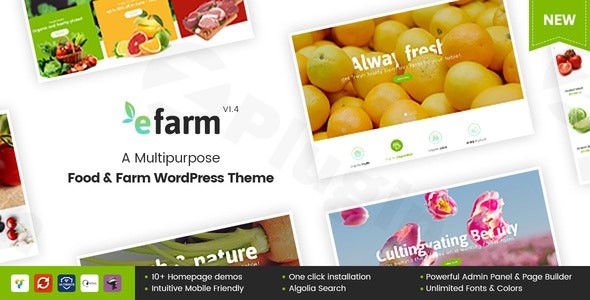
In the rapidly growing organic and agricultural digital space, your website serves as the virtual storefront for your fields and flavors. The Efarm WordPress theme is a specialized, modern solution designed specifically for organic farms, food markets, and eco-friendly grocery stores. With its clean UI/UX and robust feature set, this farm website WordPress theme provides a professional foundation for businesses looking to bridge the gap between rural production and digital retail.
1. Overview: Who is Efarm For?
Efarm is a multipurpose food WordPress theme built for variety and flexibility. Whether you are running a large-scale agricultural operation, a local farmer’s market, or a specialized organic shop, Efarm offers a tailored aesthetic that emphasizes freshness and sustainability. The theme is ideal for:
- Organic Farmers & Growers: Showcasing produce and farm-to-table services.
- eCommerce Store Owners: Selling groceries, seeds, or farm tools online via WooCommerce.
- Food Bloggers & Nutritionists: Sharing recipes and health articles with specialized layouts.
- Agencies & Freelancers: Building high-quality niche sites for clients in the agriculture sector.
2. Key Features: Design, Layout & Performance
Modern Design & Layout Options
Efarm stands out with its focus on “Modern UI/UX graphic trends,” moving away from the clunky, dated looks often found in agricultural templates.
- 10+ Unique Homepage Layouts: From specialized “Flower Farm” and “Animal Farm” designs to “Supper Farm” and “Organic Shop” configurations, there is a pre-built style for every niche.
- Flexible Shop Pages: Choose from grid or list views, with product columns ranging from 2 to 5.
- Specialized Content Areas: Dedicated layouts for recipes, nutrition information, and portfolios allow you to provide value beyond just a product list.
Advanced Customization Capabilities
The theme is powered by the Redux Framework and the Super ArrowPress Admin Panel, giving you granular control without needing to touch a line of code.
- Typography & Color: Access over 800 Google Fonts and 20+ pre-defined color schemes (plus unlimited custom color options) to match your brand identity perfectly.
- Page Builders: Efarm offers full compatibility with both Elementor and WPBakery Page Builder, allowing for drag-and-drop design on the front and back end.
Performance & SEO Readiness
A fast WordPress theme for food business success is non-negotiable. Efarm is marketed as SEO-optimized with clean markup. While specific performance benchmarks like Lighthouse scores depend on your hosting and image optimization, the theme includes a “Site Speed Up” documentation section and supports asset optimization to ensure a smooth user experience.
3. Installation & Demo Import: Getting Started
Setting up your organic farm WordPress theme is streamlined through a user-friendly process. Follow these steps to get your site looking like the demo in minutes:
- Theme Installation: Upload the Efarm theme files via Appearance > Themes > Add New in your WordPress dashboard.
- Plugin Activation: Upon activation, the theme will prompt you to install required plugins, including WooCommerce, WPBakery or Elementor, and Slider Revolution.
- One-Click Demo Import: Navigate to the theme’s admin panel and use the One-Click Demo Importer. Choose the demo that best fits your niche (e.g., Organic Shop or Flower Farm).
- Wait for Assets: The importer will pull in pages, menus, and widgets. Ensure your server has sufficient memory limits to avoid timeouts during this process.
4. Customization Guide: Personalizing Your Brand
Once the demo is imported, you can tailor the site to your specific needs using the Super ArrowPress Admin Panel:
- Branding: Upload your logo and favicon via the Global Settings. Use the color picker to set your primary “organic green” or “earthy brown” tones.
- Header & Footer: Customize your navigation using the built-in Mega Menu support. You can configure different header styles for your shop versus your blog.
- Product Displays: Utilize the Ajax Product Filter and Ajax Search to help customers find produce quickly. These features provide a high-end eCommerce feel similar to major retail sites.
- Multilingual Support: If you are serving a diverse audience, Efarm is WPML compatible, making it easy to translate your farm’s story into multiple languages.
5. FAQ & Troubleshooting
Is Efarm compatible with Elementor and WPBakery?
Yes, Efarm is a WordPress theme with Elementor and WPBakery Page Builder support. It gives you the flexibility to choose your preferred drag-and-drop editor for building custom pages.
Does Efarm support WooCommerce for online stores?
Absolutely. Efarm is a dedicated WooCommerce food theme with deep integration for online sales. It supports product grids, lists, and specialized e-commerce features like Ajax filtering and pre-order functionality.
Does it support child themes?
While not explicitly detailed in all documentation, Efarm follows standard WordPress development practices. It is highly recommended to use a child theme for any custom code modifications to ensure your changes are not lost during theme updates.
How can I improve the speed of my Efarm site?
To ensure a fast WordPress theme experience, utilize the “Site Speed Up” section in the documentation, optimize your produce images before uploading, and consider using a caching plugin alongside the theme’s built-in asset optimizations.
What should I do if the demo import fails?
Demo import failures are usually caused by server limitations. Increase your PHP max_execution_time and memory_limit via your hosting panel or .htaccess file, then try the import again.
6. Conclusion: A Modern Choice for the Modern Farmer
The Efarm WordPress theme successfully balances niche-specific functionality with high-end design aesthetics. Its primary strength lies in its specialized demos, which save hours of design time for anyone in the agriculture or organic food sector.While the theme is available at various price points, purchasing through reputable sources like ThemeForest ensures you receive 6 months of direct support from the “Power Elite Author” ArrowTheme. For those seeking an affordable, multipurpose food WordPress theme that doesn’t sacrifice performance for features, Efarm is a top-tier contender.Whether you are launching a local farm shop or a global organic brand, Efarm provides the tools to grow your digital presence as effectively as your crops. Explore more theme insights and tutorials at wppick.com.
I. Download Limits & Account Benefits
- Free Downloads: Each email address receives 3 downloads per day for free products
- Upgrade Benefits: Purchase any paid product to increase your daily download limit by 3 for each paid product
- No Account Required: You can download immediately by receiving the download link via email
- Account Recommended: Create an account for easier access to your order history and direct update downloads
II. Understanding GPL vs Official Versions
Important: The products available on WPPick are GPL-licensed versions, which differ from official developer versions. Before purchasing, please read our comprehensive guide: Understanding GPL & Official Differences at WPPick
Key Points:
- GPL versions may not include premium support from original developers
- Updates may be delayed compared to official releases
- Some premium features might have limitations
- Always consider your specific needs and support requirements
III. Support & Assistance
We’re here to help through multiple channels:
- Email Support: Direct email assistance for all inquiries
- Live Chat: Real-time support during business hours
- Comprehensive Documentation: Detailed guides and tutorials
IV. Order Tracking
Access your complete purchase history and download links anytime: Order History
V. Account Access
New to WPPick? Login or Create Account to manage your downloads and orders efficiently.
VI. Refund Protection
We stand behind our products with a clear refund policy. Review our terms: Refund Policy
VII. Privacy & Security
Your data security is our priority. Learn how we protect your information: Privacy Policy
VII. Terms of Service
Understanding our service terms ensures a smooth experience: Terms of Use
Quick Tips for Best Experience
- Verify Compatibility: Check plugin/theme compatibility with your WordPress version
- Backup First: Always backup your site before installing new plugins or themes
- Test Environment: Consider testing on a staging site first
- Stay Updated: Regularly check for updates in your account dashboard
- Read Documentation: Review any included documentation for optimal setup
Need Help?
If you have questions about downloads, licensing, or need technical assistance, don’t hesitate to contact our support team. We’re committed to ensuring you have the best possible experience with WPPick products.
Ready to get started? Your download adventure begins with just one click!
- Updated: out of date file of WooCommerce.
- Fixed: some minor bugs CSS