
Electrician – Electricity Services WordPress Theme
/Year
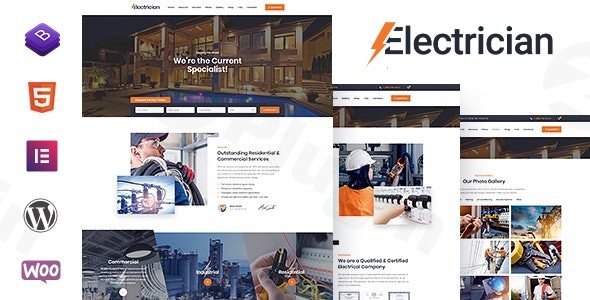
Building a robust online presence is crucial for any business, and for electricians and electrical service providers, a specialized website can make all the difference. The Electrician – Electricity Services WordPress Theme is engineered precisely for this niche, offering a modern, clean, and highly functional platform to showcase your expertise. Designed by SmartDataSoft, a respected Power Elite Author on ThemeForest, this theme focuses on putting your services front and center with a professional and intuitive design philosophy.
Key Features: Design, Layout & Performance
The Electrician theme is built to provide an exceptional user experience both for you, the site administrator, and your potential clients. Its design and underlying code are optimized for clarity, speed, and customization, ensuring your electrical business stands out.
Design & Layout Options
This theme offers a fully responsive design that adapts flawlessly to any screen size, from desktops to mobile phones, ensuring your site always looks its best. It provides a variety of pre-designed layouts for essential business pages, including:
- Diverse Homepage Layouts: Create varied first impressions with multiple homepage designs.
- Professional Service Showcase: Dedicated sections to highlight your specific electrical offerings.
- About Us & Team Member Profiles: Introduce your business and build trust by showcasing your skilled team.
- Pricing Plans: Clearly present your service costs.
- Gallery Grid: Display your completed projects and workmanship.
- Contact Us Pages: Essential for client inquiries, often featuring appointment and service request forms.
- Blog Layouts: Engage your audience with blog lists, sidebar options, and detailed blog post pages.Beyond standard pages, the theme incorporates unique visual elements crucial for service-based businesses, such as a customizable homepage banner section with clear Calls-to-Action (CTAs), testimonial carousels to showcase client feedback, and special offer highlights to promote promotions. The retina-ready design ensures crisp, high-quality visuals on all devices.
Customization Capabilities
The Electrician theme empowers you with extensive customization options, allowing you to tailor your site to perfectly match your brand without needing to write a single line of code:
- Global Color Options: Easily adjust your website’s color scheme using advanced color palettes and a user-friendly color picker, ensuring consistent branding.
- Extensive Typography: Choose from over 100 font families, including integration with 800+ Google Fonts, to achieve a professional and personalized look.
- Layout & Section Control: While granular spacing controls are implied, the theme’s structure revolves around customizable sections for About Us, Services, Testimonials, and Contact Us, giving you control over your content flow.
- Background Options: Support for background images allows for further visual personalization.
- Header and Footer Customization: Easily configure your header with social media icons, opening hours, and appointment buttons, and customize your footer content to display important information.
Performance & SEO Features
Performance and search engine visibility are paramount for any business website. The Electrician theme is built with these priorities in mind:
- Optimized, Clean, and Secure Code: Designed for faster page load times and stable performance, which is crucial for user experience and SEO rankings.
- SEO-Friendly Structure: Tailored elements and a clean markup help boost your visibility in search engines, making it an SEO friendly electrician WordPress theme.
- Mobile-First Responsiveness: With 100% responsive design, the theme ensures perfect scaling and display across all devices, passing Google-friendly tests.
- Cross-Browser Compatibility: Your site will work seamlessly across popular browsers like Chrome, Firefox, Safari, Edge, and IE9+.
Installation & Demo Import
Getting your electrical business website up and running with the Electrician theme is a streamlined process, even for beginners.
- Install & Activate the Theme:
- From your WordPress dashboard, navigate to
Appearance > Themes > Add New. - Click
Upload Themeand select the theme’s.zipfile you downloaded. - Install and then
Activatethe theme.
- From your WordPress dashboard, navigate to
- Install Required Plugins: Upon activation, the theme will typically recommend or require a set of plugins for full functionality (e.g., Elementor, Contact Form 7, WooCommerce). Install and activate these plugins as prompted.
- One-Click Demo Import: The Electrician theme demo import is a standout feature for quick deployment.
- Look for a “Demo Import” or “Import Demo Data” option, usually found under
Appearanceor a dedicated theme options panel in your WordPress dashboard. - Click the “One-Click Demo Import” button.
- What to Expect: This process will automatically import all the pre-designed pages, posts, widgets, and settings you see in the theme’s demo site. This provides a fantastic starting point, allowing you to immediately visualize your site with professional content.
- Potential Pitfalls: For larger demos, ensure your server has adequate resources (PHP memory limit, execution time) to prevent timeouts during the import process. If issues arise, increasing these limits with your hosting provider can often resolve them.
- Look for a “Demo Import” or “Import Demo Data” option, usually found under
- Post-Import Setup: After a successful import, you may need to:
- Assign your main navigation menu under
Appearance > Menus. - Set your homepage and blog page under
Settings > Reading. - Replace placeholder images and text with your own business-specific content.
- Assign your main navigation menu under
Customization Guide: Branding & Layout
Personalizing the Electrician WordPress theme to reflect your unique brand is intuitive and flexible, thanks to its integration with the WordPress Customizer and popular page builders.
- WordPress Customizer / Theme Options: Most global site settings are managed through the WordPress Customizer (
Appearance > Customize). Here, you can live-preview changes before publishing them.- Logo & Favicon: Upload your brand’s logo and favicon for professional branding.
- Colors & Typography: Fine-tune your global color scheme, button styles, and font choices from the extensive typography options.
- Header & Footer: Customize layout, content, and elements in your header (e.g., adding social media icons, business hours, and an appointment booking button) and footer (e.g., contact info, copyright).
- Page Builder Integration (Elementor/WPBakery): The Electrician theme is compatible with Elementor Page Builder and also supports WPBakery Page Builder (formerly Visual Composer). This means you can easily:
- Drag-and-Drop Layouts: Create custom page layouts, modify existing demo content, and arrange elements visually without coding.
- Content Customization: Edit text, images, videos, and other content directly on the frontend.
- Section Management: Utilize the theme’s specialized sections for services, testimonials, and team members as custom content areas, then enhance them further with your chosen page builder.
- Custom Post Types & Widgets:
- The theme leverages custom post types for managing your services, team members, testimonials, and pricing plans. This keeps your business-specific information organized and easy to update.
- Utilize widget areas (especially in blog sidebars and footers) to display supplementary content, contact forms, or recent posts.
- Menus and Navigation: Set up and manage your primary navigation menus under
Appearance > Menus. You can create multi-level menus to guide users through your services and information efficiently. - Child Theme Compatibility: The theme is Child Theme Compatible, which is a best practice for any WordPress site. Using a child theme allows you to make custom CSS or template modifications safely, ensuring that your changes are preserved even when you update the main theme.
FAQ & Troubleshooting
Here are answers to some common questions about the Electrician – Electricity Services WordPress Theme:
Q: Is Electrician WordPress theme good for small business?
A: Yes, the Electrician WordPress theme is ideal for small to medium-sized electrical service companies, solo electricians, and contractors. Its focused design and integrated features like appointment forms and service showcases are perfectly tailored for businesses that need a professional online presence without extensive development.
Q: Is Electrician theme compatible with Elementor / WPBakery / Gutenberg?
A: Yes, the Electrician theme is explicitly compatible with Elementor Page Builder and also integrates with WPBakery Page Builder (Visual Composer), allowing for easy drag-and-drop customization. While it prioritizes these page builders, it’s also built on modern WordPress standards, ensuring general compatibility with Gutenberg blocks for basic content editing.
Q: Does Electrician theme support WooCommerce for online stores?
A: Yes, the Electrician theme is fully compatible with WooCommerce. This means you can effortlessly set up an online store to sell electrical equipment, service packages, or any related products directly from your website.
Q: How can I update the theme without losing my customizations?
A: To update the Electrician theme safely without losing your customizations, it is highly recommended to use a child theme. A child theme inherits the functionality of the parent theme but allows you to make modifications to its design and functionality in separate files, protecting your changes during theme updates.
Q: What should I do if the demo import fails or looks different from the demo site?
A: If the demo import fails, first check your server’s PHP memory limit and execution time; increasing these can often resolve the issue. If it looks different, ensure all recommended plugins were installed and activated before importing the demo. Sometimes, clearing your website and browser cache after import can also help render the demo correctly. If problems persist, consult the theme’s documentation or support.
Conclusion
The Electrician – Electricity Services WordPress Theme stands out as a highly specialized and robust solution for anyone in the electrical services industry looking to establish a powerful online presence. Its modern aesthetic, combined with a focus on practical features like professional service showcases, appointment booking systems, and detailed team profiles, makes it an ideal choice.With its responsive design, comprehensive customization options through the WordPress Customizer and integration with leading page builders like Elementor, and an SEO-optimized structure, this theme provides an excellent foundation for lead generation and showcasing expertise. Whether you’re a solo electrician, a growing contractor business, or an agency building sites for clients in the electrical niche, the Electrician theme offers a fast, flexible, and feature-rich pathway to a high-converting website. Its ease of use, even for those without coding knowledge, ensures that building a professional online hub for your electrical services is achievable and effective.
I. Download Limits & Account Benefits
- Free Downloads: Each email address receives 3 downloads per day for free products
- Upgrade Benefits: Purchase any paid product to increase your daily download limit by 3 for each paid product
- No Account Required: You can download immediately by receiving the download link via email
- Account Recommended: Create an account for easier access to your order history and direct update downloads
II. Understanding GPL vs Official Versions
Important: The products available on WPPick are GPL-licensed versions, which differ from official developer versions. Before purchasing, please read our comprehensive guide: Understanding GPL & Official Differences at WPPick
Key Points:
- GPL versions may not include premium support from original developers
- Updates may be delayed compared to official releases
- Some premium features might have limitations
- Always consider your specific needs and support requirements
III. Support & Assistance
We’re here to help through multiple channels:
- Email Support: Direct email assistance for all inquiries
- Live Chat: Real-time support during business hours
- Comprehensive Documentation: Detailed guides and tutorials
IV. Order Tracking
Access your complete purchase history and download links anytime: Order History
V. Account Access
New to WPPick? Login or Create Account to manage your downloads and orders efficiently.
VI. Refund Protection
We stand behind our products with a clear refund policy. Review our terms: Refund Policy
VII. Privacy & Security
Your data security is our priority. Learn how we protect your information: Privacy Policy
VII. Terms of Service
Understanding our service terms ensures a smooth experience: Terms of Use
Quick Tips for Best Experience
- Verify Compatibility: Check plugin/theme compatibility with your WordPress version
- Backup First: Always backup your site before installing new plugins or themes
- Test Environment: Consider testing on a staging site first
- Stay Updated: Regularly check for updates in your account dashboard
- Read Documentation: Review any included documentation for optimal setup
Need Help?
If you have questions about downloads, licensing, or need technical assistance, don’t hesitate to contact our support team. We’re committed to ensuring you have the best possible experience with WPPick products.
Ready to get started? Your download adventure begins with just one click!