
Elipsa – Creative Magazine WordPress Theme
/Year
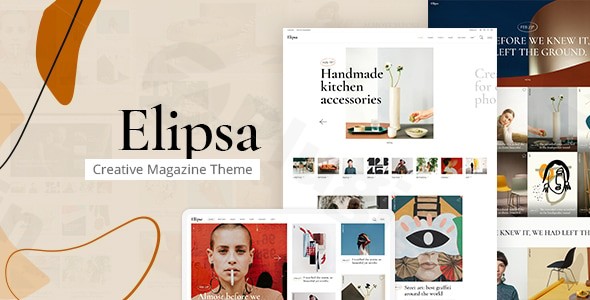
Transforming your online publication into a visually stunning and engaging experience is paramount in today’s digital landscape. The Elipsa Creative Magazine WordPress Theme offers a cutting-edge solution for modern magazines, news portals, and lifestyle blogs, meticulously crafted to captivate readers and showcase your content with sophisticated elegance. Designed by the reputable Edge-Themes (part of Qode Interactive), Elipsa bridges the gap between stunning aesthetics and robust functionality, making it an ideal choice for digital storytellers, creative professionals, and publishers seeking a premium online presence.
Key Features: Design, Layout & Performance
Elipsa is built on a philosophy that treats content, imagery, and pacing with equal care, resulting in a theme that is as beautiful as it is powerful. It empowers users to create an immersive reading experience without needing any coding knowledge.
Design & Layout Options
Elipsa stands out with its diverse and visually appealing layout options, tailored specifically for the demands of modern online magazines and blogs:
- Predesigned Homepages: Kickstart your site with 5 to 6 pre-designed homepages featuring varied magazine layouts, from art & fashion to creative and lifestyle styles. These demos offer a quick path to a professional-looking website.
- Flexible Blog Layouts: Present your articles beautifully with customizable blog layouts including grid, masonry, and list options. The theme also supports various custom post formats like audio, video, standard, gallery, link, and quote, ensuring every piece of content finds its perfect display.
- Engaging Single Article Layouts: Dive deep into diverse single article templates designed to maintain reader engagement, fostering a smooth and immersive reading experience.
- Customizable Header & Footer Layouts: Choose from two header types (Standard and Minimal Header) with multiple behaviors, including separate options for mobile headers. Footers are highly customizable with 1-4 column layouts, perfect for displaying widgets and essential information.
- Unique Visual Elements: Elipsa enriches your content with specialized shortcodes and visual elements like Featured Posts Carousels and Sliders, a Rotating Ellipse Text shortcode, a Text Marquee, and Swapping Image/Masonry Media Galleries. Content entry and scroll animations add a dynamic touch to your pages.
- Dedicated Magazine Module: A powerful “magazine module” provides flexible news layouts, post carousels, and sliders specifically designed for editorial content.
Customization Capabilities
Elipsa offers extensive customization options via its intuitive interface, ensuring your website truly reflects your brand identity.
- Powerful Admin Interface: The theme boasts an easy-to-use powerful admin interface or panel, simplifying your workflow. This central hub provides comprehensive controls to adjust virtually every aspect of your site without writing a single line of code.
- Color Schemes: Effortlessly alter the color of any section on your website. Elipsa provides a wide range of color selection options and supports various color tags to match your branding.
- Advanced Typography: With over 900 Google Fonts and advanced typography controls, you have near-limitless options to fine-tune fonts, sizes, line heights, and weights across all devices, ensuring brand consistency and optimal readability.
- Global Style Tokens: Achieve fine-grained control over your site’s aesthetics with global style tokens for typography, color, and spacing.
- Elementor Page Builder Integration: Elipsa is fully compatible with Elementor Page Builder, allowing for intuitive drag-and-drop customization and the creation of custom layouts. The theme includes custom elements (shortcodes) within the Elementor editor, found under the “Edge” section of the Elementor toolbar, further enhancing your design possibilities.
Performance & SEO Features
In the competitive world of digital publishing, speed and visibility are key. Elipsa is engineered with performance and search engine optimization in mind.
- SEO-Optimized Structure: Built with clean code and an SEO-friendly structure, Elipsa helps your content rank better in search results. Its structured headings and semantic markup provide a solid foundation for search engines.
- Fast Loading Times: The theme emphasizes fast loading times and smooth user experience, crucial for retaining readers and improving SEO. It features “Performance-minded templates that stay quick under load.”
- Mobile-First & Responsive Design: Elipsa is 100% responsive and retina-ready, ensuring your website looks pixel-perfect and performs flawlessly on any device, from desktops to smartphones. Its “mobile-first” approach is ideal for long-form content and live-posting experiences.
- Built-in Performance Settings: Gain control over your site’s speed with built-in options under
Appearance > Customize > Elipsa Performance, where you can disable certain features to optimize asset loading.
Installation & Demo Import
Getting started with Elipsa is designed to be straightforward, even for those new to WordPress.
- Install & Activate the Theme:
- First, download the Elipsa theme package from your purchase source (e.g., ThemeForest).
- Log into your WordPress dashboard.
- Navigate to
Appearance > Themes > Add New > Upload Theme. - Choose the theme’s
.zipfile (usuallyelipsa.zipwithin the main download package) and clickInstall Now. - Once installed, click
Activate.
- Install Required Companion Plugins:
- Upon activation, Elipsa will prompt you to install and activate its required plugins: “Edge Framework” and “Elipsa Core.” These plugins are essential for the theme’s full functionality and to access specific features and custom post types.
- Follow the on-screen prompts to install and activate these plugins.
- Additionally, Elipsa is fully compatible with Elementor, Contact Form 7, WPML, and includes Slider Revolution for free. While not strictly “required” for basic theme operation, installing these (especially Elementor and Slider Revolution if you plan to use them) is recommended to leverage the theme’s full potential.
- Use One-Click Demo Import:
- Elipsa simplifies setup with its powerful one-click demo import feature. This allows you to replicate one of the pre-designed homepages and inner pages with minimal effort.
- After installing the theme and required plugins, navigate to the theme options (often found under an “Elipsa” or “Edge-Themes” menu item in your WordPress dashboard).
- Look for a “Demo Import” or “Import Demo Content” section.
- Select the demo you wish to import and proceed.
- What to Expect: During the demo import, the theme will import pages, posts, images (placeholders or actual images depending on the demo), menus, widgets, and theme settings. This process can take a few minutes, depending on your server’s speed and the size of the demo content. It’s advisable to have sufficient server memory and execution time to prevent timeouts.
- After a successful import, your site will largely resemble the chosen demo, providing an excellent starting point for customization. You’ll then need to adjust the content, images, and branding to your specific needs.
Customization Guide: Branding & Layout
Personalizing Elipsa to align with your brand is made easy through its intuitive customization tools.
- Accessing Theme Options: Most global customization settings can be found within the powerful admin interface (often under “Elipsa Options” or “Edge-Themes”) or through the standard WordPress Customizer (
Appearance > Customize). - Changing Colors & Typography:
- In the theme options or Customizer, you’ll find dedicated sections for
ColorsandTypography. - Easily pick primary, secondary, and accent colors to match your brand palette.
- Utilize the advanced typography controls to select from 900+ Google Fonts, adjust font sizes, line heights, and weights for headings, body text, and other elements.
- In the theme options or Customizer, you’ll find dedicated sections for
- Uploading Logos & Favicons:
- Navigate to the
HeaderorGeneralsettings within the theme options. - Upload your main logo, a separate logo for the mobile header, and even distinct logos for light/dark header versions or sticky headers. Don’t forget your favicon for browser tabs!
- Navigate to the
- Configuring Header & Footer Layouts:
- Under
HeaderandFootersections, choose your preferred header type (Standard or Minimal), and explore various behaviors like sticky headers. - For the footer, customize the column layout (1-4 columns) and populate widget areas with contact info, social links, or navigation menus.
- Under
- Setting Up Your Homepage, Blog Page, and Menus:
- Homepage: Go to
Settings > Readingand select “A static page” for your homepage. Choose one of the demo homepages (or create a new one with Elementor). - Blog Page: In the same
Settings > Readingsection, select another page to serve as your “Posts page” for your blog archive. - Navigation Menus: Head to
Appearance > Menus. Create new menus and assign them to the desired menu locations (e.g., “Main Navigation,” “Mobile Navigation,” “Footer Navigation”). Elipsa also supports a customizable Mega Menu for rich dropdowns.
- Homepage: Go to
- Elementor for Page-Level Customization: For granular control over individual page layouts, open any page with Elementor. Drag and drop elements, utilize Elipsa’s custom shortcodes from the “Edge” section, and craft unique content sections with ease. The theme’s “reusable blocks” for timelines, footnotes, FAQs, and callouts streamline content creation within Elementor or Gutenberg-compatible areas.
FAQ & Troubleshooting
Here are answers to some common questions about the Elipsa Creative Magazine WordPress Theme.
Is Elipsa compatible with Elementor, WPBakery, or Gutenberg?
Elipsa is fully compatible with the Elementor Page Builder, allowing for extensive drag-and-drop customization. While it offers a powerful admin interface for global settings, Elementor provides the flexibility for unique page layouts. The theme’s focus on “modular layouts” and “reusable blocks” also suggests a modern approach that complements the WordPress Block Editor (Gutenberg) for content creation. There is no explicit mention of WPBakery or Beaver Builder compatibility, so Elementor is the primary recommended page builder.
Does Elipsa support WooCommerce for online stores?
Yes, Elipsa is fully compatible with WooCommerce. This means you can seamlessly integrate e-commerce functionalities into your magazine website, allowing you to create shop sections, display stylish product layouts, offer dropdown carts, and provide a smooth checkout experience for selling merchandise, digital products, or even subscriptions alongside your editorial content.
Can I update the Elipsa theme without losing my customizations?
Yes, to update Elipsa without losing your customizations, it is highly recommended to use a child theme. A child theme inherits all the functionality and styling of the parent theme (Elipsa) but allows you to make modifications safely. When the parent theme is updated, your customizations in the child theme remain intact. While specific details on child theme integration weren’t explicitly provided, it’s a standard and essential WordPress best practice for any premium theme. For minor CSS changes, you might use the “Custom CSS” area in the WordPress Customizer, but for structural or template file changes, a child theme is crucial.
What should I do if the Elipsa demo import fails or looks different from the demo site?
If the demo import fails, first ensure your server meets the minimum requirements, particularly regarding PHP memory limit (e.g., 256M or higher) and max execution time (e.g., 300 seconds or more). Large demo imports can time out on under-resourced servers. If the import completes but looks different, verify that all required companion plugins (Edge Framework, Elipsa Core) and any recommended plugins (like Elementor) are installed and activated before importing the demo. Also, ensure you’ve selected the correct demo from the import options. Sometimes, you may need to manually set the homepage and menu locations after import via Settings > Reading and Appearance > Menus. If issues persist, check the theme’s official documentation or contact Edge-Themes support.
Does the Elipsa Creative Magazine WordPress Theme support multilingual websites?
Yes, Elipsa is WPML compatible, making it multilingual and accessibility-ready. This means you can easily create and manage a website in multiple languages, reaching a broader international audience for your digital publication.
Conclusion
The Elipsa Creative Magazine WordPress Theme is an exceptional choice for anyone looking to launch or revamp a digital magazine, news portal, or lifestyle blog with a strong emphasis on visual appeal and engaging content delivery. Its striking design, coupled with a robust set of features, makes it a powerful platform for digital publishers.With its intuitive admin interface, deep Elementor compatibility, and one-click demo import, Elipsa offers a flexible and user-friendly experience for both beginners and seasoned web designers. Its focus on performance and SEO readiness ensures your content not only looks great but also ranks well and loads quickly, enhancing the overall user experience. The integrated WooCommerce compatibility further extends its utility, allowing for seamless monetization opportunities.Elipsa shines brightest for creative professionals, online publishers, lifestyle bloggers, and digital storytellers who prioritize a distinctive, modern, and visually rich design. If you’re seeking a theme that empowers you to present diverse media with sophisticated layouts, unique interactive elements, and an editorial rhythm that keeps readers immersed, Elipsa is a confident choice that stands out from generic multipurpose themes.
I. Download Limits & Account Benefits
- Free Downloads: Each email address receives 3 downloads per day for free products
- Upgrade Benefits: Purchase any paid product to increase your daily download limit by 3 for each paid product
- No Account Required: You can download immediately by receiving the download link via email
- Account Recommended: Create an account for easier access to your order history and direct update downloads
II. Understanding GPL vs Official Versions
Important: The products available on WPPick are GPL-licensed versions, which differ from official developer versions. Before purchasing, please read our comprehensive guide: Understanding GPL & Official Differences at WPPick
Key Points:
- GPL versions may not include premium support from original developers
- Updates may be delayed compared to official releases
- Some premium features might have limitations
- Always consider your specific needs and support requirements
III. Support & Assistance
We’re here to help through multiple channels:
- Email Support: Direct email assistance for all inquiries
- Live Chat: Real-time support during business hours
- Comprehensive Documentation: Detailed guides and tutorials
IV. Order Tracking
Access your complete purchase history and download links anytime: Order History
V. Account Access
New to WPPick? Login or Create Account to manage your downloads and orders efficiently.
VI. Refund Protection
We stand behind our products with a clear refund policy. Review our terms: Refund Policy
VII. Privacy & Security
Your data security is our priority. Learn how we protect your information: Privacy Policy
VII. Terms of Service
Understanding our service terms ensures a smooth experience: Terms of Use
Quick Tips for Best Experience
- Verify Compatibility: Check plugin/theme compatibility with your WordPress version
- Backup First: Always backup your site before installing new plugins or themes
- Test Environment: Consider testing on a staging site first
- Stay Updated: Regularly check for updates in your account dashboard
- Read Documentation: Review any included documentation for optimal setup
Need Help?
If you have questions about downloads, licensing, or need technical assistance, don’t hesitate to contact our support team. We’re committed to ensuring you have the best possible experience with WPPick products.
Ready to get started? Your download adventure begins with just one click!