
Emarat – Construction WordPress Theme
/Year
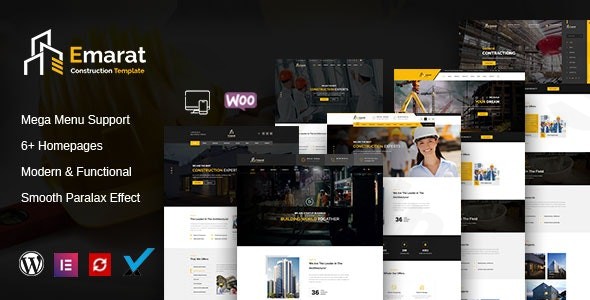
The Emarat Construction WordPress Theme is a robust and visually stunning solution crafted specifically for businesses in the building, construction, and architecture sectors. From general contractors and engineers to plumbing services and industrial factories, Emarat provides an intuitive and professional platform to establish a powerful online presence. Its modern design philosophy emphasizes a clean aesthetic, optimal user experience, and a flexible layout that adapts seamlessly to any screen size, making it ideal for showcasing your projects and services with impact.
Key Features: Design, Layout & Performance for Your Construction Business
Emarat is packed with features that empower you to build a sophisticated and high-performing website without writing a single line of code.
Intuitive Design & Flexible Layout Options
Emarat brings a professional edge to your online presence with its carefully considered design elements and versatile layout options:
- Fully Responsive & Retina-Ready: Your site will look impeccable on any device, from large desktop monitors to tablets and smartphones, ensuring a consistent and high-quality viewing experience.
- Multiple Pre-designed Homepages: Get a head start with various pre-built homepage layouts, offering diverse starting points for different business needs.
- Unlimited Sidebars: Customize your content presentation with unlimited sidebar options, allowing for dynamic widget placement across your site.
- Responsive Filterable Portfolio: Showcase your completed projects with a dynamic, filterable portfolio that highlights your best work in an engaging manner.
- Header Styles & Mega Menus: Choose from multiple header styles and implement powerful mega menus for complex, user-friendly navigation. A footer logo option also ensures consistent branding.
- Parallax Sections: Add depth and a modern visual flair to your pages with elegant parallax scrolling effects.
Powerful Customization Capabilities
Emarat offers extensive customization options, allowing you to tailor every aspect of your site to match your brand’s unique identity:
- Drag-and-Drop Page Builders: Built with Elementor and including King Composer Pro (a premium plugin often valued at $39), Emarat provides a visual, codeless editing experience. Easily drag and drop elements to design your pages exactly as you envision them.
- Unlimited Color Schemes: Match your brand’s palette effortlessly with unlimited color options, adjustable simply by changing color codes.
- Advanced Typography: Access advanced typography controls and integrate a vast library of Google Fonts, including the elegantly paired Raleway and Arimo, to perfect your site’s textual aesthetic.
- Flexible Section Types: Utilize image, video, and color sections to create diverse and engaging backgrounds and content blocks across your site.
- Redux Framework Integration: Leverage the power of the Redux Framework for comprehensive theme options, providing granular control over global styles and settings.
Performance & SEO Features
Emarat isn’t just about looks; it’s engineered for performance and discoverability:
- SEO-Optimized Structure: Designed with best SEO practices in mind, the theme provides a clean markup and structured headings to help your site rank better in search engines. This is crucial for attracting organic traffic looking for a “SEO friendly construction WordPress theme”.
- Fast Loading Performance: While specific speed scores are not detailed, the theme is built for efficient loading, contributing to a better user experience and improved search engine rankings.
- Valid HTML5 & CSS3 and Bootstrap 4.x: Built on a modern and robust framework, ensuring clean code, stability, and compatibility.
- Cross-Browser Compatibility: Emarat ensures a consistent experience for all your visitors, supporting popular browsers like Chrome, Firefox, Safari, Edge, and even older versions of Internet Explorer.
Installation & One-Click Demo Import Guide
Getting your Emarat website up and running is straightforward, even for beginners, thanks to its intuitive installation process and one-click demo import.
Step-by-Step Installation:
- Download Emarat: Obtain the theme package from ZeroPlugin.com or your purchase source. This package typically includes the theme file, documentation, and a child theme.
- Upload to WordPress:
- Log in to your WordPress dashboard.
- Navigate to
Appearance > Themes > Add New > Upload Theme. - Click
Choose File, select theemarat.zip(or similar) file from your downloaded package, and clickInstall Now. - Common Pitfall: If you encounter a “Broken theme and/or stylesheets missing” error, it likely means you’ve uploaded the main downloaded package instead of the theme’s installable
.zipfile. Unzip the main package first, then locate the correct installable theme.zipfile within it.
- Activate the Theme: Once uploaded, click
Activate. - Install Required Plugins: Upon activation, Emarat will prompt you to install a set of recommended plugins. These typically include:
- Elementor or King Composer Pro: For drag-and-drop page building.
- Revolution Slider: For creating stunning, animated sliders.
- Redux Framework: For theme options.
- Contact Form 7: For powerful contact forms.
- WooCommerce: If you plan to run an online store.
- Install and activate all required plugins for full theme functionality.
Performing the One-Click Demo Import:
Emarat simplifies the setup process with its one-click demo import feature, allowing you to replicate the demo site’s content, layouts, and settings almost instantly.
- Navigate to Demo Importer: After activating all necessary plugins, look for a “Demo Import” or “Import Demo Data” option within your WordPress dashboard, usually under
Appearanceor a dedicated theme options panel. - Start Import: Select your desired demo and click the import button.
- What to Expect:
- The importer will automatically fetch and set up demo pages, posts, images, menus, widgets, and theme options.
- This process can take several minutes, depending on your server’s speed and the amount of demo content.
- Server Requirements: For a smooth demo import, ensure your hosting environment meets the recommended PHP settings:
max_execution_time – 3600,max_input_time – 3600,memory_limit – 256M,post_max_size – 64M,upload_max_filesize – 64M, andmax_input_vars – 3000. Contact your host if you need assistance with these settings.
- After Import: Once complete, your site will largely resemble the chosen Emarat demo. You can then proceed to customize the content with your own.
Customization Guide: Branding & Layout with Emarat
Personalizing your Emarat website is an intuitive process, allowing you to easily infuse your brand’s identity into every aspect of your site.
Leveraging the Page Builders (Elementor/King Composer Pro)
The cornerstone of Emarat’s customization lies in its integration with leading drag-and-drop page builders.
- Visual Editing: Navigate to any page and click “Edit with Elementor” (or “Edit with King Composer Pro”). This will launch the visual editor, where you can drag and drop sections, columns, and elements directly onto your page.
- Content & Style: Click on any element (text, image, button, etc.) to access its content and styling options. Change text, upload images, adjust colors, typography, spacing, and more, all in real-time.
- Pre-built Sections: Emarat often includes pre-designed blocks and sections within the page builder, allowing you to quickly assemble professional-looking layouts without starting from scratch.
Global Styling with Theme Options
Emarat utilizes the powerful Redux Framework for its theme options panel, providing centralized control over your site’s global styling:
- Accessing Theme Options: Look for “Theme Options” or “Emarat Options” in your WordPress dashboard.
- Colors & Typography: Easily set your primary and secondary brand colors, link colors, and global font choices (including Google Fonts) from a single interface.
- Header & Footer Layouts: Customize your site’s header (choosing from multiple styles) and footer areas. You can upload your logo, adjust navigation settings, and set up footer widgets.
- Layout Settings: Configure global layout settings such as full-width or boxed layouts, and manage sidebar positions.
Setting Up Your Homepage, Blog Page, and Menus
- Homepage: Go to
Settings > Readingand select “A static page” for your homepage. Choose one of the demo pages (e.g., “Home 1”) or create a new page using Elementor/King Composer Pro. - Blog Page: Similarly, designate a page as your “Posts page” under
Settings > Readingto display your blog articles. - Menus: Navigate to
Appearance > Menus. Here you can create and organize your main navigation menu, footer menu, and any other custom menus. Assign your newly created menu to the primary header location provided by Emarat.
Child Theme Compatibility
Emarat is child theme compatible, and a child theme is included in the download package. It’s highly recommended to install and activate the child theme if you plan to make any code modifications (custom CSS, PHP functions, etc.). This ensures that your customizations are preserved when you update the parent theme, preventing them from being overwritten.
FAQ & Troubleshooting
Here are answers to common questions about the Emarat Construction WordPress Theme:
Is Emarat compatible with Elementor and Gutenberg?
Emarat is fully compatible with Elementor, offering seamless drag-and-drop visual page building. It also includes support for King Composer Pro. The theme is also optimized for Gutenberg, WordPress’s native block editor, allowing you to use blocks for content creation alongside your chosen page builder.
Does Emarat support WooCommerce for online stores?
Yes, Emarat provides full WooCommerce support. This means you can easily set up and run an online store to sell building materials, tools, or related services directly from your website. It is compatible with various WooCommerce versions.
Does the Emarat theme support child themes?
Yes, Emarat is child theme compatible, and a child theme is included in the download package. Using a child theme is best practice for making any custom code modifications, as it protects your changes from being lost during theme updates.
What should I do if the demo import fails or looks different from the demo site?
If the demo import fails or doesn’t look as expected, first check your server requirements (PHP version, max_execution_time, memory_limit, etc.) as outlined in the installation section. Insufficient server resources are a common cause. Also, ensure all required and recommended plugins are installed and activated before attempting the import. If problems persist, consult the theme documentation or your hosting provider.
How can I update the Emarat theme without losing my customizations?
To update the Emarat theme safely, always ensure you have installed and activated the included child theme for any custom code changes (CSS, functions). When an update is available, download the latest version of the main theme file and either replace the old theme files via FTP (overwriting only the parent theme) or delete the old parent theme (after backing up!) and upload the new version, then reactivate. Your child theme and its customizations will remain intact.
Conclusion: Build Your Digital Foundation with Emarat
The Emarat – Construction WordPress Theme stands out as an excellent choice for any business in the construction, architecture, or related industrial sectors looking to establish a professional, high-performing online presence. Its clean and modern design, combined with powerful customization features via Elementor or King Composer Pro, provides a flexible canvas for showcasing projects and services.With its SEO-optimized structure, responsive design, and WooCommerce compatibility, Emarat is not just visually appealing but also functionally robust. It’s ideal for a broad range of users, from beginners who can leverage its one-click demo import to quickly launch a site, to experienced professionals (contractors, architects, engineers) seeking extensive control over their online portfolio and services. While some compatibility data dates back a few years, its core features and strong foundational build make it a reliable platform for creating a modern construction website that converts visitors into clients. Choose Emarat to build a solid digital foundation for your business.
I. Download Limits & Account Benefits
- Free Downloads: Each email address receives 3 downloads per day for free products
- Upgrade Benefits: Purchase any paid product to increase your daily download limit by 3 for each paid product
- No Account Required: You can download immediately by receiving the download link via email
- Account Recommended: Create an account for easier access to your order history and direct update downloads
II. Understanding GPL vs Official Versions
Important: The products available on WPPick are GPL-licensed versions, which differ from official developer versions. Before purchasing, please read our comprehensive guide: Understanding GPL & Official Differences at WPPick
Key Points:
- GPL versions may not include premium support from original developers
- Updates may be delayed compared to official releases
- Some premium features might have limitations
- Always consider your specific needs and support requirements
III. Support & Assistance
We’re here to help through multiple channels:
- Email Support: Direct email assistance for all inquiries
- Live Chat: Real-time support during business hours
- Comprehensive Documentation: Detailed guides and tutorials
IV. Order Tracking
Access your complete purchase history and download links anytime: Order History
V. Account Access
New to WPPick? Login or Create Account to manage your downloads and orders efficiently.
VI. Refund Protection
We stand behind our products with a clear refund policy. Review our terms: Refund Policy
VII. Privacy & Security
Your data security is our priority. Learn how we protect your information: Privacy Policy
VII. Terms of Service
Understanding our service terms ensures a smooth experience: Terms of Use
Quick Tips for Best Experience
- Verify Compatibility: Check plugin/theme compatibility with your WordPress version
- Backup First: Always backup your site before installing new plugins or themes
- Test Environment: Consider testing on a staging site first
- Stay Updated: Regularly check for updates in your account dashboard
- Read Documentation: Review any included documentation for optimal setup
Need Help?
If you have questions about downloads, licensing, or need technical assistance, don’t hesitate to contact our support team. We’re committed to ensuring you have the best possible experience with WPPick products.
Ready to get started? Your download adventure begins with just one click!
- Add Header(Desktop, Sticky, Mobile) Builder With Elementor
- Add Mega Menu(Elementor)
- Update Revolution Slider
- Update WooCommerce