

Eroica – Bold & Lightweight WordPress Blog Theme
/Year
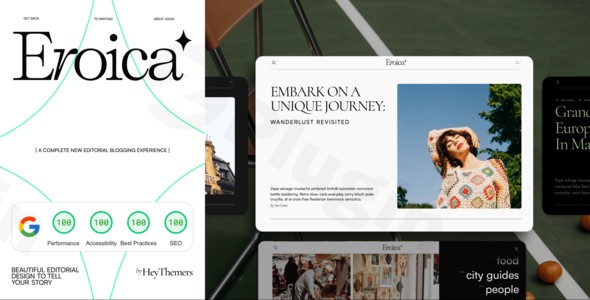
Eroica is a modern WordPress blog theme meticulously designed for the discerning content creator – specifically travel bloggers, lifestyle influencers, and personal publishers. This bold lightweight WordPress blog theme marries elegant minimalist aesthetics with robust, cutting-edge WordPress functionality, delivering an exceptional and distraction-free reading experience for your audience. It’s built for those who prioritize clean design, blazing-fast performance, and a streamlined publishing workflow, allowing you to focus on creating remarkable content rather than wrestling with technical complexities.
Key Features: Design, Layout & Performance
Eroica stands out by offering a highly optimized platform where form meets function, ensuring your content is both beautifully presented and easily discoverable.
Design & Layout Options: Content Front and Center
Eroica embraces a philosophy of minimalist blog design, putting your stories and visuals at the forefront. While it steers clear of the overwhelming layout variations found in multipurpose themes, its design is intentionally structured to enhance readability and user engagement.
- Mobile-First Responsive Design: Your content will look flawless on any device, from smartphones to desktops, thanks to a meticulously crafted mobile-first approach. This ensures an optimal user experience for all visitors, regardless of how they access your site.
- Typography Excellence: Eroica boasts carefully curated font pairings and optimized typography settings that prioritize readability. The “bold” aspect of its design suggests strong, clear headlines and body text, ensuring your message is conveyed effectively.
- Gallery & Media Integration: For travel bloggers and visual storytellers, beautiful presentation of photography and other media is crucial. Eroica provides elegant integration for galleries and visual content, making your images shine without compromising performance.
Customization Capabilities: Intuitive Control
Instead of relying on heavy page builders, Eroica empowers you to customize your site using WordPress’s native tools, especially the Customizer and Block Editor.
- WordPress Customizer Integration: Personalize your website’s look and feel through the intuitive WordPress Customizer. With version 1.2.0, Eroica introduced new global color scheme functionality festered in the Customizer, offering a centralized way to manage your brand’s color palette across the entire site.
- Streamlined Block Editor Experience: Eroica is built to enhance the native WordPress Block Editor (Gutenberg). This means you can design your posts and pages with thoughtful design patterns and a workflow that feels natural and efficient, removing the need for complex, proprietary interfaces.
- Newsletter & Social Media Connectivity: Built-in support for popular email marketing platforms and seamless social media integration allows you to grow your audience and encourage sharing effortlessly.
Performance & SEO Features: Built for Speed and Discoverability
One of Eroica’s core strengths is its commitment to performance and search engine optimization.
- Optimized Performance Architecture: Built with clean code and modern development practices, Eroica delivers blazing-fast loading speeds. This translates directly into superior Core Web Vitals scores, which are critical for user engagement and Google search rankings. The theme’s lightweight nature prevents the feature bloat common in other themes, ensuring your site remains nimble.
- SEO-Ready Foundation: Every element of Eroica is engineered for discoverability. It features semantic HTML5 markup, optimized schema.org integration, and a structure that helps search engines understand and rank your content effectively. This enhanced search visibility and social sharing capabilities ensure your travel stories and lifestyle articles reach wider audiences.
- Accessibility-Focused Development: Adhering to WCAG 2.1 compliance, Eroica is designed for inclusive publishing, making your content accessible to the broadest possible audience.
Installation & Setup Guide
Getting started with Eroica is straightforward, designed to leverage the standard WordPress installation process.
- Download the Theme: Obtain the Eroica theme files, typically as a
.ziparchive. If purchased from a marketplace, ensure you download the theme file itself, not any accompanying documentation or licensing files. - Upload & Install:
- Log in to your WordPress dashboard.
- Navigate to Appearance > Themes.
- Click on the “Add New” button at the top.
- Click “Upload Theme”.
- Choose the Eroica
.zipfile from your computer and click “Install Now”.
- Activate the Theme: Once installed, click the “Activate” link to make Eroica your live theme.
- Initial Configuration: As Eroica emphasizes a minimalist approach and native WordPress functionality, specific “demo import” steps are not explicitly part of its core offering. Instead, you’ll immediately begin customizing your site through the WordPress Customizer and creating content with the Block Editor. No specific companion plugins are explicitly required according to the documentation, allowing for a lean setup.
Customization Guide: Branding Your Blog
Eroica’s customization process is intuitive, allowing you to personalize your blog quickly without delving into complex code.
- Access the WordPress Customizer: From your WordPress dashboard, go to Appearance > Customize. This is where you’ll find most of Eroica’s visual settings.
- Set Your Global Colors: As of version 1.2.0, you can define global color schemes within the Customizer. Navigate through the color options to set your primary, secondary, accent, and text colors to match your brand’s aesthetic.
- Manage Typography: Explore the typography settings to choose font families, sizes, and weights that best represent your brand and enhance readability. Eroica’s “typography excellence” ensures that even subtle changes will maintain a professional look.
- Upload Your Logo and Site Identity: In the Customizer’s “Site Identity” section, upload your logo and set your site title and tagline. This is crucial for establishing your brand presence.
- Configure Menus: Go to Appearance > Menus to create and assign your navigation menus. Eroica will typically support a primary navigation in the header, and potentially a footer menu.
- Set Up Your Homepage and Blog Page:
- Homepage: To set a static homepage, create a new page in Pages > Add New. Then, go to Settings > Reading and choose “A static page” for your homepage display, selecting the page you just created.
- Blog Page: Similarly, create another new page (e.g., “Blog”) and select it as your “Posts page” in Settings > Reading. This is where all your blog posts will be listed.
- Utilize the Block Editor: For individual post and page layouts, embrace the native WordPress Block Editor. Eroica’s thoughtful design patterns integrate seamlessly, allowing you to build visually appealing content with ease.
FAQ & Troubleshooting
Here are answers to some common questions about the Eroica WordPress theme:
Is Eroica compatible with page builders like Elementor or WPBakery?
Eroica is explicitly designed to enhance the native WordPress Block Editor experience. While it doesn’t explicitly state incompatibility, its philosophy steers away from heavy, proprietary page builders, encouraging users to leverage the streamlined functionality of core WordPress for content creation.
Does Eroica support WooCommerce for online stores?
Eroica is primarily developed as a blogging theme for travel, lifestyle, and personal publishers. There is no explicit mention of WooCommerce compatibility in the provided documentation, suggesting that it may not include dedicated e-commerce features or styling out-of-the-box. For a robust online store, a theme built specifically for WooCommerce would be more suitable.
How can I customize colors and typography in the Eroica WordPress theme?
You can customize colors and typography in Eroica primarily through the WordPress Customizer. Version 1.2.0 introduced new global color scheme functionality in the Customizer, providing a centralized way to manage your site’s color palette. Typography settings are also available there to adjust fonts for optimal readability.
Is Eroica WordPress theme good for SEO?
Yes, Eroica is built with a strong SEO-ready foundation. It features clean, semantic HTML5 markup, optimized schema.org integration, and a focus on blazing-fast loading speeds that contribute positively to search engine rankings. This makes it an excellent choice for content creators aiming for enhanced search visibility.
How to install Eroica WordPress theme?
To install Eroica, first download the theme’s .zip file. Then, log in to your WordPress dashboard, navigate to Appearance > Themes, click “Add New”, then “Upload Theme”. Choose the Eroica .zip file and click “Install Now”, followed by “Activate”. This standard process will make Eroica your active theme.
Conclusion
The Eroica WordPress theme is an exceptional choice for travel bloggers, lifestyle influencers, and personal publishers who value a sophisticated, minimalist design paired with outstanding performance. Its focus on lightweight architecture, blazing-fast loading speeds, and robust SEO features makes it a powerful platform for delivering an unparalleled reading experience.While it prioritizes a streamlined experience over extensive, complex customization options (like those found in heavy page builders), Eroica’s intuitive integration with the WordPress Customizer and Block Editor provides ample flexibility for branding and content creation. It’s ideal for bloggers and content creators who want to publish with confidence, knowing their platform is fast, future-proof, and designed to put their stories front and center without unnecessary bloat or technical headaches. If you’re seeking a professional, high-performing, and aesthetically pleasing digital canvas for your narratives, Eroica is a smart and dependable choice.
I. Download Limits & Account Benefits
- Free Downloads: Each email address receives 3 downloads per day for free products
- Upgrade Benefits: Purchase any paid product to increase your daily download limit by 3 for each paid product
- No Account Required: You can download immediately by receiving the download link via email
- Account Recommended: Create an account for easier access to your order history and direct update downloads
II. Understanding GPL vs Official Versions
Important: The products available on WPPick are GPL-licensed versions, which differ from official developer versions. Before purchasing, please read our comprehensive guide: Understanding GPL & Official Differences at WPPick
Key Points:
- GPL versions may not include premium support from original developers
- Updates may be delayed compared to official releases
- Some premium features might have limitations
- Always consider your specific needs and support requirements
III. Support & Assistance
We’re here to help through multiple channels:
- Email Support: Direct email assistance for all inquiries
- Live Chat: Real-time support during business hours
- Comprehensive Documentation: Detailed guides and tutorials
IV. Order Tracking
Access your complete purchase history and download links anytime: Order History
V. Account Access
New to WPPick? Login or Create Account to manage your downloads and orders efficiently.
VI. Refund Protection
We stand behind our products with a clear refund policy. Review our terms: Refund Policy
VII. Privacy & Security
Your data security is our priority. Learn how we protect your information: Privacy Policy
VII. Terms of Service
Understanding our service terms ensures a smooth experience: Terms of Use
Quick Tips for Best Experience
- Verify Compatibility: Check plugin/theme compatibility with your WordPress version
- Backup First: Always backup your site before installing new plugins or themes
- Test Environment: Consider testing on a staging site first
- Stay Updated: Regularly check for updates in your account dashboard
- Read Documentation: Review any included documentation for optimal setup
Need Help?
If you have questions about downloads, licensing, or need technical assistance, don’t hesitate to contact our support team. We’re committed to ensuring you have the best possible experience with WPPick products.
Ready to get started? Your download adventure begins with just one click!