

Eventsy – Event Organizer & Planner Elementor Template Kit
/Year
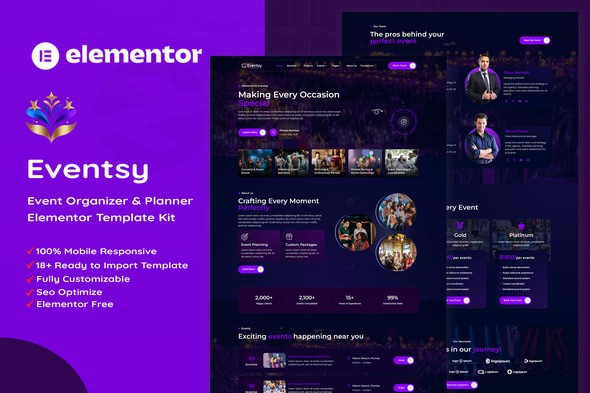
Building a high-converting website for an event planning business often feels like a logistical hurdle. You need to showcase portfolios, list complex services, and manage inquiries without getting bogged down in code. The Eventsy Elementor Template Kit solves this by providing a complete, ready-to-use design framework specifically for event planners and coordinators. As a specialized event organizer WordPress template, Eventsy allows you to launch a premium-looking site in hours rather than weeks, utilizing the power of the Elementor drag-and-drop builder.
Why Choose Eventsy for Your Event Planning Business?
The core value of the Eventsy Elementor Template Kit lies in its “Design-First” approach. Instead of a bulky theme that slows down your site, Eventsy is a lightweight collection of templates that sit on top of your WordPress installation.
This event planner Elementor template is ideal for:
- Wedding Organizers: Creating elegant, image-heavy layouts for ceremonies.
- Corporate Event Planners: Establishing a professional, authoritative brand presence.
- Party Decorators: Showcasing specific service details and pricing tiers.
- Agencies: Rapidly deploying sites for clients using a proven, responsive structure.
Key Features and Benefits
Eventsy is more than just a home page; it is a comprehensive toolkit with over 18 pre-designed templates.
1. No Elementor Pro Required
One of the most significant advantages of Eventsy is that it is built using free plugins. You do not need to pay for an Elementor Pro subscription to get a professional result. It utilizes free tools like ElementsKit Lite and Jeg Elementor Kit to provide advanced header, footer, and widget functionality.
2. Fully Responsive and Mobile-Friendly
With a large percentage of event inquiries coming from mobile devices, Eventsy ensures your site looks perfect on all screens. The templates are 100% responsive, meaning your “Event Details” and “Contact” pages will be easily navigable for clients on the go.
3. Comprehensive Page Selection
Eventsy covers every stage of the customer journey:
- Service Details: Deep-dive pages to explain your planning process.
- Projects/Portfolio: A dedicated space to showcase past successful events.
- Pricing & FAQ: Transparently communicate your rates and answer common client questions.
- MetForm Integration: Professional-grade contact and newsletter forms are included to capture leads immediately.
4. Global Styling for Brand Consistency
You can change your entire site’s color palette and typography in one place. By using Global Kit Styles, you ensure that your brand identity remains consistent across the Home, About, and Blog pages without manual editing.
How to Install the Eventsy Elementor Template Kit
Setting up your WordPress event website builder experience with Eventsy is straightforward. Follow these steps for a clean installation:
- Prepare Your Environment:
- Install and activate the free Hello Elementor theme. This provides the most lightweight, compatible base.
- Install the Elementor plugin (Free version).
- Install the Template Kit Plugin:
- Go to Plugins > Add New and search for “Envato Elements.”
- Install and activate the plugin.
- Import the Kit:
- Navigate to Elements > Installed Kits.
- Upload your Eventsy zip file or connect your Envato account to find it.
- Click “Install Requirements” to ensure all necessary free plugins (like MetForm and ElementsKit) are active.
- Import Templates:
- Import the Global Kit Styles first.
- Import individual pages (Home, About, Services) one by one.
- Create Your Pages:
- Go to Pages > Add New.
- Click “Edit with Elementor.”
- Open the Elementor Template Library (folder icon), go to “My Templates,” and insert the desired Eventsy page.
Practical Usage and Best Practices
To get the most out of this event planner Elementor template, follow these workflow tips used by top agencies:
- When to use Project Pages: Don’t just list services; use the “Projects” template to create case studies. Showing a “Before and After” of a venue setup is the best way to build trust with potential clients.
- Optimize for Speed: Because template kits use several plugins, always optimize your images before uploading. Use a plugin like Smush or a service like TinyPNG to keep your event gallery pages loading fast.
- Leverage the FAQ Page: Use the FAQ section to address “Question-Based Queries” your clients often ask, such as “Do you handle outdoor weddings?” or “What is your cancellation policy?” This helps with both SEO and conversion.
FAQ & Troubleshooting
Can I use Eventsy without Elementor Pro?
Yes, Eventsy is designed to work with the free version of Elementor. It uses free add-ons like Jeg Elementor Kit and ElementsKit Lite to provide features that usually require the Pro version, such as custom headers and footers.
Which theme is best for the Eventsy Template Kit?
While it works with most themes, we highly recommend the Hello Elementor theme. It is a “plain canvas” theme that prevents styling conflicts and ensures the fastest possible loading speeds for your event website.
How do I customize the contact forms?
Eventsy uses MetForm for its contact and newsletter sections. You can edit these forms by going to the MetForm menu in your WordPress dashboard. You can add custom fields, change email notification settings, and integrate with mailing lists easily.
What should I do if the layout looks “broken” after import?
This usually happens if the Global Kit Styles were not imported first. Go to Elements > Installed Kits, find Eventsy, and ensure the “Global Kit Styles” are imported and active. Also, ensure your page layout is set to “Elementor Full Width” in the page settings.
Final Verdict
The Eventsy Elementor Template Kit provides exceptional ROI for event planners who want a high-end web presence without the high-end development costs. Its reliance on free plugins makes it one of the most accessible kits on the market, while its 18+ page templates offer a level of depth usually reserved for premium themes.
For those looking to build an event organizer WordPress website that is both beautiful and functional, Eventsy is a top-tier choice. By following the best practices outlined by our experts at wppick.com, you can ensure your site is not only visually stunning but also optimized for both users and search engines.
I. Download Limits & Account Benefits
- Free Downloads: Each email address receives 3 downloads per day for free products
- Upgrade Benefits: Purchase any paid product to increase your daily download limit by 3 for each paid product
- No Account Required: You can download immediately by receiving the download link via email
- Account Recommended: Create an account for easier access to your order history and direct update downloads
II. Understanding GPL vs Official Versions
Important: The products available on WPPick are GPL-licensed versions, which differ from official developer versions. Before purchasing, please read our comprehensive guide: Understanding GPL & Official Differences at WPPick
Key Points:
- GPL versions may not include premium support from original developers
- Updates may be delayed compared to official releases
- Some premium features might have limitations
- Always consider your specific needs and support requirements
III. Support & Assistance
We’re here to help through multiple channels:
- Email Support: Direct email assistance for all inquiries
- Live Chat: Real-time support during business hours
- Comprehensive Documentation: Detailed guides and tutorials
IV. Order Tracking
Access your complete purchase history and download links anytime: Order History
V. Account Access
New to WPPick? Login or Create Account to manage your downloads and orders efficiently.
VI. Refund Protection
We stand behind our products with a clear refund policy. Review our terms: Refund Policy
VII. Privacy & Security
Your data security is our priority. Learn how we protect your information: Privacy Policy
VII. Terms of Service
Understanding our service terms ensures a smooth experience: Terms of Use
Quick Tips for Best Experience
- Verify Compatibility: Check plugin/theme compatibility with your WordPress version
- Backup First: Always backup your site before installing new plugins or themes
- Test Environment: Consider testing on a staging site first
- Stay Updated: Regularly check for updates in your account dashboard
- Read Documentation: Review any included documentation for optimal setup
Need Help?
If you have questions about downloads, licensing, or need technical assistance, don’t hesitate to contact our support team. We’re committed to ensuring you have the best possible experience with WPPick products.
Ready to get started? Your download adventure begins with just one click!