

Evergreen – Landscaping Gardening WordPress Theme
/Year
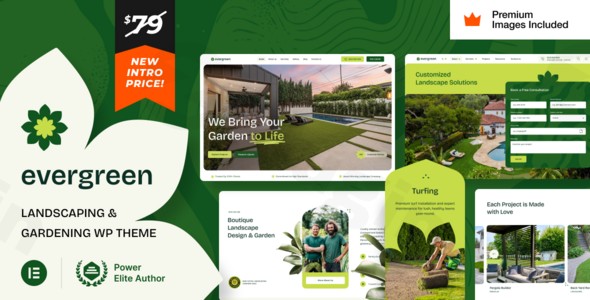
In today’s digital landscape, a stunning and highly functional website is paramount for any business, especially for those in the visually driven landscaping and gardening industry. The “Evergreen – Landscaping Gardening WordPress Theme” offers a sophisticated and robust solution, meticulously designed to help landscape companies, garden designers, and outdoor service providers flourish online. This premium theme combines verdant aesthetics with powerful functionalities, ensuring your digital presence is as vibrant and well-tended as the outdoor spaces you create.
The Core Design Philosophy: Verdant Aesthetics Meets Intuitive Functionality
Evergreen is built upon a design philosophy that prioritizes both visual appeal and user experience. Its “verdant aesthetics” immediately convey the essence of nature, growth, and professionalism, making it an ideal choice for businesses focused on enhancing outdoor environments. The theme’s intuitive layout ensures that visitors can effortlessly navigate your services, projects, and contact information, leading to a seamless and engaging browsing experience.
Key Design Features for an Immersive Experience
Evergreen’s design elements are carefully crafted to showcase your work with clarity and impact, providing a professional-grade platform for your business.
- Responsive Design: In an age where digital interaction happens across countless devices, Evergreen guarantees a flawless presentation on desktops, tablets, and smartphones alike. This adaptability ensures your site is accessible and visually appealing to every potential client, regardless of how they access your content.
- Intuitive & Customizable Layouts: The theme boasts an inherently intuitive design, making information discovery straightforward for your visitors. Furthermore, it offers multiple layout options, providing you the flexibility to tailor your website’s structure to perfectly align with your brand and content strategy.
- Unique Visual Elements & Extended Elementor Functionality: Go beyond static images with Evergreen’s refined galleries, ideal for showcasing dramatic before-and-after transformations of your projects. Photo carousels effectively highlight your diverse service offerings, while interactive maps guide clients directly to your physical locations. The theme extends Elementor and Elementor Pro widgets, adding unique styles and animations that elevate your site’s visual appeal and user engagement.
Empowering Customization with Unrivaled Flexibility
Evergreen truly shines in its customization capabilities, putting the power of professional web design into your hands without requiring any coding expertise.
- Drag-and-Drop Page Building with Elementor: At the heart of Evergreen’s flexibility is its full compatibility with Elementor and Elementor Pro. This integration provides an intuitive drag-and-drop interface, allowing you to effortlessly design and customize every aspect of your site—from the homepage and contact pages to blog layouts and service presentations. Create custom pages with complete creative freedom.
- Advanced Theme Options & Global Styles Panel: Beyond Elementor, Evergreen offers a suite of advanced theme options for granular control over your site’s appearance and functionality. Leveraging Elementor Pro’s Global Styles Panel, the theme provides a centralized “Theme Panel” where you can manage fonts, colors, and other global design settings, ensuring consistent branding across your entire website.
- Custom Widgets & Extensive Templates: Enhance your site’s functionality with a variety of custom widgets designed to integrate seamlessly with the theme. Evergreen also includes dedicated templates for crucial pages such as blog posts, product archives (for WooCommerce), a professional 404 page, maintenance mode, coming soon pages, and search results, ensuring a polished experience across all user interactions.
- Flexible Header/Footer Options: Tailor the look and feel of your website’s header and footer sections, allowing you to optimize these crucial areas for navigation, branding, and calls-to-action.
Technical Excellence for Peak Performance & Reach
Beyond its beautiful design, Evergreen is engineered with robust technical specifications that contribute to a powerful and reliable online presence.
- WordPress Compatibility & Regular Updates: Evergreen proudly claims compatibility with WordPress 6.8 and is consistently updated to ensure seamless integration with the latest WordPress versions, guaranteeing stability and access to new features.
- WooCommerce Compatible: For businesses looking to sell plants, gardening tools, or related products, Evergreen is fully compatible with WooCommerce, enabling you to set up a professional and functional online store with ease.
- SEO Optimized: Built with industry best practices for SEO (Search Engine Optimization), Evergreen provides a solid foundation for higher search engine rankings. Its clean code and logical structure help search engines understand your content, making it easier for potential clients to find your services.
- Translation Ready: Expand your reach to a global audience with Evergreen’s translation-ready features, allowing you to translate your website into multiple languages.
- Retina Ready: Ensure your high-resolution images and graphics appear stunningly sharp on all high-density (Retina) displays, projecting a professional and sophisticated image of your brand.
- PHP Version Compatibility: The theme indicates compatibility with PHP version 7.2, ensuring it runs efficiently on modern server environments.
Ideal for Diverse Landscaping & Gardening Professionals
Evergreen is specifically designed to cater to a broad spectrum of professionals within the landscaping and gardening industry, providing tailored solutions for various business models.
- Target Audience: This theme is ideally suited for landscaping companies, garden design studios, lawn care services, hardscaping specialists, outdoor maintenance providers, irrigation system installers, and sustainable landscaping consultants.
- Suitable Websites: It excels at showcasing detailed project portfolios, service offerings (sustainable landscaping, irrigation systems, seasonal maintenance, full-service outdoor design), and business information. Whether you’re a small local business or a growing enterprise, Evergreen provides the tools to present your expertise effectively.
Setting Up Your Evergreen Website: A Step-by-Step Guide
Getting your Evergreen website up and running is a straightforward process, designed for both technical and non-technical users.
- Theme Installation: Begin by installing Evergreen through your WordPress dashboard. Navigate to Appearance > Themes > Add New and upload the theme zip file, then activate it.
- Required Plugins: The theme will prompt you to install any necessary plugins, including Elementor. If you plan to import demo content and leverage all advanced features, ensure you have Elementor Pro installed and activated.
- Import Demo Content: Utilize the one-click demo import feature to quickly set up your site with pre-designed layouts and content. Note: Some sources indicate that Elementor Pro is required to fully import and utilize all demo content features.
- Customization with Elementor: Dive into Elementor to customize your pages. Drag and drop sections, add your images, text, and calls-to-action. Utilize the theme’s extended Elementor widgets for unique design elements.
- Global Styling: Use the Elementor Pro Global Styles Panel (acting as your Theme Panel) to set consistent fonts, colors, and button styles across your entire site, ensuring brand consistency.
- Showcasing Your Work: Populate the refined galleries and photo carousels with your best “before-and-after” project photos, highlighting your expertise and transforming capabilities.
- Service Integration: Clearly outline your landscaping services using the theme’s dedicated sections, providing detailed descriptions and pricing where applicable.
- WooCommerce Setup (Optional): If selling products, configure WooCommerce settings, add your products, and customize your shop pages using Elementor.
Why Evergreen Stands Out: Expertise, Authority, and Trust
Developed by VamTam themes, a known name in the WordPress theme development community, Evergreen benefits from a foundation of expertise and experience. Its focused approach on industry-specific elements—such as refined galleries, photo carousels, and interactive maps—demonstrates a deep understanding of what landscaping businesses need to succeed online. The inclusion of premium image stock (valued at $380) with the demo content further enhances its value, allowing users to legally utilize high-quality visuals without additional licensing concerns. This commitment to detail and industry relevance establishes Evergreen as an authoritative and trustworthy solution for professionals seeking a premium online presence.
Important Considerations Before Purchase
While Evergreen offers immense value, it’s important to be aware of a few key considerations to ensure it meets your specific needs:
- Elementor Pro Requirement: For full access to all demo content and advanced customization features, Elementor Pro is highly recommended, and in some cases, stated as required. Factor this into your overall investment.
- GPL Licensing: The theme is available through various GPL clubs for a lower price. While GPL compliance allows for unlimited site usage, acquiring the theme through these channels may mean foregoing official support directly from VamTam themes. For dedicated support and direct updates from the developer, purchasing directly is often recommended.
- Theme Version: The current documented version appears to be v1. Users should always check for the latest version and update information.
Conclusion: Watch Your Business Bloom with Evergreen
Evergreen is more than just a WordPress theme; it’s a comprehensive marketing and portfolio tool designed to elevate your landscaping or gardening business. Its professional design, industry-specific features, and unparalleled customization options make it the ideal solution for anyone looking to establish a strong, visually compelling, and highly functional online presence.Invest in Evergreen today and cultivate a digital garden that attracts new clients, showcases your stunning work, and helps your business grow exponentially.
I. Download Limits & Account Benefits
- Free Downloads: Each email address receives 3 downloads per day for free products
- Upgrade Benefits: Purchase any paid product to increase your daily download limit by 3 for each paid product
- No Account Required: You can download immediately by receiving the download link via email
- Account Recommended: Create an account for easier access to your order history and direct update downloads
II. Understanding GPL vs Official Versions
Important: The products available on WPPick are GPL-licensed versions, which differ from official developer versions. Before purchasing, please read our comprehensive guide: Understanding GPL & Official Differences at WPPick
Key Points:
- GPL versions may not include premium support from original developers
- Updates may be delayed compared to official releases
- Some premium features might have limitations
- Always consider your specific needs and support requirements
III. Support & Assistance
We’re here to help through multiple channels:
- Email Support: Direct email assistance for all inquiries
- Live Chat: Real-time support during business hours
- Comprehensive Documentation: Detailed guides and tutorials
IV. Order Tracking
Access your complete purchase history and download links anytime: Order History
V. Account Access
New to WPPick? Login or Create Account to manage your downloads and orders efficiently.
VI. Refund Protection
We stand behind our products with a clear refund policy. Review our terms: Refund Policy
VII. Privacy & Security
Your data security is our priority. Learn how we protect your information: Privacy Policy
VII. Terms of Service
Understanding our service terms ensures a smooth experience: Terms of Use
Quick Tips for Best Experience
- Verify Compatibility: Check plugin/theme compatibility with your WordPress version
- Backup First: Always backup your site before installing new plugins or themes
- Test Environment: Consider testing on a staging site first
- Stay Updated: Regularly check for updates in your account dashboard
- Read Documentation: Review any included documentation for optimal setup
Need Help?
If you have questions about downloads, licensing, or need technical assistance, don’t hesitate to contact our support team. We’re committed to ensuring you have the best possible experience with WPPick products.
Ready to get started? Your download adventure begins with just one click!