

Evocar – Electric Vehicle & Charging Station WordPress Theme
/Year
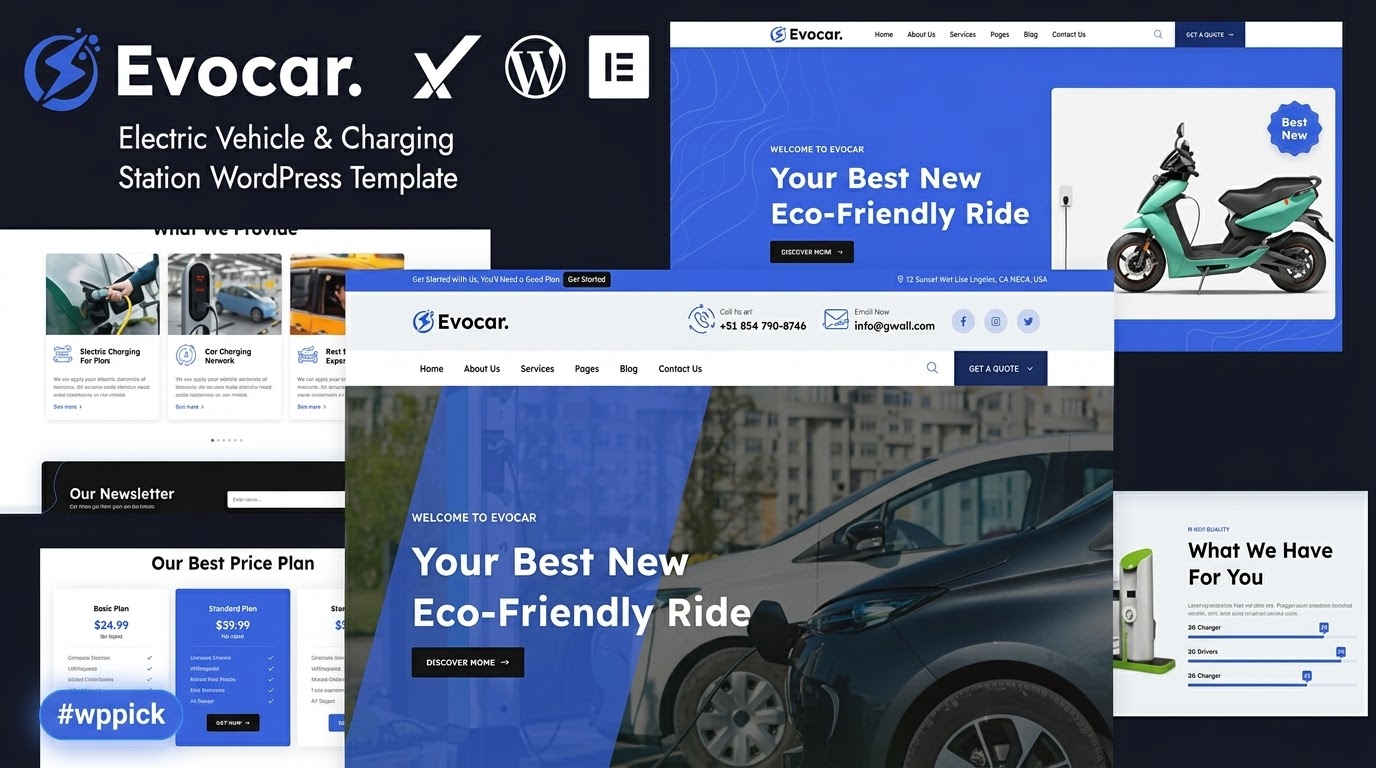
The digital landscape for electric vehicle (EV) businesses is accelerating, and establishing a robust online presence is crucial. The Evocar WordPress theme emerges as a specialized solution, meticulously crafted to power websites for EV charging stations, electric car rental services, and various sustainable mobility enterprises. This theme offers a modern, professional, and visually engaging platform designed to attract eco-conscious customers and effectively showcase your EV-related services.
Key Features: Design, Layout & Performance for EV Businesses
Evocar is engineered to meet the unique demands of the electric vehicle industry, combining sleek design with essential functionality. It provides a comprehensive toolkit for businesses looking to establish a dominant online presence in this rapidly growing sector.
Design & Layout Options
Evocar presents a modern, responsive design that adapts flawlessly across all devices, from desktop monitors to smartphones, ensuring an optimal viewing experience for every visitor. Its aesthetic prioritizes a clean, professional look essential for a tech-driven industry.
- Specialized Layouts: The theme truly shines with its specialized layouts, particularly for showcasing charging station locations and managing vehicle showcases and booking systems. This makes it an ideal WordPress theme for EV charging station operators and electric car dealerships.
- Pre-built Templates: Get a head start with two distinct homepage layouts and twelve inner page designs. These pre-built pages, including Home, Services, Locations, Blog, Team, and Contact, facilitate quick content setup.
- Dynamic Visuals: Evocar incorporates “Wow Animations” to add a layer of visual engagement, making your site interactive and memorable. It’s also Retina Ready, guaranteeing crisp and sharp graphics on high-resolution screens.
Customization Capabilities
Tailoring Evocar to your brand’s identity is straightforward, offering flexible options to match your unique vision.
- Brand Alignment: Easily modify color schemes to align with your brand identity, ensuring a cohesive look.
- Typography Control: Access a wide selection of free Google Fonts for extensive typography customization, allowing you to set the perfect tone for your content.
- Layout Flexibility: Built on the robust Bootstrap 5 framework, Evocar offers control over spacing, containers, sections, and backgrounds, enabling you to refine your site’s layout to perfection. These adjustments are typically managed through WordPress’s native Customizer (Appearance > Customize), providing an intuitive interface for real-time changes.
Performance & SEO Features
In the competitive digital space, speed and search visibility are paramount. Evocar is built with these critical factors in mind.
- SEO-Optimized Structure: The theme features an SEO-optimized and fast-loading structure, crucial for achieving better search engine rankings and attracting more organic traffic.
- Mobile-First Responsiveness: Beyond just being responsive, Evocar’s design inherently supports a mobile-first approach, recognizing that a significant portion of web traffic comes from mobile devices.
- Cross-Browser Compatibility: Your website will perform consistently across all major web browsers, including Firefox, Safari, Opera, Chrome, and Edge, ensuring a broad reach for your EV business.
Installation & Demo Import Guide for Evocar
Getting your Evocar-powered website up and running is a streamlined process, thanks to its user-friendly installation and one-click demo import feature.
- Download the Theme: After purchasing Evocar, download the theme package from ZeroPlugin.com or your chosen marketplace. This package typically includes the main theme files and a child theme.
- Install the Theme:
- Log in to your WordPress dashboard.
- Navigate to Appearance > Themes.
- Click on “Add New” at the top.
- Click “Upload Theme” and choose the
evocar.zipfile (the main theme file, not the child theme yet) from your downloaded package. - Click “Install Now” and then “Activate”.
- It’s recommended to install the provided child theme as well. This ensures any custom modifications you make won’t be lost during theme updates.
- Install Required Plugins: Upon activation, Evocar will likely prompt you to install a set of recommended plugins. It is explicitly compatible with the Elementor Page Builder and Contact Form 7. Install and activate these as instructed. Elementor is crucial for leveraging the theme’s drag-and-drop customization capabilities.
- One-Click Demo Import: This is where the Evocar Electric Vehicle theme truly speeds up your setup.
- After installing the necessary plugins, look for a “Demo Import” or “Import Demo Data” option in your WordPress dashboard, usually under Appearance or a dedicated theme menu.
- Click the “One-Click Demo Import” button. This will import all the demo content, including pages, posts, images (placeholders may be used), widgets, and theme settings, replicating the Evocar demo site.
- What to Expect: The demo import process can take several minutes, depending on your hosting environment. During this time, it’s crucial not to close your browser or navigate away. Once complete, you should find pre-configured menus, widgets, and all the demo pages ready for you to customize.
- Common Pitfalls: For large demo imports, ensure your server meets WordPress’s recommended PHP configuration limits (e.g.,
memory_limitof at least 128M,max_execution_timeof 180 seconds). If the import fails or times out, consult your hosting provider or theme documentation.
Customization Guide: Branding Your Evocar Website
Personalizing your Evocar website to reflect your brand’s unique identity is a key step after installation. The theme’s integration with Elementor and adherence to WordPress customization standards make this process intuitive.
- Using Elementor for Page Layouts:
- Evocar leverages Elementor for its drag-and-drop page building. To edit any page (e.g., Home, Services, Locations), navigate to that page in your WordPress dashboard and click “Edit with Elementor.”
- Within the Elementor interface, you can easily drag and drop elements, modify text, swap images, adjust section layouts, and fine-tune every visual aspect of your page without writing a single line of code. This is particularly useful for creating compelling vehicle showcases or detailed service pages.
- WordPress Customizer for Global Styles:
- Go to Appearance > Customize in your WordPress dashboard. This interface allows you to make global changes that affect your entire site.
- Colors: Adjust primary and secondary color schemes, link colors, and background colors to match your brand palette.
- Typography: Select different Google Fonts for headings and body text, and control font sizes for various elements.
- Logo & Site Identity: Upload your brand logo, favicon, and update your site title and tagline.
- Header & Footer Layouts: While Elementor can customize sections, the Customizer might offer basic structural options for headers and footers, such as enabling/disabling elements or adjusting certain styles.
- Menus: Set up your primary navigation menus by going to Appearance > Menus. After importing the demo, you’ll likely have demo menus that you can easily edit or replace with your own.
- Homepage Settings: Under “Homepage Settings” in the Customizer, you can choose whether your front page displays your latest posts (a blog) or a static page (like one of Evocar’s pre-built homepages).
- Child Theme for Advanced Customization:
- Evocar includes a child theme in its package. If you plan to make extensive code modifications (e.g., custom CSS, PHP functions), activate the child theme instead of the main theme. This prevents your changes from being overwritten during theme updates, making it a robust solution for developers and power users. Custom CSS can also be added via the Customizer’s “Additional CSS” section for smaller stylistic tweaks.
FAQ & Troubleshooting for Evocar
Here are answers to some common questions about the Evocar theme, designed to be clear and helpful for quick reference.
Is Evocar WordPress theme Gutenberg compatible?
No, the Evocar WordPress theme is explicitly stated as not being Gutenberg Optimized. It relies on the Elementor Page Builder for its primary drag-and-drop customization and content creation. Users who prefer the native WordPress block editor for full site editing would need to consider other theme options.
Does Evocar support WooCommerce for online stores?
WooCommerce compatibility for Evocar is not explicitly mentioned in the provided information. While many Elementor-based business themes often support WooCommerce, if robust e-commerce features are a core requirement for your EV business, it’s advisable to verify this directly with the theme developer or conduct a specific compatibility check.
How to install Evocar WordPress theme?
To install the Evocar WordPress theme, first download the theme package. Then, navigate to Appearance > Themes in your WordPress dashboard, click “Add New”, then “Upload Theme”. Select the evocar.zip file, click “Install Now”, and finally “Activate”. Don’t forget to install and activate any recommended plugins, especially Elementor, and consider activating the included child theme.
Does Evocar support child themes?
Yes, the Evocar theme includes a child theme in its package. Using a child theme is highly recommended for any custom code modifications, as it ensures that your changes are preserved even when the main Evocar theme receives updates.
What should I do if the demo import fails or looks different from the demo site?
If the Evocar demo import fails, try increasing your PHP limits (e.g., memory_limit, max_execution_time) in your hosting environment, as large imports can time out. If the imported content looks different, ensure all required plugins (especially Elementor) are installed and activated, and clear any caching plugins. Sometimes, permalinks need to be reset (Settings > Permalinks > Save Changes) after importing.
Conclusion
The Evocar – Premium Electric Vehicle & Charging Station WordPress Theme stands out as a highly specialized and effective solution for businesses operating within the EV ecosystem. Its focus on modern design, responsive layouts, and niche-specific features like charging station locations and vehicle showcases makes it an exceptional choice for electric car dealerships, EV charging point operators, and related service providers.With its integration of the Elementor Page Builder and a convenient one-click demo import, Evocar offers significant ease of use, catering to both beginners seeking a rapid setup and experienced users looking for powerful customization. While it may not cater to those strictly adhering to Gutenberg, its strengths in specialized design, performance, and SEO readiness for the electric vehicle market make it a compelling option. If you’re looking for a fast loading WordPress theme for EV business that delivers a professional aesthetic and focused functionality, Evocar is a solid investment to power your online presence in the sustainable mobility sector.
I. Download Limits & Account Benefits
- Free Downloads: Each email address receives 3 downloads per day for free products
- Upgrade Benefits: Purchase any paid product to increase your daily download limit by 3 for each paid product
- No Account Required: You can download immediately by receiving the download link via email
- Account Recommended: Create an account for easier access to your order history and direct update downloads
II. Understanding GPL vs Official Versions
Important: The products available on WPPick are GPL-licensed versions, which differ from official developer versions. Before purchasing, please read our comprehensive guide: Understanding GPL & Official Differences at WPPick
Key Points:
- GPL versions may not include premium support from original developers
- Updates may be delayed compared to official releases
- Some premium features might have limitations
- Always consider your specific needs and support requirements
III. Support & Assistance
We’re here to help through multiple channels:
- Email Support: Direct email assistance for all inquiries
- Live Chat: Real-time support during business hours
- Comprehensive Documentation: Detailed guides and tutorials
IV. Order Tracking
Access your complete purchase history and download links anytime: Order History
V. Account Access
New to WPPick? Login or Create Account to manage your downloads and orders efficiently.
VI. Refund Protection
We stand behind our products with a clear refund policy. Review our terms: Refund Policy
VII. Privacy & Security
Your data security is our priority. Learn how we protect your information: Privacy Policy
VII. Terms of Service
Understanding our service terms ensures a smooth experience: Terms of Use
Quick Tips for Best Experience
- Verify Compatibility: Check plugin/theme compatibility with your WordPress version
- Backup First: Always backup your site before installing new plugins or themes
- Test Environment: Consider testing on a staging site first
- Stay Updated: Regularly check for updates in your account dashboard
- Read Documentation: Review any included documentation for optimal setup
Need Help?
If you have questions about downloads, licensing, or need technical assistance, don’t hesitate to contact our support team. We’re committed to ensuring you have the best possible experience with WPPick products.
Ready to get started? Your download adventure begins with just one click!