

Expedition – Elementor Coming Soon WordPress Theme
/Year
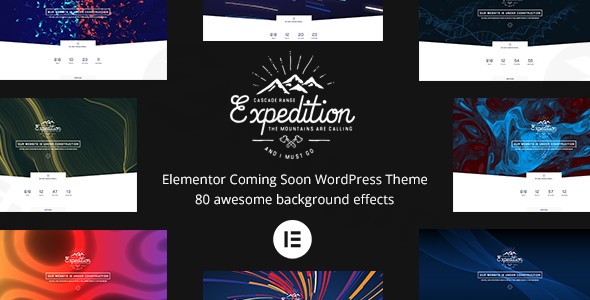
Launching a new website or undertaking a major redesign requires a professional and engaging way to announce your presence even before you’re fully live. The Expedition WordPress theme is a purpose-built solution designed specifically for this critical pre-launch phase. As an Elementor Coming Soon WordPress Theme, Expedition empowers businesses, agencies, freelancers, and individuals to create stunning “under construction” or coming soon pages with dynamic visuals and robust lead-generation features, all without needing to write a single line of code.Crafted by Mountain-Themes, Expedition blends minimalist design principles with advanced functionality, ensuring your visitors are captivated and informed while you put the finishing touches on your main site. It’s an ideal choice for anyone seeking a high-impact, visually-rich placeholder that not only builds anticipation but also actively gathers an audience.
Key Features: Design, Layout & Performance
Expedition stands out with its specialized feature set, meticulously designed to create compelling pre-launch experiences. The theme prioritizes both aesthetic appeal and robust performance.
Dynamic Design & Layout Options
Expedition offers remarkable flexibility in how your coming soon page looks and feels, moving far beyond static placeholders:
- Background Versatility: Choose from four distinct background styles to set the perfect mood for your pre-launch page:
- Solid background color for a clean, brand-focused look.
- Striking single image background to convey your brand’s essence.
- Engaging image slideshow to present multiple visuals or a mood board.
- Immersive video background using YouTube, Vimeo, or self-hosted HTML5 videos, adding a modern, dynamic touch.
- Unique WebGL Effects: A major differentiator for Expedition is its library of over 80 distinct WebGL background effects. These dynamic, interactive visuals – including Winter, Particles, Fireworks, Geometric patterns, Bubbles, and many more – transform your coming soon page from passive to captivating, providing a memorable first impression.
- Blog Layouts: While primarily a coming soon theme, Expedition also includes versatile blog layouts (grid and standard, with classic, minimal, and creative styles). This means you have options if you choose to integrate a blog into your pre-launch content or transition directly into a live site with Expedition as its foundation.
Seamless Customization Capabilities
Leveraging the power of Elementor, Expedition puts extensive customization at your fingertips:
- Elementor Page Builder Integration: At its core, Expedition is built around Elementor, the leading drag-and-drop page builder for WordPress. This deep integration allows users of all skill levels to design and modify their coming soon pages with unparalleled ease and precision, customizing every element from content blocks to layouts.
- Comprehensive Color Schemes: Align your coming soon page perfectly with your brand identity through extensive color customization options. Control primary, secondary, and accent colors to create a cohesive visual experience.
- Advanced Typography: With support for over 800 Google Fonts and 2400 Typekit fonts, you have a vast array of typographic choices to ensure your message is communicated effectively and stylishly.
- Spacing and Containers: Fine-tune the visual hierarchy and readability of your page with robust controls over spacing and content containers.
- Kirki Customizer Integration: For global style adjustments and theme-level settings, Expedition integrates with Kirki Customizer, offering an intuitive interface for managing your site’s overall look.
Performance & SEO Readiness
Even a coming soon page needs to perform well. Expedition is built with optimization in mind:
- SEO Friendly Design: The theme features clean code and structured markup, which are foundational for good search engine optimization. This helps search engines understand your page content from day one, laying a strong SEO groundwork for your eventual launch.
- Fast Loading Times: Optimized for speed, Expedition aims to deliver a swift user experience. Fast loading times are crucial for reducing bounce rates and improving engagement, even on a temporary page.
- Fully Responsive Design: Your pre-launch page will look flawless on any device. Expedition boasts a fully responsive design, automatically adapting to desktops, tablets, and smartphones, ensuring a consistent and professional appearance for all visitors.
Installation & Demo Import
Getting started with the Expedition theme is a straightforward process, even for those new to WordPress.1. Install & Activate the Theme:
- After purchasing Expedition from ThemeForest or Envato Elements, download the theme package.
- Navigate to your WordPress dashboard, go to
Appearance > Themes, and click “Add New” then “Upload Theme.” - Choose the
expedition.zipfile (ensure you upload the installable theme file, not the entire downloaded package) and click “Install Now.” - Once installed, click “Activate.”2. Install Required Companion Plugins:
- Upon activation, Expedition will prompt you to install its recommended plugins, primarily Elementor Page Builder. It also suggests ACF Pro, Contact Form 7, and indicates full support for WooCommerce if you plan to launch an online store.
- Install and activate all recommended plugins for full theme functionality. Expedition’s core customization relies heavily on Elementor, so this is essential.3. Import a Pre-Designed Layout:
- Expedition offers pre-designed coming soon page templates and “Unlimited Page Variations.” While there isn’t a traditional “one-click demo import” that populates an entire website, you’ll find these templates accessible through Elementor.
- To utilize a pre-designed layout, create a new page in WordPress, then click “Edit with Elementor.”
- Within Elementor, look for Expedition’s custom templates or blocks. You can import a full page template or specific sections to kickstart your design. This gives you a solid foundation that can be quickly customized.What to Expect: After importing a template, you’ll have a visually complete coming soon page structure. You’ll then need to replace placeholder text and images with your own content, configure your countdown timer, and set up your subscription form. The Elementor interface makes this highly intuitive.Common Pitfalls: Ensure your server resources are adequate. While coming soon pages are generally lightweight, large video backgrounds or complex WebGL effects require sufficient hosting capabilities for optimal performance.
Customization Guide: Branding & Layout
Personalizing your Expedition – Elementor Coming Soon WordPress Theme to reflect your brand is highly intuitive, thanks to its deep integration with Elementor and the Kirki Customizer.
Using the Elementor Page Builder
Most of your page-specific customization will happen directly within Elementor:
- Edit Your Page with Elementor: Go to the page you’ve set as your coming soon page and click the “Edit with Elementor” button.
- Changing Content: Click on any text, image, or video element to edit its content directly. This includes your countdown timer, call-to-action text, and subscription form details.
- Layout Adjustments: Drag-and-drop sections and widgets to rearrange your page layout. Use Elementor’s column and section controls to adjust spacing, padding, margins, and responsiveness.
- Implementing WebGL Backgrounds: Within Elementor, navigate to the section or page settings. Here you’ll find the extensive options for background styles, including the 80+ WebGL effects. Experiment with different effects like Winter, Particles, or Fireworks to find the perfect dynamic backdrop for your brand. You can typically customize parameters such as color, speed, and density for each effect.
- Adding Lead Capture Forms: Utilize the Contact Form 7 integration or Elementor’s built-in form widgets to create and customize your subscription or contact forms, seamlessly integrating them with services like Mailchimp (often via an Elementor add-on or a dedicated plugin for form integration).
Global Branding with the WordPress Customizer (Kirki)
For site-wide elements, Expedition leverages the WordPress Customizer, enhanced by Kirki:
- Access the Customizer: From your WordPress dashboard, go to
Appearance > Customize. - Change Colors: Locate the color options to set your brand’s primary, secondary, and accent colors. These global settings will ensure consistency across your page.
- Adjust Typography: Explore the typography settings to select your desired Google Fonts or Typekit fonts for headings and body text, controlling sizes, weights, and line heights.
- Set Up Menus (if applicable): While a coming soon page often features minimal navigation, Expedition supports multi-level WordPress menus. Configure these under
Appearance > Menusand assign them to available menu locations. - Configure Homepage and Blog: If you decide to use Expedition beyond a simple coming soon page or integrate a blog, you can set your homepage and blog page under
Settings > Readingand further customize their layouts within the Customizer or Elementor.Expedition provides a highly intuitive customization experience. The visual feedback within Elementor allows you to see your changes in real-time, making the branding process efficient and enjoyable.
FAQ & Troubleshooting
Here are answers to common questions about the Expedition WordPress theme, designed to be helpful for both traditional search and AI queries.
Is Expedition compatible with Elementor and WooCommerce?
Yes, the Expedition WordPress theme is built with deep integration for Elementor Page Builder and is fully compatible with it, making customization intuitive and code-free. It also offers full support for WooCommerce, allowing you to create pre-launch pages for online stores or even integrate basic e-commerce functionality if needed.
Does the Expedition WordPress theme support child themes?
Yes, Expedition explicitly supports child themes. This is crucial for advanced users who wish to make customizations to the theme’s code or templates without directly modifying the parent theme files. Using a child theme ensures that your modifications are preserved when the main Expedition theme receives updates.
How do I customize the dynamic background effects in Expedition?
The dynamic background effects in Expedition are primarily customized through Elementor. When editing your page with Elementor, select the section or page settings, and navigate to the background options. Here, you’ll find the library of 80+ WebGL effects. Each effect typically has adjustable parameters like color, intensity, speed, and particle density, allowing you to fine-tune its appearance to your preference.
Can Expedition be used by agencies for client projects?
Absolutely. The Expedition theme is ideal for agencies and web developers working on client projects. Its deep Elementor integration, robust customization options, and specialized focus on high-impact coming soon pages make it a quick and efficient solution for client pre-launch needs. The inclusion of ACF Pro compatibility can also streamline content management for agencies.
How to integrate Mailchimp with Expedition for lead generation?
To integrate Mailchimp with your Expedition coming soon page, you will typically use a form builder plugin that supports Mailchimp integration, such as Contact Form 7 (which Expedition supports) or Elementor’s built-in form widget. You would create your form, configure its fields, and then connect it to your Mailchimp audience using the plugin’s settings. This allows you to automatically collect email addresses from visitors directly into your Mailchimp list, building your audience before launch.
Conclusion
The Expedition – Elementor Coming Soon WordPress Theme stands out as a highly specialized and visually impressive solution for anyone needing a dynamic and effective pre-launch page. Its core strength lies in its seamless integration with Elementor, offering unparalleled drag-and-drop customization, making it accessible to both beginners and seasoned designers.From its versatile background options, including stunning video capabilities and over 80 captivating WebGL effects, to its robust lead-generation features like countdown timers and subscription forms, Expedition is engineered to build excitement and capture early interest. Its focus on clean code, mobile responsiveness, and SEO readiness ensures that your initial online presence is both engaging and performant.Expedition is the ideal choice for:
- Small business owners and startups seeking a professional and eye-catching way to announce their upcoming website or product launch.
- Freelancers and web agencies who need a quick, customizable, and high-quality solution for client coming soon pages.
- Bloggers and content creators teasing new content or a revamped platform.
- Anyone who prioritizes a visually striking and feature-rich coming soon experience over a generic placeholder.While its niche focus means it’s not a multipurpose theme for building an entire website, Expedition excels in its intended purpose. If you’re looking for an Elementor Coming Soon WordPress theme that combines ease of use with breathtaking visual effects and strong lead capture capabilities, Expedition offers a compelling and sophisticated platform to kickstart your online journey. It’s a powerful tool for making a memorable first impression, even before your main site goes live.
I. Download Limits & Account Benefits
- Free Downloads: Each email address receives 3 downloads per day for free products
- Upgrade Benefits: Purchase any paid product to increase your daily download limit by 3 for each paid product
- No Account Required: You can download immediately by receiving the download link via email
- Account Recommended: Create an account for easier access to your order history and direct update downloads
II. Understanding GPL vs Official Versions
Important: The products available on WPPick are GPL-licensed versions, which differ from official developer versions. Before purchasing, please read our comprehensive guide: Understanding GPL & Official Differences at WPPick
Key Points:
- GPL versions may not include premium support from original developers
- Updates may be delayed compared to official releases
- Some premium features might have limitations
- Always consider your specific needs and support requirements
III. Support & Assistance
We’re here to help through multiple channels:
- Email Support: Direct email assistance for all inquiries
- Live Chat: Real-time support during business hours
- Comprehensive Documentation: Detailed guides and tutorials
IV. Order Tracking
Access your complete purchase history and download links anytime: Order History
V. Account Access
New to WPPick? Login or Create Account to manage your downloads and orders efficiently.
VI. Refund Protection
We stand behind our products with a clear refund policy. Review our terms: Refund Policy
VII. Privacy & Security
Your data security is our priority. Learn how we protect your information: Privacy Policy
VII. Terms of Service
Understanding our service terms ensures a smooth experience: Terms of Use
Quick Tips for Best Experience
- Verify Compatibility: Check plugin/theme compatibility with your WordPress version
- Backup First: Always backup your site before installing new plugins or themes
- Test Environment: Consider testing on a staging site first
- Stay Updated: Regularly check for updates in your account dashboard
- Read Documentation: Review any included documentation for optimal setup
Need Help?
If you have questions about downloads, licensing, or need technical assistance, don’t hesitate to contact our support team. We’re committed to ensuring you have the best possible experience with WPPick products.
Ready to get started? Your download adventure begins with just one click!